
Matt Ramage retweetledi
Matt Ramage
8.6K posts


Matt Ramage
@ramagetime
Running @emarketed and building with AI. Using OpenClaw and Paperclip.
Ether Katılım Ekim 2007
13.3K Takip Edilen12.6K Takipçiler


Matt Ramage retweetledi

Matt Ramage retweetledi

Holy shit I just got OpenClaw to turning a meeting transcript into a video using the @Remotion skill. It produced a 2-min explainer video that captures the meeting's key points, complete with script, visuals, voiceover, animation...
Imagine sending someone a 2-min meeting recap video instead of a 1000-word summary that nobody will read.
English
Matt Ramage retweetledi

Matt Ramage retweetledi

🚀 Introducing NemoVideo Skill — The World's First Pro Video Editing Skill for AI Agents
If every lobster has a dream, Nemo’s was to stop mopping and start directing. 🦞🎬
Today, that dream ships.
NemoVideo Skill, is the world’s first all-in-one professional video editing skill for your OpenClaw agent.
What NemoVideo Skill can do for you:
🎬 Research, script, and storyboard — from a single prompt
🎙️ Generate AI voices, auto-mix audio, and source footage
✅ Self-audit and deliver a full timeline — ready to export
Huge thanks and respect to @OpenClaw and @steipete for building the infrastructure that makes this possible.
⭐Want to try it?
Just tell your OpenClaw:
“Install the nemo-video skill from ClawHub.”
That’s it. Your lobster will handle the rest. 🦞
❤️Love what Nemo’s building?
Star & rate on GitHub/ClawHub
→ github.com/nemovideo/nemo…
→ clawhub.ai/nemovideonemo/…
Screenshot your star & DM us — we’ll send you free credits!
🎬 Start creating
→ discord.gg/8QhQuuUuzJ
#NemoVideo #AgenticAI #AIvideo
English
Matt Ramage retweetledi

LinkedIn is the #1 cited domain in AI search.
325K prompts. ChatGPT, Perplexity, Copilot, Google AI Mode. Same result.
Your buyers are getting answers there. Are you in those answers?
emarketed.com/aeo/linkedin-a…
English
Matt Ramage retweetledi

cron is the quietest failure point in openclaw.
no errors, no alerts. you think the 7am daily briefing is running.
it stopped two days ago. you don't check, you never know.
so on top of gateway maintenance, i added a second automation just for cron.
this one does 4 things:
1. SSH in, discover all jobs dynamically, classify recurring vs one-shot
2. separate real failures from normal behavior (quiet-hours skip, retry backoff, one-shot auto-delete are not failures)
3. smallest safe repair only. restart gateway, fix residue, re-enable accidentally disabled jobs. never touch schedules, prompts, or secrets
4. incidents get an alert. warnings get logged. same issue doesn't alert twice
full prompt (sanitized, replace with your own server address):
Maintain OpenClaw cron reliability with a single conservative automation. Read local docs before making any claims about commands or fixes. SSH to your server on its configured SSH port. Use the live service owner’s OpenClaw context as cron truth, backed by system service status and recent journal logs. Run openclaw status, openclaw gateway status, openclaw cron status --json, openclaw cron list --all --json, inspect recent cron runs, and discover jobs dynamically from the machine. Treat cron disabled, missing next wake, timer tick failures, unhealthy gateway runtime, or multiple recurring jobs failing together as incidents. Do not misclassify retry backoff, one-shot auto-delete, one-shot terminal disable, quiet-hours skips, duplicate delivery suppression, or intentionally paused jobs as scheduler failures. Apply only the smallest safe non-destructive repair such as restarting the gateway, running safe diagnostics, repairing the canonical symlink, fixing accidental root-owned residue, or re-enabling a recurring job only when strong evidence shows accidental disable. If a warning becomes chronic, alert once; otherwise alert only for incidents, and use automation memory to avoid repeat alerts for unchanged issues. If a significant issue is found, first write an incident markdown with severity, impact, evidence, repair attempted, current status, and next action, then send a short alert through the existing notification path. On Sunday morning, also run drift checks for backups, root-owned residue, and recent journal error patterns. Leave one inbox summary with healthy state, repaired issues, incidents, alerts sent, warnings, intentionally paused jobs, and blockers requiring human judgment. Never expose secrets, never weaken auth or access policy.
gateway maintenance checks if the system is alive.
cron maintenance makes sure everything keeps running while you're not looking.
Vox@Voxyz_ai
dead simple way to maintain openclaw. bugs, oauth expiring, worried it breaks while you're away. install codex app. set an automation. it checks and fixes your gateway on a schedule. new problem? fix once, add to prompt, never again. my prompt does these things: 1. SSH into the VPS, run four health checks 2. if something's wrong, apply the smallest safe non-destructive fix. no touching auth, no touching secrets 3. if it can't fix it or it's serious, write an incident report and send me a notification on telegram 4. on sundays, run a drift check for backups, root-owned residue, and journal error patterns the powerful thing about codex is that its login session can be shared directly with openclaw. oauth expiring? codex just renews it. solving this with other agents would be a much bigger problem. what you end up with is a maintenance expert that gets smarter over time. every new problem you solve gets added to the prompt, so it knows how to handle it next time. token cost is low too, each run takes about a minute. full prompt (sanitized, replace with your own server address): Maintain the OpenClaw gateway with a single conservative automation. Read local docs before making any claims about commands or fixes. SSH to your-server on port 22. Treat systemctl and journalctl as supervisor truth. Run openclaw status --deep, openclaw channels status --probe, openclaw cron status, and openclaw models status --check. Apply only the smallest safe non-destructive repair such as restarting openclaw-gateway.service, running openclaw doctor, repairing symlinks, or fixing accidental root-owned residue. If a significant issue is found, first write an incident markdown file with severity, impact, evidence, repair attempted, current status, and next action. Then deliver a short alert summary through your preferred notification channel. On Sunday morning, also run weekly drift checks for backups, root-owned residue, and recent journal error patterns. Leave one inbox summary that separates healthy state, repaired issues, incidents, alerts sent, and blockers requiring human judgment. Never expose secrets, never weaken auth or access policy.
English
@iruletheworldmo I miss ur tweets about AI taking over the world. 🤩
English

bookmark this immediately.
someone just open sourced the methodology that changes how ai agents write code. 40,000 stars on github in days.
it's called superpowers and if you're using claude code or codex without this, your so cooked.
don't fall behind.
Ihtesham Ali@ihtesham2005
🚨 Holy shit...A developer on GitHub just built a full development methodology for AI coding agents and it has 40.9K stars on GitHub. It's called Superpowers, and it completely changes how your AI agent writes code. Right now, most people fire up Claude Code or Codex and just… let it go. The agent guesses what you want, writes code before understanding the problem, skips tests, and produces spaghetti you have to babysit. Superpowers fixes all of that. Here's what happens when you install it: → Before writing a single line, the agent stops and brainstorms with you. It asks what you're actually trying to build, refines the spec through questions, and shows it to you in chunks short enough to read. → Once you approve the design, it creates an implementation plan so detailed that "an enthusiastic junior engineer with poor taste and no judgement" could follow it. → Then it launches subagent-driven development. Fresh subagents per task. Two-stage code review after each one (spec compliance, then code quality). The agent can run autonomously for hours without deviating from your plan. → It enforces true test-driven development. Write failing test → watch it fail → write minimal code → watch it pass → commit. It literally deletes code written before tests. → When tasks are done, it verifies everything, presents options (merge, PR, keep, discard), and cleans up. The philosophy is brutal: systematic over ad-hoc. Evidence over claims. Complexity reduction. Verify before declaring success. Works with Claude Code (plugin install), Codex, and OpenCode. This isn't a prompt template. It's an entire operating system for how AI agents should build software. 100% Opensource. MIT License.
English
Matt Ramage retweetledi

Anthropic launching an openclaw competitor :)
'Dispatch' lets you text claude to do work for you while you're away, claude spins up agents to do it all.
- just instruct agents to complete a task and come home to finished work
- also launched persistent memory so claude keeps context across multiple tasks
this turns your phone into a personal ai computer
very cool
Felix Rieseberg@felixrieseberg
We're shipping a new feature in Claude Cowork as a research preview that I'm excited about: Dispatch! One persistent conversation with Claude that runs on your computer. Message it from your phone. Come back to finished work. To try it out, download Claude Desktop, then pair your phone.
English
Matt Ramage retweetledi

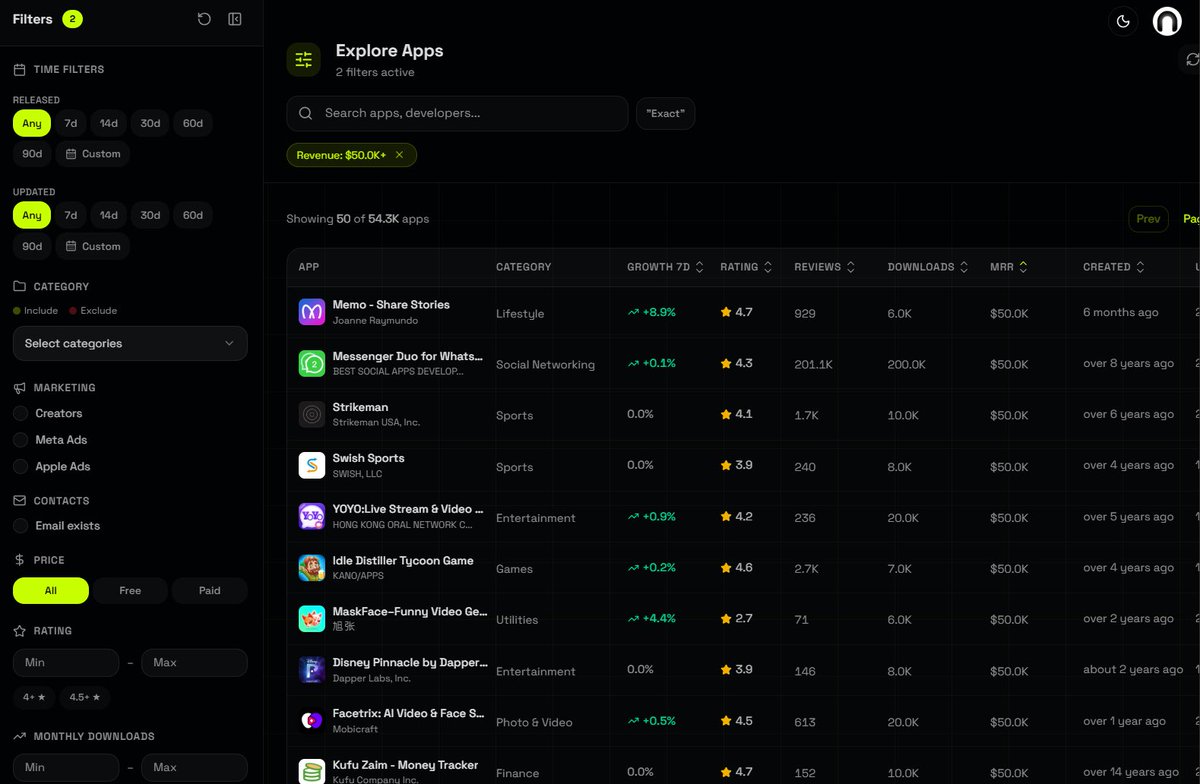
find app ideas that already work:
1. go to appkittie.com
2. filter apps making over $50,000/mo
3. sort by rating (low to high)
4. pick the worst rated ones
5. build a better version
find demand, then build
English
Matt Ramage retweetledi

a friend had OpenClaw plan his whole wedding and "bring the costs down"
OpenClaw canceled the catering contracts and ordered 300 lbs of raw ground beef to the venue
food costs dropped from $35,171 to about $2,000
you can just do things 🔥
English
@DallasAptGP Great post Barrett! Looking forward to implementing.
English
Matt Ramage retweetledi

We built a system where Claude knows our entire company before I type a word.
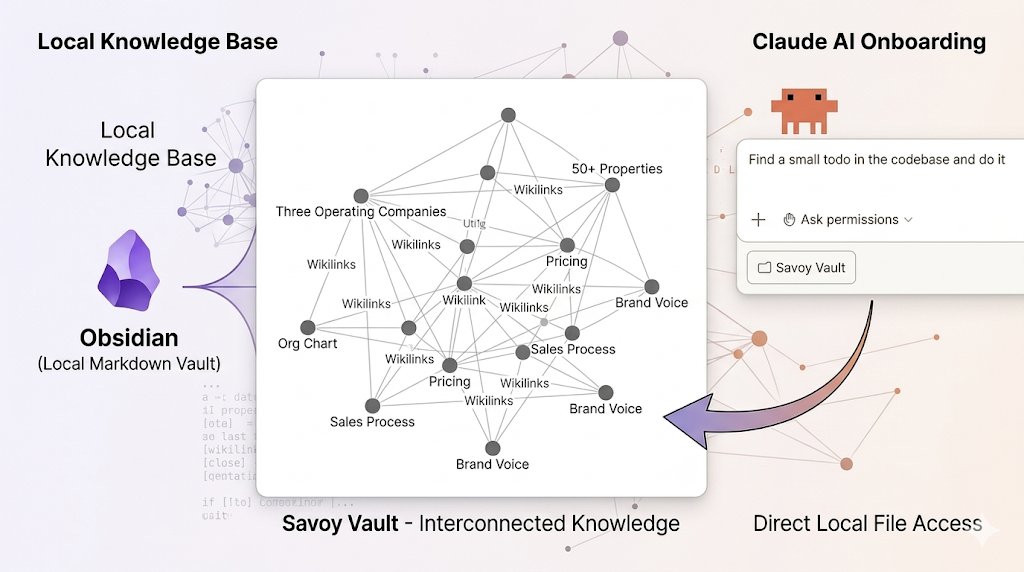
Three operating companies. 50+ properties. Full context on every session.
Three tools. Any small business can build this.
Most business owners use AI the same way every time. Open Claude. Re-explain the business. Re-explain the team. Re-explain the numbers. Then ask the question.
You're onboarding the same employee every morning.
We fixed this. Claude now knows the full operation before I type a word.
Start with your most important company knowledge. Turn each topic into its own markdown file. Markdown is simple text that AI reads clean.
Think about what you re-explain over and over. How your business makes money. Your org chart and who owns what. Your pricing. Key metrics for each team member. Your sales process. Your brand voice.
One topic per file. Keep them short.
Put everything in Obsidian. It's free. Files stay on your computer. Nothing goes to the cloud. Think of it as a filing cabinet on your own hard drive that AI can search in milliseconds.
Here's what makes it work. Every file connects to related files through tagged links called wikilinks. When you ask Claude about a specific client, it doesn't just find the client file. It pulls every project, contract, invoice, and note tied to that client. One question. Full picture.
Then connect Claude Code. It works like the regular Claude desktop app with one difference. It has the keys to your filing cabinet.
Claude Code reads files right off your computer. No uploads. No cloud. No file size limits. Your financials, client data, and internal strategy never leave your machine. For business owners who won't put sensitive data on someone else's server, this solves the problem.
Most people I know spend $100 to $200 a month on Claude. If you're already paying that, you should be getting more out of it than a chatbot that forgets who you are every session.
Some of you already use Claude Projects. Good. That puts you ahead of most people.
Projects let you upload files and give Claude a custom instruction set. For small tasks, it works. If you have a handful of documents and a clear use case, Projects is the right starting point.
But it has a ceiling. Upload limits cap how much context you can load. Your files live on Anthropic's servers. And every project is its own silo. Your sales project doesn't talk to your ops project. Your finance files don't connect to your team files.
The Obsidian setup removes all three limits. No upload cap. Files stay on your machine. And every file links to every related file across your whole company.
The last piece is one instruction file. It tells Claude how your company works, what role it plays, and how to navigate the knowledge base. Think of it as the onboarding doc you'd hand a senior executive on day one. Except this executive never forgets it.
Once it's built, every session starts with full context. Claude knows your team. Your numbers. Your processes. You skip the setup. You go straight to the work.
Three tools. Obsidian (free). Claude Code (you're already paying for it). One instruction file.
If you run a business and you're still re-explaining yourself to AI every session, you're leaving speed on the table.
English
Matt Ramage retweetledi

"Every software company in the world, needs to have an @openclaw strategy" - Jensen at @NVIDIAAI GTC
Framing OpenClaw as one of the most important open source releases ever, they have announced NemoClaw - a reference platform for enterprise grade secure Openclaw, with OpenShell, Network boundaries, security baked in.
English

I realize that I forgot to mention that I’ve joined the @openclaw maintainers team (as of a little over two weeks ago)! Too busy drinking from the firehose.
Incredibly honored and excited to be working alongside one of the coolest and most competent teams in OSS.
English
English

Been so much fun cooking OpenShell and NemoClaw with the @NVIDIAAI folks! 🙏🦞
Huge step towards secure agents you can trust.
What’s your OpenClaw strategy?
English
Highly recommend exe.dev if you're looking for a place to host your OpenClaw agents.
The server comes with its own AI agent called Shelley who will help you if you ever get stuck.
DM me for a free month if you'd like to give them a spin.
English
Thinking how we can evolve openclaw plugins to be more powerful while also making core leaner. Also wanna add support for claude code/codex plugin bundles. Good stuff coming soon!
English
Matt Ramage retweetledi
bookmark this immediately.
cognee just solved the biggest problem with ai skills/prompts, they break silently over time and its hard to notice
their fix: skills that observe their own failures, inspect what went wrong, and amend themselves automatically.
try not to fall behind ^^
Vasilije@tricalt
English