
stef

2.5K posts

stef banner
stef

stef

@stefsy

visual thinker, coffee drinker. founder @thinkdatasci

Manila Katılım Nisan 2009
1.6K Takip Edilen1.1K Takipçiler
stef retweetledi
Cheng Lou
Cheng Lou@_chenglou·
My dear front-end developers (and anyone who’s interested in the future of interfaces): I have crawled through depths of hell to bring you, for the foreseeable years, one of the more important foundational pieces of UI engineering (if not in implementation then certainly at least in concept): Fast, accurate and comprehensive userland text measurement algorithm in pure TypeScript, usable for laying out entire web pages without CSS, bypassing DOM measurements and reflow
English
1.3K
8.3K
65.4K
23.9M
stef retweetledi
Akin Unver
Akin Unver@AkinUnver·
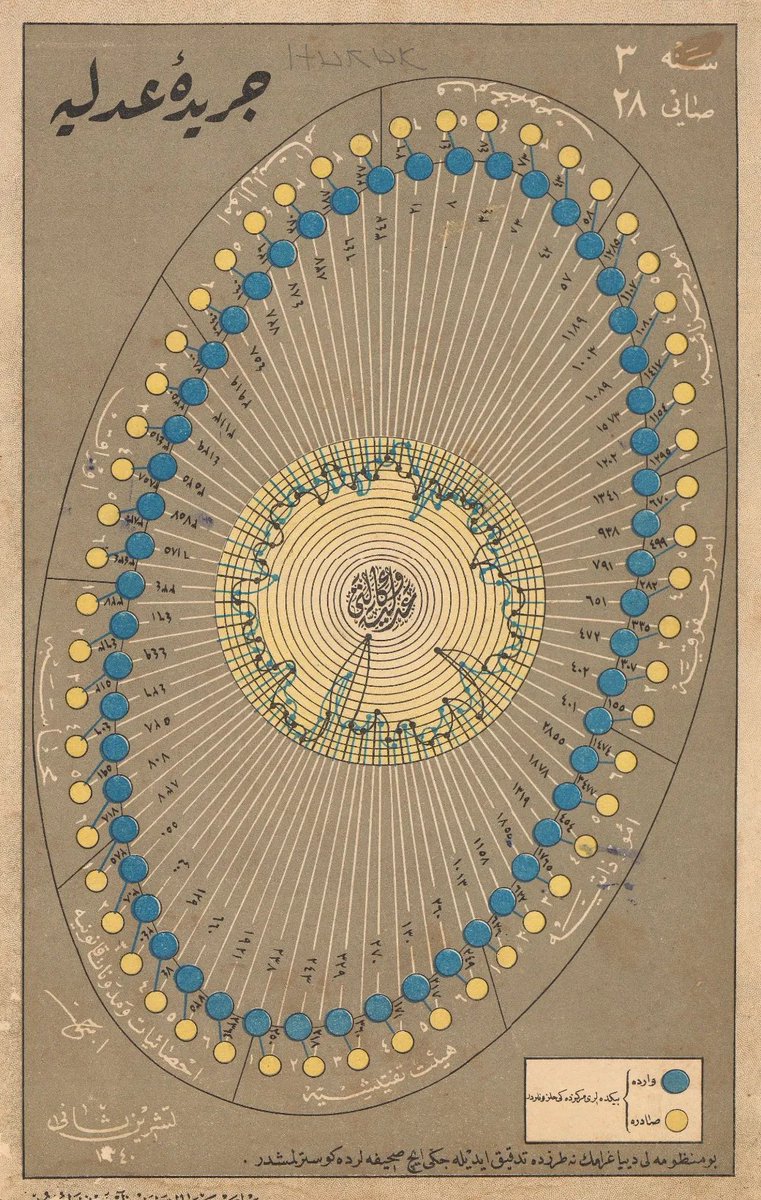
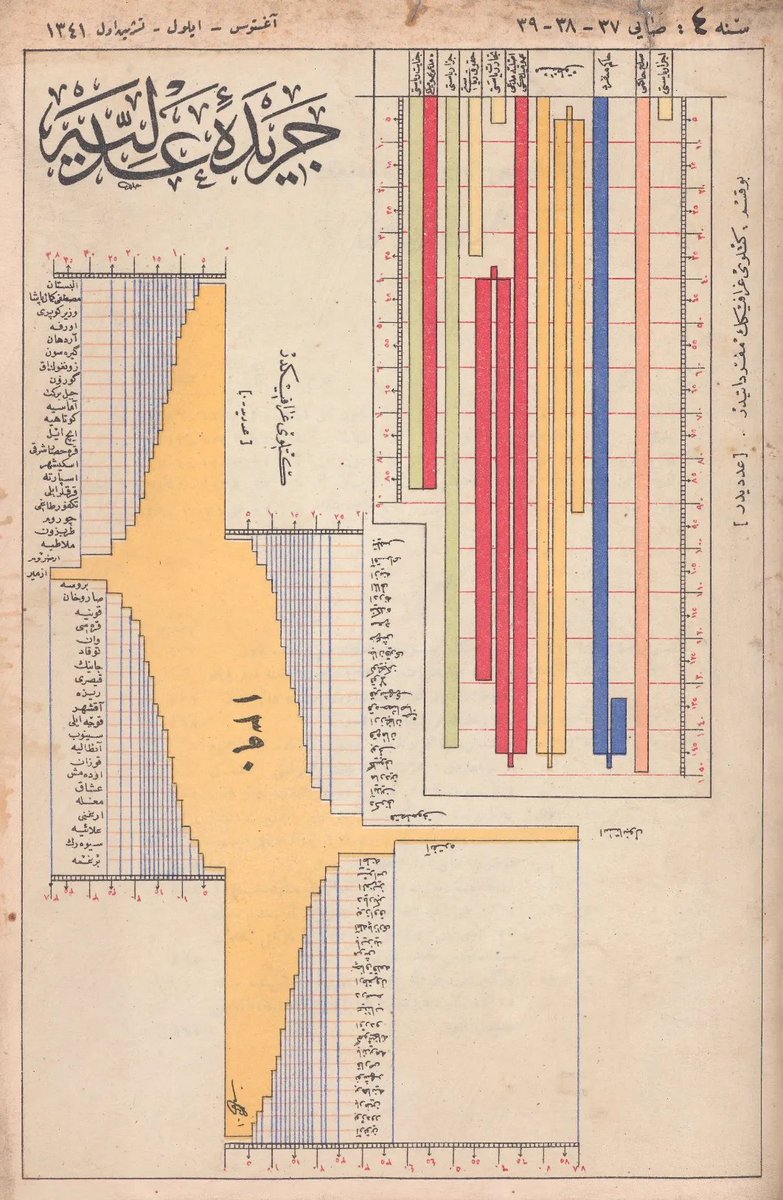
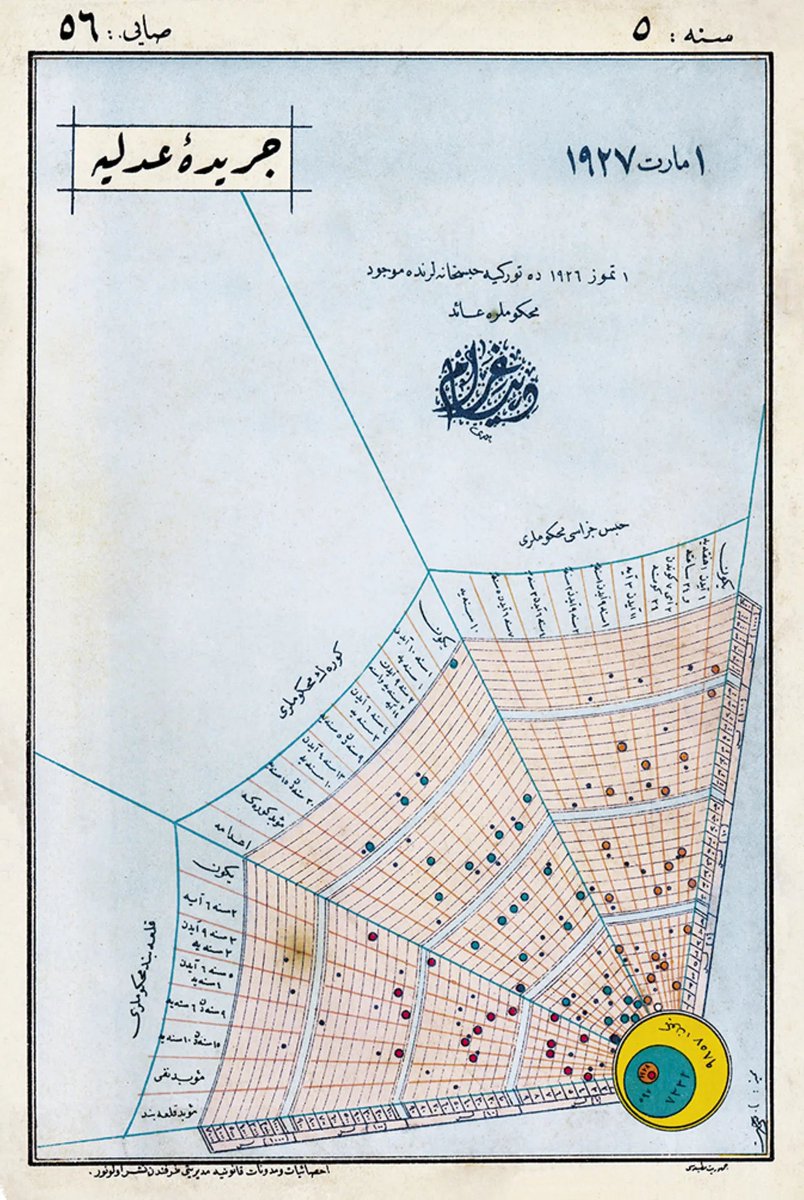
My new obsession: Ottoman-era data visualizations from Cerîde-i Adliyye, “The Justice Gazette,” a Ministry of Justice publication printed in Türkiye in the mid-1920s casualarchivist.substack.com/p/poetic-justi…
Akin Unver tweet mediaAkin Unver tweet mediaAkin Unver tweet mediaAkin Unver tweet media
Română
65
1.3K
7.8K
564.1K
stef retweetledi
Prathyush
Prathyush@prathyvsh·
Yearly reminder that Bret Victor has a frequently updated catalog of some of the very best material relevant to computation / user interface design over here: worrydream.com/refs/
English
3
55
491
58K
stef retweetledi
Frank Yan
Frank Yan@FrankYan2·
As promised, here's the short film Jia Zhangke produced using Seedance 2.0 for Chinese New Year and his take on AI filmmaking
Frank Yan tweet mediaFrank Yan tweet media
English

41
256
1.6K
569.9K
stef retweetledi
Tyler McCall
Tyler McCall@eiffeltyler·
you’re telling me SNL did a whole-ass Heated Rivalry send up set at Hogwarts and it WASN’T Harry and Draco?!!!!!!! Reopen the fucking schools man what goes on in these writer rooms!!!!!!!
English
32
1.1K
23.1K
497.6K
stef retweetledi
LangChain
LangChain@LangChain·
We surveyed 1,300+ developers and business leaders to understand how AI agents are actually being built, tested, and shipped to real users. What are the most popular agent use cases? Biggest challenges when building agents? And who's really using observability or evals tooling? Read the full report here ➡️ bit.ly/state-of-agent… Here's 6 key insights below 🧵👇
LangChain tweet media
English
14
74
407
115.6K
stef retweetledi
Alex Komoroske
Alex Komoroske@komorama·
What if technology didn’t feel so… hollow? Some friends and I just released a manifesto about a world where tech leaves us feeling nourished (along with an evolving list of theses about how we can build it) resonantcomputing.org
English
47
122
911
261.9K
stef retweetledi
Lee Robinson
Lee Robinson@leerob·
Introducing Cursor Learn! My first course is a six-part video series on AI foundations. It's designed for beginners to learn concepts like tokens, context, and agents. If you prefer to read, there's quizzes + AI models to try out. You can watch it in ~1 hour, 100% free!
English
228
615
6.8K
1.4M
stef retweetledi
bayesian asian (42/50 paintings)
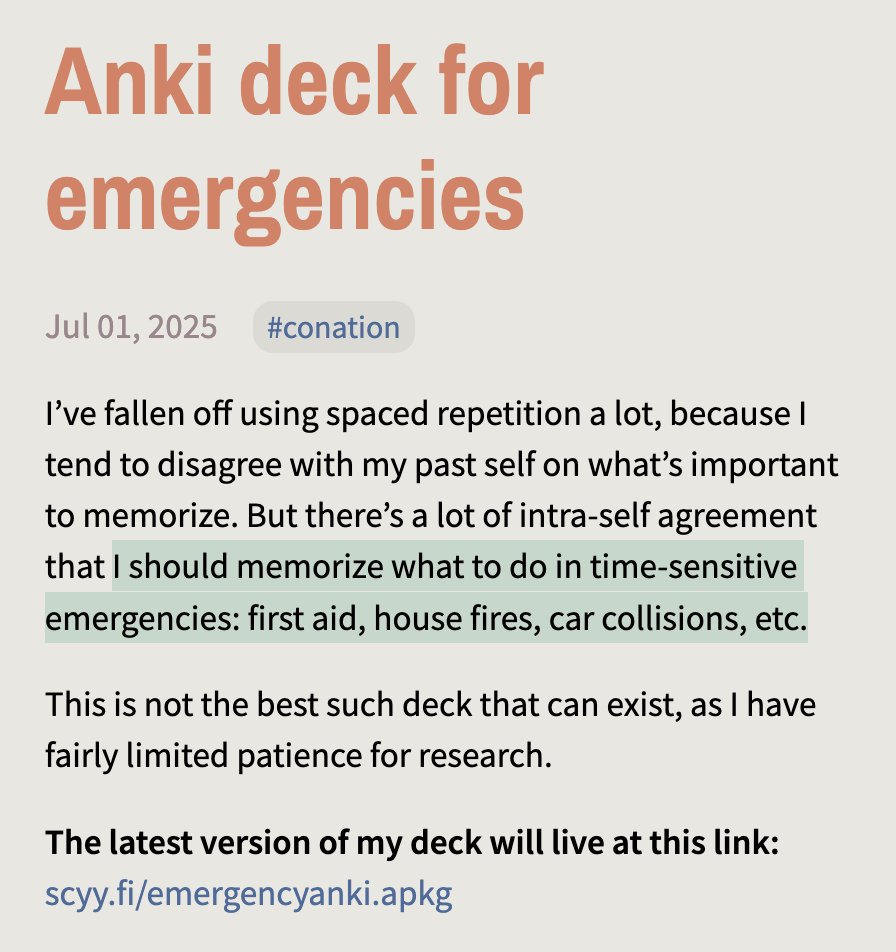
I spent some hours last month making an Anki deck for various emergencies where the outcomes will be significantly worse if you have to spend 30 seconds googling what to do. It's not extensive, or extensively researched, but it exists!
bayesian asian (42/50 paintings) tweet media
English
9
58
1.4K
84.8K
stef retweetledi
fafa
fafa@fafa818969·
I’m honored to have been invited to create a brand-new piece of calligraphic motion design for 'Ink & The City: Calligraphy in Urban Life' , an exhibition that’s part of the Hong Kong International Airport Arts & Culture Festival 2025 Exhibition Period: 25 July – 8 November 2025
English
48
674
6.3K
184.6K
stef retweetledi
Jules Guiang
Jules Guiang@julesguiang·
Sharing this handy Maginhawa food guide prepared by TRAVEL UP. Thanks for this! 🫶
Jules Guiang tweet media
English
31
1.8K
11.4K
807.2K
stef retweetledi
Lenny Rachitsky
Lenny Rachitsky@lennysan·
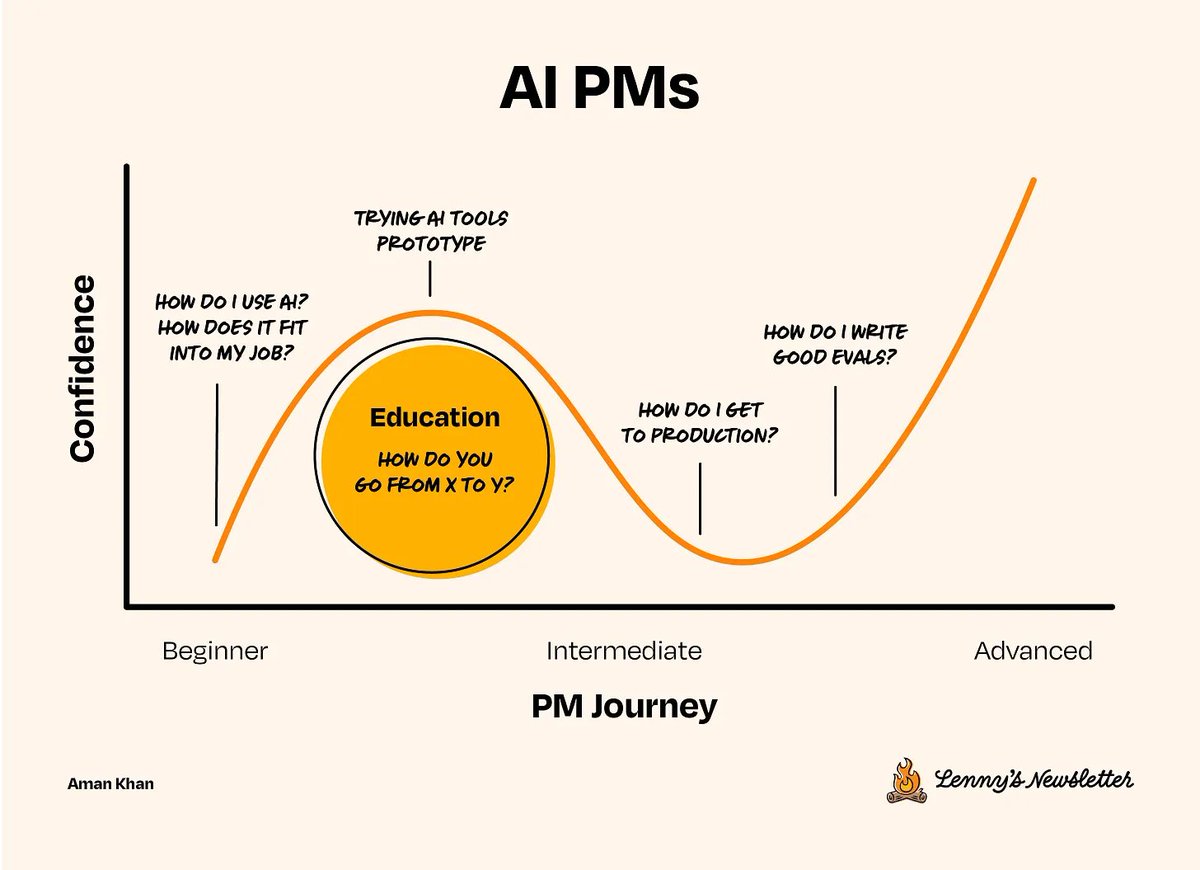
"Evals are emerging as the real moat for Al startups." — @garrytan (YC CEO) "Writing evals is going to become a core skill for product managers." — @kevinweil (OpenAI CPO) "If there is one thing we can teach people, it's that writing evals is probably the most important thing." — @mikeyk (Anthropic CPO) "Evals are surprisingly often all you need." — @gdb (OpenAI President) Writing evals is quickly becoming a core skill for anyone building AI products (which will soon be everyone). Yet there’s very little specific advice on how to get good at this. In today's post, @amankhan tells you everything you need to understand to master this skill, including: 1. WTF are evals 2. Why are they so important 3. The three different eval approaches 4. The four distinct parts of a great eval 5. A workflow for writing effective eval + more Don't miss this one → lennysnewsletter.com/p/beyond-vibe-…
Lenny Rachitsky tweet media
English
38
146
1.5K
185.5K
stef retweetledi
Andrej Karpathy
Andrej Karpathy@karpathy·
I wrote a quick new post on "Digital Hygiene". Basically there are some no-brainer decisions you can make in your life to dramatically improve the privacy and security of your computing and this post goes over some of them. Blog post link in the reply, but copy pasting below too. Every now and then I get reminded about the vast fraud apparatus of the internet, re-invigorating my pursuit of basic digital hygiene around privacy/security of day to day computing. The sketchiness starts with major tech companies who are incentivized to build comprehensive profiles of you, to monetize it directly for advertising, or sell it off to professional data broker companies who further enrich, de-anonymize, cross-reference and resell it further. Inevitable and regular data breaches eventually runoff and collect your information into dark web archives, feeding into a whole underground spammer / scammer industry of hacks, phishing, ransomware, credit card fraud, identity theft, etc. This guide is a collection of the most basic digital hygiene tips, starting with the most basic to a bit more niche. Password manager. Your passwords are your "first factor", i.e. "something you know". Do not be a noob and mint new, unique, hard passwords for every website or service that you sign up with. Combine this with a browser extension to create and Autofill them super fast. For example, I use and like 1Password. This prevents your passwords from 1) being easy to guess or crack, and 2) leaking one single time, and opening doors to many other services. In return, we now have a central location for all your 1st factors (passwords), so we must make sure to secure it thoroughly, which brings us to... Hardware security key. The most critical services in your life (e.g. Google, or 1Password) must be additionally secured with a "2nd factor", i.e. "something you have". An attacker would have to be in possession of both factors to gain access to these services. The most common 2nd factor implemented by many services is a phone number, the idea being that you get a text message with a pin code to enter in addition to your password. Clearly, this is much better than having no 2nd factor at all, but the use of a phone number is known to be extremely insecure due to the SIM swap attack. Basically, it turns out to be surprisingly easy for an attacker to call your phone company, pretend they are you, and get them to switch your phone number over to a new phone that they control. I know this sounds totally crazy but it is true, and I have many friends who are victims of this attack. Therefore, purchase and set up hardware security keys - the industrial strength protection standard. In particular, I like and use YubiKey. These devices generate and store a private key on the device secure element itself, so the private key is never materialized on a suspiciously general purpose computing device like your laptop. Once you set these up, an attacker will not only need to know your password, but have physical possession of your security key to log in to a service. Your risk of getting pwned has just decreased by about 1000X. Purchase and set up 2-3 keys and store them in different physical locations to prevent lockout should you physically lose one of the keys. The security keys support a few authentication methods. Look for "U2F" in the 2nd factor settings of your service as the strongest protection. E.g. Google and 1Password support it. Fallback on "TOTP" if you have to, and note that your YubiKeys can store TOTP private keys, so you can use the YubiKey Authenticator app to access them easily through NFC by touching your key to the phone to get your pin when logging in. This is significantly better than storing TOTP private keys on other (software) authenticator apps, because again you should not trust general purpose computing devices. It is beyond the scope of this post to go into full detail, but basically I strongly recommend the use of 2-3 YubiKeys to dramatically strengthen your digital security. Biometrics. Biometrics are the third common authentication factor ("something you are"). E.g. if you're on iOS I recommend setting up FaceID basically everywhere, e.g. to access the 1Password app and such. Security questions. Dinosaur businesses are obsessed with the idea of security questions like "what is your mother's maidan name?", and force you to set them up from time to time. Clearly, these are in the category of "something you know" so they are basically passwords, but conveniently for scammers, they are easy to research out on the open internet and you should refuse any prompts to participate in this ridiculous "security" exercise. Instead, treat security questions like passwords, generate random answers to random questions, and store them in your 1Password along with your passwords. Disk encryption. Always ensure that your computers use disk encryption. For example, on Macs this total no-brainer feature is called "File Vault". This feature ensures that if your computer gets stolen, an attacker won't be able to get the hard disk and go to town on all your data. Internet of Things. More like @internetofshit. Whenever possible, avoid "smart" devices, which are essentially incredibly insecure, internet-connected computers that gather tons of data, get hacked all the time, and that people willingly place into their homes. These things have microphones, and they routinely send data back to the mothership for analytics and to "improve customer experience" lol ok. As an example, in my younger and naive years I once purchased a CO2 monitor from China that demanded to know everything about me and my precise physical location before it would tell me the amount of CO2 in my room. These devices are a huge and very common attack surface on your privacy and security and should be avoided. Messaging. I recommend Signal instead of text messages because it end-to-end encrypts all your communications. In addition, it does not store metadata like many other apps do (e.g. iMessage, WhatsApp). Turn on disappearing messages (e.g. 90 days default is good). In my experience they are an information vulnerability with no significant upside. Browser. I recommend Brave browser, which is a privacy-first browser based on Chromium. That means that basically all Chrome extensions work out of the box and the browser feels like Chrome, but without Google having front row seats to your entire digital life. Search engine. I recommend Brave search, which you can set up as your default in the browser settings. Brave Search is a privacy-first search engine with its own index, unlike e.g. Duck Duck Go which basically a nice skin for Bing, and is forced into weird partnerships with Microsoft that compromise user privacy. As with all services on this list, I pay $3/mo for Brave Premium because I prefer to be the customer, not the product in my digital life. I find that empirically, about 95% of my search engine queries are super simple website lookups, with the search engine basically acting as a tiny DNS. And if you're not finding what you're looking for, fallback to Google by just prepending "!g" to your search query, which will redirect it to Google. Credit cards. Mint new, unique credit cards per merchant. There is no need to use one credit card on many services. This allows them to "link up" your purchasing across different services, and additionally it opens you up to credit card fraud because the services might leak your credit card number. I like and use privacy dot com to mint new credit cards for every single transaction or merchant. You get a nice interface for all your spending and notifications for each swipe. You can also set limits on each credit card (e.g. $50/month etc.), which dramatically decreases the risk of being charged more than you expect. Additionally, with a privacy dot com card you get to enter totally random information for your name and address when filling out billing information. This is huge, because there is simply no need and totally crazy that random internet merchants should be given your physical address. Which brings me to... Address. There is no need to give out your physical address to the majority of random services and merchants on the internet. Use a virtual mail service. I currently use Earth Class Mail but tbh I'm a bit embarrassed by that and I'm looking to switch to Virtual Post Mail due to its much strong commitments to privacy, security, and its ownership structure and reputation. In any case, you get an address you can give out, they receive your mail, they scan it and digitize it, they have an app for you to quickly see it, and you can decide what to do with it (e.g. shred, forward, etc.). Not only do you gain security and privacy but also quite a bit of convenience. Email. I still use gmail just due to sheer convenience, but I've started to partially use Proton Mail as well. And while we're on email, a few more thoughts. Never click on any link inside any email you receive. Email addresses are extremely easy to spoof and you can never be guaranteed that the email you got is a phishing email from a scammer. Instead, I manually navigate to any service of interest and log in from there. In addition, disable image loading by default in your email's settings. If you get an email that requires you to see images, you can click on "show images" to see them and it's not a big deal at all. This is important because many services use embedded images to track you - they hide information inside the image URL you get, so when your email client loads the image, they can see that you opened the email. There's just no need for that. Additionally, confusing images are one way scammers hide information to avoid being filtered by email servers as scam / spam. VPN. If you wish to hide your IP/location to services, you can do so via VPN indirection. I recommend Mullvad VPN. I keep VPN off by default, but enable it selectively when I'm dealing with services I trust less and want more protection from. DNS-based blocker. You can block ads by blocking entire domains at the DNS level. I like and use NextDNS, which blocks all kinds of ads and trackers. For more advanced users who like to tinker, pi-hole is the physical alternative. Network monitor. I like and use The Little Snitch, which I have installed and running on my MacBook. This lets you see which apps are communicating, how much data and when, so you can keep track of what apps on your computer "call home" and how often. Any app that communicates too much is sus, and should potentially be uninstalled if you don't expect the traffic. I just want to live a secure digital life and establish harmonious relationships with products and services that leak only the necessary information. And I wish to pay for the software I use so that incentives are aligned and so that I am the customer. This is not trivial, but it is possible to approach with some determination and discipline. Finally, what's not on the list. I mostly still use Gmail + Gsuite because it's just too convenient and pervasive. I also use 𝕏 instead of something exotic (e.g. Mastodon), trading off sovereignty for convenience. I don't use a VoIP burner phone service (e.g. MySudo) but I am interested in it. I don't really mint new/unique email addresses but I want to. The journey continues. Let me know if there are other digital hygiene tips and tricks that should be on this list. Link to blog post version in the reply, on my brand new Bear ʕ•ᴥ•ʔ blog cute 👇
Andrej Karpathy tweet media
English
697
3.5K
26.5K
4M
stef retweetledi
benjamin
benjamin@ikeadrift·
"Computer-Using Agent" from 1994 and also it is a dog
English
9
51
561
33.6K
Audrey M. Roy Greenfeld
Audrey M. Roy Greenfeld@audreyfeldroy·
In 2012 @codemickeycode first attended @pyconph, which inspired her to: 1. Co-found @pythonph as its first treasurer 2. Co-host countless Python user group meetups including @pyladiesmanila 3. Get into open-source, Django, OpenERP, running @djangogirls tutorials, becoming a @ThePSF fellow 4. Organize sooo many PyCons all over the Philippines, including a @pyconapac Her slides tell her full story in photos: slides.com/codemickeycode… What a cool journey, and imagine how many other developers she has inspired in turn
Audrey M. Roy Greenfeld tweet media
English
1
5
14
777
stef
stef@stefsy·
@jxnlco Proposal — curious to know also if this kind of engagement farming works on real customers
English
0
0
0
24
jason
jason@jxnlco·
Starting to freelance? A great proposal is the first step - present options to get paid more and show you understand their needs, while adding urgency. This template landed me my first $10k monthly contract, my first $60k prepaid, and even equity in 3 startups. Want to charge more and move to value-based pricing? Reply 'proposal' or retweet and I'll DM you my proposal template
English
362
54
287
71.4K
stef retweetledi
Steve Stewart-Williams
Steve Stewart-Williams@SteveStuWill·
This illusion – one of the best of the last few years – will really mess with your head. How many black dots are there? The answer is 12, but your visual system won’t let you see them all at once. stevestewartwilliams.com/p/12-mind-blow…
Steve Stewart-Williams tweet media
English
26
187
827
174.2K
stef retweetledi
Chenyan Xiong
Chenyan Xiong@XiongChenyan·
My last work at Microsoft Research is finally released: github.com/microsoft/MS-M… 10 MILLION REAL Bing search queries with 60 MILLON+ REAL user clicks on 10 BILLION ClueWeb22 documents. Have fun scaling up!
English
12
112
643
95.9K