
Post


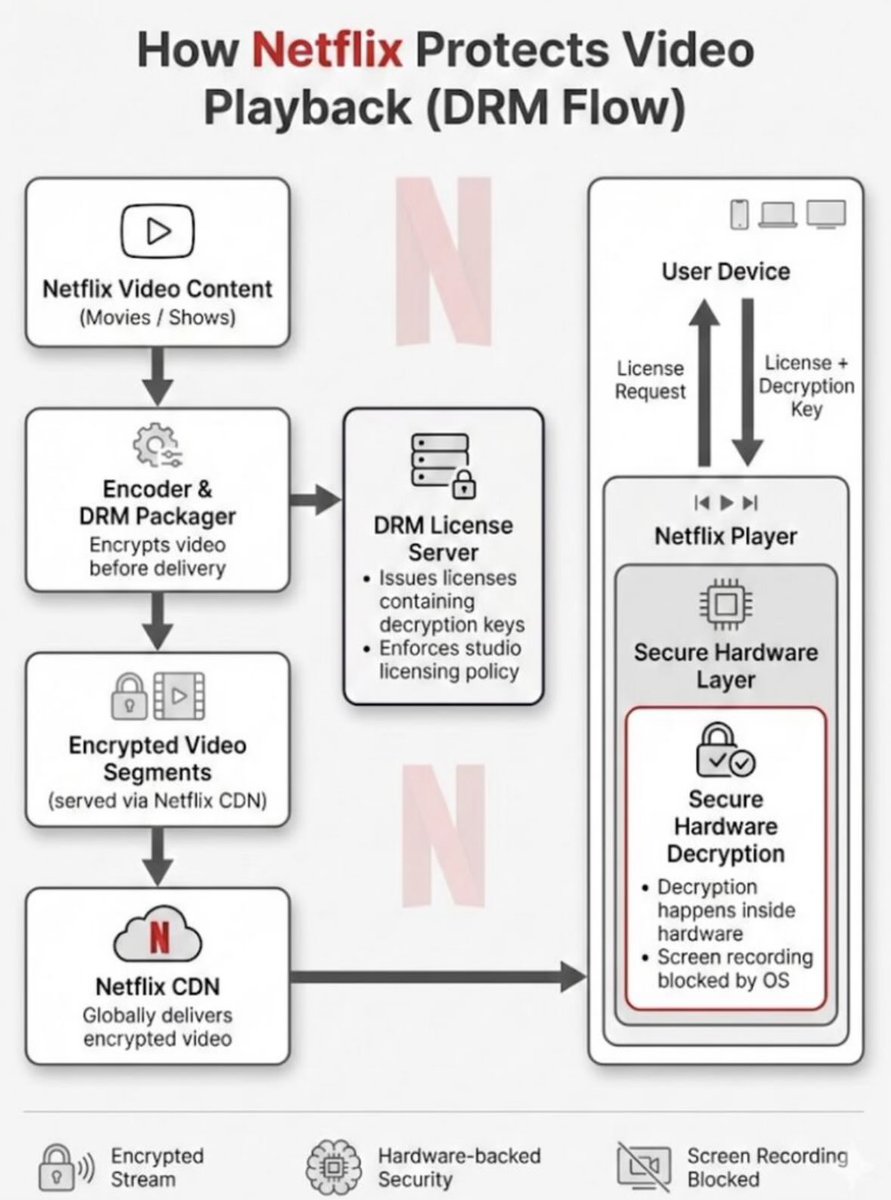
Because of DRM + secure video pipelines 👇
• Video is decrypted inside a protected buffer
• OS / GPU marks it as non-capturable
• Screen capture APIs can’t access those pixels
• Result → black screen
Technologies:
• Widevine (Android/Chrome)
• FairPlay (iOS/macOS)
• HDCP for external displays
You’re watching the video…
but your system isn’t allowed to “see” it 😄
English

This is DRM (Digital Rights Management) at the OS level 👀
Here's exactly how it works 👇
The Technology: HDCP + Widevine
→ Netflix uses Widevine DRM (Google's content protection)
→ Video is encrypted end to end
→ Only trusted display pipelines can decrypt it
Why screenshots go black:
→ Netflix sets a protected flag on the video layer
→ OS honors this flag → blocks screenshot APIs
→ Screenshot tool captures everything EXCEPT protected layer
→ Result: black screen 💀
How it works on different platforms:
→ Windows: Uses PlayReady DRM → blocks screen capture APIs
→ Android: Sets FLAG_SECURE on the window → OS blocks capture
→ iOS: CoreMedia protection → same result
Why can't you bypass it?
→ Protection happens at hardware level (HDCP)
→ Even OBS and screen recorders get blocked
→ GPU itself refuses to output unencrypted frames
Netflix never sees your screen.
Your own OS protects the content for them. 🤯
That's why HDMI capture cards also show black. 🔥
English

@suni_code They’re not “detecting” screenshots so much as working with OS-level protections like DRM (e.g., HDCP/Widevine) that prevent the display pipeline from being captured. Once you understand that, the black screen isn’t a hack. it’s just the system enforcing playback rights.
English

That black screen is DRM doing its job 👀
Netflix uses content protection systems like Widevine / PlayReady + HDCP.
The video is decrypted inside a secure GPU pipeline, and screen capture tools are blocked from accessing those frames.
So when you take a screenshot, the UI may capture…
but the video layer is replaced with black.
Basically: the player can show it, but the OS can’t copy it 🎬🔒🚀
English

@suni_code Netflix uses Digital Rights Management (DRM), specifically systems like Widevine or FairPlay, to protect content, which forces video to render in a secure, encrypted layer that operating systems block screen recording tools from accessing.
English

@suni_code Netflix uses DRM technologies like Widevine and PlayReady that enforce hardware-level protected video paths, so when a screenshot or screen recording is attempted, the system returns a black frame instead of the actual content.
English

@suni_code Netflix uses DRM (Widevine/PlayReady) with hardware-backed secure decode.
Flow:
- Encrypted stream
- decrypted inside secure hardware
- rendered via protected pipeline
OS-level screenshot tools can’t access that buffer.
English

@suni_code That's an interesting question! I wonder if they use some sort of DRM technology to prevent it.
English

@suni_code Netflix uses DRM + OS-level secure video playback (secure surfaces)
So when screen capture is attempted, the system blocks it and returns a black screen
English

@suni_code netflix uses hardware level drm to encrypt video stream so os blocks the capture attempt to prevent piracy
English

Chrom -> Settings -> System -> Use graphics acceleration when available: OFF / Relaunch Chrome.
DRM uses GPU's protected pipeline. When hardware acceleration is off, Chrome renders everything on the CPU in regular system memory instead of the GPU's protected pipeline, making it accessible to screen capture tools.
English

@suni_code Do you realise that if you disable hardware acceleration in your browser then you will be able to record and share everything without getting black screen? :)
English

You just have heard of widevine.
DRM is what’s behind this. When you try to take a screenshot or screen record, you often get a black screen because the content is rendered in a protected video pipeline, not directly through the normal display buffer.
Apps like Netflix, Prime Video, etc. use secure hardware paths (like Widevine L1) so the video is decrypted and displayed in a restricted environment that the OS doesn’t allow other apps (including screen recorders) to access.
English

@suni_code Screenshot tool = camera
DRM video = invisible ink
Camera works—but can’t “see” protected content
Netflix uses DRM with secure hardware decoding and OS-level protections like secure surfaces, so screenshots can’t access video frames and appear black.
English

@suni_code It’s not magic,it’s DRM doing its job
Netflix uses encrypted video streams & secure playback paths,so when a screenshot or recorder tries to capture it,the system just returns a blank frame
But if everything is locked down like this how pirates still manage to get clean copies?
English

@suni_code it’s your device and the video DRM pipeline refusing to give you pixels.
English

@suni_code Is my Netflix supposed to be doing that? On what platforms?
English

@suni_code Netflix doesn’t directly detect screenshots. It uses DRM protection and secure video rendering so the video is shown on a protected display layer that screen capture tools can’t access. That’s why screenshots or recordings show a black screen instead of the video.
English

@suni_code Follow up question. What happens if you are watching Netflix in a VM?
English

@suni_code DRM is in the middle to actually show content
English