ビスター(Vistar)

1.5K posts

ビスター(Vistar) banner
ビスター(Vistar)

ビスター(Vistar)

@Lmssync

UIKit SwiftUI Exploring Internals

เข้าร่วม Şubat 2024
98 กำลังติดตาม868 ผู้ติดตาม
ビスター(Vistar)
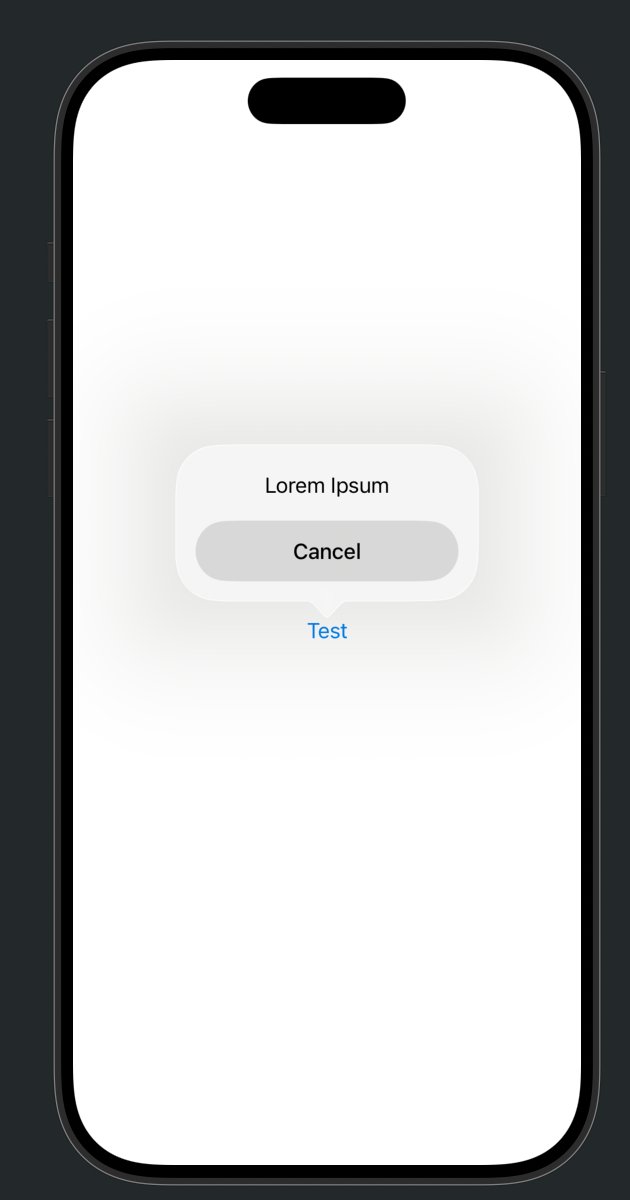
@morrisinlife You can get a ZoomTransition with a popover, but as far as I know, confirmationDialog only supports ZoomTransition when presented from a UIBarButtonItem.
English
0
0
0
10
Morris Richman
Morris Richman@morrisinlife·
Question for the internet: Does anyone know how to do this in SwiftUI?
English
6
0
6
1.1K
ビスター(Vistar)
@morrisinlife So you mean creating a smooth transition where a View shrinks into a small popover-like View but not using a toolbar?
English
1
0
1
103
Morris Richman
Morris Richman@morrisinlife·
@Lmssync Turns out it works perfectly in the toolbar, but not in the body
Morris Richman tweet mediaMorris Richman tweet media
English
1
0
0
135
ビスター(Vistar)
@ertembiyik I personally think it’s better to use the properties with the equivalent propertie on UITraitCollection rather than UIScreen since UIScreen.main is deprecated.
English
1
0
6
145
ertem
ertem@ertembiyik·
@_Kavsoft nice finding! there is a simpler api that works pretty much on any os version: UIScreen.main.value(forKey: “_displayCornerRadius”) as? CGFloat
English
1
0
16
695
Kavsoft
Kavsoft@_Kavsoft·
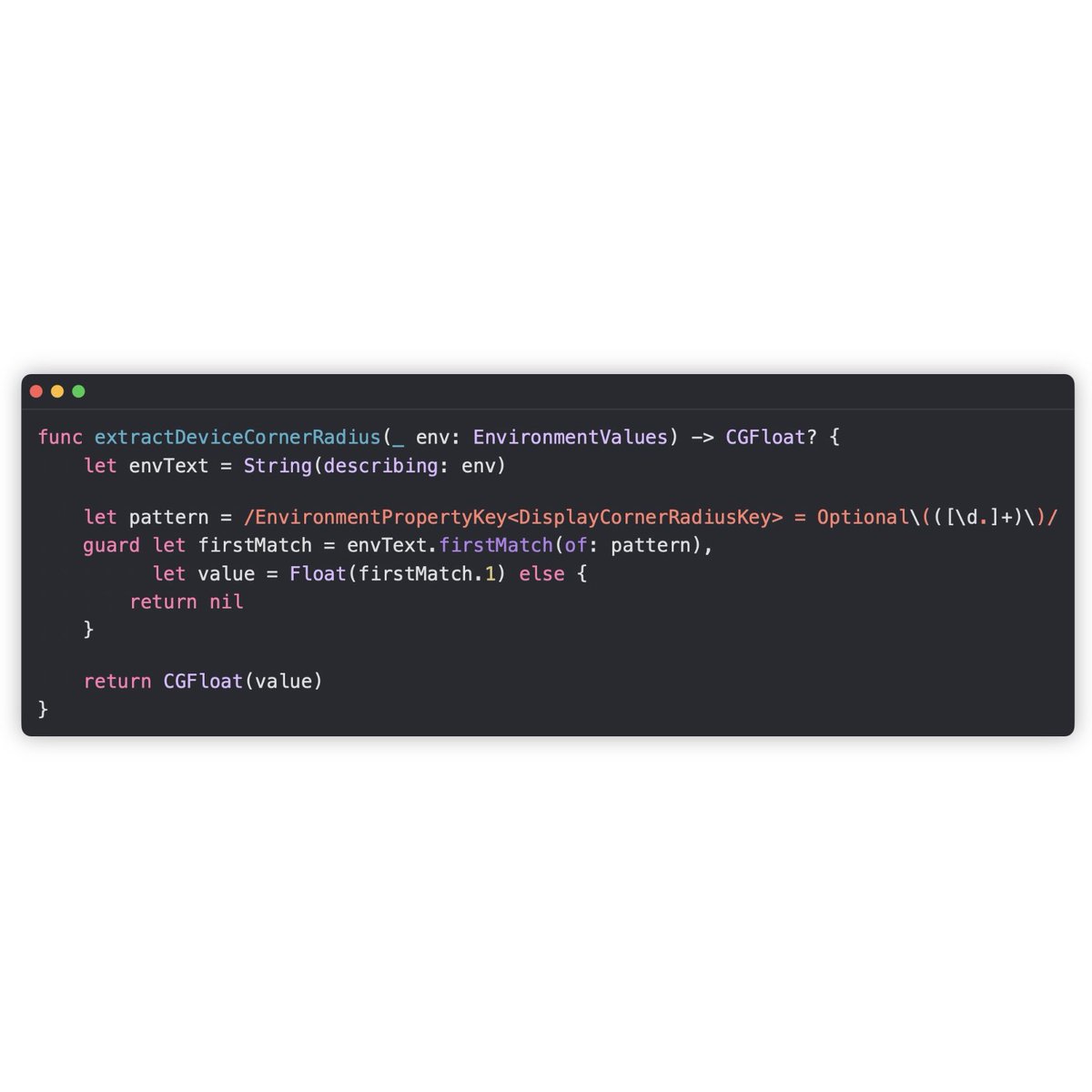
I recently discovered that the SwiftUI EnvironmentValues infant contains Device Corner Radius value, but it’s not available for use. However, we can easily extract those values using a simple String Regex. With this information, we can basically Backport the ConcentricRectangle shape for older iOS versions as well. For More, check out this video. youtu.be/D6vOHiBpemM NOTE: I tested this even with iOS 16, and the value is indeed present. It’s possible that it’s available for even older versions, but I haven’t tested it yet.
YouTube video
YouTube
Kavsoft tweet media
English
2
13
294
16.4K
ビスター(Vistar)
@jeudesprits Thanks! If CAMatchMoveAnimation and CAMatchPropertyAnimation aren’t available, would you recommend using UIUpdateLink (haven’t tried it yet 🤔) or CADisplayLink to achieve similar real-time synchronization?
English
1
0
0
38
jeudesprits
jeudesprits@jeudesprits·
CAMatchMoveAnimation and CAMatchPropertyAnimation have begun to be actively used in liquid glass. In many cases, you simply want to mirror certain properties of the sourceLayer in real-time. Apple uses MatchMove for the position key and multiple MatchProperty instances for the hidden, cornerRadius, and meshTransform keys, added with duration=infinity to replicate the shape of the layer to which the effect is applied.
English
1
0
1
45
ビスター(Vistar)
Gonna try this with CADisplayLink... if it doesn’t work, I might switch to CAMatchMoveAnimation 😅 Has anyone here already ventured into the world of CAMatchMoveAnimation?
English
4
0
4
748
Seb Vidal
Seb Vidal@SebJVidal·
Trying to whip up a nice animation for this play control. At some point the UIKit team fixed UIGlassEffect's ability to animate in/out which was broken in 26.0 but it's still not perfect... Notice the transform applied by _UIFlexInteraction resetting without animating. 🥹
English
4
2
41
12.2K
ビスター(Vistar)
@Barbapapapps It seems to be an animation where the render server resolves transforms from a source layer’s points in a different coordinate space and transfers them onto a target layer. Used for effects like a view “jumping” from a sheet to a specific spot 🚀
English
2
0
4
208
Julien Sagot
Julien Sagot@Barbapapapps·
@Lmssync Never heard of it! Is this a matchedGeometry like effect at the CoreAnimation layer?
English
1
0
0
277
ビスター(Vistar)
@cifilter It presumably resolves displacement, rotation, and scale from source layer’s point set across coordinate spaces atomically within the render server, transferring them to the target layer without touching the main thread.
English
0
0
0
44
Shannon Potter
Shannon Potter@cifilter·
@Lmssync How does it work? Does it diff the incoming layer tree looking for a layer with the same id/namespace to map the animation?
English
1
0
0
85
ビスター(Vistar)
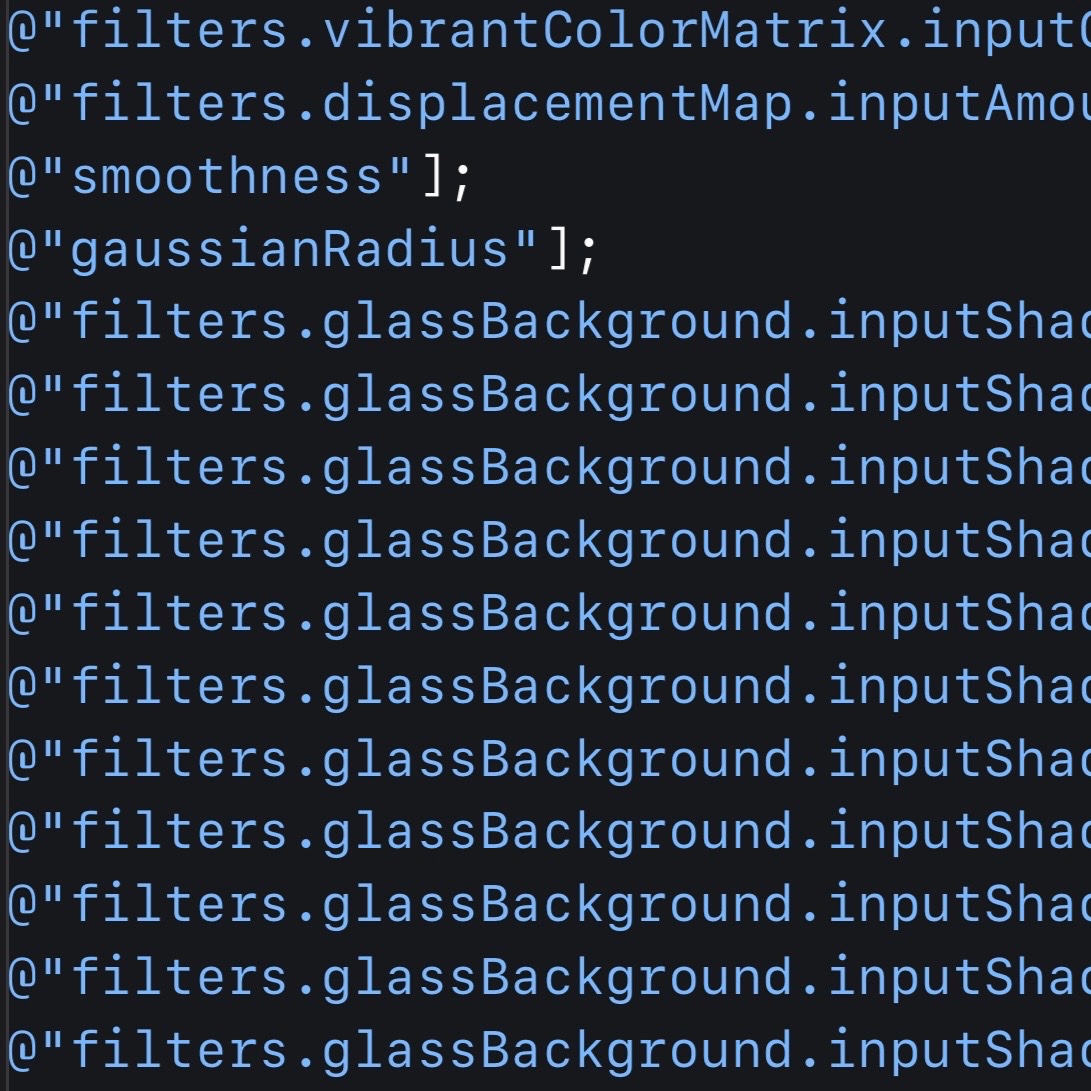
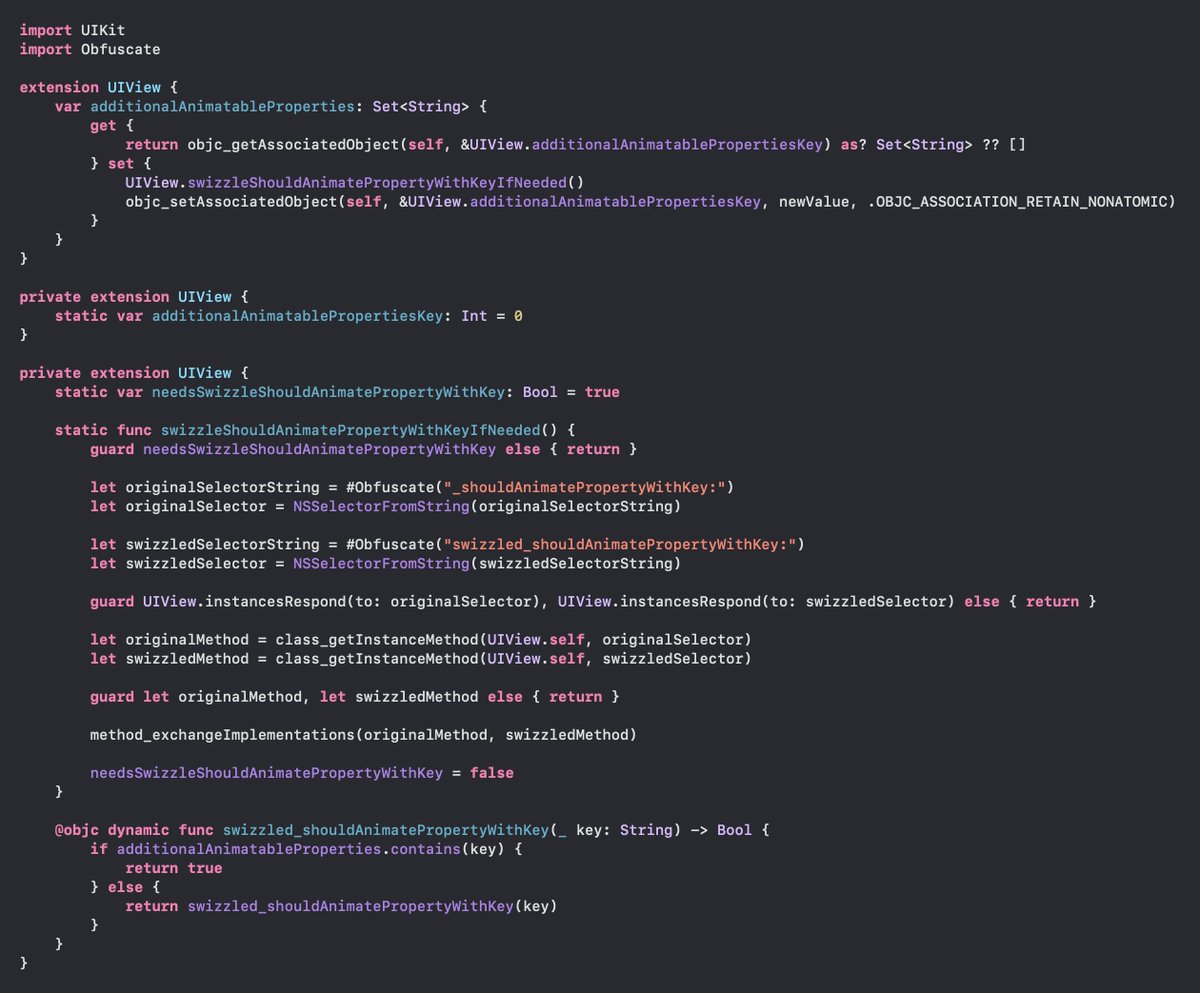
@SebJVidal This approach is needed for “filters.gaussianBlur.inputRadius”, but it looks like some filter properties are already recognized as animatable 🤔
ビスター(Vistar) tweet media
English
0
0
0
82
Seb Vidal
Seb Vidal@SebJVidal·
Reasonably nice API, you can set any UIView's additionalAnimatableProperties...property to a Set of Strings. Something like ["filters.gaussianBlur.inputRadius"]. Used a Set instead of an Array for O(1) contains(_:) lookup.
English
2
0
5
1.2K
Seb Vidal
Seb Vidal@SebJVidal·
Some Objective-C Runtime trickery to enable UIKit-based animations on properties that, by default, aren't animatable. Wrote this to enable CAFilter animations without requiring a UIView subclass overriding _shouldAnimatePropertyWithKey:
Seb Vidal tweet media
English
5
7
133
8.2K
ビスター(Vistar)
ビスター(Vistar)@Lmssync·
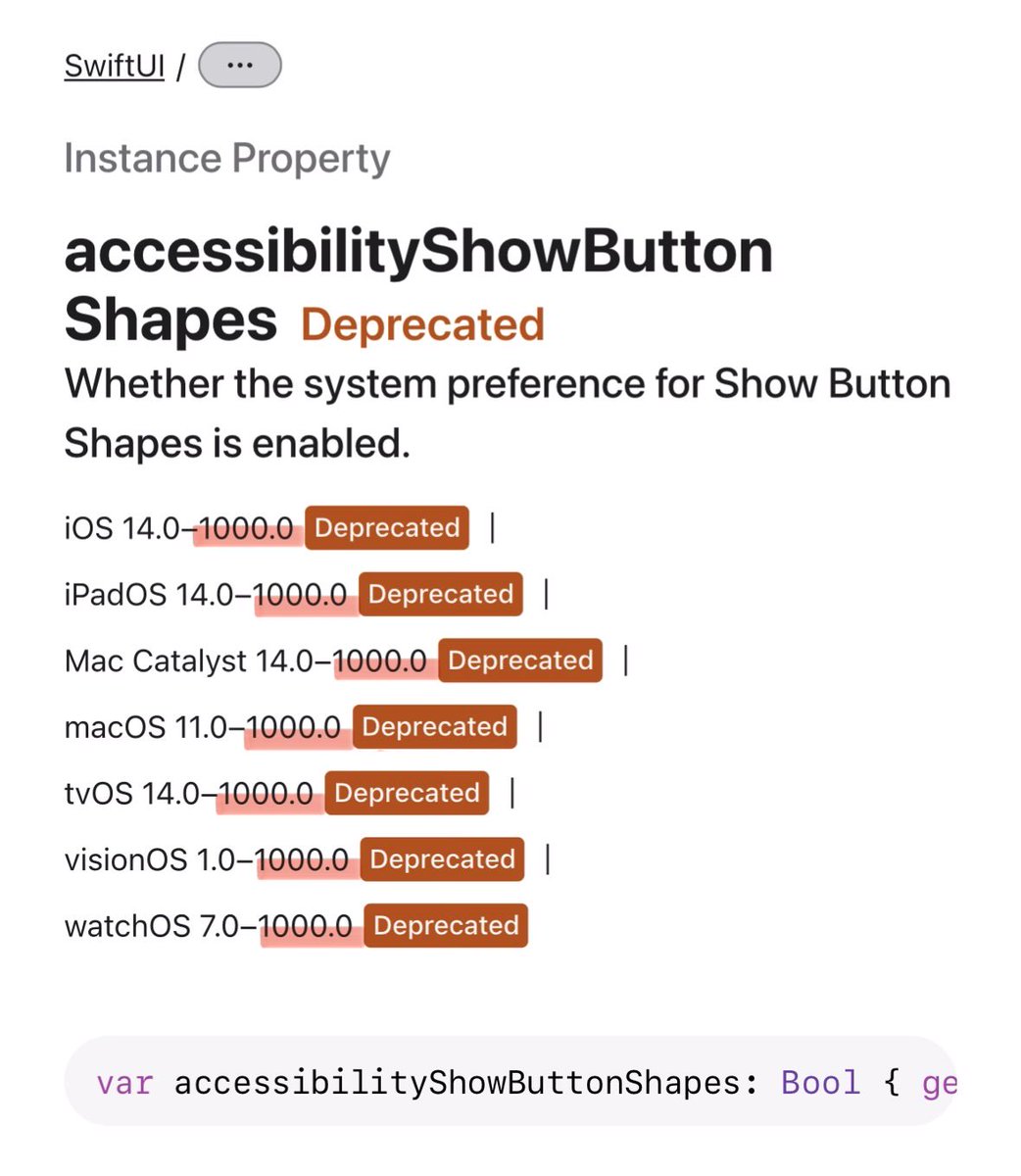
Apple docs say this API is supported until iOS 1000.0. Nice to know SwiftUI will outlive humanity 😂
ビスター(Vistar) tweet media
English
1
2
58
4.8K
Julien Sagot
Julien Sagot@Barbapapapps·
Does anyone know why I don’t get the blur effect and such a light black overlay on this view (scroll edge effect), whereas in Settings it works as intended? The setup is pretty much the same (UINavigationController) ☹️
English
7
0
65
13K
ビスター(Vistar)
ビスター(Vistar)@Lmssync·
@Barbapapapps -[UIScrollView _pocketForEdge:makeIfNeeded:] (still not removed?) or somewhere inside UIScrollView’s subviews.
English
1
0
0
56
Julien Sagot
Julien Sagot@Barbapapapps·
@Lmssync How do you even get that _UIScrollPocket? UIScrollView used to have _UIScrollPocket *_topPocket (iOS 26.0), but it’s gone now (iOS 26.3)😵‍💫 I tried accessing it through UIScrollView._edgeEffectViewInteraction -> topPocket, but no luck.
English
1
0
0
65
Swift Dev
Swift Dev@SwiftDev_UI·
is anyone noticing a major lag/whitescreen when running the 26.4 simulators from Xcode 26.4? still present in the latest beta. it waits about 30 seconds on the white screen before the app actually launches, on 26.2 simulator with Xcode 26.3 no issues at all.
English
1
0
3
743
ビスター(Vistar)
ビスター(Vistar)@Lmssync·
@Barbapapapps Does -[UIScrollPocket setReducedTransparency:true] improve it a bit? Overriding props is becoming a pain now that they’re defining these symbols in Swift🙃
English
1
0
1
75
Julien Sagot
Julien Sagot@Barbapapapps·
Seb Vidal@SebJVidal

@zats @Barbapapapps UIKit’s ScrollEdgeEffectView (a Swift class, hence no UI prefix 🤢) uses a CABackdropLayer with luma tracking enabled. The intensity of the “shadow” and whether or not the blur effect is enabled is based off the reported average luma composited below the backdrop layer.

QME
1
0
3
544
ジュニア
ジュニア@jrsaruo_tech·
SwiftUIでlayoutMarginsGuide的なものってあったっけ?システム標準の余白って端末によって16ptになったり20ptになったりしたと思うけど単にpadding()だけでいけるんだっけ…?
日本語
1
0
2
523