Dave The Spreadsheet Guy

45 posts

Dave The Spreadsheet Guy banner
Dave The Spreadsheet Guy

Dave The Spreadsheet Guy

@NiceSpreadsheet

I'm on a mission to help both Businesses and Individuals enhance their usage and experience of Microsoft Excel.


เข้าร่วม Haziran 2018
15 กำลังติดตาม14 ผู้ติดตาม
the muddy mum 💙
the muddy mum 💙@muddymuddymum·
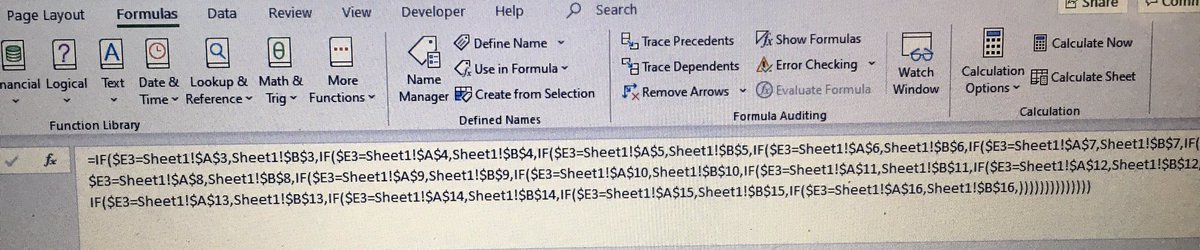
This is probably not going to be appreciated by many of you, but what a lovely formula! 😂😂😂 It works and I’m very happy! And I actually get it now! Now RPA can change what they like as I have a system that can keep up!
the muddy mum 💙 tweet media
English
5
0
12
0
Dave The Spreadsheet Guy
Dave The Spreadsheet Guy@NiceSpreadsheet·
@muddymuddymum So glad the spreadsheet magic has worked out nicely for you 😍 Feel free to give us a shout if I can help with any more?
English
0
0
1
0
the muddy mum 💙
the muddy mum 💙@muddymuddymum·
Does anyone know how to do complicated formulas on excel spreadsheets?
English
7
2
3
0
Dave The Spreadsheet Guy
Dave The Spreadsheet Guy@NiceSpreadsheet·
@muddymuddymum That's the one... jackpot 😁 There are many different ways to do things in Excel... that's the beauty of it. You're smashing it today 😍
English
1
0
1
0
the muddy mum 💙
the muddy mum 💙@muddymuddymum·
@NiceSpreadsheet Yes, yes, yes! I get it, you don’t close the equation, As the next sum is the false answer. And it works!! Wooooohoooooo!
English
1
0
1
0
the muddy mum 💙
the muddy mum 💙@muddymuddymum·
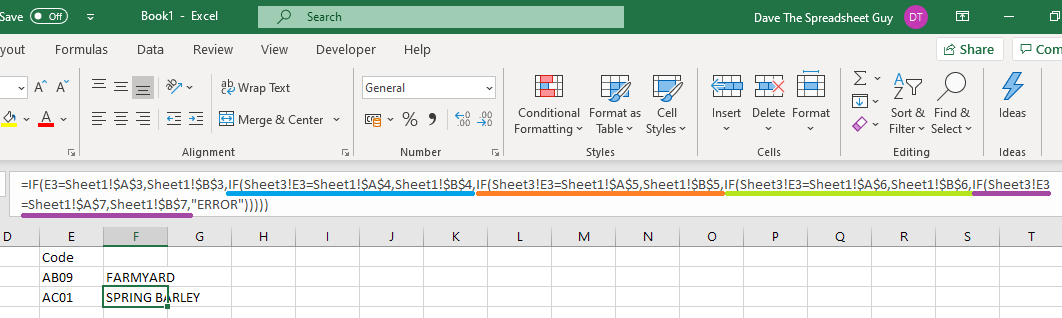
@NiceSpreadsheet This works, as long it’s only one formula. But if I can’t repeat the formula for the other codes, it will be return #ref or the above. Would it better to just create a drop down menu?
the muddy mum 💙 tweet media
English
1
0
0
0
Dave The Spreadsheet Guy
Dave The Spreadsheet Guy@NiceSpreadsheet·
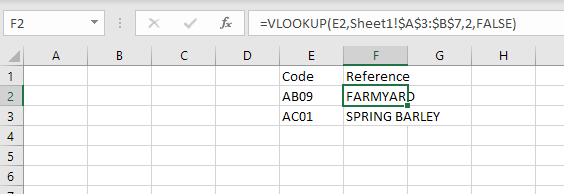
@muddymuddymum Just gotten the VLOOKUP working at my end, as per pic, so definitely all about the formatting. The IF formula could work as well though, it will just be a massive formula... all about your preference though :-)
Dave The Spreadsheet Guy tweet media
English
0
0
1
0
Dave The Spreadsheet Guy
Dave The Spreadsheet Guy@NiceSpreadsheet·
@muddymuddymum Ahh sometimes the cell formatting can cause an issue? Can you ensure that both sets of codes are formatted as General and not Text?
English
1
0
0
0
Dave The Spreadsheet Guy
Dave The Spreadsheet Guy@NiceSpreadsheet·
@muddymuddymum Perfect! So your VLOOKUP in the column F cell should look like this: =VLOOKUP(column E cell ref i.e. E5, Sheet 1 table range from A3 to bottom right of table, 2, FALSE) The 2 and the FALSE are as is. The previous two bits depend on cell references... hope that helps?
English
2
0
1
0
Dave The Spreadsheet Guy
Dave The Spreadsheet Guy@NiceSpreadsheet·
@muddymuddymum Excellent stuff! In your table in sheet 1, is the code to the left of the description? If so, if you do a VLOOKUP in the cell in column F that looks up the column E value in the sheet1 table, that'll do it... just confused myself reading that back! Can ya send a pic of sheet 1?
English
2
0
1
0
the muddy mum 💙
the muddy mum 💙@muddymuddymum·
@NiceSpreadsheet I remember vaguely doing absolute referencing when I did my business and admin course, but I haven’t had to use them until now. After all these years it’s just a dim memory!
English
1
0
1
0
Dave The Spreadsheet Guy
Dave The Spreadsheet Guy@NiceSpreadsheet·
@muddymuddymum Cool. Do you have a full list of all codes and descriptions somewhere else in the spreadsheet? If not, could you build one? Then you could use a VLOOKUP to populate column F, using the code in column E, plus the reference list?
English
1
0
1
0
the muddy mum 💙
the muddy mum 💙@muddymuddymum·
@NiceSpreadsheet Are you sure? Cos here’s the next one: we thought this formula was right but if you do more than one, it doesn’t like it. I want it to be that if I change the code in column E, that it will change the text in column F to the one that matches. And only because I’m lazy 😂
the muddy mum 💙 tweet media
English
1
0
1
0
Dave The Spreadsheet Guy
Dave The Spreadsheet Guy@NiceSpreadsheet·
@muddymuddymum Ahh the pleasure is all mine @muddymuddymum Seeing people applying spreadsheets to solve real life tasks makes me happy 😍 Hope the rest of your day goes brilliantly and feel free to give us a shout if I can help any more?
English
1
0
1
0
the muddy mum 💙
the muddy mum 💙@muddymuddymum·
@NiceSpreadsheet It means I can now input the RPA size changes or crop changes and it will autosum it for me. THANK YOU THANK YOU THANK YOU
English
1
0
1
0
Dave The Spreadsheet Guy
Dave The Spreadsheet Guy@NiceSpreadsheet·
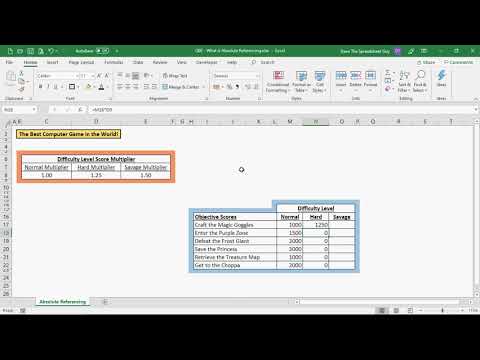
@muddymuddymum Fantastic stuff that is 😍 Proper glad you got it working the way you want it! Plus you got some exposure to SUMIF's and Dollar Signs... it's gonna be a great day for spreadsheets 😁
English
0
0
1
0
the muddy mum 💙
the muddy mum 💙@muddymuddymum·
@NiceSpreadsheet This is what awesome looks like! When I did it with $E it kept moving the number to the next box down, same as where I was doing the formula. This is working, I’ve done a check back and totals match. You don’t realise how wonderful this is!
the muddy mum 💙 tweet media
English
1
0
1
0
Dave The Spreadsheet Guy
Dave The Spreadsheet Guy@NiceSpreadsheet·
@muddymuddymum Oh yes, it's all about the $ signs, or Absolute Referencing... everyone calls it the dollar signs thing though! You'll also want a dollar sign in front of the column reference i.e. $E$3 because columns and rows can be locked independently.
English
1
0
1
0
Dave The Spreadsheet Guy
Dave The Spreadsheet Guy@NiceSpreadsheet·
@muddymuddymum If you swap out the E:E and D:D, replacing them with $E:$E and $D:$D, that should lock them down nicely 👍 Hope your day of spreadsheet fun is going awesomely?
English
2
0
1
0
the muddy mum 💙
the muddy mum 💙@muddymuddymum·
@NiceSpreadsheet How do I lock the search area, if I’m copying and pasting. By the way, you’re my new techno god. This if fun!
English
2
0
1
0