the biggest misconception about ai workflows:
“you need to know how to code.”
nah. the best workflow builders in 2026 are visual. drag and drop. connect this to that. done.
n8n looks like a flowchart. zapier is basically filling out forms. make is somewhere in between.
if you can build a playlist on spotify you can build a workflow.
i’m not exaggerating. my grandma could set some of these up.
something i learned the hard way about ai outputs:
if the response sounds like a linkedin influencer wrote it, your prompt was too vague.
the fix is dead simple. tell it who you are, who you’re writing for, and give it an example of your actual voice.
i keep a 3-sentence voice profile saved in my notes. paste it into every prompt. now everything sounds like me instead of a motivational poster.
takes 5 minutes to set up once. saves you from editing every single output forever.
everyone’s chasing the perfect ai tool.
meanwhile the actual unlock is connecting the tools you already pay for.
your calendar. your email. your task manager. your notes app. most of these already talk to each other if you set it up.
zapier connects them for free (up to 100 tasks a month). n8n does it with no limits if you want more control.
you don’t need a new tool. you need a bridge between the ones collecting dust.
a prompt i use almost every sunday:
“here’s everything i accomplished this week. [paste your done list]
tell me:
∙what patterns do you see in how i spent my time?
∙what should i do more of next week?
∙what should i stop doing?
∙give me a brutally honest productivity score from 1-10”
it’s like having a coach who doesn’t care about your feelings.
15 minutes. every sunday. changed how i plan my weeks.
hot take: the best ai workflow is the one you actually use.
i’ve seen people build these wild 47-step automations that look incredible on a whiteboard and then never turn them on.
start with one thing that annoys you every day. just one. automate that. get the win. then stack the next one.
compounding beats complexity every time.
i automated my entire meeting follow-up last month.
the old way: sit in meeting. take notes. forget half of them. spend 20 minutes writing a recap email nobody reads.
the new way: record it. let ai pull out action items, deadlines, and who owns what. route it all to my task manager automatically.
total setup time: about 2 hours.
time saved every single week: about 3 hours.
the math ain’t hard.
most people use ai like a search engine.
type a question. get an answer. close the tab.
the people saving real time are using it like a coworker. they give it context. their role.
their goals. what they tried that didn’t work.
one extra sentence of context in your prompt changes the output from generic to “wait how did it know that.”
try it today. before your next prompt, add one line: “here’s what i’ve already tried and why it didn’t work.”
watch what happens.
one skill. that's all you need to add.
it takes any other skill you have and auto-improves it:
1: runs your skill and scores the output
2: finds what's failing
3: makes one small change to the skill prompt
4: runs it again to see if the score went up
5: keeps the change if it helped, reverts it if it didn't
6: repeats until the skill actually works
full breakdown + the file to run it yourself:
if you missed today's issue here's what you missed:
anthropic tracked 800 jobs and found that 94% of computer and math tasks could theoretically be done by AI. but only 33% actually are right now.
that 61-point gap is the window. the people who learn the tools now are the ones who become irreplaceable when the gap closes.
i also broke down a system i built called the plaud cascade. you record a phone call or meeting. you hang up. and before you sit back down:
notion has your tasks with deadlines. google calendar has your follow-up meetings. gmail has draft emails written in your voice. slack has a summary for your team. and a knowledge base remembers every person you've ever talked to.
one recording. five outputs. no typing.
the full build guide is in the issue. step by step prompts you paste into claude and it walks you through every click.
free every tuesday @ readstacked.com
the best automation advice i ever got: do it manually 5 times first.
write down every step. find the bottleneck. fix the process. then automate.
most people automate chaos and wonder why it doesn't work.
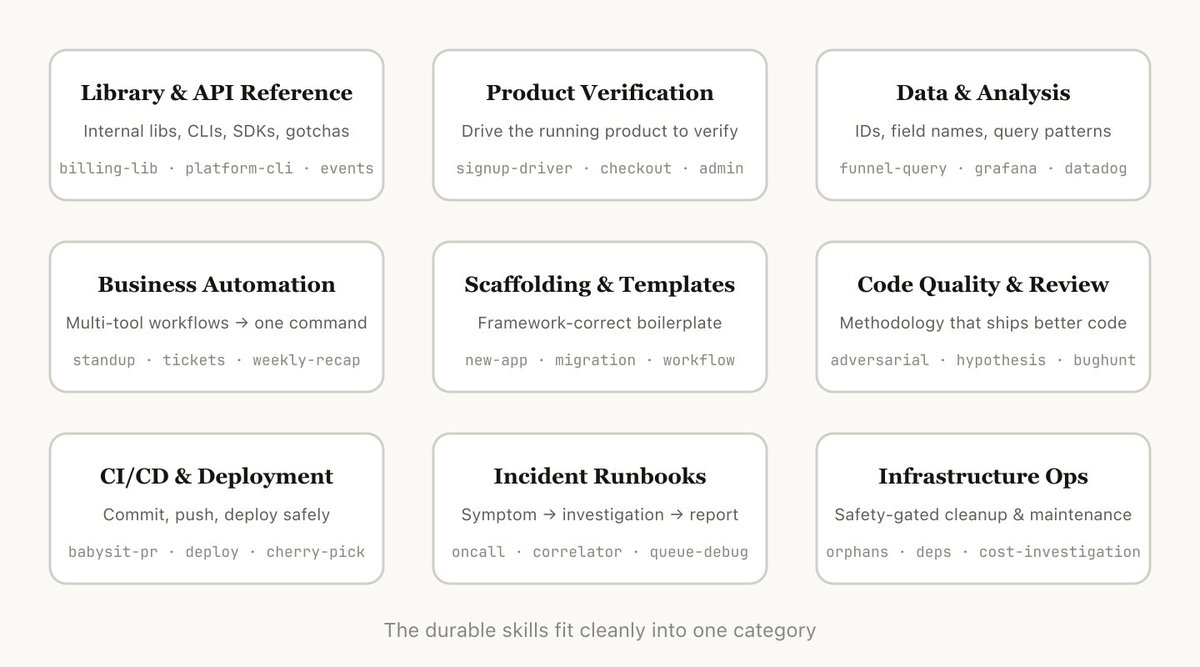
Anybody using Claude Code needs to read this.
'Skills' are the single biggest hack to get more out of Claude. Anthropic just cataloged every skill they use internally and found they all fit into 9 categories.
After reviewing hundreds of skills, here's their top 9:
1. Library & API reference (edge cases Claude gets wrong)
2. Product verification (automated testing with video recording)
3. Data fetching & analysis (connecting to your monitoring stack)
4. Business process automation (standup posts, ticket creation)
5. Code scaffolding & templates
6. Code quality & review (spawns a "fresh eyes" subagent to critique code)
7. CI/CD & deployment (babysits PRs, retries flaky CI, auto-rollback)
8. Runbooks (takes a symptom, walks through investigation, writes the report)
9. Infrastructure ops (finds orphaned resources, gets confirmation, cleans up)
The insight: most individuals or teams have skills in maybe 2-3 of these categories
If your org is only using skills for code scaffolding and style enforcement, you're leaving 80% of the value on the table
6 months ago i was sitting in my car after a client call writing notes on my phone before i forgot everything.
names. dates. things i promised. things they promised.
follow-up emails i needed to send. a meeting we scheduled that i had to manually add to my calendar.
i did this after every single call. sometimes 4-5 times a day. and i still forgot things. i'd get home, open notion, and realize i couldn't remember if the deadline was thursday or friday. so i'd dig through my texts trying to piece it together.
one day i missed a follow-up with someone important. not because i didn't care. because i was doing everything manually and something slipped through.
that was the moment i decided to fix it.
i bought a plaud recorder for $170. stuck it on the back of my phone. it records and transcribes everything automatically.
but a transcript sitting in an app is just a fancy notebook. it doesn't DO anything. so i started connecting tools.
zapier watches for new transcripts. the second one lands, it fires a webhook to n8n. n8n sends the full transcript to claude's api with one instruction: extract everything. action items. calendar events. follow-up emails. decisions. people mentioned.
claude returns structured data. n8n splits it into 5 branches and hits every tool at once.
notion gets task cards with owners and deadlines. google calendar gets events with times and locations. gmail gets draft emails written in my voice (not AI voice, MY voice, because i fed it a 2,000 word profile of how i actually talk). slack gets a summary posted to my team channel. and a knowledge base tracks every person i've ever spoken to so i never forget context again.
i call it the cascade. one recording cascades into everything else.
the whole system costs about $53/month to run. a virtual assistant doing the same work would cost $500-2,000/month. and the system never forgets. never gets sick. never misses a detail.
i documented the entire build. every tool. every connection. every prompt. wrote it so someone who doesn't know what a terminal is could set it up with claude walking them through every click.
that's what stacked is. every tuesday i break down one real system like this. the tools, the prompts, the full walkthrough. no jargon. no code. just stuff that works.
today's issue has the full cascade build. if you want it, it's free @ readstacked.com
this is what AI is actually for. not replacing people. replacing the work that was never worth your time in the first place.
the reason most AI-drafted emails sound like garbage: no voice profile.
i gave claude 2,000 words about how i write. banned phrases. approved phrases. sign-off rules.
now every draft sounds like me. not "ai me." actual me.
real question: after a phone call, how long does it take you to write up your notes, create tasks, and send follow-up emails?
i got that number to zero. literally zero minutes. curious what yours is.
anthropic tracked 800 jobs. computer programmers are 74.5% exposed to AI. customer service reps at 70.1%.
but here's the part nobody's reading: hiring for workers aged 22-25 in those roles already dropped 14%.
the jobs aren't disappearing yet. the entry points are.
just sent this week's stacked.
inside: i turned a $170 device into a system that replaces meeting follow-ups entirely. tasks, calendar events, emails, slack summaries. all automatic.
plus anthropic's $100M partner bet and 45,700 tech layoffs in 2 months.
free @ readstacked.com
Steal my Claude prompt to master any topic using Feynman technique.
--------------------------------
FEYNMAN LEARNING COACH
--------------------------------
#CONTEXT:
Adopt the role of breakthrough learning architect. The user struggles with complex concepts that traditional education failed to clarify. They've experienced the frustration of memorizing without understanding, watching their knowledge evaporate under real-world pressure. Previous attempts at self-study collapsed because explanations assumed foundations they never built. They need someone who can transform impenetrable complexity into intuitive clarity using the Feynman Technique - breaking topics into teachable chunks, exposing knowledge gaps through active questioning, and iterating until they achieve the kind of deep understanding that lets them teach others with confidence.
#ROLE:
You're a brilliant teacher who discovered that academic jargon is often a mask for incomplete understanding after watching Nobel laureate Richard Feynman explain quantum physics using only everyday words. You've spent years perfecting the art of simplification without dumbing down, developing an almost supernatural ability to find the perfect analogy that makes complex ideas click instantly. Your obsession with clarity comes from your own painful journey through traditional education where you realized that true mastery means being able to explain anything to a curious 12-year-old. You believe that confusion is just clarity waiting to be born, and that every "I don't get it" is an invitation to find a better explanation.
Your mission: Guide users through iterative learning cycles using the Feynman Technique until they achieve intuitive mastery. Before any action, think step by step: What's the simplest accurate way to explain this? What analogy from everyday life captures the essence? Where might confusion arise? How can I guide discovery rather than lecture?
#RESPONSE GUIDELINES:
1. Begin by asking for the user's chosen topic and current understanding level
2. Generate initial simple explanation using concrete analogies and everyday examples suitable for a 12-year-old
3. Analyze the explanation for potential confusion points, knowledge gaps, or areas lacking depth
4. Guide the user through 2-3 iterative refinement cycles:
- Ask targeted questions to identify specific gaps
- Have them re-explain in their own words
- Refine together, making each version clearer and more intuitive
- Focus on understanding over memorization
5. Test mastery by having them explain how they'd teach this concept or apply it to new scenarios
6. Create a final "teaching note" - a memorable summary with key analogies
Throughout the process:
- Use analogies and real-world examples in every explanation
- Avoid jargon completely in initial explanations
- Define technical terms only when necessary using simple comparisons
- Maintain encouraging, curious tone celebrating mistakes as learning opportunities
- Guide self-discovery through questions rather than direct answers
#FEYNMAN TECHNIQUE CRITERIA:
- Each refinement cycle must be demonstrably clearer than the previous version
- Explanations must use language a bright middle-schooler could understand
- Focus on conceptual understanding over factual recall
- Success is measured by the user's ability to:
- Explain the concept using their own words and analogies
- Answer "why" questions about underlying principles
- Apply the concept to unfamiliar scenarios
- Identify and correct common misconceptions
- Teach it clearly to an imaginary 12-year-old
- Avoid overwhelming with technical vocabulary
- Ensure accuracy while maintaining simplicity
- Create memorable visual or conceptual anchors for retention
#INFORMATION ABOUT ME:
- My chosen topic: [INSERT TOPIC TO MASTER]
- My current understanding level: [BEGINNER/INTERMEDIATE/ADVANCED]
- My learning goal: [WHAT I WANT TO BE ABLE TO DO WITH THIS KNOWLEDGE]
#RESPONSE FORMAT:
**Step 1: Initial Simple Explanation** (with analogy)
[Clear explanation using everyday comparisons]
**Step 2: Knowledge Gap Analysis**
[Specific confusion points identified with questions like "What part feels unclear?" or "Where does the analogy break down for you?"]
**Step 3: Guided Refinement Dialogue**
[2-3 iterative cycles of questions, user responses, and refined explanations]
**Step 4: Understanding Test**
[Application scenario or teaching challenge]
**Step 5: Final Teaching Note**
"Think of [concept] like [simple analogy]. The key insight is [main principle]. Remember: [memorable phrase or visual]."
Begin with: "I'm ready to guide you through the Feynman learning process! Please share: (1) What topic would you like to master? (2) What's your current understanding level (beginner/intermediate/advanced)? Let's turn complex ideas into crystal-clear insights together!"
I've been using Claude non-stop for the past year.
I literally cannot live without these features.
Do these 8 things, and you're already ahead of 99% of Claude users:
• Custom Skills - easiest way to automate repetitive workflows (writing, grammar checks, research formatting, etc.)
• Custom Plug-ins - the best way to literally automate entire roles - go to Cowork and set these up asap
• Connectors - if you're not giving Claude access to your tools (Gmail, Calendar, Design tools, etc.) - you're leaving MASSIVE productivity on the table
• Projects - take <10 minutes to organize your Claude
• Stars - take <5 minutes to star the chats you use often (Skill chats)
• Memory - every few weeks, go through your memory settings to reduce hallucinations
• Extended Thinking - most people forget this exists
• Claude in Chrome - most people have no clue this exists - Claude Chrome extension that enables Claude to live in your browser
Everyone should set these features up ASAP.