qu4nt

11.2K posts

qu4nt banner
qu4nt

qu4nt

@_qu4nt

Ofrecer soluciones guiadas por datos es un reto. Buscamos el uso inteligente de información para la acción colectiva. #qu4nt #datascience #datadriven

https://t.me/qu4nt เข้าร่วม Aralık 2018
677 กำลังติดตาม2.5K ผู้ติดตาม
qu4nt
qu4nt@_qu4nt·
qu4nt tweet media
ZXX
0
0
0
13
qu4nt
qu4nt@_qu4nt·
qu4nt tweet media
ZXX
0
0
0
12
qu4nt
qu4nt@_qu4nt·
qu4nt tweet media
ZXX
0
0
0
13
qu4nt รีทวีตแล้ว
Jesse--The Data Guy
Jesse--The Data Guy@Mbadiwejesse·
Top 20 Excel Formulas👇
Jesse--The Data Guy tweet media
English
0
34
165
3.5K
qu4nt รีทวีตแล้ว
Fran Pradas | Ingeniero de IA
ADIÓS PAGAR por herramientas de IA 👋 Usa mejor estas GRATIS 👇 (Guárdalo para más tarde)
Fran Pradas | Ingeniero de IA tweet media
Español
1
58
177
5.5K
qu4nt รีทวีตแล้ว
Python Programming
Python Programming@PythonPr·
Data Analytics is not just a skill... It's an ECOSYSTEM
Python Programming tweet media
English
4
139
1.1K
17.1K
qu4nt รีทวีตแล้ว
Fran Actúa
Fran Actúa@Fran_actua·
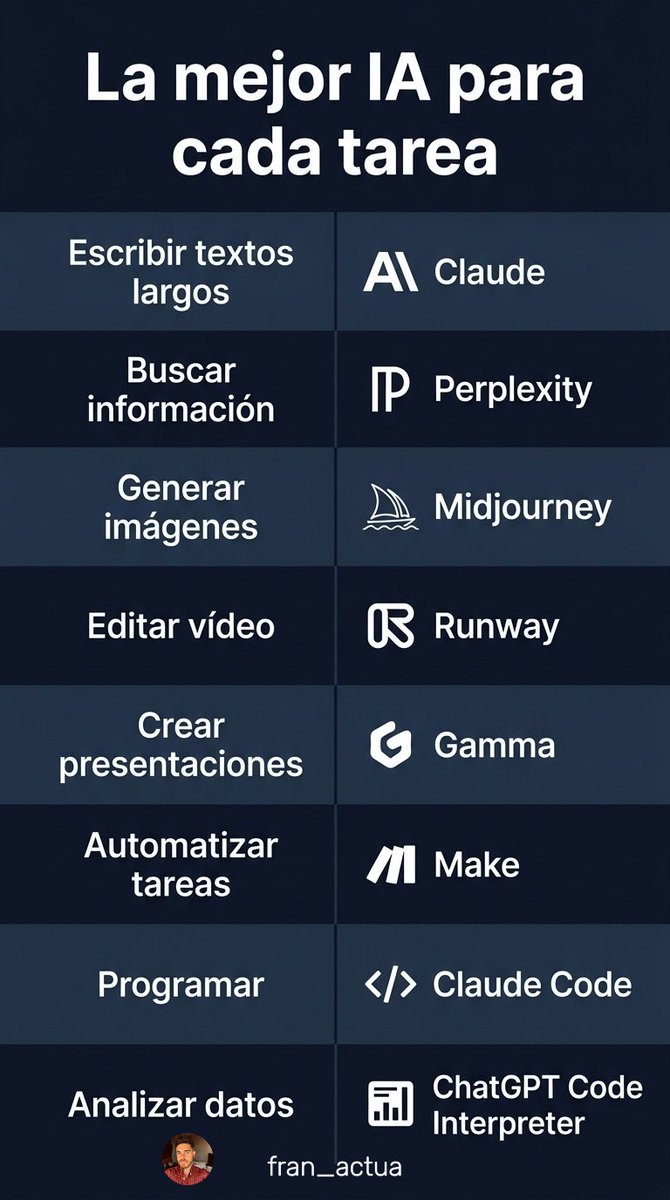
El 90% de la gente usa ChatGPT para todo. Pero hay una IA mejor para cada tarea. Aquí tienes qué IA usar según lo que necesitas 👇
Fran Actúa tweet media
Español
3
59
199
11.1K
qu4nt รีทวีตแล้ว
Dhanian 🗯️
Dhanian 🗯️@e_opore·
Linux Firewall Configuration 1. Introduction → A firewall is a security system that controls incoming and outgoing network traffic. → It acts as a barrier between trusted internal systems and untrusted external networks. → In Linux, firewalls help protect servers, applications, and data from unauthorized access. 2. Why Firewall Configuration Matters → Prevent unauthorized access to your system. → Protect against network-based attacks. → Control which services are exposed to the internet. → Monitor and filter traffic based on rules. → Strengthen overall system security. 3. Types of Linux Firewall Tools → iptables → Traditional and powerful firewall tool. → Uses rule chains to filter traffic. → Operates at a low level in the kernel. → nftables → Modern replacement for iptables. → Simplified syntax and better performance. → Supports advanced rule management. → UFW (Uncomplicated Firewall) → Beginner-friendly firewall interface. → Built on top of iptables. → Easy to configure and manage. 4. Firewall Concepts → Rules → Define what traffic is allowed or blocked. → Example: → Allow SSH (port 22) → Block all other incoming traffic → Chains → Rules are organized into chains: → INPUT → Incoming traffic → OUTPUT → Outgoing traffic → FORWARD → Traffic passing through system → Policies → Default action for traffic: → ACCEPT → Allow traffic → DROP → Block traffic silently → REJECT → Block traffic with response 5. Using UFW (Simple Approach) → Enable Firewall → sudo ufw enable → Allow a Service → sudo ufw allow ssh → Allow a Port → sudo ufw allow 80 → Deny a Port → sudo ufw deny 21 → Check Status → sudo ufw status 6. Using iptables (Advanced Control) → Allow SSH → iptables -A INPUT -p tcp --dport 22 -j ACCEPT → Allow HTTP → iptables -A INPUT -p tcp --dport 80 -j ACCEPT → Drop All Other Traffic → iptables -A INPUT -j DROP → Save Rules → iptables-save 7. Using nftables (Modern Approach) → Create Basic Rule → nft add rule inet filter input tcp dport 22 accept → List Rules → nft list ruleset → Flush Rules → nft flush ruleset 8. Common Firewall Configuration Strategy → Allow essential services (SSH, HTTP, HTTPS). → Deny all unnecessary ports. → Restrict access to trusted IP addresses. → Enable logging for suspicious traffic. → Apply least privilege principle. 9. Firewall Logging → Monitor blocked and allowed traffic. → Helps detect attacks or misconfigurations. → Example (UFW logging): → sudo ufw logging on 10. Best Practices → Always allow SSH before enabling firewall (avoid lockout). → Use default deny policy. → Regularly review firewall rules. → Keep firewall tools updated. → Combine firewall with intrusion detection tools. 11. Tip → Linux firewalls are essential for network security. → UFW is simple and beginner-friendly. → iptables provides deep control. → nftables offers modern and efficient rule management. → Proper configuration protects systems from unauthorized access. 📘 Linux Mastery Ebook → Master Linux internals, security, firewall configuration, system monitoring, and architecture step-by-step. 🔗 Grab the Linux Mastery Ebook: codewithdhanian.gumroad.com/l/dynwdc
Dhanian 🗯️ tweet media
English
10
94
438
9.9K
qu4nt
qu4nt@_qu4nt·
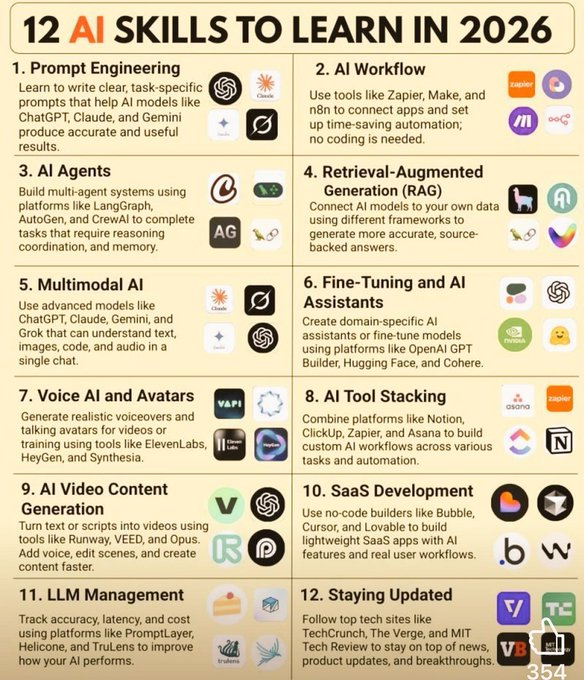
qu4nt tweet media
ZXX
0
0
0
8
qu4nt
qu4nt@_qu4nt·
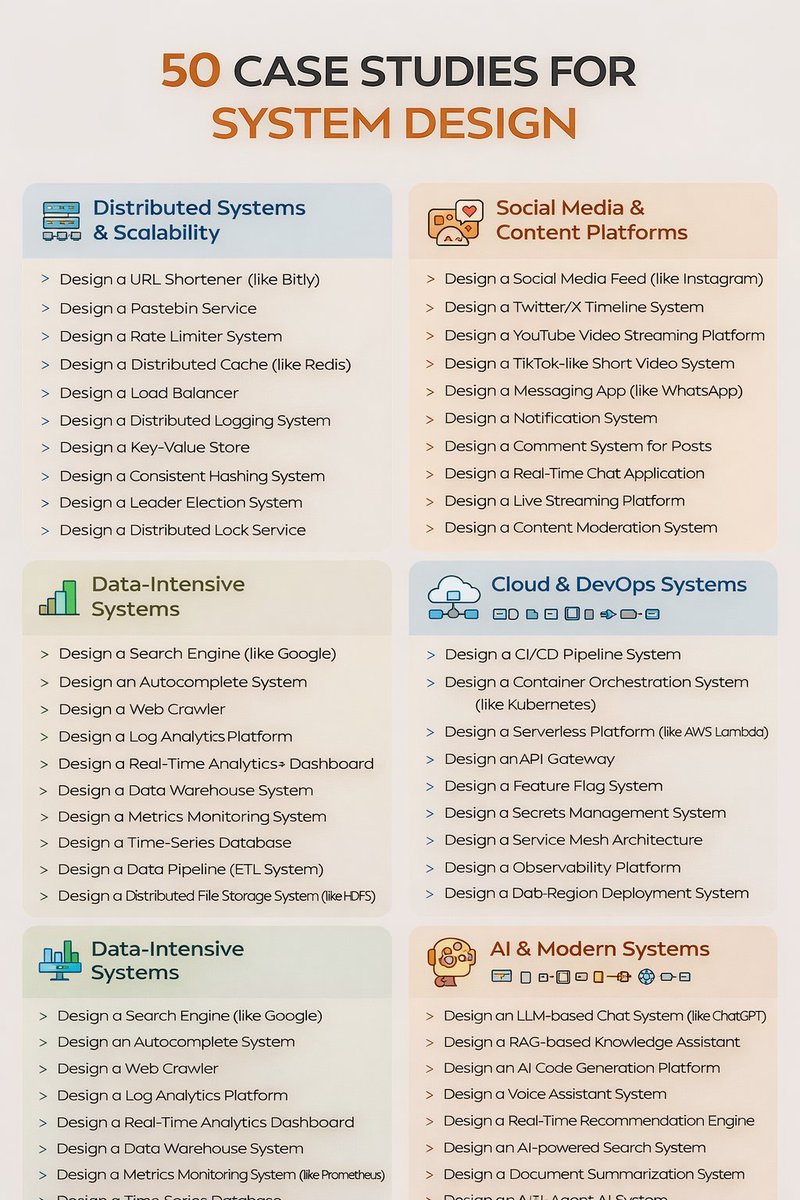
50 System Design Case Studies v/@e_opore
qu4nt tweet media
English
0
0
0
16
qu4nt
qu4nt@_qu4nt·
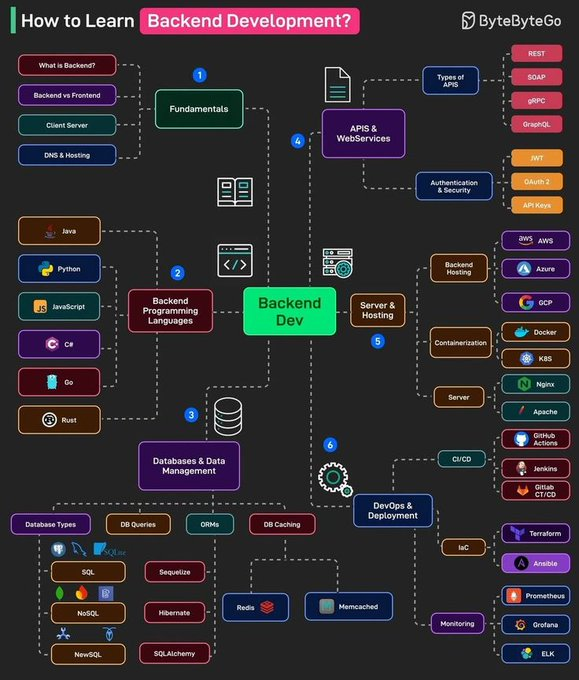
How to learn backend development?
qu4nt tweet media
English
0
0
0
5
qu4nt
qu4nt@_qu4nt·
Cybersecurity Acronyms
qu4nt tweet media
English
0
0
0
22
qu4nt
qu4nt@_qu4nt·
Linux file permissions for beginners
qu4nt tweet media
English
0
0
1
31