vsop@oxvsop
🚀Track your winrate directly in Obsidian!
Here's a simple guide to set up a Winrate Tracker.
The code is basic yet powerful—customize it as you like!💡
Requirements:
✅Obsidian installed
✅DB Folder plugin
✅Journaling in Obsidian
✅Optional: Force Note View Mode
Setup:
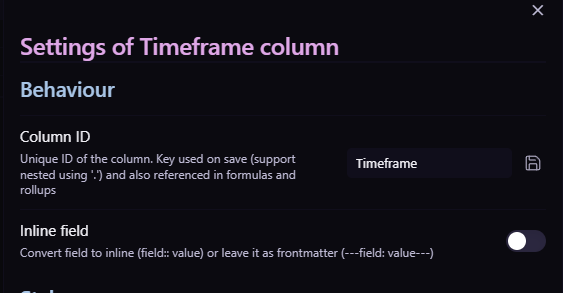
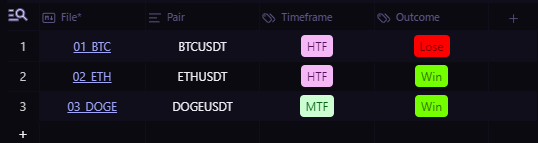
1️⃣Open your DB Folder table and check column IDs:
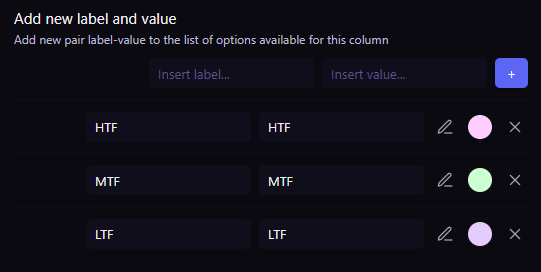
Timeframe:
Type: Tags
Labels: HTF, MTF, LTF
Outcome:
Type: Tags
Labels: Win, Lose
Pair:
Type: Text
⚠️Make sure the column ID names match exactly (e.g., "Timeframe").
2️⃣Add the corresponding tags (labels must match):
For this tweet, I set up a test DB folder to showcase the functionality.
3️⃣Adjust the path in the code to point to your root directory:
Example: 02_Journals/Test/Test Journal
🔗pastebin.com/ZkCaCcSB
Final Steps:
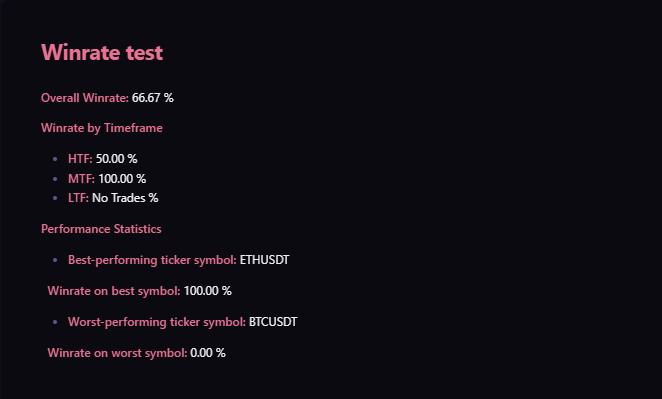
Paste the code into a new Obsidian note, switch to Reading Mode, and voilà!
You’ve got your Winrate Overview Table.📊
✨Tips for a smoother experience:
Use the Force Note View Mode plugin.
Store your Winrate file in a separate directory.
💡This is just a starting point—a basic idea to show what's possible. If you have some knowledge of JavaScript or coding in general, you can build on this and customize it further.
It’s meant to give you a glimpse of what’s achievable!
If something doesn't work, feel free to send me a DM or reply here!😊