TextSoap

941 posts

TextSoap banner
TextSoap

TextSoap

@textsoap

Automate Away Tedious Text Processing

macOS Tham gia Haziran 2008
12 Đang theo dõi468 Người theo dõi
TextSoap
TextSoap@textsoap·
Last chance to grab some or all of these great gems at a huge discount. 24 hours left -- and the final countdown is on! 🚀🚀 textsoap.com/blackfriday202…
TextSoap tweet media
English
0
0
2
82
TextSoap
TextSoap@textsoap·
@tonylewis Technically, yes… but TextSoap normalizes all EOL to \n. It does some conversions back and forth when pasting/copying text from other apps so it matches original format. But (currently) within TextSoap, you should use \n.
English
0
0
0
28
Tony Lewis ♏️
Tony Lewis ♏️@tonylewis·
@textsoap I believe there is a bug in the insert character function. Both insert newline and insert carriage return are \n when to my knowledge carriage return should be \r check out this screen recording for an example
English
1
0
0
34
TextSoap
TextSoap@textsoap·
TextSoap 9.3b2 (3108) is now available for the more adventurous. This latest beta includes lots of internal improvements to custom cleaner handling. textsoap.com/update/beta/
English
0
0
2
239
TextSoap
TextSoap@textsoap·
TextSoap (9.3b1) beta is now available - Improved rich text ruler tab handling - Support null regex matches - Sort lines based on line char count - Improved list editor navigation - Updated Batch File interface textsoap.com/update/beta/
English
0
0
1
215
TextSoap
TextSoap@textsoap·
25 years of TextSoap!! 🥳 I would love to hear when you first started using TextSoap and the tasks you tackle with the app.
TextSoap tweet media
English
1
2
15
591
TextSoap
TextSoap@textsoap·
Good morning. A new beta for TextSoap Agent is out. Adds support to bring up Agent's Preferences window when re-launched from Finder (particularly useful when Dock icon is hidden). Now checking for any edge cases. textsoap.com/agent/update/b…
English
0
0
2
246
TextSoap
TextSoap@textsoap·
@marketingwizdom It should still be available on the menubar (on the right). Click the soap bottle icon, then select gear to open preferences. Go to General and uncheck the Hide dock icon option.
English
0
0
0
13
Robert Clay
Robert Clay@marketingwizdom·
@textsoap how can I unhide Text Soap Helper so it shows up in the dock? I now can’t access it. I’m using v9. Cheers
English
1
0
0
29
TextSoap
TextSoap@textsoap·
Setapp users - 9.2.3 update submitted and under review.
English
0
0
0
173
TextSoap
TextSoap@textsoap·
TextSoap 9.2.3 (3079) New: - Preview in Marked2 cleaner - Font variations (Regular, Light, ..) as default font pref. Fixed: - Format Dates action issues for predefined formats - Action custom titles not maintained between launches - 9.2.2 launch issue textsoap.com/update/
English
1
1
1
254
TextSoap
TextSoap@textsoap·
@MikeKonia Did you have clipboard workspace set to Plain Text? Or your initial document type as plain text?
English
0
0
0
8
TextSoap
TextSoap@textsoap·
@MikeKonia I've had a couple other similar reports, but have not been able to dupe here. What specifically are you experiencing?
English
0
0
0
7
TextSoap
TextSoap@textsoap·
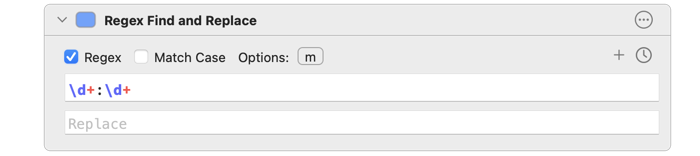
@zacchaeusnifong @Setapp You said alphanumeric, but then a timestamp. For the latter, you can use an expression like this \d+:\d+ \d+ - one or more digits (0-9) : - colon \d+ - one or more digits (0-9) Alt: \b\d+:\d+\b - the \b word break match to make sure it is by itself.
English
2
0
1
55
TextSoap
TextSoap@textsoap·
@TomBener Re: invoking on command line. What should that look like? Where is the content you are cleaning? You can combine AppleScript and the osascript command to invoke it.
English
1
0
0
0
Tom Ben
Tom Ben@TomBener·
@textsoap Thanks, it worked well. But seems that the possessive case like `citizens'` doesn’t work. By the way, is it possible to invoke a specific cleaner on the command line?
English
2
0
0
0
Tom Ben
Tom Ben@TomBener·
There is a built-in cleaner in @textsoap to convert straight quotes to curly quotes, which is very handy. I’d like to write a regular expression in shell script to use smart quotes. But I have no idea how to write it? Could you provide some ideas? Thanks.
English
1
0
0
0
TextSoap
TextSoap@textsoap·
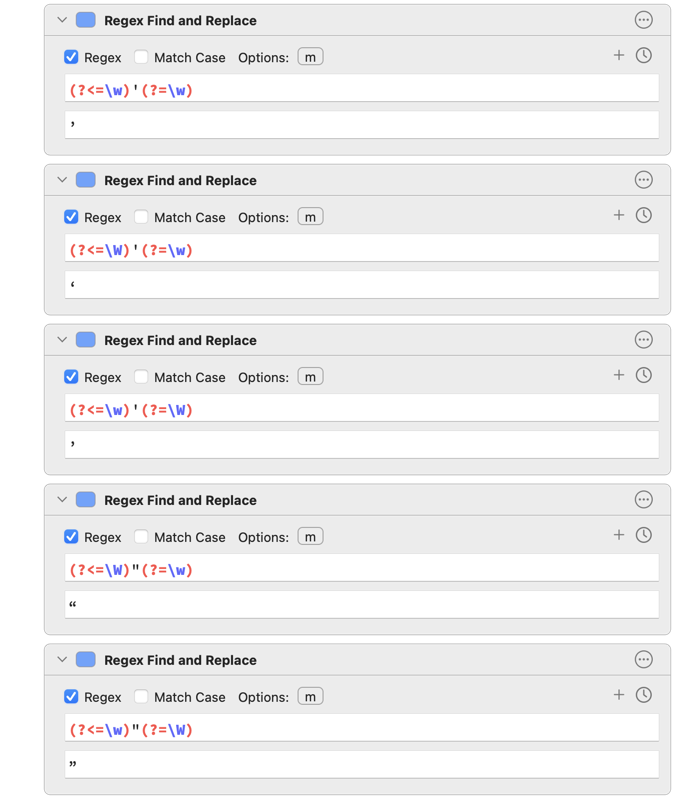
@TomBener You’ll need to build exceptions for edge cases, like plural possessives. Something like: (?<=s)’(?=\W) -> ’ First should be a straight quote. Can’t type it in w/o it being substituted in Twitter client. Smarten Quotes cleaner does this internally.
English
0
0
1
0
TextSoap
TextSoap@textsoap·
@TomBener TextSoap doesn’t use Regex for its Smart Quotes, but these will show you how to match each of these scenarios using Regex.
TextSoap tweet media
English
1
0
0
0
Tom Ben
Tom Ben@TomBener·
@textsoap I’d like to match all straight quotes (" and ') and convert them to curly quotes properly. For example: - it's 👉 it’s - 'Twitter' 👉 ‘Twitter’ - "Textsoap" 👉 “Textsoap”
English
1
0
0
0