Deepak Bhardwaj
809 posts

Deepak Bhardwaj
@techdataguru
Building https://t.co/cLEFCRaAKI | 35K+ Readers on LinkedIn | Simplifying Data, AI & MLOps Through Clear, Actionable Insights

Sydney, New South Wales Joined Temmuz 2024
130 Following235 Followers

@KevinSzabo14 Sign of a weak man:
He admits he’s wrong,
Too soon.
English

@karpathy Once these bacterias spread enough, they become closed-source.
English

How to build a thriving open source community by writing code like bacteria do 🦠. Bacterial code (genomes) are:
- small (each line of code costs energy)
- modular (organized into groups of swappable operons)
- self-contained (easily "copy paste-able" via horizontal gene transfer)
If chunks of code are small, modular, self-contained and trivial to copy-and-paste, the community can thrive via horizontal gene transfer. For any function (gene) or class (operon) that you write: can you imagine someone going "yoink" without knowing the rest of your code or having to import anything new, to gain a benefit? Could your code be a trending GitHub gist?
This coding style guide has allowed bacteria to colonize every ecological nook from cold to hot to acidic or alkaline in the depths of the Earth and the vacuum of space, along with an insane diversity of carbon anabolism, energy metabolism, etc. It excels at rapid prototyping but... it can't build complex life. By comparison, the eukaryotic genome is a significantly larger, more complex, organized and coupled monorepo. Significantly less inventive but necessary for complex life - for building entire organs and coordinating their activity. With our advantage of intelligent design, it should possible to take advantage of both. Build a eukaryotic monorepo backbone if you have to, but maximize bacterial DNA.

English

@goyalshaliniuk Maybe you can't master AI in 2025, but you can kick-start your journey today.
English

I get this question in my DMs almost everyday - I want to start learning AI - but where do I begin?
If you are wondering the same, you're not alone.
Here’s a checklist that breaks down everything you need, from learning the fundamentals to building real-world projects. Follow these sections step-by-step and track your progress like a pro.
1. AI Fundamentals
Start with the core concepts like supervised vs. unsupervised learning, neural networks, and what makes AI different from ML and DL.
2. Data Handling
Master the basics of data cleaning, preprocessing, handling nulls, and using visual libraries like Matplotlib and Seaborn for EDA.
3. Machine Learning Skills
Use libraries like Scikit-learn to build models, evaluate them with proper metrics, and learn techniques like cross-validation and ensemble methods.
4. AI Tools & Platforms
Explore tools like ChatGPT, Claude, Vertex AI, SageMaker, Hugging Face, and even no-code solutions like Make.com and AutoML platforms.
5. Model Deployment
Learn how to deploy ML models with Flask or FastAPI, add UI with Streamlit, and manage deployments using Docker and GitHub Actions.
6. LLMs & Prompt Engineering
Dive into concepts like token limits, prompt patterns, and tools like LangChain and RAG. Practice with open-source LLMs like LLaMA and Mistral.
7. NLP & Computer Vision
From tokenization to image captioning, this section covers everything you need to know about transformers, OCR, and pretrained models.
[Explore More In The Post]
✅ Bookmark this and check off each section as you go. You don’t just need skills - you need the right structure. This is it.

English

The healthcare customer experience is broken.
Not because people don’t care, but because the systems are stuck in 2005.
Last week, I spent 30 minutes on hold just to reschedule a doctor’s appointment.
30 full minutes of bad hold music, dropped calls, and being transferred twice.
So I built my own fix.
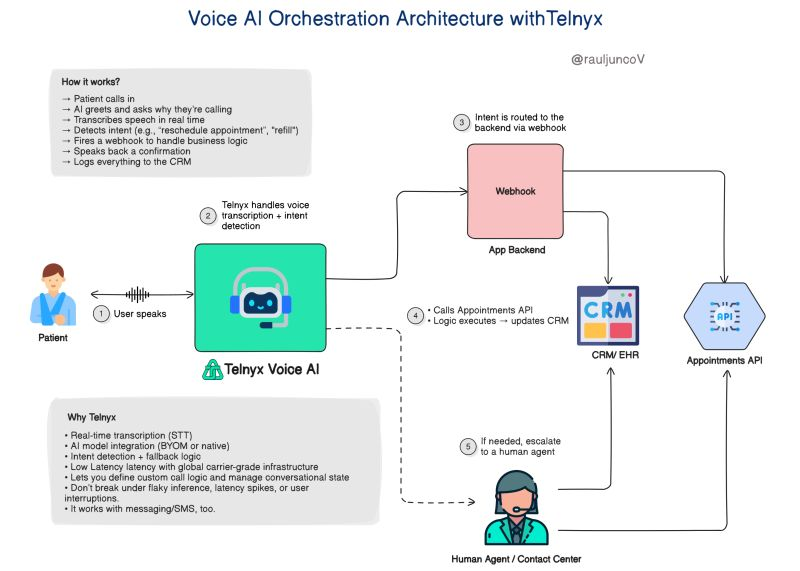
Not for the clinic (yet). But as an engineer, I wanted to see how far I could get by myself, with a voice assistant that actually works.
In under 1 hour, I had a prototype:
→ Patient calls in
→ AI greets and asks why they’re calling
→ Transcribes speech in real time
→ Detects intent (e.g., “reschedule appointment”)
→ Fires a webhook to handle business logic
→ Speaks back a confirmation
→ Logs everything to the CRM
All of it handled without a human, unless absolutely needed.
No waiting. No transferring. No human intervention unless necessary.
I built it using Telnyx Voice AI because it treats voice as a real system, not a side feature.
Voice input = event stream
Inference = microservice
Call flow = orchestrator
Fallbacks = retries & timeouts
The end result?
An assistant that sounds natural and behaves like real infrastructure.
What would you add to this design?
If you want to explore how this works, here’s a solid link: 👇
telnyx.com/products/voice…

English

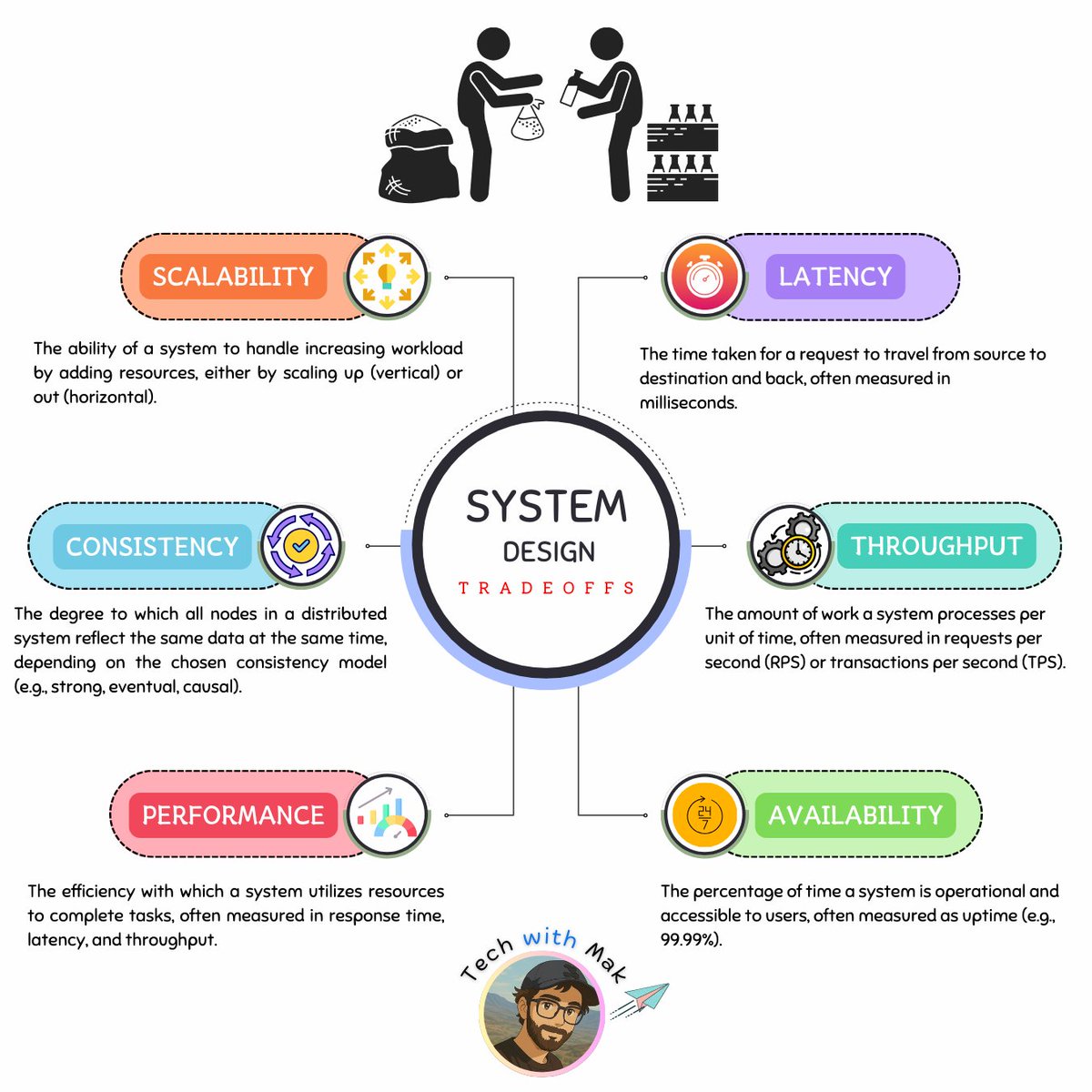
Preparing for a system design interview?
Think Tradeoffs, Not Just Tech
[1.] CAP Theorem
Consistency vs. Availability vs. Partition Tolerance
Choose 2 - Consistent data, high availability or tolerance to network failures.
(It's actually a choice between C & A)
[2.] Latency vs. Throughput
Fast response times vs. high data processing volume
[3.] ACID vs. BASE
Strict transaction guarantees vs. flexible consistency models
[4.] Monolithic vs. Microservices
Single, unified application vs. distributed, independent services
[5.] SQL vs. NoSQL
Structured data and complex queries vs. flexible schemas and scalability
[6.] Push vs. Pull
Data delivery initiated by server vs. requested by client
[7.] Caching Strategies
Tradeoffs between different cache eviction policies (LRU, LFU, etc.)
Balancing faster data access with potential staleness and increased complexity.
[8.] Statefulness vs. Statelessness
Maintaining session state vs. stateless interactions for scalability
[9.] Optimistic vs. Pessimistic Locking
Optimistic locking assumes no conflicts, favoring speed and concurrency. Pessimistic locking prevents conflicts by acquiring locks upfront, sacrificing performance for data integrity.
[10.] Data Locality vs. Data Distribution
Keeping data close for faster access vs. distributing for resilience and parallel processing
[11.] Security vs. Performance
Implementing robust security measures like encryption and authentication can introduce overhead and impact system performance. Finding the right balance is crucial.
[12.] Scalability vs. Resilience
Balancing the need to scale with the ability to quickly recover from failures is a critical design challenge.
[13.] Centralization vs. Decentralization
Choose centralization for control and efficiency, decentralization for resilience and adaptability.
[14.] Data Duplication vs. Data Normalization
Duplicate data for faster reads vs. normalize data for storage efficiency and data integrity.
[15.] Resilience vs. Cost
Investing in robust fault tolerance mechanisms and redundancy increases reliability but also increases system costs.
[16.] Batch Processing vs. Real-Time Processing
Choose batch processing for efficient handling of large datasets and real-time processing when immediate results are essential, even at a higher resource cost.
[17.] Long Polling vs WebSockets
Choose long polling for simplicity and compatibility, or WebSockets for efficient, bi-directional real-time communication.
[18.] REST vs. GraphQL
Standardized simplicity with multiple endpoints vs. flexible, efficient queries with a single endpoint (GraphQL).
[19.] TCP vs. UDP
Choose TCP for reliability and order, UDP for speed.
[20.] Caching vs. Real-Time Data
Prioritizing faster access to potentially stale data in a cache versus ensuring the freshest data is retrieved directly from the source.
Follow - @techNmak

English

If you write code, you should read this.
𝐖𝐡𝐲 𝐃𝐞𝐬𝐢𝐠𝐧 𝐏𝐚𝐭𝐭𝐞𝐫𝐧𝐬 𝐌𝐚𝐭𝐭𝐞𝐫?
[1.] Reusability
◾ proven solutions that work across projects
[2.] Flexibility
◾ encourage loose coupling and easier maintenance
[3.] Communication
◾ provide a shared vocabulary for discussing design issues and solutions
[4.] Experience
◾ encapsulate the experience of seasoned developers, helping others avoid common pitfalls and design better software
📌 𝐂𝐫𝐞𝐚𝐭𝐢𝐨𝐧𝐚𝐥 𝐏𝐚𝐭𝐭𝐞𝐫𝐧𝐬
[1.] Abstract Factory
◾ creates families of related objects through a common interface
[2.] Builder
◾ separates complex object construction from representation
[3.] Factory Method
◾ defines an interface for creating objects
◾ allows subclasses to choose the concrete class to instantiate
[4.] Prototype
◾ creates new objects by copying a prototypical instance
[5.] Singleton
◾ ensures a class has only one instance
📌 𝐒𝐭𝐫𝐮𝐜𝐭𝐮𝐫𝐚𝐥 𝐏𝐚𝐭𝐭𝐞𝐫𝐧𝐬
[6.] Adapter
◾ converts one interface to another, allowing incompatible classes to work together
[7.] Bridge
◾ decouples abstraction and implementation, enabling independent variation
[8.] Composite
◾ treats individual objects & their compositions uniformly, representing part-whole hierarchies
[9.] Decorator
◾ dynamically adds responsibilities to an object without subclassing
[10.] Facade
◾ provides a simplified interface to a complex subsystem
[11.] Flyweight
◾ shares objects to reduce memory usage for large numbers of fine-grained objects
[12.] Proxy
◾ controls access to an object, offering various capabilities like lazy loading or remote access
📌 𝐁𝐞𝐡𝐚𝐯𝐢𝐨𝐫𝐚𝐥 𝐏𝐚𝐭𝐭𝐞𝐫𝐧𝐬
[13.] Chain of Responsibility
◾ decouples request senders and receivers, allowing multiple objects to handle the request
[14.] Command
◾ encapsulates requests as objects, enabling logging, queuing, and undo/redo operations
[15.] Interpreter
◾ defines a grammar for a language and an interpreter to execute expressions
[16.] Iterator
◾ provides sequential access to aggregate elements without exposing the underlying representation
[17.] Mediator
◾ encapsulates object interaction, promoting loose coupling
[18.] Memento
◾ captures and restores an object's state without violating encapsulation
[19.] Observer
◾ notifies dependents automatically when an object's state changes
[20.] State
◾ alters an object's behavior when its internal state changes
[21.] Strategy
◾ encapsulates interchangeable algorithms, allowing clients to choose dynamically
[22.] Template
◾ defines the skeleton of an algorithm, deferring steps to subclasses
[23.] Visitor
◾ adds new operations to object structures without modifying the element classes
While design patterns are conceptual, their proper application is often reflected in consistent structure, naming, and abstraction. Tools like @coderabbitai help catch inconsistencies and code smells during reviews, making it easier to maintain pattern-aligned code as projects scale.

English

@karpathy Language models overlook the core principles of learning. True learning is not a one-time event; it is an ongoing, dynamic process that must be nurtured continuously.
English

We're missing (at least one) major paradigm for LLM learning. Not sure what to call it, possibly it has a name - system prompt learning?
Pretraining is for knowledge.
Finetuning (SL/RL) is for habitual behavior.
Both of these involve a change in parameters but a lot of human learning feels more like a change in system prompt. You encounter a problem, figure something out, then "remember" something in fairly explicit terms for the next time. E.g. "It seems when I encounter this and that kind of a problem, I should try this and that kind of an approach/solution". It feels more like taking notes for yourself, i.e. something like the "Memory" feature but not to store per-user random facts, but general/global problem solving knowledge and strategies. LLMs are quite literally like the guy in Memento, except we haven't given them their scratchpad yet. Note that this paradigm is also significantly more powerful and data efficient because a knowledge-guided "review" stage is a significantly higher dimensional feedback channel than a reward scaler.
I was prompted to jot down this shower of thoughts after reading through Claude's system prompt, which currently seems to be around 17,000 words, specifying not just basic behavior style/preferences (e.g. refuse various requests related to song lyrics) but also a large amount of general problem solving strategies, e.g.:
"If Claude is asked to count words, letters, and characters, it thinks step by step before answering the person. It explicitly counts the words, letters, or characters by assigning a number to each. It only answers the person once it has performed this explicit counting step."
This is to help Claude solve 'r' in strawberry etc. Imo this is not the kind of problem solving knowledge that should be baked into weights via Reinforcement Learning, or least not immediately/exclusively. And it certainly shouldn't come from human engineers writing system prompts by hand. It should come from System Prompt learning, which resembles RL in the setup, with the exception of the learning algorithm (edits vs gradient descent). A large section of the LLM system prompt could be written via system prompt learning, it would look a bit like the LLM writing a book for itself on how to solve problems. If this works it would be a new/powerful learning paradigm. With a lot of details left to figure out (how do the edits work? can/should you learn the edit system? how do you gradually move knowledge from the explicit system text to habitual weights, as humans seem to do? etc.).
English

@systemdesignone I'm a slow reader, took a little more than 2 minutes. 😜
But I got it. Thanks for sharing, Neo.
English

@NikkiSiapno Caching and Indexing aren't scaling, but optimisation techniques.
Sharding doesn't work with most RDBMS.
Each database leverages different approaches to scale.
English