aVersionOfReality

3.4K posts

aVersionOfReality banner
aVersionOfReality

aVersionOfReality

@AversionReality

Developing stylized 3D rendering in Blender and making tutorials. Available for work. https://t.co/XJ2dNUpt2G

Bay Area, California Katılım Eylül 2015
410 Takip Edilen8.9K Takipçiler
Sabitlenmiş Tweet
aVersionOfReality
aVersionOfReality@AversionReality·
The @getfondant Easy Custom Normals addon v2.1.0 is here! Works in Blender 4.3-4.5. I've reworked the Laplacian Smooth Modifier to run on Face Corners, giving us more control and quad mesh support. Also optimizations and new features. No longer needs to run slow triangulation operations. Stability problems are addressed by Momentum Smoothing, which also allows the strength to be scaled up as high as 3 without blowing everything up. So you can do more smoothing in fewer iterations! And there's more control of how things interact with the smoothing. Instead of only choosing how strong it is on a given point, now you can scale the amount it contributes to the smoothing of its neighbors. Or reduce its Original Normal strength to allow it to be overwritten or filled in. These changes and more are all part of the free tier of the addon. Please consider picking up the paid Face Proxy system to support continued development!
English
7
83
908
45.6K
aVersionOfReality
aVersionOfReality@AversionReality·
@KiwiPoku Excellent! Feel free to reach out if you have any more issues, or just questions in general. Ill try to get a more robust fix pushed soon.
English
0
0
1
25
KiwiPoku
KiwiPoku@KiwiPoku·
@AversionReality oh my god, i think it worked... I've been at this all day oh my god thank you SO MUCH 🙏🙏🙏🙏 If i have any further complications i'll be sure to report back (and i'll send the file if needed too) but til then, THANK YOU 🙏
English
1
0
1
24
aVersionOfReality retweetledi
aVersionOfReality
aVersionOfReality@AversionReality·
The goal of my Line Art addon is not merely to offer a source of Screen Space Extraction (aka post-process) line art, but to actually offer a fully functionable workflow. SSE lines are commonly used based on Depth and Normals in games for things like highlighting selections, but they aren't commonly used for high detail line art because they are hard to control. They allow very advanced results, but you have to setup the inputs for them. My toolset is not just about extracting lines, but giving artist friendly tools to author the necessary mesh data. This clip shows an example of why this matters: - First, we see regular Normal based lines on the hardsurface headset. These work fine from some angles, but the lines break from others. This is because the detection is based on comparing neighboring pixels and the angle of the Normals there. But those comparisons are in screen space, so as things move, areas can get occluded, or the comparison is between pixels that don't fall exactly on hardsurface edge. These work great on organic shapes where lines won't necessarily follow mesh edge loops, but not well on complex hard surfaces. - Second, we see Marked Edges. These work slightly better, but still have similar problems. This is because they don't work well if both faces around the marked edge aren't visible and a decent size on the screen. There is 2 levels of subsurf on this mesh, so the marked faces can be very small. Marked edges work on flatter surfaces, but not so well here. - Third is a proper ID mask. Each area contained by marked edges is set to a different color. Now the lines detect super cleanly because there are solid areas of color. It can detect a difference in the regions even if the actual edge is partly occluded, or the camera very zoomed out. So we have 3 slightly different options for slightly different use cases. And the third requires the ID groups to be created. So a successful toolset needs to make it easy to do whichever is needed in a specific area, or run some combination. So I am including tools for ID group setup too. And these will still be useful for other SSE workflows, like the new Raycast node in 5.1, which is doing the same process and has all the same artistic challenges, but we can't feed it arbitrary data yet. But hopefully in 5.2. The addon will support it in the future. But getting all this figured out and working well is also why it still isn't ready for release 😅
English
5
10
160
6.7K
aVersionOfReality
aVersionOfReality@AversionReality·
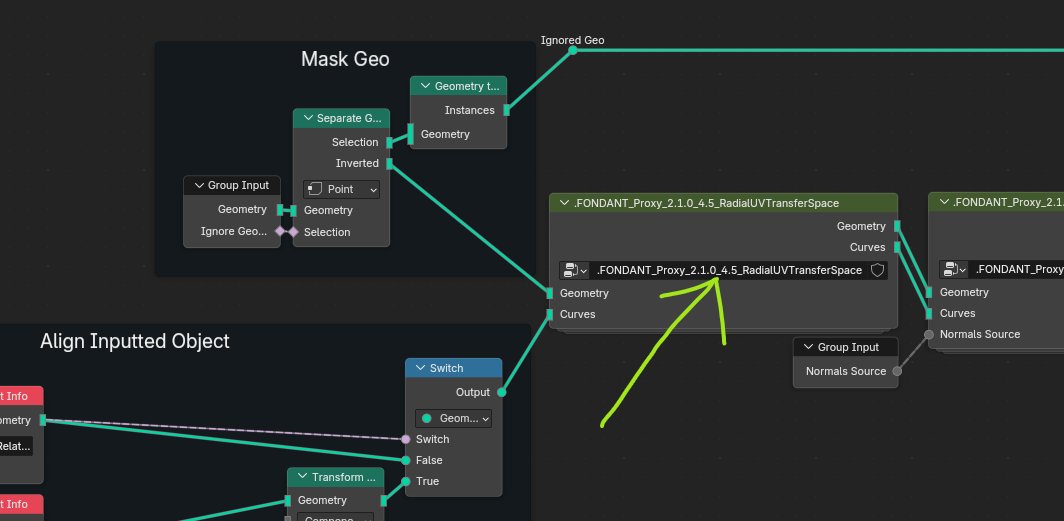
Okay, so I'm not sure this fix is for your exact problem, but give it a try and if it doesn't work, DM me your file to check (remove everything but the relevant rigs of course). Go into the Face Proxy Normals group and find RadialUVTransferSpace group. At the beginning of that group, find where the root_position attribute plugs into the Sample Index node. Replace it with a Vector node with 0,0,0. The problem is with transform spaces and how the position is detected. This part of the setup is supposed to keep things synced together, but it isn't working quite right. This disables it. However, this introduces a new problem: now Object Space transforms will probably break things. If you move the armature object, it will probably mess things up now. But if you parent all the proxy objects to the armature object, then everything should be fine. In other words, this part of the setup solves object space transform differences if things aren't parented to the rig object, but causes an issue when there is position offset from the rig itself, hence the problem. Please let me know if this fixes it! I should be able to push this as a proper update next week. I've been sitting on it for awhile because its not an ideal solution, and nobody else has brought up the problem as most people are using this only to make custom normals for game export I guess.
aVersionOfReality tweet mediaaVersionOfReality tweet media
English
2
0
3
308
KiwiPoku
KiwiPoku@KiwiPoku·
@AversionReality Thank you, it’s super important and you’ll be saving my LIFE 🙏 (no rush of course) I shall wait patiently, thank you so much 🙏
English
1
0
1
34
aVersionOfReality
aVersionOfReality@AversionReality·
@KiwiPoku Ah, that is a problem with them but it is fixable. I will need to dig up the file with the fix later, i will get back to you.
English
1
0
1
44
KiwiPoku
KiwiPoku@KiwiPoku·
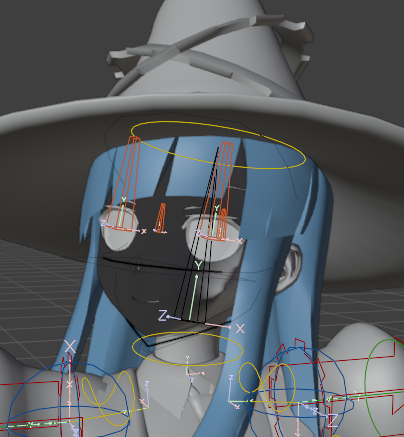
@AversionReality Hell yeah! Also i know this is unrelated but I need help with fondant normals. I can't get them to behave properly on a rigify rig and it's driving me insane... is there any way I can make the normals *not* freak out when moving the *rigify* root bone?
KiwiPoku tweet media
English
1
0
2
455
aVersionOfReality
aVersionOfReality@AversionReality·
@JNS_Studios This method works best when run on Non-AA'd inputs already, so it should work better than geo lines for you in general. Im not sure the default workflow will be ideal for pixel art, but will probably work fine.
English
0
0
1
79
JNS | jnsstudios.bsky.social
JNS | jnsstudios.bsky.social@JNS_Studios·
@AversionReality I've been trying to find a good way to do consistent colored line art for pixel-art prerendered game sprites, I'll definitely keep an eye on this. Amazing work already!
English
1
0
1
52
aVersionOfReality
aVersionOfReality@AversionReality·
@PhaetheFae Thanks :) I have the pipe dream of getting higher quality lines like these working in-engine for vtubers some day too, but there's still a lot to figure out (both on the technical and artistic side).
English
0
0
2
101
aVersionOfReality
aVersionOfReality@AversionReality·
@HarrierCitadel @djaxx @_Mari_Art @MrZing07 Yes, hello! I specialize in Normals and Line Art, but also do all sorts of procedural and technical character stuff. My profile is the best place to see examples of what I do, as my website and youtube aren't up to date.
English
0
0
1
62
Denver Jackson 🍥
Denver Jackson 🍥@djaxx·
Any technical riggers and/or modellers fluent in #bnpr anime styles? Fire your portfolios in the comments below!
English
4
3
10
855
aVersionOfReality
aVersionOfReality@AversionReality·
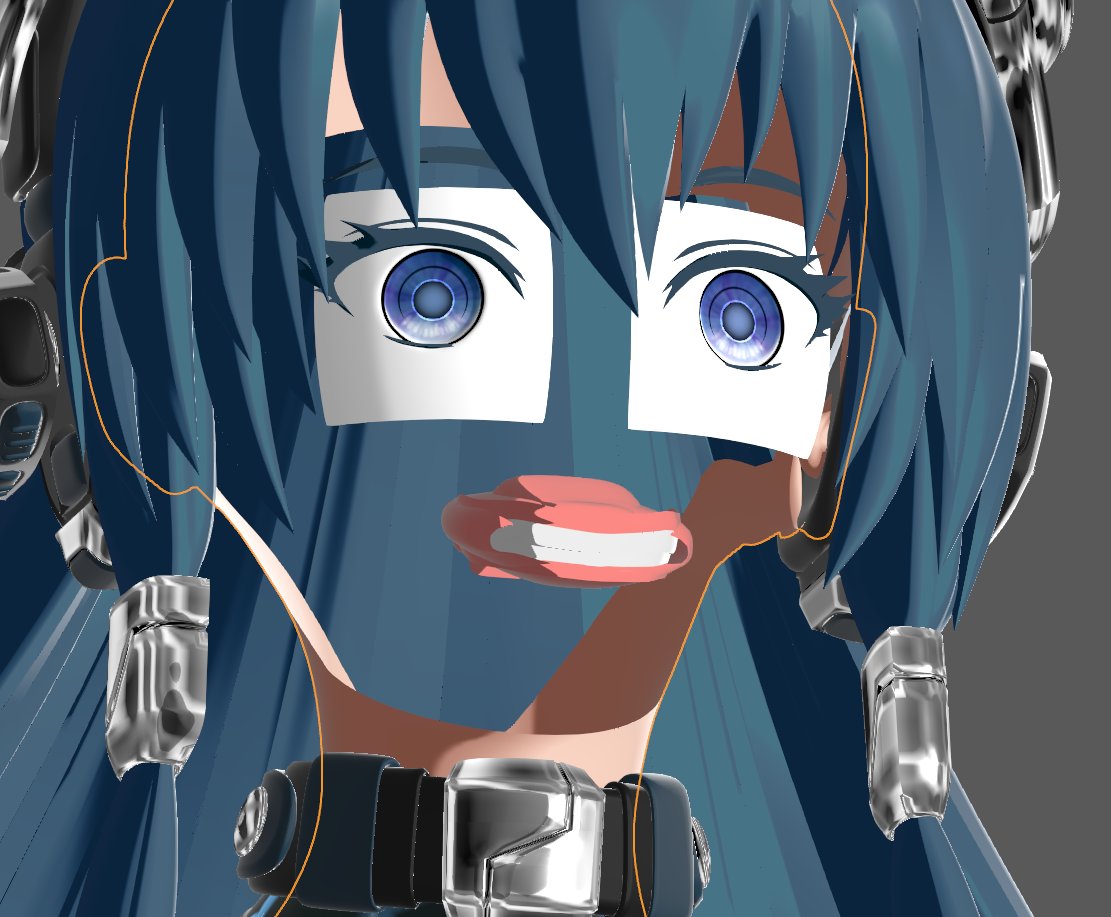
In the final stages of testing my Blender Compositor Line Art addon before release. Here's a look at how it works on a very high detail character. We have lines based on toon shading and vertex color ID groups. You can see it works very cleanly in some areas, but then runs into issues in others. That is because this mesh is complex but doesn't have smoothed normals yet, which causes the toon shading to create very small shaded areas that become lines. (We'll see it with Smoothed Normals next update.) This is the double-edged sword of this method, and any other Screen Space Extraction method, including the new Raycast Node: they are extremely precise, which allows very high detail and fine control, but also means you need to guard against bad inputs. But my toolset gives you full control over what data you create lines from, so you can ensure clean ID groups, run lines on different Normals than you shade with, mask at any stage, or anything else you need! And of course, most line methods (especially Inverted Hull) completely fail on complex or dirty geometry.
English
7
29
269
16.4K
aVersionOfReality
aVersionOfReality@AversionReality·
@HentaiBorg I'm working on detailed documentation and guides for how to get the best results :)
English
0
0
1
17
HentaiBorg 🔞
HentaiBorg 🔞@HentaiBorg·
@AversionReality I wish i had the time to learn more of that knowledge. All i know is that for the front angle, the noise line must be a separate custom geometry so it can always be there.
English
1
0
1
34
aVersionOfReality
aVersionOfReality@AversionReality·
The thickness is controlled by values on the mesh, so those can be animated. Or, you can animate the lines in the compositor with displacement after (or I suppose animate the inputs with displace too.) So there isn't an explicit line boil input, but you can easily boil the inputs or outputs in whatever way you need.
English
0
0
0
116
aVersionOfReality
aVersionOfReality@AversionReality·
Yup! You can alter scale, thresholds, color, etc with any mesh or shader data. For example, here it shows using the shading to alter the line scale. And getting line art on the edge of the toon shading itself. You can put a line anywhere there is a difference between neighboring pixels (in other words, you need areas of solid color.)
English
1
0
2
156
Nurserik
Nurserik@Nurserik18·
@AversionReality I'm wondering if it's possible to transfer mesh normal data in a line? This would give artists so many possibilities, such as lighting the lines in the compositor, making the lines thicker in the direction of the light, or making rim light effect, etc.
English
1
0
1
64
aVersionOfReality
aVersionOfReality@AversionReality·
I got depth priority working on Jump Flood lines, which means full color! I had given up on this working in Blender's Compositor previously, but decided to take another crack at it before releasing the addon. Now it works as well as the previous Brute Force lines but is vastly faster, and can easily go to 60+ px thick! Now back to finishing up the python side of the addon so this can actually get released.
aVersionOfReality@AversionReality

Options panel complete! Now we can adjust our global line settings without even needing to keep a Compositor window open, and it also handles things that need to be changed within the group itself. Its getting very close!

English
2
8
157
9.4K
aVersionOfReality
aVersionOfReality@AversionReality·
@yutorikoubo If you check out the Malt render engine, it already has SSE lines working. And I have an addon coming out soon that will be doing the same in Blender's compositor. github.com/bnpr/Malt
English
1
0
4
226
ゆとりCG
ゆとりCG@yutorikoubo·
@AversionReality おお!!素敵な情報ありがとうございます!! アウトライン構築はコンポジターで既に実現できていたんですね🧐調べてみます! シェーディングなので、厳密にはアウトラインの影響を他のマテリアルも受けるかなと。 このあたり、使い分けも一つのノウハウになりそうですね!
日本語
1
0
1
669
ゆとりCG
ゆとりCG@yutorikoubo·
Blender5.1以降に出たレイキャストノードで、なんとなくわかってきたことをメモ! ・異なるオブジェクト同士が重なっても、輪郭を自動で形成してくれる。これが画期的かもしれない。 ・カメラ視点に追従するエッジ検出ができる。どのアングルから見ても輪郭線が崩れず、アニメーションにも自動で対応する。これも凄いかもしれない。 ・3種のエッジを独立して制御できる。シワ・ハードエッジ・シルエット輪郭線をそれぞれ別の太さや色にカスタマイズできる。輪郭のカスタマイズ性が高そう。 ・カメラとの距離に応じてエッジの見え方を自動補正できる。遠くでもエッジが消えず、近すぎても太くなりすぎないよう自動で調整される。従来のソリッド化を使った輪郭線によりも美しい!! ・エッジ情報を使って、ベースのシェーディングそのものを制御できる。ディフューズBSDFのカラーに繋ぐかどうかで、スケッチ風かハードコントラスト風かを切り替えられる。影の色をすぐにコントロールできそう。 ・既存のAOやディフューズ BSDFと組み合わせることで、カスタムNPRシェーダーの質が上がる。 結論、NPR表現を非常に高めるツールでありそうという感じです!! まだまだ理解が追いつきませんが、色々試してみようと思います。 #blender #b3d
ゆとりCG@yutorikoubo

Blender5.1 シェーダーノードのレイキャストを理解するには、忍耐力が要りそうです。 NPR表現の輪郭、影の落ち方には使える。頑張る。 #blender #b3d

日本語
4
203
1.6K
120.4K