
Futurality AI retweetledi
Futurality AI
1.5K posts

Futurality AI
@Futurality
Futurality AI | AI-Powered Design Workflows for Automotive + Industrial Design | Sketch → 3D → Prototype in minutes | Helping car designers & makers ship 10x fa
Katılım Ağustos 2010
306 Takip Edilen120 Takipçiler


Futurality AI retweetledi

You keep hitting Claude's limit by 2 pm. Every day.
These 21 habits make it last all day:
(even if you're on the $20 plan)
1. Convert files before uploading.
☑ One PDF page = 1,500–3,000 tokens
☑ Paste text into doc .new → download as .md file
☑ 15-page PDF → 2,000 clean tokens
2. Plan in Chat. Build in Cowork.
☑ File creation & analysis eats more of your limit
☑ Think in the cheap product (Claude Chat)
☑ Build in the expensive one (Claude Cowork)
3. Say "ask me questions" instead.
☑ 500-word prompt costs 500 tokens every reread
☑ Let AskUserQuestion pull the context
☑ Clicking options costs almost nothing
4. Speak, don't type.
☑ Install Wispr Flow .ai (free)
☑ Voice = more context in one shot
☑ Fewer messages = fewer rereads
5. Fix the broken section only.
☑ Don't ask for a full redo
☑ "Only redo section 2."
☑ Targeted edits = fewer tokens burned
6. Edit your prompt, never correct it.
☑ "Actually, change…" = another full reread
☑ Hit edit on the original instead
☑ One clean prompt beats five corrections
7. New topic = new chat.
☑ Message 30 re-reads 29 exchanges first
☑ Long chats are token furnaces
☑ Restart before it eats your day
8. Use Sonnet for the simple stuff.
☑ Save Opus for deep work
☑ Match the model to the task
☑ Stop paying Opus prices for easy jobs
9. Use Projects for recurring files.
☑ Same PDF in 5 chats = 5 full reads
☑ Upload once → it gets cached
☑ Every future chat references it free
10. Turn off Memory. Set Preferences.
☑ Every fresh chat wastes 3–5 setup messages
☑ Settings → General → Personal preferences
☑ One setup, permanent savings
11. Spread your sessions.
☑ Claude runs a rolling 5-hour window
☑ Burn it all by noon = wasted capacity
☑ Split into morning, afternoon, evening
The other 12 habits here: ruben.substack.com/p/how-to-stop-…
(save this to make your $20 plan last all day)

Ruben Hassid@rubenhassid
English
Futurality AI retweetledi

Most people think AI agents are just “LLMs with tools.” But the interesting part is memory.
Just like humans, capable AI agents need different kinds of memory to function properly.
This is one of the core ideas behind the COALA framework
(Cognitive Architectures for Language Agents).
Think about how humans work:
- You remember what someone said 10 seconds ago.
- You remember facts from school.
- You remember how to ride a bicycle.
- You remember important life experiences.
AI agents need similar layers of memory too.
Here are the 4 major types:
1. Working Memory (Short-Term Memory)
Human analogy: You’re reading a sentence right now while remembering the previous sentence. It’s temporary memory used for the current task.
For AI agentst his is the active context window which includes:
- current conversation
- recent tool outputs
- current reasoning chain
Without it, the agent loses track mid-task like a human getting distracted every 5 seconds.
------------
2. Semantic Memory (Factual Knowledge)
Human analogy: You know Paris is the capital of France. You know Kubernetes manages containers.
These are facts, concepts, and knowledge.
For AI agents this includes:
- stored facts
- documentation
- knowledge bases
- vector databases
- retrieved company information
It answers: “What does the agent KNOW?”
CLAUDE.MD is an example of Semantic Memory
------------
3. Procedural Memory (Learned Skills)
Human analogy: You don’t consciously think about every muscle movement while riding a bike.
Skills become automatic.
For AI agents this is:
- workflows
- system prompts
- learned action patterns
- tool usage strategies
- step-by-step execution habits
Example: An agent learns: “First query database → then validate → then summarize.”. Agent Skills or Skills.md are examples of procedural memory
It answers: “What does the agent KNOW HOW TO DO?”
------------
4. Episodic Memory (Past Experiences)
Human analogy: You remember your first interview. Or a production outage you once handled at work.
These are experiences tied to events.
For AI agents this includes:
- previous interactions
- past successes/failures
- user preferences
- historical task outcomes
Example: “The last deployment failed because of missing env variables.”
It answers: “What has the agent EXPERIENCED before?”
------------
This is why memory is becoming one of the biggest frontiers in AI engineering. A model without memory is just reacting. An agent with memory starts behaving more like a system that learns, adapts, and improves over time.

English
Futurality AI retweetledi

12 CLAUDE CODE CONCEPTS YOU NEED TO KNOW BEFORE YOU TOUCH ANYTHING ELSE:
- CLAUDE. md
- Permissions
- Plan Mode
- Checkpoints
- Skills
- Hooks
- MCP
- Plugins
- Context
- Slash Commands
- Compaction
- Subagents
BOOKMARK THIS. YOU'LL NEED IT.
English
Futurality AI retweetledi

Developers are quietly building a second brain inside their AI coding tools right now.
And almost nobody realizes how important this shift is.
Claude Code’s "Skills.md" looks like “just another markdown file.”
It’s not.
It’s the beginning of programmable AI memory for software engineering.
Most AI coding workflows today are broken in the same way:
• repetitive prompting
• inconsistent outputs
• forgotten context
• unstable architecture decisions
• AI behaving differently every session
So developers waste hours re-explaining:
“use this stack”
“follow this pattern”
“don’t break this API”
“write code this way”
Over and over again.
"Skills.md" changes that completely.
Instead of prompting the AI every time…
You teach it how your team builds once.
Now Claude starts operating with:
- coding standards
- architecture rules
- debugging workflows
- testing systems
- project conventions
- review patterns
- deployment logic
persisted directly into its workflow.
That’s a massive shift.
Because this is where AI stops feeling like autocomplete…
and starts feeling like infrastructure.
The real breakthrough in AI coding isn’t smarter models anymore.
It’s persistent operational context.
The teams moving fastest right now are not the ones writing better prompts.
They’re the ones building reusable intelligence layers around AI.
That compounds.
Fast.
And the scary part?
Most developers still haven’t noticed this transition happening.
They’re benchmarking models.
Meanwhile advanced teams are quietly building internal AI operating systems around their workflows.
That gap is going to become enormous.
"Skills.md" is interesting because it represents something much bigger than Claude Code itself:
AI that adapts to YOUR engineering system instead of forcing engineers to adapt to the AI.
That changes:
• onboarding
• consistency
• code quality
• iteration speed
• institutional memory
• engineering velocity
A lot of people will look back at these “simple markdown skill files” the same way we now look at:
- Dockerfiles
- package.json
- .gitignore
- tsconfig
Small files.
Huge workflow shift.
The future of AI coding won’t belong to the people with the longest prompts.
It’ll belong to the people who build the best AI environments.
And that transition has already started.

Nainsi Dwivedi@NainsiDwiv50980
English
Futurality AI retweetledi

Still confused between MCP, A2A, and Functional Calling?
These three approaches are reshaping how LLMs and agents operate at scale, but each one solves a very different problem.
Let’s break it down 👇
1. Model-Context Protocol (MCP)
MCP manages dynamic context windows across enterprise LLM infrastructure. It retrieves prior memory, history, and metadata to personalize every response without hardcoding logic into prompts.
2. Agent-to-Agent Protocol (A2A)
In A2A, agents talk to each other directly using shared protocols. Think of it as collaborative problem-solving between specialized local agents, especially useful in multi-agent ecosystems.
3. Functional Calling
Here, an LLM acts like a planner. It decomposes a task (e.g., comparing market caps), generates a Directed Acyclic Graph (DAG) of subtasks, and then sends each task to appropriate tools (math, search, APIs) for execution.
Conclusion
- MCP is about managing context,
- A2A is about agent collaboration,
- Functional Calling is about task execution.
Mastering all three is key to building powerful, production-ready AI systems. Save this visual for your next AI project!
GIF
English
Futurality AI retweetledi

Futurality AI retweetledi

AI tools are evolving fast.
But the real advantage comes from knowing which skills and systems to master next.
From simple prompting → intelligent workflows.
From basic automation → AI-powered execution.
The people building these skills today will lead tomorrow’s digital economy.
Which AI skill do you think will dominate in 2026?
#AI #ArtificialIntelligence #AIAgents #Automation #ClaudeAI #ChatGPT #FutureOfWork #AITools #Tech

English
Futurality AI retweetledi

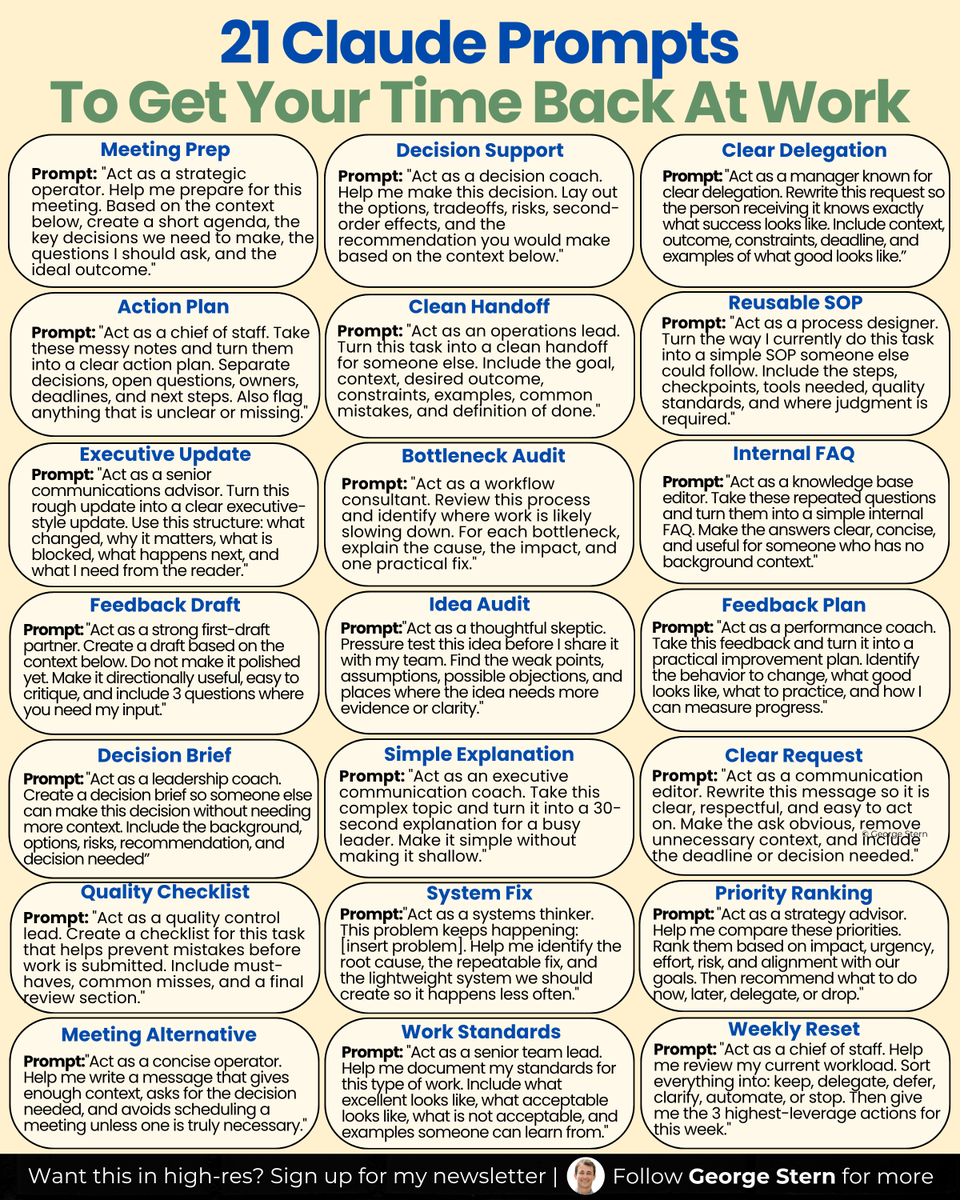
Want to get more time back at work?
Use these AI prompts:
English
Futurality AI retweetledi

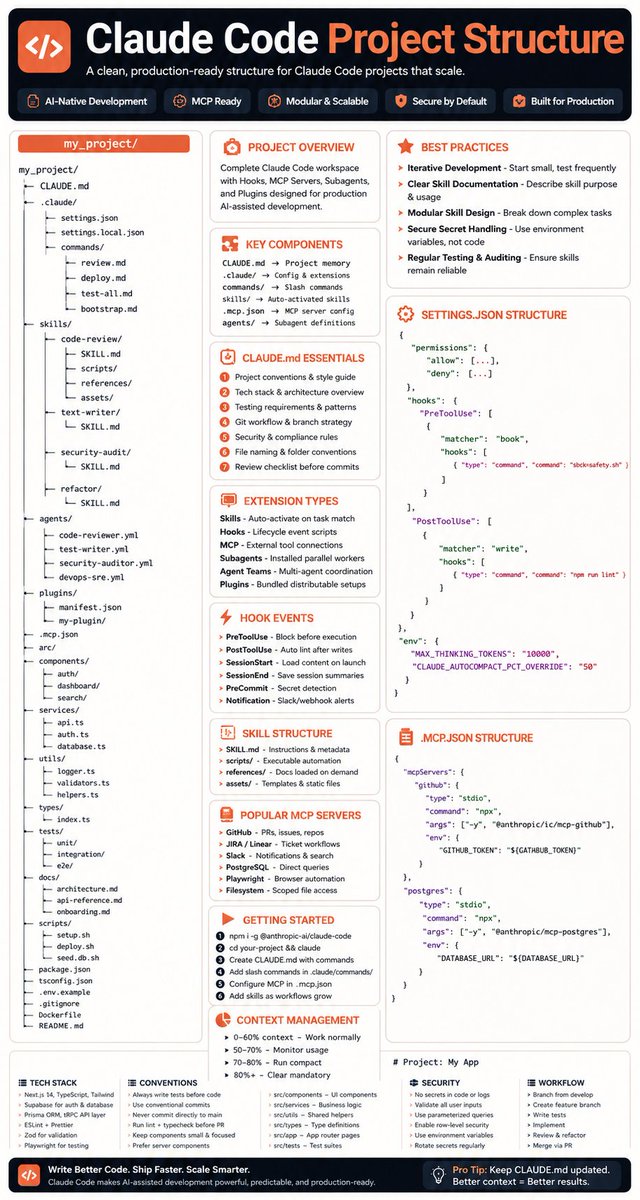
Everyone is still prompting claude
a few teams are structuring it
and the difference is insane
once you add:
CLAUDE.md → project memory
skills/ → auto-activated workflows
agents/ → parallel workers
hooks → lifecycle automation
MCP → external tools
settings.json → permissions & guardrails
Claude stops being a chatbot
and starts acting like a senior engineer that knows your repo
it remembers conventions
runs tests before commits
refactors in your style
calls tools automatically
splits work across agents
this is not prompting anymore
this is giving Claude a brain + muscle + memory
the teams using structured Claude will ship 10x faster
because they’re not asking AI for answers
they’re assigning it responsibilities
bookmark this before everyone discovers CLAUDE.md
RT if you’re building with Claude Code already
English
Futurality AI retweetledi
How to set up Claude Projects completely in 1 hour:
(duplicate my exact project, files, and prompts)
1. Update your Claude desktop app.
2. Click the Cowork tab at the top.
3. You need a Pro plan ($20/mo). Worth it.
-----
→ 0-5 min: Open Projects in Cowork.
Cowork tab → Projects → click '+'.
3 choice: scratch, import old Project, existing folder.
Pick the recurring task you do every single week.
(This is where 90% of people overthink. Don't)
→ 5-20 min: Create your first Project.
Start from scratch = brand new folder.
Import a Claude Project = old files + instructions.
Use existing folder = your Cowork memory + rules.
(Pick one. You can build more next weekend)
→ 20-30 min: Write Project instructions.
Keep them short. 5-8 lines max.
Cover: tone, format, output type, hard rules.
End with: "Use AskUserQuestion before executing."
(You write this once. It runs every time)
→ 30-40 min: Add files to the folder.
about-me .md = who you are, how you work.
anti-ai-style .md = every word you'd never use.
2-3 of your best past outputs as examples.
To download my files, go to how-to-ai.guide.
Don't pay anything. It's free in the welcome email
(These files replace 500-word prompts forever)
→ 40-50 min: Run your first real task.
Setup prompt: "Read every file in this folder. Summarize what you know about this workspace."
Then: "I want to [task]. Ask me questions first."
Claude generates clickable forms to prompt you.
(Stop prompting. Start directing)
→ 50-60 min: Schedule a recurring task.
Open the Project → Scheduled tasks → New.
"Every Monday at 7am, create my weekly briefing."
You wake up to a finished doc. That's the endgame.
Pro tip: Keep the desktop app open + computer awake. Scheduled tasks need it running.
To download all of my other Claude infographics:
Step 1. Go to how-to-ai.guide.
Step 2. Subscribe for free. Don't pay anything.
Step 3. Open my welcome email (most skip this).
Step 4. Hit the automatic reply button inside.
Step 5. Download my infographics from my Notion.
Bonus. Enjoy my best copy-paste prompts, too.

Ruben Hassid@rubenhassid
English
Futurality AI retweetledi

Most engineers think CLAUDE.md is just a README for AI.
They’re wrong.
It’s the difference between:
→ Claude acting like a junior intern
→ Or a senior engineer who’s been on your team for 10 years
Here’s what almost nobody talks about 👇
The 4-Layer Context System:
1) Project Memory
Your team’s brain in one file
Decisions. conventions. edge cases.
(Not just what to do — what to NEVER do)
Most people stop here.
That’s the mistake.
2) Behavior Gates
Guardrails before chaos
→ Block risky actions before they happen
→ Auto-fix code after every step
→ Stop secrets from ever leaking
AI without this = unpredictable
AI with this = reliable
3) Specialized Workflows
You stop prompting.
You start building playbooks.
→ Tasks trigger automatically
→ Each workflow brings its own tools + logic
→ Claude doesn’t guess — it executes
4) Team Orchestration
This is where things get wild
→ Multiple agents working in parallel
→ Tasks split, solved, merged
→ Clean, isolated contexts
This isn’t AI anymore.
It’s an AI team.
Here’s the real unlock:
Individually, these are useful.
Together, they’re unfair.
Hooks enforce
Skills execute
Agents coordinate
CLAUDE.md connects everything
Most engineers are still writing prompts.
The ones moving 10x faster?
They’re building systems.

English
Futurality AI retweetledi

You install Claude Code and stop there.
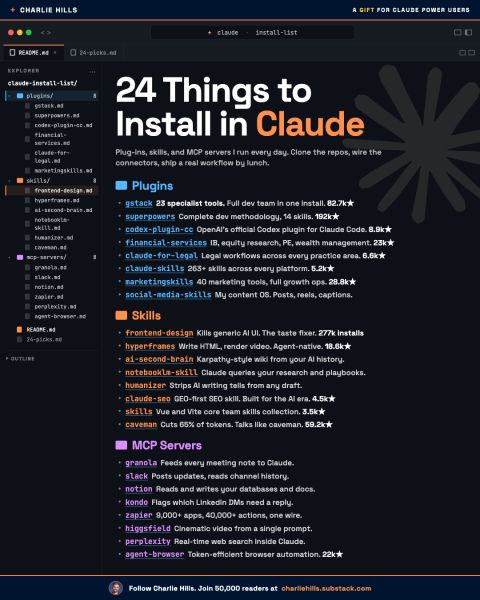
Here are 24 things actually worth adding:
If you're totally new to Claude Code:
━━━━━━━━━━━━━━━
START HERE
━━━━━━━━━━━━━━━
Claude Code for Normal People
charliehills.substack.com/p/claude-code-…
Build Your First AI Agent in Claude
charliehills.substack.com/p/build-your-1…
━━━━━━━━━━━━━━━
PLUG-INS
(Bundled tools, agents, and commands)
━━━━━━━━━━━━━━━
• gstack
23 specialist dev tools in one install
github.com/garrytan/gstack (82.7k★)
• superpowers
Complete dev methodology + 14 skills
github.com/obra/superpowe… (192k★)
• codex-plugin-cc
OpenAI’s official Codex plugin
github.com/openai/codex-p… (8.9k★)
• financial-services
IB, PE, equity, and wealth workflows
github.com/anthropics/fin… (23k★)
• claude-for-legal
Legal workflows for every practice area
github.com/anthropics/cla… (6.6k★)
• claude-skills
263+ skills across every platform
github.com/alirezarezvani… (5.2k★)
• marketingskills
40 marketing tools for full growth ops
github.com/coreyhaines31/… (28.8k★)
• social-media-skills
Content OS for posts, reels, and growth
github.com/charlie947/soc…
━━━━━━━━━━━━━━━
SKILLS
(Specialist instructions Claude loads on demand)
━━━━━━━━━━━━━━━
• frontend-design
Kills generic AI UI
github.com/anthropics/ski…
• hyperframes
Write HTML, render video, agent-native
github.com/heygen-com/hyp… (18.6k★)
• ai-second-brain
Karpathy-style wiki + AI history
github.com/charlie947/ai-…
• notebooklm-skill
Claude queries your research
github.com/PleasePrompto/…
• humanizer
Removes AI writing tells from drafts
github.com/blader/humaniz… (2.9k★)
• claude-seo
GEO-first SEO built for the AI era
github.com/AgriciDaniel/c… (4.5k★)
• antfu-skills
Vue + Vite core team skills
github.com/antfu/skills (3.5k★)
• caveman
Cuts 65% of tokens. Talks like caveman.
github.com/JuliusBrussee/… (59.2k★)
━━━━━━━━━━━━━━━
MCP SERVERS
(Live connections to your apps)
━━━━━━━━━━━━━━━
• granola
Meeting notes fed directly into Claude
granola.ai/blog/granola-m…
• slack
Reads channels + posts updates
slack.com/help/articles/…
• notion
Reads and writes your docs
developers.notion.com/guides/mcp/get…
• kondo
Triages your LinkedIn DMs
relay.trykondo.com/mcp
• zapier
9,000+ apps with one connection
mcp.zapier.com
• higgsfield
Cinematic video from a prompt
higgsfield.ai/mcp
• perplexity
Live web search for Claude
github.com/perplexityai/m…
• agent-browser
Browser automation with fewer tokens
github.com/browserbase/mc…
━━━━━━━━━━━━━━━
Save this for later.
Most people install Claude Code.
Very few build an actual AI operating system around it.
Repost ♻️ to help someone in your network.
P.S. Which one are you installing first?
English
Futurality AI retweetledi

1/ iPhone Users
Settings > your name > Sign-In & Security > Legacy Contact
Assign someone you trust. Apple generates an access key tied to them. The moment they show that key alongside a death certificate, your entire iCloud opens up. Photos, files, emails, notes. Everything.
Skip this and your family spends months fighting Apple's bureaucracy with no guarantee it works.
English
Futurality AI retweetledi
If you died tomorrow your family could not access a single thing you own digitally.
Bank accounts. Crypto. Passwords. Cloud storage. All of it locked permanently.
Here is how to fix that in 30 minutes:
English

Futurality AI retweetledi

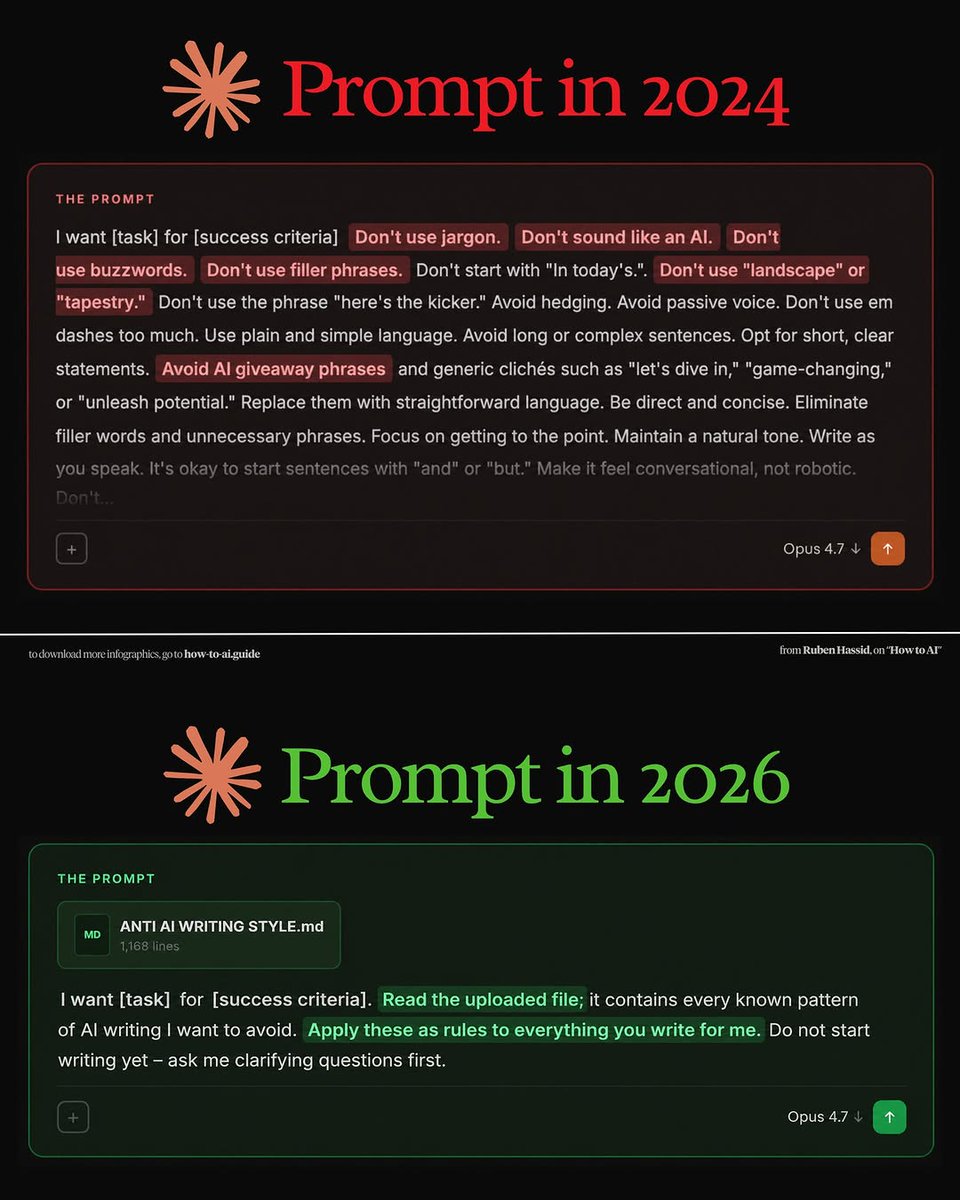
Prompts we should consider!
2024 Prompting:
“Don’t sound like AI.”
“Don’t use buzzwords.”
“Don’t use filler.”
“Don’t use em dashes.”
People were manually fighting AI writing patterns line by line.
2026 Prompting:
“Here’s a file with 1,168 lines of AI writing patterns. Read it. Learn it. Apply it globally.”
We went from prompting outputs
to prompting behavior systems.
The real shift in AI isn’t bigger models.
It’s persistent context, memory, and style control.
Prompt engineering is slowly turning into: • rule engineering
• taste engineering
• identity engineering
And most people still think better prompts = adding more adjectives.
English
Futurality AI retweetledi
Anthropic just dropped a 31-page prompting guide.
Here's everything you actually need (in 10 rules):
1. You write "review this contract" and pray.
Fix: Name every output. "Review this contract. Flag risks per clause. Rate severity 1-5. Return as a table."
2: You say "summarize this" on a 40-page report.
Fix: 4.7 sizes the answer to the input. Cap it: "5 bullets. Each under 15 words. Start each with an action verb."
3: You write "don't use jargon. don't be salesy."
Fix: Negative instructions don't stick.
Flip them: "Write in plain English a 16-year-old could read aloud."
4: You type "can you help me with the email?"
Fix: Each verb ships something. For example: "Go to Gmail. Find [contact]. Write the send-ready reply. Under 90 words. Tone: confident, casual."
5: You wait for Claude to web search on its own.
Fix: Claude opus 4.7 calls fewer tools than 4.6.
Force it: "Use web search aggressively. Verify every claim with at least 2 sources."
6: You miss the warm tone from old Claude.
Fix: Claude opus 4.7 is direct. Almost zero emojis. Paste 2-3 sentences in the voice you want.
Tell Claude to match the rhythm.
7: You ask for "a landing page" & get bare minimum.
Fix: Drop this one line on every creative task
→ "Go beyond the basics."
It's from Anthropic's own doc.
8: You forget Claude 4.7 doesn't reason by default.
Fix: They call it "adaptive thinking."
Add this at the end: "Think before answering (maximum reasoning)." Free upgrade. Every time.
9: You rewrite the same prompt 14 times a week.
Fix: A skill is a command with instructions pre-built.
Write the same prompt twice? Make it a skill.
10: You assume Claude knows what you meant.
Fix: Old Claude 4.6 guessed.
New Claude 4.7 does exactly what you typed.
Spell it out. Output. Order. Length. Tone. Format.
If you don't say it, you don't get it.
To go even further & download my .md files directly:
Step 1. Go to how-to-ai.guide.
Step 2. Subscribe for free. Don't pay anything.
Step 3. Open my welcome email (most skip this).
Step 4. Hit the automatic reply button inside.
Step 5. Download my .md files from my Notion.
Bonus. Enjoy my best copy-paste prompts, too.

Ruben Hassid@rubenhassid
English
Futurality AI retweetledi

I built these 7 prompts from frameworks that have driven billions of dollars in decisions across companies like Amazon, Toyota, and Berkshire Hathaway.
The prompts are free. The thinking systems behind them are what separate good decisions from expensive mistakes.
Also checkout the following:
Turn Claude into 20+ different specialists for marketing & business.
Install real expertise, not just prompts.
Get my Claude skills bundle 👇
linktr.ee/alex_prompter
English
Futurality AI retweetledi

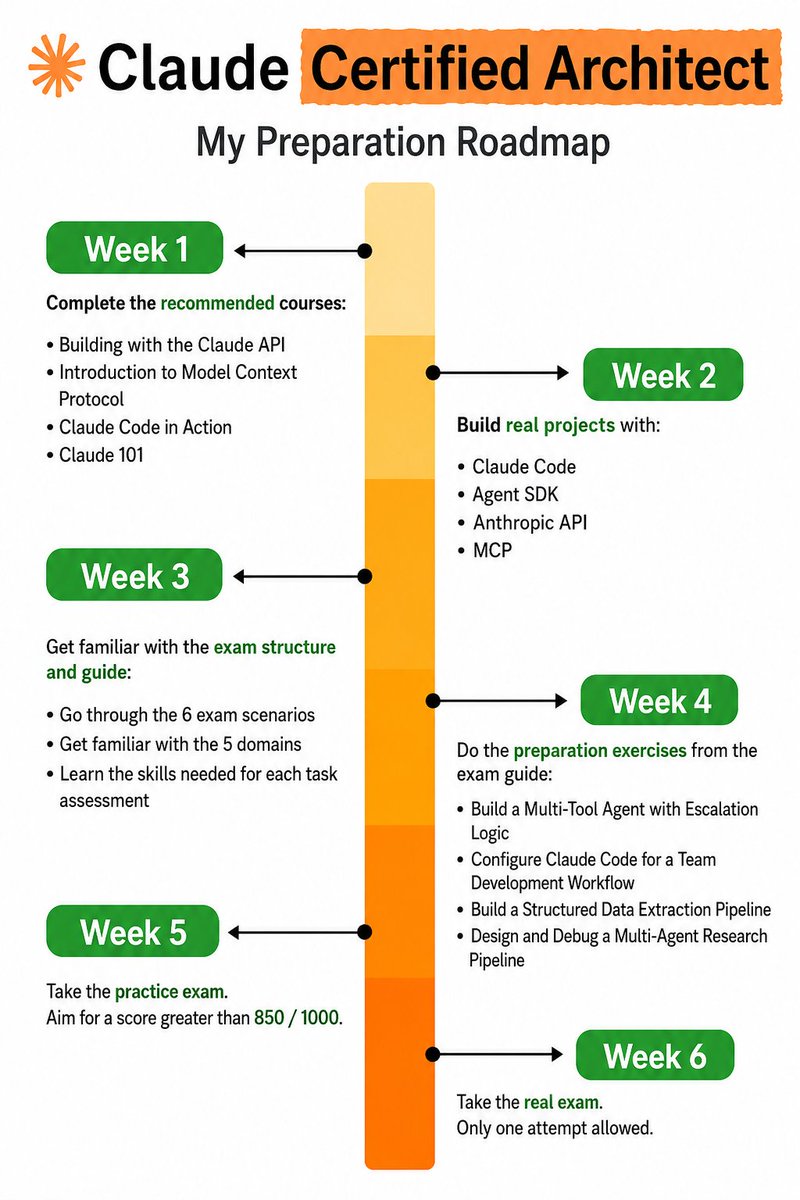
Want to become a Claude Certified Architect in 6 weeks? 🚀
Here’s a simple roadmap to go from beginner → builder → certified 👇
📅 Week 1 — Learn the Basics Master the essentials: • Claude API
• MCP (Model Context Protocol)
• Claude Code
• Claude fundamentals
📅 Week 2 — Build Real Projects Stop watching tutorials. Start shipping: • Apps with Claude Code
• AI agents + APIs
• MCP workflows & integrations
📅 Week 3 — Study the Exam Understand what matters: • Real-world case studies
• 5 important domains
• Skills tested in the exam
📅 Week 4 — Advanced Practice Level up your projects: • Multi-agent systems
• Team collaboration workflows
• Research + automation pipelines
📅 Week 5 — Mock Tests Train under pressure: • Practice exams
• Analyze weak areas
• Aim for 850+/1000
📅 Week 6 — Certification Time Take the real exam. One attempt. One goal. 🏆
❤️ Like
🔁 Repost
🔖 Save for later
Follow for more AI learning content ⚡
English