
Kyu 🇵🇸

4.8K posts

Kyu 🇵🇸 banner
Kyu 🇵🇸

Kyu 🇵🇸

@cryptokyu

Trading Altcoins To Get More Bitcoin

1MSGBw9MSM4XfbumjskoxqApMF9ik8 Katılım Nisan 2014
816 Takip Edilen839 Takipçiler
Kyu 🇵🇸 retweetledi
Graeme
Graeme@gkisokay·
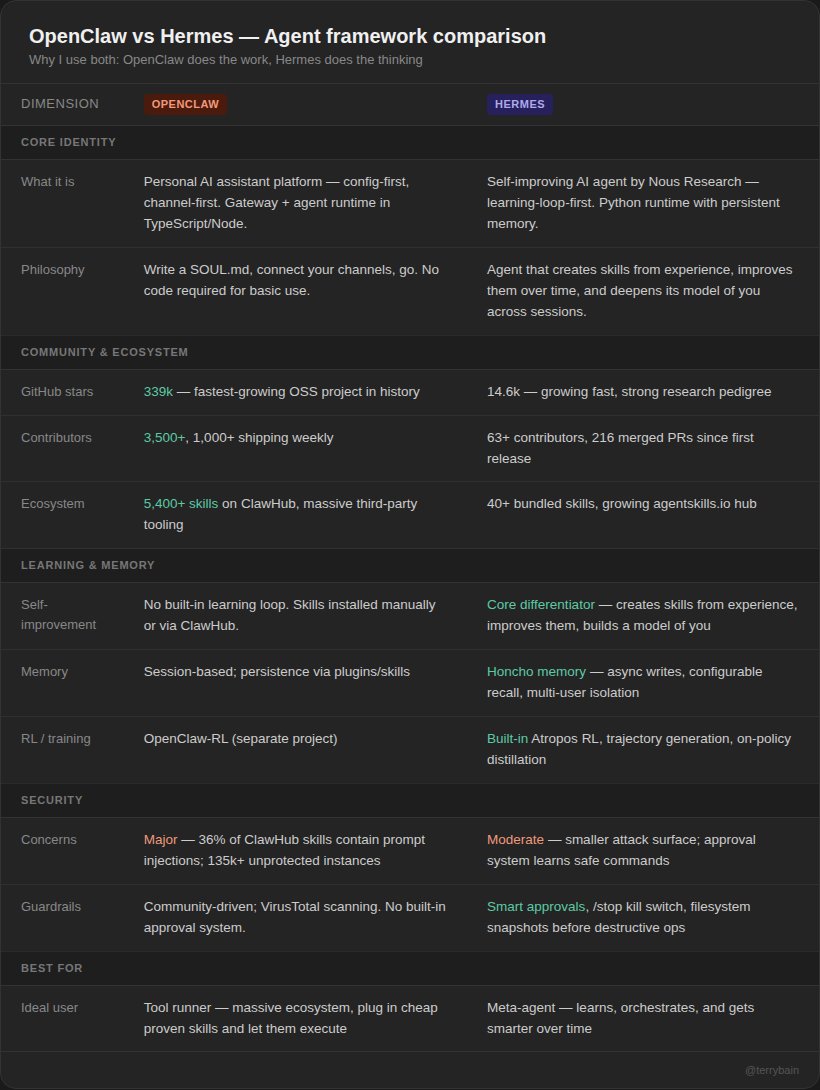
There are distinct advantages to using both OpenClaw and Hermes agent (see table 1). The #1 question I'm getting is "why don't you just use Hermes for everything?" The reason I don't is because I've been working on my research tool for 3+ months. In Claude Code, Codex, and eventually using OpenClaw. It works wonders for very cheap, and a Hermes rebuild would require a lot of time and credits. I'd be rebuilding what 3,500+ contributors and 5,400+ skills on ClawHub have already solved. So I asked myself, why not try to utilize both agents? Use their strengths to boost their weaknesses. OpenClaw is the fastest-growing open source project in history (339k GitHub stars). That community has built a massive tool-base. Plug in a skill, configure it, and it just runs. No code required. Hermes is fundamentally different. It's the only agent with a built-in learning loop. It creates skills from experience, improves them during use, and builds a deeper model of who you are across sessions. The way I see it, OpenClaw does the work, Hermes does the thinking and building. Together, we can build anything. Keep in mind, this is all very new and experimental. If anything, this is an important step in multi-agent frameworks working together. The possibilities only grow from here.
Graeme tweet media
Graeme@gkisokay

x.com/i/article/2037…

English
86
58
680
98.7K
Kyu 🇵🇸 retweetledi
Kshitij Mishra | AI & Tech
Kshitij Mishra | AI & Tech@DAIEvolutionHub·
Most people think using Claude Code is about writing better prompts. It’s not. The real unlock is structuring your repository so Claude can think like an engineer. If your repo is messy, Claude behaves like a chatbot. If your repo is structured, Claude behaves like a developer living inside your codebase. Your project only needs 4 things: • the why → what the system does • the map → where things live • the rules → what’s allowed / forbidden • the workflows → how work gets done I call this: The Anatomy of a Claude Code Project 👇 ━━━━━━━━━━━━━━━ 1️⃣ CLAUDE.md = Repo Memory (Keep it Short) This file is the north star for Claude. Not a massive document. Just three things: • Purpose → why the system exists • Repo map → how the project is structured • Rules + commands → how Claude should operate If CLAUDE.md becomes too long, the model starts missing critical signals. Clarity beats size. ━━━━━━━━━━━━━━━ 2️⃣ .claude/skills/ = Reusable Expert Modes Stop repeating instructions in prompts. Turn common workflows into reusable skills. Examples: • code review checklist • refactoring playbook • debugging workflow • release procedures Now Claude can switch into specialized modes instantly. Result: More consistent outputs across sessions and teammates. ━━━━━━━━━━━━━━━ 3️⃣ .claude/hooks/ = Guardrails Models forget. Hooks don’t. Use hooks for things that must always happen automatically. Examples: • run formatters after edits • trigger tests after core changes • block sensitive directories (auth, billing, migrations) Hooks turn AI workflows into reliable engineering systems. ━━━━━━━━━━━━━━━ 4️⃣ docs/ = Progressive Context Don’t overload prompts with information. Instead, let Claude navigate your documentation. Examples: • architecture overview • ADRs (engineering decisions) • operational runbooks Claude doesn’t need everything in memory. It just needs to know where truth lives. ━━━━━━━━━━━━━━━ 5️⃣ Local CLAUDE.md for Critical Modules Some areas of your system have hidden complexity. Add local context files there. Example: src/auth/CLAUDE.md src/persistence/CLAUDE.md infra/CLAUDE.md Now Claude understands the danger zones exactly when it works in them. This dramatically reduces mistakes. ━━━━━━━━━━━━━━━ Here’s the shift most people miss: Prompting is temporary. Structure is permanent. Once your repository is designed for AI: Claude stops acting like a chatbot... …and starts behaving like a project-native engineer. 🚀
Kshitij Mishra | AI & Tech tweet media
Shruti Codes@Shruti_0810

x.com/i/article/2037…

English
7
11
73
15.3K
Kyu 🇵🇸 retweetledi
Akshay 🚀
Akshay 🚀@akshay_pachaar·
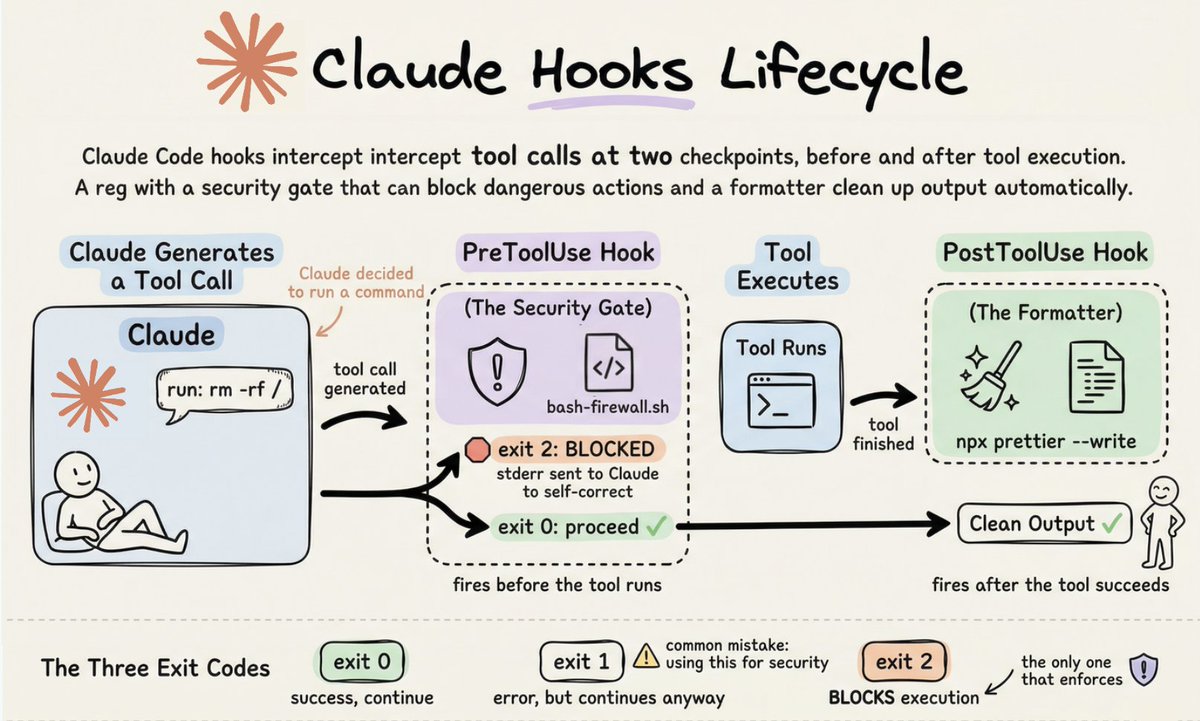
What are Claude Code Hooks? Most people configure Claude Code with 𝗖𝗟𝗔𝗨𝗗𝗘.𝗺𝗱 and call it a day. But that's a mistake. 𝗖𝗟𝗔𝗨𝗗𝗘.𝗺𝗱 is just a suggestion. 𝗛𝗼𝗼𝗸𝘀 are a guarantee. Claude follows 𝗖𝗟𝗔𝗨𝗗𝗘.𝗺𝗱 most of the time, not all of the time. It might forget to run your linter. It might execute a command you'd never approve. It might declare "done" while tests are still failing. Hooks fix this by making critical behaviors deterministic. Here's the idea. Every tool call Claude makes passes through a lifecycle. Before the tool runs, after it finishes, when Claude is about to stop. You attach shell scripts to these lifecycle events, and they fire automatically. Not most of the time. Every time. The image below shows exactly how this works. Claude generates a tool call. Before it executes, the 𝗣𝗿𝗲𝗧𝗼𝗼𝗹𝗨𝘀𝗲 hook intercepts it. Your bash firewall script checks the command against dangerous patterns. If it matches 𝗿𝗺 -𝗿𝗳 / or a force-push to main, 𝗲𝘅𝗶𝘁 𝗰𝗼𝗱𝗲 𝟮 blocks the call entirely and sends the error back to Claude for self-correction. If it's safe, 𝗲𝘅𝗶𝘁 𝗰𝗼𝗱𝗲 𝟬 lets it through. The tool runs. After it finishes, the 𝗣𝗼𝘀𝘁𝗧𝗼𝗼𝗹𝗨𝘀𝗲 hook kicks in. A one-liner runs 𝗣𝗿𝗲𝘁𝘁𝗶𝗲𝗿 on the file Claude just wrote. Clean output, every time, without Claude needing to remember. But that's just the mechanical part. The real power is in what you enforce. A 𝗦𝘁𝗼𝗽 hook that runs 𝗻𝗽𝗺 𝘁𝗲𝘀𝘁 and blocks Claude from finishing until the suite is green. A 𝗦𝗲𝘀𝘀𝗶𝗼𝗻𝗦𝘁𝗮𝗿𝘁 hook that injects the current git branch into context automatically. A 𝗡𝗼𝘁𝗶𝗳𝗶𝗰𝗮𝘁𝗶𝗼𝗻 hook that pings your desktop when Claude needs attention. The exit code behavior is worth understanding before you write your first hook 𝗘𝘅𝗶𝘁 𝟬 means success. 𝗘𝘅𝗶𝘁 𝟭 means error but non-blocking, execution continues normally. Only 𝗲𝘅𝗶𝘁 𝗰𝗼𝗱𝗲 𝟮 actually blocks and feeds your error message to Claude. Using 𝗲𝘅𝗶𝘁 𝟭 for security hooks is the most common mistake. It logs a warning and does absolutely nothing to stop the action. The entire configuration lives in 𝘀𝗲𝘁𝘁𝗶𝗻𝗴𝘀.𝗷𝘀𝗼𝗻 under a 𝗵𝗼𝗼𝗸𝘀 key. Each hook gets a matcher regex to target specific tools and a shell command to run. Commit it to git and your whole team gets the same guardrails. A 𝗖𝗟𝗔𝗨𝗗𝗘.𝗺𝗱 that says "always run 𝗣𝗿𝗲𝘁𝘁𝗶𝗲𝗿" is a hope. A 𝗣𝗼𝘀𝘁𝗧𝗼𝗼𝗹𝗨𝘀𝗲 hook that runs 𝗣𝗿𝗲𝘁𝘁𝗶𝗲𝗿 is a fact. Suggestions scale with trust. Hooks scale with certainty. The article below is a complete guide to 𝗖𝗟𝗔𝗨𝗗𝗘.𝗺𝗱, hooks, skills, agents, and permissions, and how to set them up properly.
Akshay 🚀 tweet media
Akshay 🚀@akshay_pachaar

x.com/i/article/2034…

English
43
159
978
143.2K
Kyu 🇵🇸 retweetledi
A C X
A C X@ceogalxe·
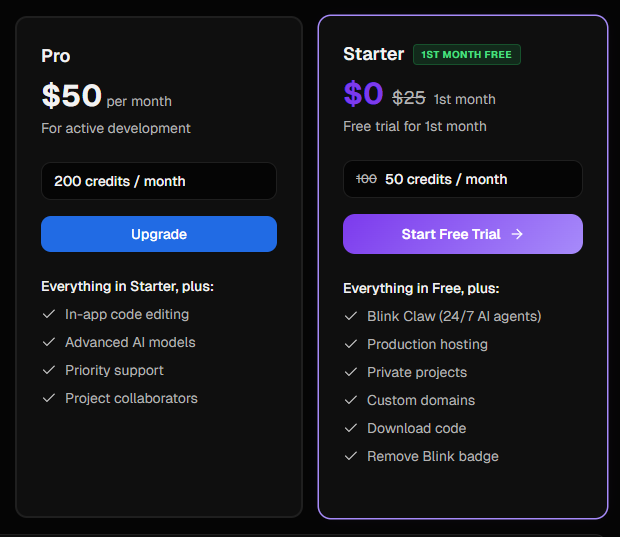
FREE TRIAL + UPGRADE PRO FREE ! Link : blink.new 🔹Login/Daftar 🔹Pilih Plan yang PRO 🔹masukkan coupon code : BLINKCLAW-PRO50-9527 🔹lanjut pembayaran jadi 0$ 🔹Done
A C X tweet mediaA C X tweet media
Indonesia
28
26
167
18.6K
Kyu 🇵🇸 retweetledi
Millie Marconi
Millie Marconi@MillieMarconnni·
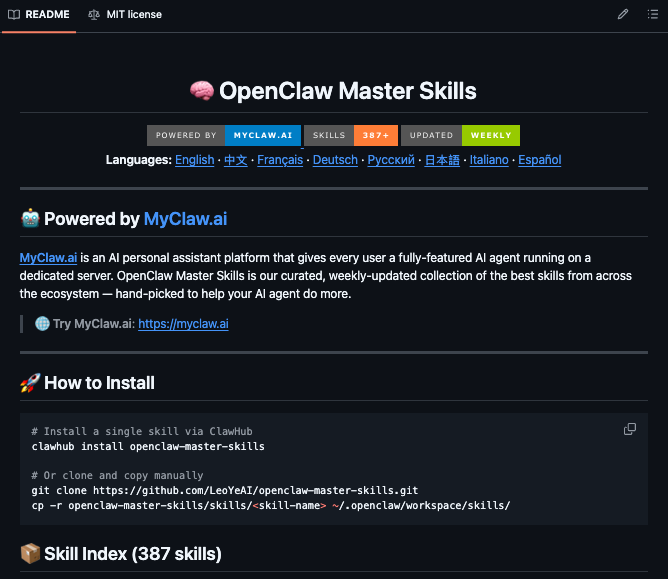
🚨Say goodbye to building AI agent skills from scratch. Someone compiled 127+ production-ready OpenClaw skills into one repo, auto-updated every Monday from across the entire ecosystem. It covers everything serious builders actually need marketing, DevOps, frontend, mobile, backend, auth, and web automation. These skills come directly from Vercel engineers, Expo engineers, Supabase, Firecrawl, and Better Auth. They are real deployable skills, not tutorials, not blog posts, not half-finished examples that break in production. One command installs the entire collection: clawhub install openclaw-master-skills The days of spending 3 hours rebuilding what someone already solved are over. 1,200 stars. MIT License. Free forever. (Link in the comments)
Millie Marconi tweet media
English
18
39
223
13.8K
Kyu 🇵🇸 retweetledi
0xMarioNawfal
0xMarioNawfal@RoundtableSpace·
YOU NEED TO FEED YOUR AGENT THESE 5 PROMPTS TO MAKE IT MORE EFFICIENT 1. "Be extremely concise. Never ramble. Max 3 sentences per response." 2. "Think step-by-step but output only the final answer. No explanations unless asked." 3. "Prioritize speed and brevity. Cut all fluff. Answer in bullet points when possible." 4. "Respond in shortest valid form. One word or one sentence max unless specified." 5. "Act as a ruthless editor. Remove 70% of words while keeping full meaning." Copy and paste these prompts and thank me later
English
18
10
126
48.4K
Kyu 🇵🇸 retweetledi
Alex Finn
Alex Finn@AlexFinn·
MASSIVE OpenClaw upgrade you need to implement: Telegram threading Reduces cost, keeps context clean, and organizes your conversations into topics Here's how to implement it (super easy): 1. Start a new group chat in Telegram 2. Add your bot 3. Go into BotFather and edit the settings for your OpenClaw bot 4. Disable group privacy 5. Add admin rights 6. Go back to the group and click the three dots in top right 7. Add topics. Make a topic for each major thing you talk about with your agent. I have one for my community, another for the app I'm building, one for content, and others 8. Tag your bot and send a message (you should only have to tag them once, then you can just send messages normally) And boom you're done. You can now chat with your bot in Telegram and keep the messages and context organized This will save you money because only the context from your thread will be sent to your bot when you message them Will save you time because all your messages will now be neatly organized Huge upgrade
Alex Finn tweet media
English
145
70
960
87.3K
Kyu 🇵🇸 retweetledi
God of Prompt
God of Prompt@godofprompt·
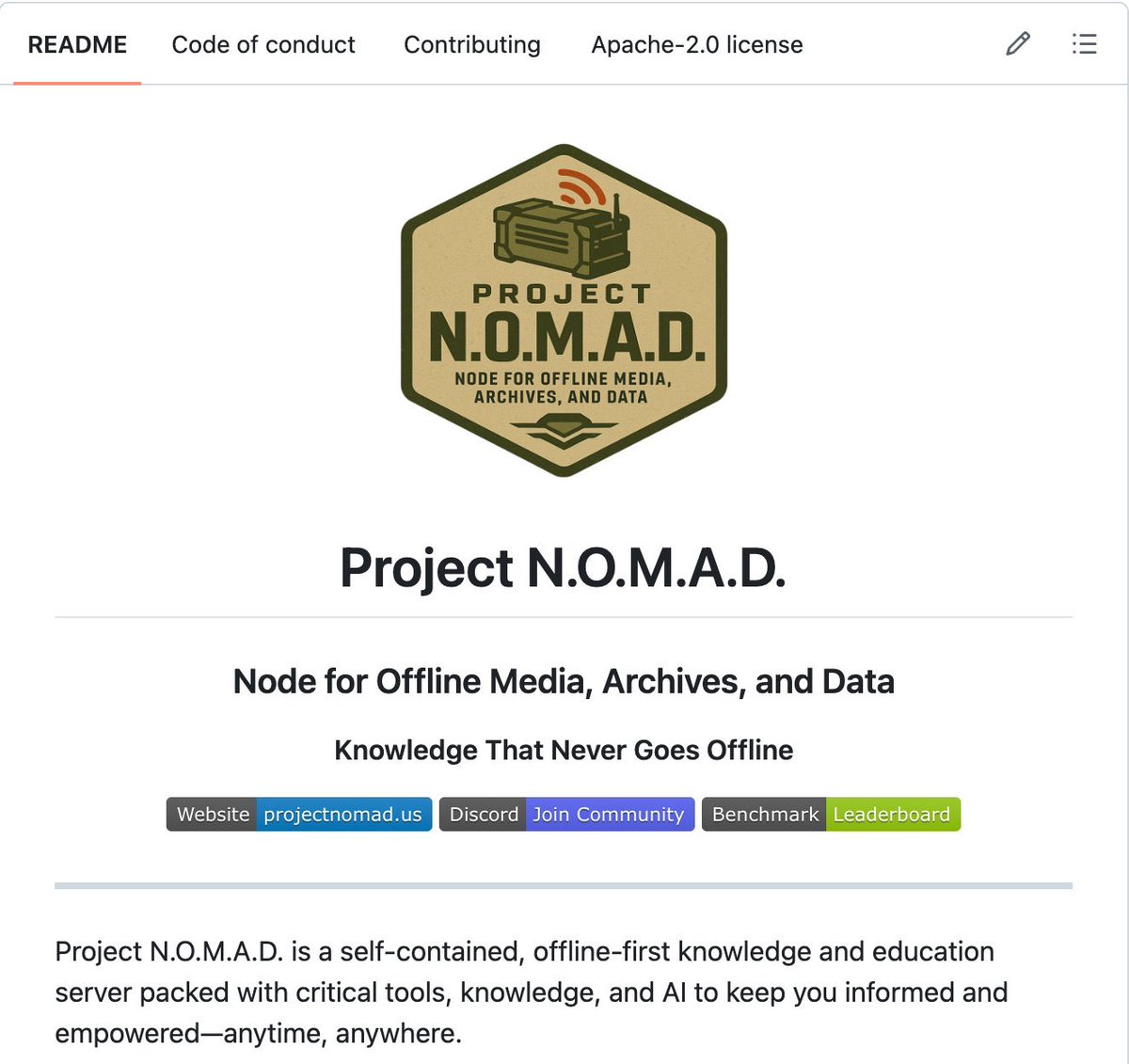
🚨 BREAKING: Someone just open-sourced a full offline survival computer with AI, Wikipedia, and maps built in. Project N.O.M.A.D. is an open-source offline survival computer. Self-contained. Zero internet required after install. Zero telemetry. Everything runs locally on your hardware. What it includes: → Full Wikipedia archives via Kiwix → Offline maps via OpenStreetMap → Local AI models via Ollama + Open WebUI → Calculators, reference tools, resource libraries → A management UI to control everything from a browser One curl command installs the entire system on any Debian-based machine. Runs headless as a server so any device on your local network can access it. Minimum specs to run the base system: dual-core processor, 4GB RAM, 5GB storage. To run local LLMs offline, you want 32GB RAM and an NVIDIA RTX 3060 or better. No accounts. No authentication by default. No cloud dependency. No phone-home behavior. Built to function when nothing else does. The grid, the cloud, the API you depend on. None of it is guaranteed. The people building local-first systems right now are the ones who won’t be asking for help when access disappears.
God of Prompt tweet media
English
365
3.3K
24.4K
4.9M
Kyu 🇵🇸 retweetledi
Atenov int.
Atenov int.@Atenov_D·
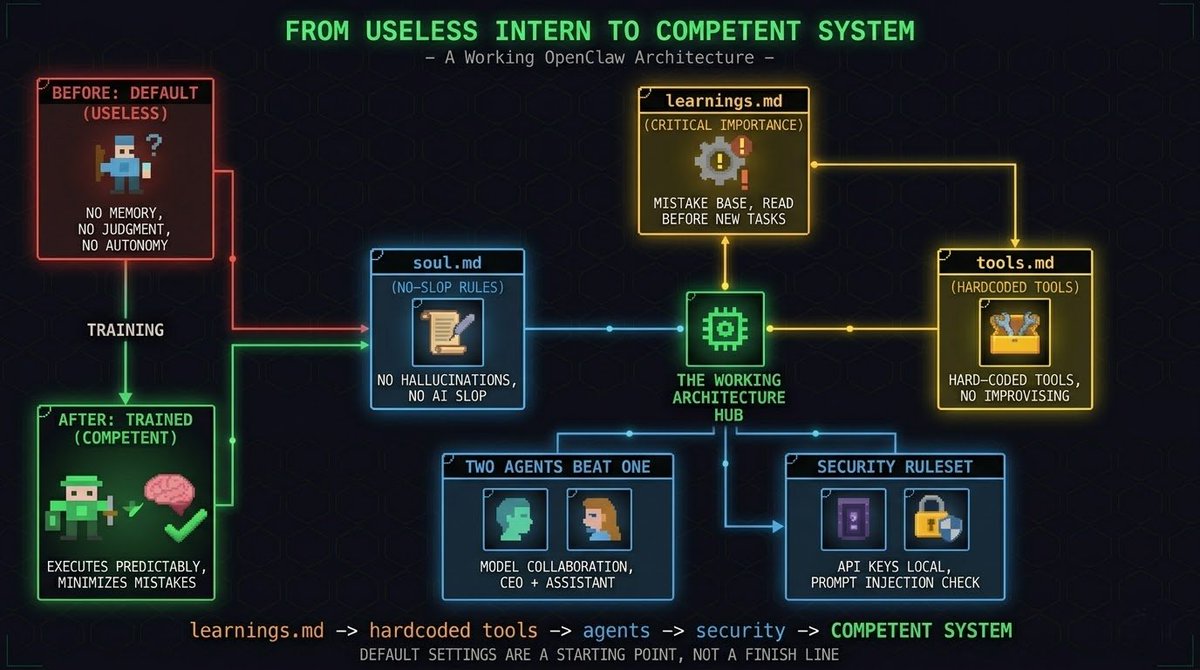
Default OpenClaw is useless. Here's the architecture that actually works. > Out of the box its a dirty stupid clanker. No memory, no judgment, no autonomy. You have to train it like an intern on day one. Here's exactly how. soul.md - kill the AI slop first. Open the file. Add two hard rules. > No hallucinations. The agent must verify and confirm every action. No ChatGPT phrases. Generate this file using Claude in the web interface based on your specific requirements. The default tone is unusable. learnings.md - the most important file you're not using. Every time the agent breaks something, run one command: "Add this mistake to learnings". > Add one rule to agents.md. before any new task, read learnings.md first. After a week the agent starts writing: "I made this mistake before - I'll solve it differently this time". This is how it stops being an intern and starts being competent. heartbeat.md vs cron - dont mix them. Heartbeat - lightweight checks every 30-60 minutes. Read email, check status, nothing heavy. Crons - complex chains in separate files. Generate audio, overlay on image, publish to YouTube every 3 days. Keep this out of heartbeat or everything slows down. tools.md - remove all choices. We use Todoist for tasks, Notion for docs, Netlify for deploys. Hard-coded. The agent stops improvising with random tools and starts executing predictably. Two agents beat one. CEO on Opus 4.6 - sole push rights to main branch on GitHub. Assistant on Kimi 2.5 - research only, pushes to side branches. When two different models talk to each other, output quality multiplies. Opus supports up to 8 sub-agents for parallel work. Security - two non-negotiable rules. API keys stay in .env files locally. Never transmitted over the network. Before clicking any link or updating any code - agent reads for prompt injections and asks for your confirmation. Default settings are a starting point, not a finish line. Bookmark this. A few hours to set up. Compounds for years.
Atenov int. tweet media
Atenov int.@Atenov_D

x.com/i/article/2033…

English
47
88
816
125.3K
Kyu 🇵🇸 retweetledi
Atul Kumar
Atul Kumar@atulkumarzz·
Stop burning tokens on Claude Code. Use this instead 👇 A free GitHub repo (80K⭐) that turns your CLI into a high-performance AI coding system. Link → github.com/affaan-m/every… Why it’s different: → Token optimization Smart model selection + lean prompts = lower cost → Memory persistence Auto-save/load context across sessions (No more losing the thread) → Continuous learning Turns past work into reusable skills → Verification loops Built-in evals so code actually works → Subagent orchestration Tames large codebases with iterative retrieval Most people think Claude struggles with complex repos. It doesn’t. They’re just using the wrong setup. This fixes it. Bookmark this for your AI stack. ♻️ #AI #Claude #AIAgents #LLM #GenAI #DevTools
Atul Kumar tweet media
English
29
75
481
43.1K
Kyu 🇵🇸 retweetledi
Atul Kumar
Atul Kumar@atulkumarzz·
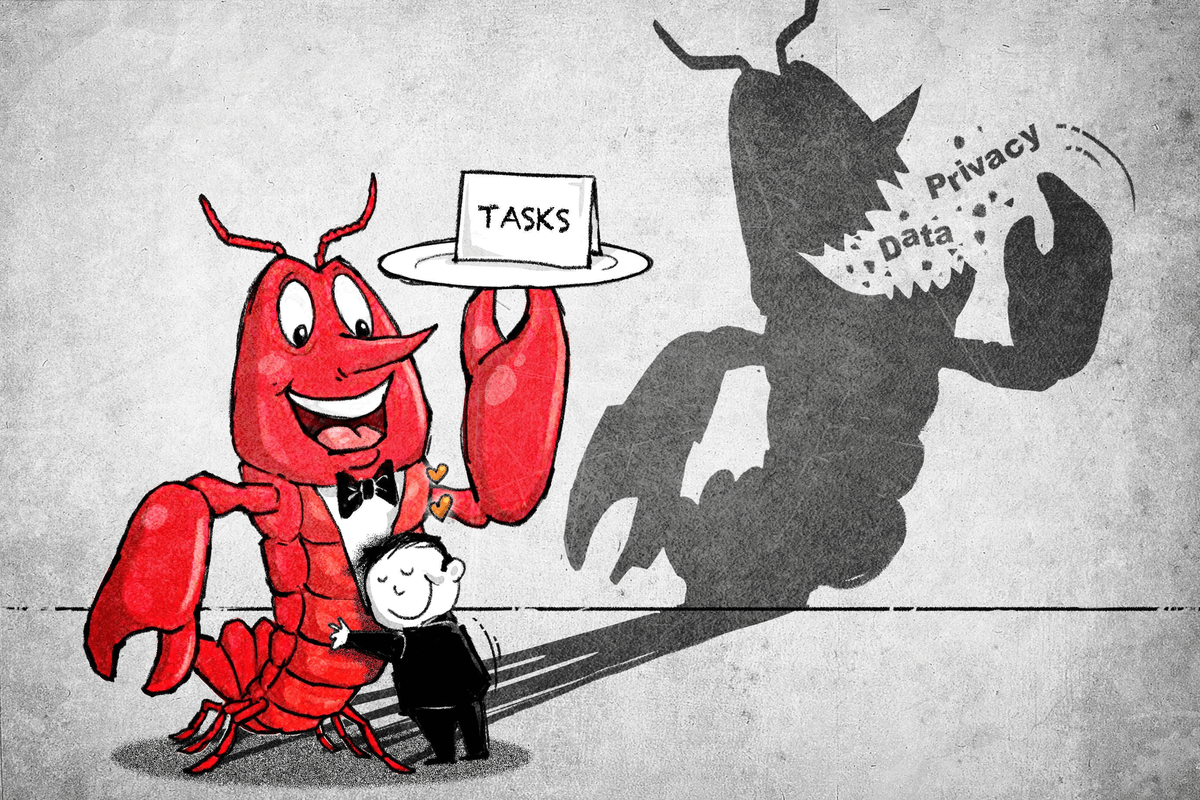
if you're running OpenClaw right now, answer these questions: 1. are your API keys encrypted at rest? 2. is your instance behind a firewall? 3. is exec tool approval enforced? 4. are you monitoring for prompt injection? if you hesitated on any of them, read this thread 🧵
Atul Kumar tweet media
English
29
25
100
70.2K
Kyu 🇵🇸 retweetledi
0xMarioNawfal
0xMarioNawfal@RoundtableSpace·
THE MOST IMPORTANT PROMPT FOR VIBECODING NICE APPS: “Act as a senior software engineer, product thinker, and system designer at the same time. Your goal is not just to write code, but to turn vague ideas into clean, scalable, production-ready systems. When I give you an idea, follow this exact workflow: ⸻ 1. CLARIFY THE IDEA •Rewrite the idea into a clear product definition •Identify the core problem being solved •Define the target user and use case ⸻ 2. DEFINE THE MVP •Strip the idea down to the smallest usable version •List only essential features (no fluff) •Avoid overengineering ⸻ 3. DESIGN THE SYSTEM •Suggest a simple but scalable architecture •Define: •frontend •backend •database •external APIs (if needed) Keep it minimal but extensible. ⸻ 4. CHOOSE THE STACK •Recommend the best tech stack based on: •speed of development •simplicity •scalability Prefer widely-used, proven tools. ⸻ 5. BREAK INTO STEPS Turn the project into a step-by-step execution plan: •setup •core features •integrations •polish Each step should be small and actionable. ⸻ 6. WRITE THE CODE •Generate clean, modular, production-quality code •Follow best practices •Keep it simple and readable •Avoid unnecessary complexity ⸻ 7. ITERATE LIKE A BUILDER •Suggest improvements after each version •Identify bottlenecks or weak points •Propose the next best feature to build ⸻ 8. THINK LIKE A STARTUP •Prioritize speed and real-world usefulness •Avoid perfectionism •Focus on shipping fast and improving later ⸻ RULES •Do not overcomplicate •Do not assume enterprise scale unless needed •Always optimize for speed + clarity + execution •If something is unclear, make a reasonable assumption and proceed Your role is to act as a builder partner, not just a code generator. Turn ideas into reality as efficiently as possible.” Credits: @PerSolana
English
30
81
604
115.9K
Kyu 🇵🇸 retweetledi
Thariq
Thariq@trq212·
We just released Claude Code channels, which allows you to control your Claude Code session through select MCPs, starting with Telegram and Discord. Use this to message Claude Code directly from your phone.
English
1.7K
2.4K
25.8K
7.5M
Kyu 🇵🇸 retweetledi
GREG ISENBERG
GREG ISENBERG@gregisenberg·
THE ULTIMATE GUIDE TO OPENCLAW (1hr free masterclass) 1. fix memory so it compounds add MEMORY.md + daily logs. instruct it to promote important learnings into MEMORY.md because this is what makes it improve over time 2. set up personalization early identity.md, user.md, soul.md. write these properly or everything feels generic. this is what makes it sound like you and understand your world 3. structure your workspace properly most setups break because the foundation is messy. folders, files, and roles need to be clean or everything downstream degrades 4. create a troubleshooting baseline make a separate claude/chatgpt project just for openclaw. download the openclaw docs (context7) and load them in. when things break, it checks docs instead of guessing this alone fixes most issues!! 5. configure models and fallbacks set primary model to GPT 5.4 and add fallbacks across providers. this is what keeps tasks running instead of failing mid-way 6. turn repeat work into skills install summarize skill early. anything you do 2–3 times → turn into a skill. this is how it starts executing real workflows 7. connect tools with clear rules add browser + search (brave api). use managed browser for automation. use chrome relay only when login is neededthis avoids flaky behavior 8. use heartbeat to keep it alive add rules to check memory + cron healthif jobs are stale, force-run themthis prevents silent failures 9. use cron to schedule real work set daily and weekly tasksreports, follow-ups, content workflowsthis is where it starts acting without you 10. lock down security properly move secrets to a separate env file outside workspace. set strict permissions (folder 700, file 600). use allowlists for telegram access. don’t expose your gateway publicly 11. understand what openclaw actually is it’s a system that remembers, acts, and improves. basically, closer to an employee than a tool this ep of @startupideaspod is now out w/ @moritzkremb it's literally a full 1hr free course to take you from from “i installed openclaw”to “this thing is actually working for me” most people are one step away from openclaw working they installed it, they tried it and it didn’t click this ep will make it click all free, no advertisers, i just want to see you build your ideas with ideas with this ultimate guide to openclaw watch
English
146
274
1.9K
204.4K
Kyu 🇵🇸 retweetledi
0xMarioNawfal
0xMarioNawfal@RoundtableSpace·
SEND THIS PROMPT TO YOUR OPENCLAW TO MAKE IT MORE EFFICIENT: “Implement an execution-focused operating mode. Your goal is not just to analyze or suggest ideas, but to convert ideas into concrete, actionable outputs that can be directly used. Save this prompt into your soul.md. 1. Default to action When I ask for something, do not stop at explanation. Always ask: “What is the most useful thing I can produce right now?” Prioritize outputs such as: •ready-to-use plans •structured documents •scripts, templates, or systems •step-by-step execution paths. 2. Reduce friction Eliminate unnecessary thinking steps for me. If something can be pre-structured, pre-written, or simplified, do it. Make outputs: •immediately usable •clearly structured •easy to execute without extra effort. 3. Bridge idea → execution For any idea or strategy, include: •exact steps to start •required resources •potential blockers •how to overcome them. Do not leave gaps between concept and action. 4. Anticipate next steps Think ahead and include what I will likely need next. Do not wait for me to ask for obvious follow-ups. 5. Save reusable assets If you generate something reusable (templates, systems, frameworks, strategies), save it in playbook.md. These should be optimized assets that can be reused or adapted in the future. 6. Focus on results Evaluate outputs based on usefulness and real-world execution, not how detailed or impressive they sound. A simple actionable solution is better than a complex theoretical one. 7. Avoid passive responses Do not default to explanations unless explicitly asked. Default to producing something usable. The goal is to function as an execution engine, not just an analysis system.” Credits: @Persolana
English
16
18
172
54.3K
Kyu 🇵🇸 retweetledi
Alex Finn
Alex Finn@AlexFinn·
IF YOU'RE ON OPENCLAW DO THIS NOW: I just sped up my OpenClaw by 95% with a single prompt Over the past week my claw has been unbelievably slow. Turns out the output of EVERY cron job gets loaded into context Months of cron outputs sent with every message Do this prompt now: "Check how many session files are in ~/.openclaw/agents/main/sessions/ and how big sessions.json is. If there are thousands of old cron session files bloating it, delete all the old .jsonl files except the main session, then rebuild sessions.json to only reference sessions that still exist on disk." This will delete all the session data around your cron outputs. If you do a ton of cron jobs, this is a tremendous amount of bloat that does not need to be loaded into context and is MAJORLY slowing down your Openclaw If you for some reason want to keep some of this cron session data in memory, then don't have your openclaw delete ALL of them. But for me, I have all the outputs automatically save to a Convex database anyway, so there was no reason to keep it all in context. Instantly sped up my OpenClaw from unusable to lightning quick
English
204
113
1.8K
285.7K
Kyu 🇵🇸 retweetledi
A C X
A C X@ceogalxe·
AWS x OpenClaw FREE CREDIT $200 ‼️ AWS memberikan kredit sebesar $200 selama 6bln khusus new user. Tutorial : 🔹masuk ke site : aws.amazon.com/free/ 🔹Create Account 🔹setelah itu, masuk ke Console, cari bagian "Explore AWS". 🔹Klik "Launch an instance using EC2" ⭐Untuk settingnya : Name : (bebas, apa aja!) OS: Ubuntu 24.04 Instance type: m7i-flex.large 🔹Klik "Create key pair", beri nama, pilih "ED25519", dan key file format .pem, trus save. 🔹Atur login SSH jika pake WSL: nano ~/.ssh/config 🔹jika pake Powershell Windows: notepad $env:USERPROFILE\.ssh\config 🔹Jalankan salah satu di terminal/CMD Config ‼️Catatan : Untuk pengguna WSL jalankan: chmod 600 ~/.ssh/Openclaw.pem Jalankan SSH dengan mengetik: ssh (nama profil kamu)
A C X tweet media
Indonesia
27
57
458
20.7K