rainworm.eth

1.1K posts

rainworm.eth banner
rainworm.eth

rainworm.eth

@rainworm11

Katılım Mayıs 2021
944 Takip Edilen247 Takipçiler
rainworm.eth retweetledi
GoFly
GoFly@GoGoFly23·
复刻了大神@DilumSanjaya的视觉框架,建了一个 F-22、F -35、星舰、猛禽发动机的展示网页。主要有 3 步: 1、使用 GPT 2 Image 生成模型三视图, 2、然后在 ComfyUI 里使用 Hunyuan 3.1生成对应的模型, 3、把大神@servasyy_ai开源的仓库丢给 Codex,然后换个SpaceX 网站的风格就可以了。 github.com/huangserva/3DC… 非常轻松就可以搞定了
中文
53
173
1.1K
91.1K
rainworm.eth retweetledi
INK
INK@0xInk_·
How to create this kind of video game interface animation with GPT Image 2 and Seedance 2 why is it possible now thanks to GPT Image 2? This model is really good in terms of details and design interface. Also, this model allows you to rework multiple times an image without damaging the quality let me share my workflow👇
INK@0xInk_

Just created my own AAA game with GPT image 2 and Seedance 2

English
67
238
2.4K
236.7K
rainworm.eth retweetledi
Andrej Karpathy
Andrej Karpathy@karpathy·
LLM Knowledge Bases Something I'm finding very useful recently: using LLMs to build personal knowledge bases for various topics of research interest. In this way, a large fraction of my recent token throughput is going less into manipulating code, and more into manipulating knowledge (stored as markdown and images). The latest LLMs are quite good at it. So: Data ingest: I index source documents (articles, papers, repos, datasets, images, etc.) into a raw/ directory, then I use an LLM to incrementally "compile" a wiki, which is just a collection of .md files in a directory structure. The wiki includes summaries of all the data in raw/, backlinks, and then it categorizes data into concepts, writes articles for them, and links them all. To convert web articles into .md files I like to use the Obsidian Web Clipper extension, and then I also use a hotkey to download all the related images to local so that my LLM can easily reference them. IDE: I use Obsidian as the IDE "frontend" where I can view the raw data, the the compiled wiki, and the derived visualizations. Important to note that the LLM writes and maintains all of the data of the wiki, I rarely touch it directly. I've played with a few Obsidian plugins to render and view data in other ways (e.g. Marp for slides). Q&A: Where things get interesting is that once your wiki is big enough (e.g. mine on some recent research is ~100 articles and ~400K words), you can ask your LLM agent all kinds of complex questions against the wiki, and it will go off, research the answers, etc. I thought I had to reach for fancy RAG, but the LLM has been pretty good about auto-maintaining index files and brief summaries of all the documents and it reads all the important related data fairly easily at this ~small scale. Output: Instead of getting answers in text/terminal, I like to have it render markdown files for me, or slide shows (Marp format), or matplotlib images, all of which I then view again in Obsidian. You can imagine many other visual output formats depending on the query. Often, I end up "filing" the outputs back into the wiki to enhance it for further queries. So my own explorations and queries always "add up" in the knowledge base. Linting: I've run some LLM "health checks" over the wiki to e.g. find inconsistent data, impute missing data (with web searchers), find interesting connections for new article candidates, etc., to incrementally clean up the wiki and enhance its overall data integrity. The LLMs are quite good at suggesting further questions to ask and look into. Extra tools: I find myself developing additional tools to process the data, e.g. I vibe coded a small and naive search engine over the wiki, which I both use directly (in a web ui), but more often I want to hand it off to an LLM via CLI as a tool for larger queries. Further explorations: As the repo grows, the natural desire is to also think about synthetic data generation + finetuning to have your LLM "know" the data in its weights instead of just context windows. TLDR: raw data from a given number of sources is collected, then compiled by an LLM into a .md wiki, then operated on by various CLIs by the LLM to do Q&A and to incrementally enhance the wiki, and all of it viewable in Obsidian. You rarely ever write or edit the wiki manually, it's the domain of the LLM. I think there is room here for an incredible new product instead of a hacky collection of scripts.
English
2.9K
7.1K
59K
21.1M
rainworm.eth retweetledi
Yanhua
Yanhua@yanhua1010·
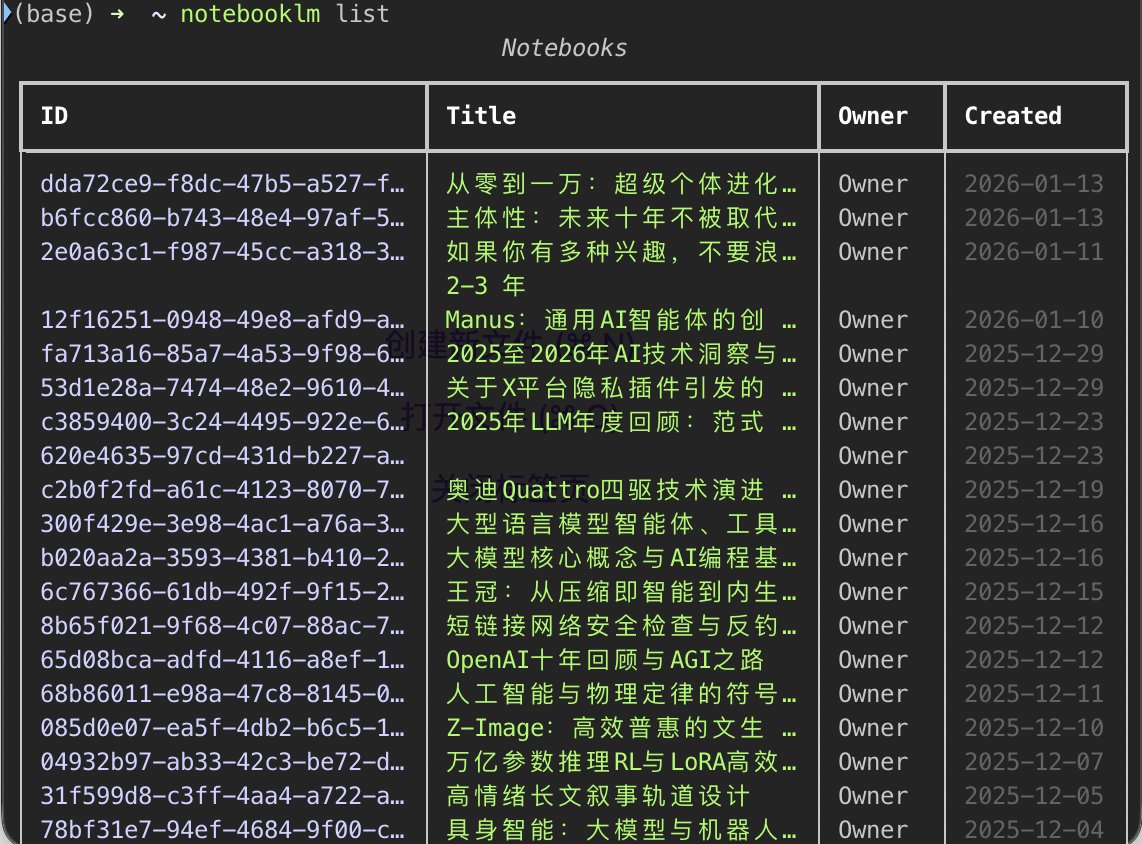
补充一下NotebookLM skills: github.com/teng-lin/noteb… 原文中的Skills无法自动上传本地文件,这个skills更强大🔥 如何安装: 1. 对cc直接说:帮我安装这个Claude skill:github.com/teng-lin/noteb… 2. pip3 install playwright + playwright install chromium (可选) 3. 登录:notebooklm login 4. 验证:notebooklm list
Yanhua tweet media
Yanhua@yanhua1010

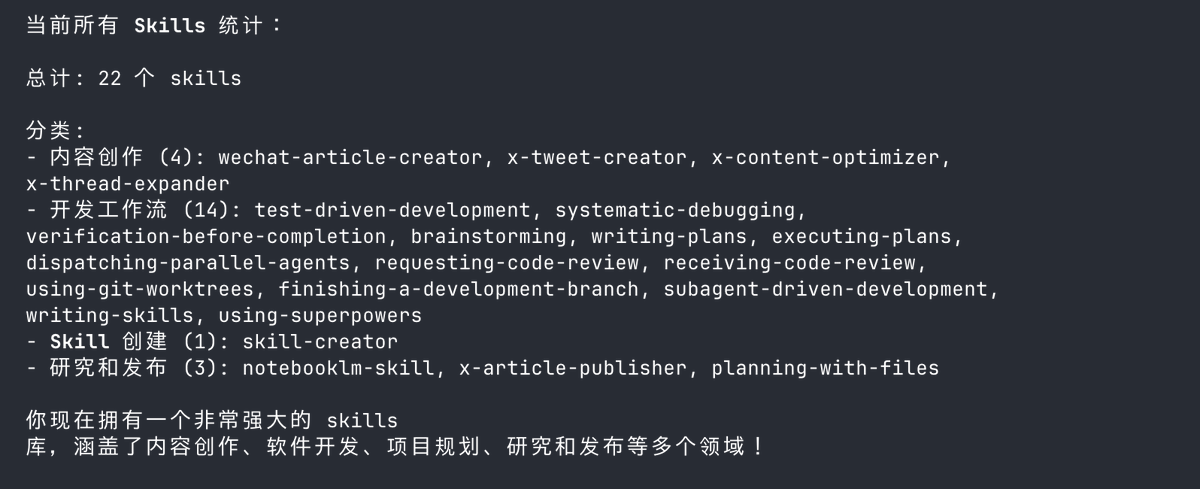
推荐一些我目前安装的Claude Skills: 1. Anthropic官方Skills github.com/anthropics/ski… 2. Superpowers 1.6万Star的Skill精选,从脑暴、写需求文档、开发、测试全包含,口碑相当好。 github.com/obra/superpowe… 3. Planning-with-files 参考Manus的Agent方法写的Skill。很适合多步骤任务,用这个Skill指导其他Skill工作也挺好。 github.com/OthmanAdi/plan… 4. X-article-publisher-skill 王树义老师写的X文章发布Skill, 这个值得研究下,后续看看能不能实现其他平台的自动化 github.com/wshuyi/x-artic… 5. NotebookLM skill 自动上传PDF、Youtube链接到NotebookLM,很适合NotebookLM内容的自动化处理 github.com/PleasePrompto/… 还有一些是自己平时总结的内容创作skills,后续继续分享具体使用场景案例!

中文
9
58
262
30.3K
rainworm.eth retweetledi
kabikabi
kabikabi@jakevin7·
最近把 CLI 工具生态做了一轮大更新: xiaohongshu-cli — 逆向小红书 Web 接口,搜索/阅读/评论/发帖/点赞,终端里全搞定 twitter-cli — 写接口全覆盖 + 反风控升级 + 架构重构 bilibili-cli — 结构化输出 + 错误分类 + 反风控 discord-cli / tg-cli — 统一结构化输出 五个项目全部支持 --yaml/--json,非 TTY 自动 YAML,配了 SKILL.md 让 AI Agent 直接调用。 反风控也都尽力拉满了:TLS 指纹、请求 jitter、Cookie 管理。 GitHub: github.com/jackwener
中文
37
117
813
61.2K
rainworm.eth retweetledi
Ring Hyacinth
Ring Hyacinth@ring_hyacinth·
项目开源啦! ▶ 完整项目:github.com/ringhyacinth/S… ▶ Skill:github.com/ringhyacinth/S… 项目简介: 1. OpenClaw 龙虾的“像素办公室”:龙虾会根据状态自动走到不同位置(休息区 / 工作区 / bug 区) 2. 左下角添加他昨天的工作小记。 3. 支持邀请其他龙虾加入办公室(丰富功能开发中) 4. 手机端适配 created by: @simonxxoo and me
Ring Hyacinth@ring_hyacinth

最新的界面做好了!如果大家喜欢的话,这个版本的skill我们也开源😆
中文
151
405
2.6K
535.4K
rainworm.eth retweetledi
币世王 | 🦅🐬TermMax
币世王 | 🦅🐬TermMax@0xKingsKuan·
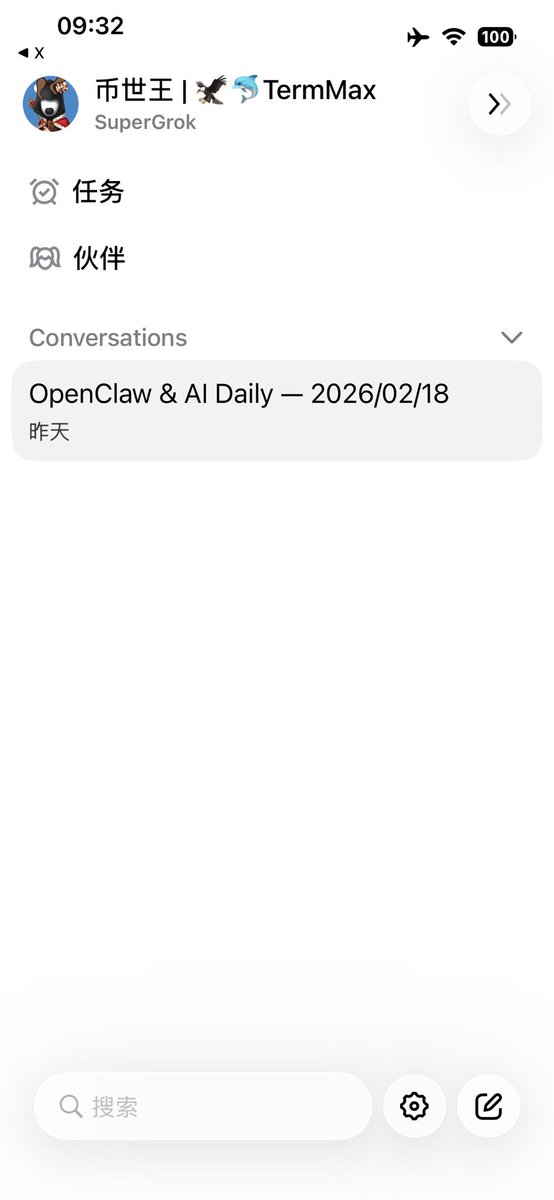
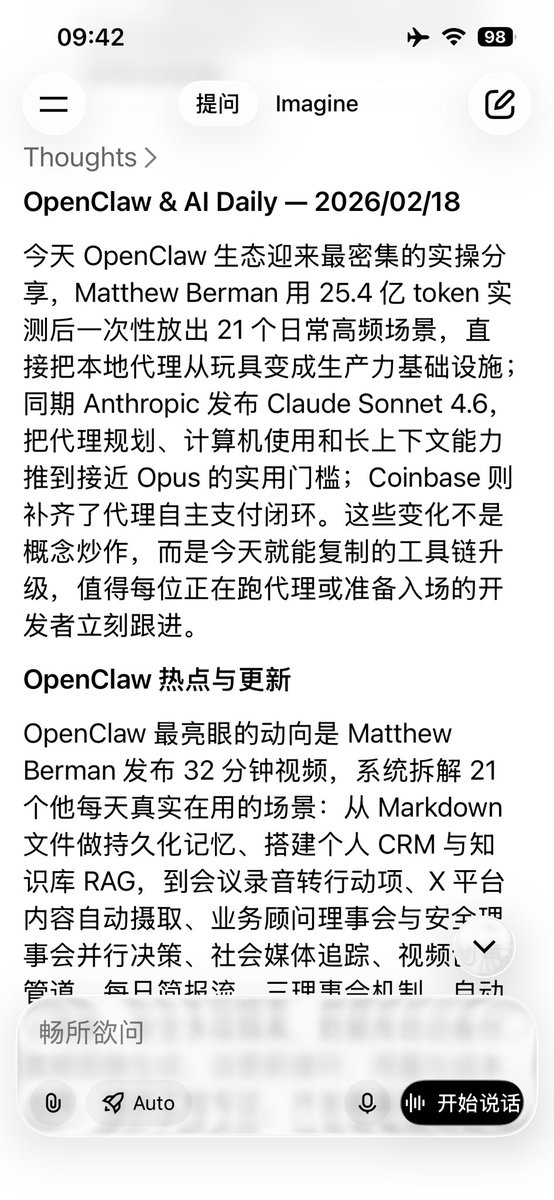
Grok 推送每日 AI 高质量热点日报! 更简单的日报任务可使用 @grok ! 设定好每日日报任务和时间点即可获得过去 24 小时在推特上的 AI 热点! // 指令输入: 在 X(Twitter)上抓取过去 24 小时内最热门、最有信息密度的 OpenClaw 相关内容与 AI(Agents / Tools / Infra / Research) 重要更新,并输出一份“可直接发布”的中文简报。 要求与范围: •时间窗口:过去 24 小时(必要时补充过去 72 小时内仍在发酵的重大信息) •主题优先级: 1.OpenClaw(产品更新、插件/skill、生态项目、关键线程、Demo、bug/修复、版本发布) 2.AI Agents / Agent 工具链(框架、协议、插件市场、部署与工作流) 3.AI 基础设施与趋势(模型发布、推理/训练、数据层、评测、开源仓库更新) •只收录“热 + 有用”:能带来认知增量、可复现、可行动、或被大量转推讨论的内容;纯情绪/纯喊单/无信息密度的过滤掉 •去重:同一事件只保留信息最全的一条,其他用“补充来源”合并 •可信度:对争议信息标注“未确认/来源单一”,不当作事实陈述 输出格式(不使用 point form / 不要 AI 味 / 语气稳、信息明确): 1.标题:OpenClaw & AI Daily — YYYY/MM/DD 2.开头 2–3 句:今天最重要的变化是什么、为什么值得看 3.正文分三段(每段 4–7 条要点,但用自然段表达,不用项目符号): •OpenClaw 热点与更新 •AI Agents 工具链与产品动向 •研究/开源/基础设施关键更新 4.每条内容都要包含:一句话结论 + 关键细节(数字/版本/链接点/影响)+ 原推链接(或作者@与关键词便于检索) 5.结尾给“可执行动作”一段:今天值得立刻做的 1–3 件事(例如:去看哪个 repo、收藏哪个 thread、试跑哪个工具、关注谁) 6.全文控制在 2200–3200 字;如果信息爆炸,先保留“最重要 10 条”,其余放“附录:更多链接” 热度判断(综合,不要只看点赞): •引用转推/讨论密度、作者权重(项目方/核心开发者/研究者)、是否引发二次解读线程、是否出现多个独立来源交叉验证、是否涉及版本发布/安全事件/重大合作/资金或生态里程碑。 最后再做一次自检: •是否覆盖了 OpenClaw 的关键更新? •是否把“热”转化成“可用信息”? •是否有任何未经证实的内容被写成确定事实?如有改为条件句并标注来源。
币世王 | 🦅🐬TermMax tweet media币世王 | 🦅🐬TermMax tweet media
币世王 | 🦅🐬TermMax@0xKingsKuan

开源顶端 AI 技术日报生成器,杜绝垃圾噪音! 这个开源 github 把 Andrej Karpathy 推荐体系里那批顶级技术博客(约 90 个 RSS/Atom 源)的新文章抓下来,用 AI 从相关性 / 质量 / 时效性三维打分、自动分类、提炼摘要与关键词,然后输出一份结构化的 Markdown 日报。默认用 Gemini,如果 Gemini 挂了还能自动降级到 OpenAI 兼容 API(比如 DeepSeek 这类 endpoint)。 // OpenClaw 操作精简版: 1/ 把项目丢给 OpenClaw: github.com/vigorX777/ai-d… 告诉它装好并设置每天几点 XX:XX 跑一次,把日报发到指定地方。 2/ 贴 API(选一个就行): Gemini:直接给 key (免费领取 key aistudio.google.com/apikey) 或 OpenAI 兼容:给 endpoint + key + model(比如 deepseek-chat) 3/ 想立刻验收就加一句: “这个日报现在发送一份看看” 完成后就是固定节奏:每天 XX:XX 自动生成 + 自动投递,你只负责起床打开看!

中文
34
48
207
25.5K
rainworm.eth retweetledi
佐哥 ZOHAN
佐哥 ZOHAN@zohanlin·
大部分人用 AI 助理的方式是:叫它做事,然後去盯著看 這樣其實叫做監工,很累 真正的助理是做完事,回來主動找你回報 我之前一直沒有辦法完美調教好 它都跟我說:「完成後回報」 但它都沒有⋯常常忘記,還是要我自己去追 但是我終於成功測試出來了~ 現在每次派給我的 Jarvis 任務,它完成後會自己通知我 整個流程我不用盯,它會自己找我! 想做到這件事,在你的 AGENTS .md 加進去這段指令: 「 如果接受到需要花費較長時間處理的任務 ① 開一個 background session 跑任務 ② 同時設一個 cron,N 分鐘後去 check 進度 ③ 任務完成 → 主動傳 TG 給我(或改成你的通訊軟體) ④ 通知完自動清掉 cron,不重複打擾 」 存起來,照這樣設定,下次派 AI 助理完成任務會開始主動回報
佐哥 ZOHAN tweet media
中文
6
14
79
27.7K
rainworm.eth retweetledi
huangserva
huangserva@servasyy_ai·
我靠,这个记忆系统很牛逼!强烈推荐🔥!! 字节跳动开源的 OpenViking,可能指明了 Agent 记忆进化的终局 现在的 Agent 普遍有“健忘症”或“幻觉”,根源在于传统的 RAG 模式太扁平了:把万卷书切成碎片扔进大桶,搜索时在大桶里捞针,这叫“平面检索”。 OpenViking 的降维打击:用“文件系统”重构记忆。 它建立了一套立体的“虚拟目录”: 1. L0 (摘要):先看文件夹目录,瞬间定位领域。 2. L1 (概览):确定相关,再读大纲,极度节省 Token。 这种“目录递归检索”的思想,让 Agent 从“造书签”进化到了“造图书馆索引”。 虽然底层依然挂载着向量库(Milvus/Chroma),但上层的管理逻辑已经是立体化操作了。 这套“文件系统范式”,才是 Agent 真正拥有大脑的样子。 核心差异: 以前:搜“代码”,给你 100 条不相干的碎片。 现在:先定项目目录,再定具体文件,最后才看逻辑行。 如果你也在被 Agent 的长文本幻觉困扰👇 github.com/volcengine/Ope…
中文
64
366
1.9K
384.3K
rainworm.eth retweetledi
DiscusFish
DiscusFish@bitfish·
你以为时间是均匀流逝的。但真相是:时间是块状的。 有些年份是空白——你活着,但什么都没发生。有些月份是地震——一切在几周内被重写。 文化崇拜"持续进步"——每天背单词、每周跑步、每月读书。把生命切成均匀小块,以为匀速积累就能兑换蜕变。 但化石记录讲的是另一个故事:三叶虫每天也在"进步",两千万年纹丝不动。然后海水化学变了,一百万年内全部重来。 你的努力不会在你预期的时间兑现。它会在一个你完全没预料到的时刻,以完全没预料到的方式,一次性释放。 就像地震:能量在停滞期沉默积累,在间断期爆发释放。 唯一的任务:在漫长的平原上不要停止积累,耐心不是美德,是策略。真正的收益来自间断时刻的一次性捕获。而间断时刻唯一的入场券是:你还活着,你还有弹药,你还在场。
中文
94
228
1K
73.8K
rainworm.eth retweetledi
QingYue
QingYue@YuLin807·
@LufzzLiz 我第一次看到你这个标题,脑海里是《瞬息全宇宙》!
中文
0
1
0
506
rainworm.eth retweetledi
苏打白.Dev
苏打白.Dev@sodawhite_dev·
Clawdbot (Moltbot) 折腾记录& 避坑指南 🧭 这两天我把 Clawdbot 装了两遍。 硬件从 Macbook 换到 Macmini,大模型从 GLM4.7 测到 MiniMax 2.1。主要是GLM4.7老是报红,需要等待。 心态也经历了一次过山车,从刚开始为了“祛魅”而跟风,到现在沉下心来把它当作新事物慢慢去探索。 💡 写在前面: - 不想折腾?跳过也没事,你不会因此错过一个亿,也不用焦虑,把它当个新资讯听听就好。 - 手痒想试?请务必先看完下面的“安全风险”再动手。 以下是我看到的的高质量资源汇总(欢迎评论区补充共创): 🧐 第一步:它到底是个啥? 1. @dotey 宝玉老师:深度解析,看完非常受触动。 x.com/dotey/status/2… 2. @binghe 冰河老师:文字版详解,概念扫盲必读。 x.com/binghe/status/… 🛠️ 第二步:保姆级安装教程 1. 官方指引:@MiniMax_AI 官方教程,我第一次在 Macbook 安装就是看这个。 x.com/MiniMax_AI/sta… 2. 视频手把手:@lxfater 铁锤老师的完整入门视频,省去闲鱼几百块冤枉钱。 x.com/lxfater/status… 3. 避坑指南:@mike_chong_zh 迈克老师几十小时踩坑经验总结,含金量极高。 x.com/mike_chong_zh/… 4. VPS 玩法:@AppSaildotDEV教你不用 Macmini,在 VPS 上体验一条龙(含安全配置)。 5.VPS玩法:@vista8乔木老师推荐,@discountifu老师的教程。 x.com/discountifu/st… 6. 飞书接入:@akokoi1开源了接入飞书的方法,办公场景狂喜。 x.com/akokoi1/status… ⚠️ 第三步:安全!安全!安全!(必看)裸奔必死,请勿在无防护情况下暴露端口! 1. 风险警告:@Khazix0918 卡兹克老师的教程附劝大家悠着点。 x.com/Khazix0918/sta… 2. 深度解析:@servasyy_ai 黄老师深度解析安全隐患。x.com/servasyy_ai/st… 3. 安全提示:@op7418歸藏老师也反复提醒关于安全问题 x.com/op7418/status/… 4. 漏洞实录:@fmdz387发现大量 VPS 暴露端口无认证,这是在送人头! x.com/fmdz387/status… 第四步:社区与替代方案 1. 中文社区:@yucheng YC老师建立了(官方认可的)最大中文社区,有问题进去问。 x.com/lyc_zh/status/… 2. 平替体验:@YukerX老师演示了用 Claude Code 实现类似体验。 x.com/YukerX/status/… 最后,工具只是手段。 如果你发现了其他好内容,请贴在评论区,我们一起共创!
中文
65
587
2.1K
197.3K
rainworm.eth retweetledi
李不凯正在研究
李不凯正在研究@libukai·
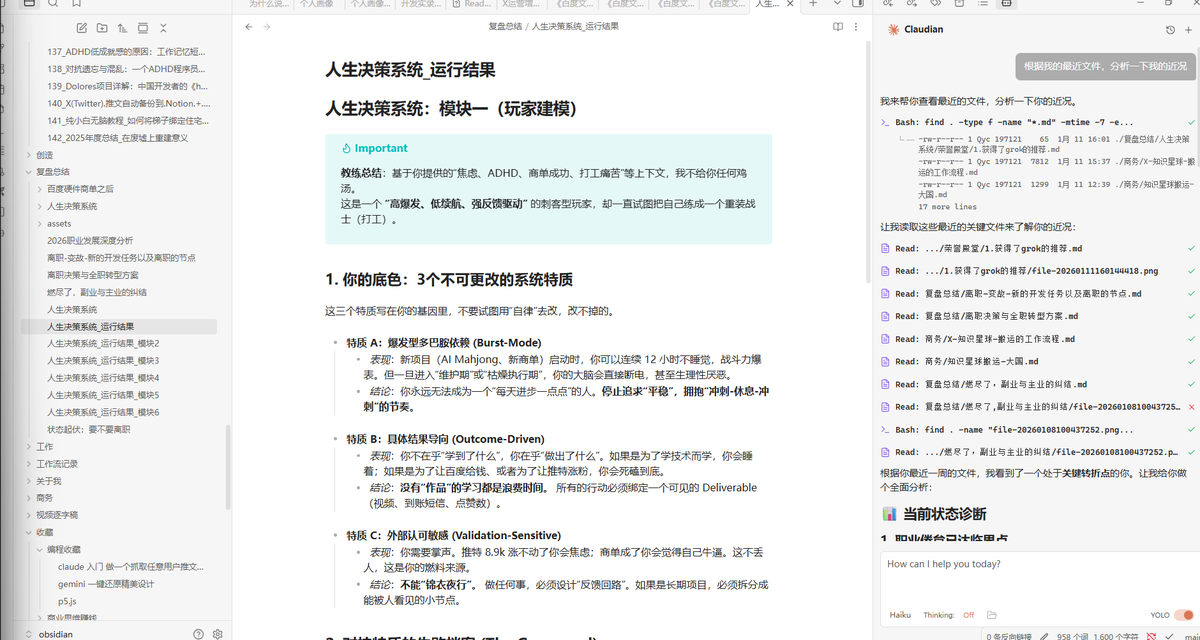
作为一个把 Obsidan 写到 Profile 里面的男人,我必须向你们推荐一个还未广为人知但必然封神的插件:Claudian Claudian 解决了什么痛点呢?那就是在 Obsidian 里面最便捷最强大地使用 Claude Code。 相对于我此前通过 Terminal 插件调用 Claude Code 的方案,Claudian 拥有以下的优势: 1. 免配置,即装即用,直接调用系统级 Claude Code 2. 更直观的聊天式界面,消除小白的命令行恐惧症 3. 支持行内交互模式,精准选择文本进行 AI 处理 4. 自动定位 Vault 为工作目录,免除手动定位的麻烦 5. 自动附加当前文件,以及编辑器中选择的文本,在对话中作为上下文提供给大模型 6. 支持 Skill/Command/MCP 项目级的自定义,非常方便打造个人最顺手的操作流程 7/8/9 功能实在是太多了,我就不一一列出了,在评论中我会附上几张图让大家体会一下它的强大。 顺便提一句,Clauddian 的作者就是拒绝了我的 PR 的那个男人 🤣。虽然心中略有不爽 ,看到他疯狂到半夜都在更新,我还是非常乐意当这个自来水,让每个 Obsidian 使用者能把 Claude Code 的超级强大功能利用好。 此外,我正基于 Claudian,打磨一个 Skill,目的就是让 Obsidian 成为最顺手最强大的公众号/公文写作工具,敬请期待。 github.com/YishenTu/claud…
中文
9
16
127
49.6K
rainworm.eth retweetledi
Yanhua
Yanhua@yanhua1010·
推荐一些我目前安装的Claude Skills: 1. Anthropic官方Skills github.com/anthropics/ski… 2. Superpowers 1.6万Star的Skill精选,从脑暴、写需求文档、开发、测试全包含,口碑相当好。 github.com/obra/superpowe… 3. Planning-with-files 参考Manus的Agent方法写的Skill。很适合多步骤任务,用这个Skill指导其他Skill工作也挺好。 github.com/OthmanAdi/plan… 4. X-article-publisher-skill 王树义老师写的X文章发布Skill, 这个值得研究下,后续看看能不能实现其他平台的自动化 github.com/wshuyi/x-artic… 5. NotebookLM skill 自动上传PDF、Youtube链接到NotebookLM,很适合NotebookLM内容的自动化处理 github.com/PleasePrompto/… 还有一些是自己平时总结的内容创作skills,后续继续分享具体使用场景案例!
Yanhua tweet media
向阳乔木@vista8

x.com/i/article/2010…

中文
70
473
2.4K
598.3K
rainworm.eth retweetledi
huangserva
huangserva@servasyy_ai·
我艹!内置 4 万 skill,可一键安装卸载!? skill 应用市场 GUI,还能自动检测 刚发现个Claude Skill管理器,直接起飞: ✅ 40,800+个Skill秒装,告别命令行 ✅ 自动安全扫描+评分(再也不怕后门) ✅ GitHub URL直接导入 ✅ 系统/项目级一眼分清带 ✅ GUI管理超级方便,拖个文件夹就能用 完全开源,4万个,随便你挑! 再也不怕找到好的skill了 👉 github.com/buzhangsan/ski…
中文
27
142
734
53.4K
rainworm.eth retweetledi
志辉
志辉@iamzhihui·
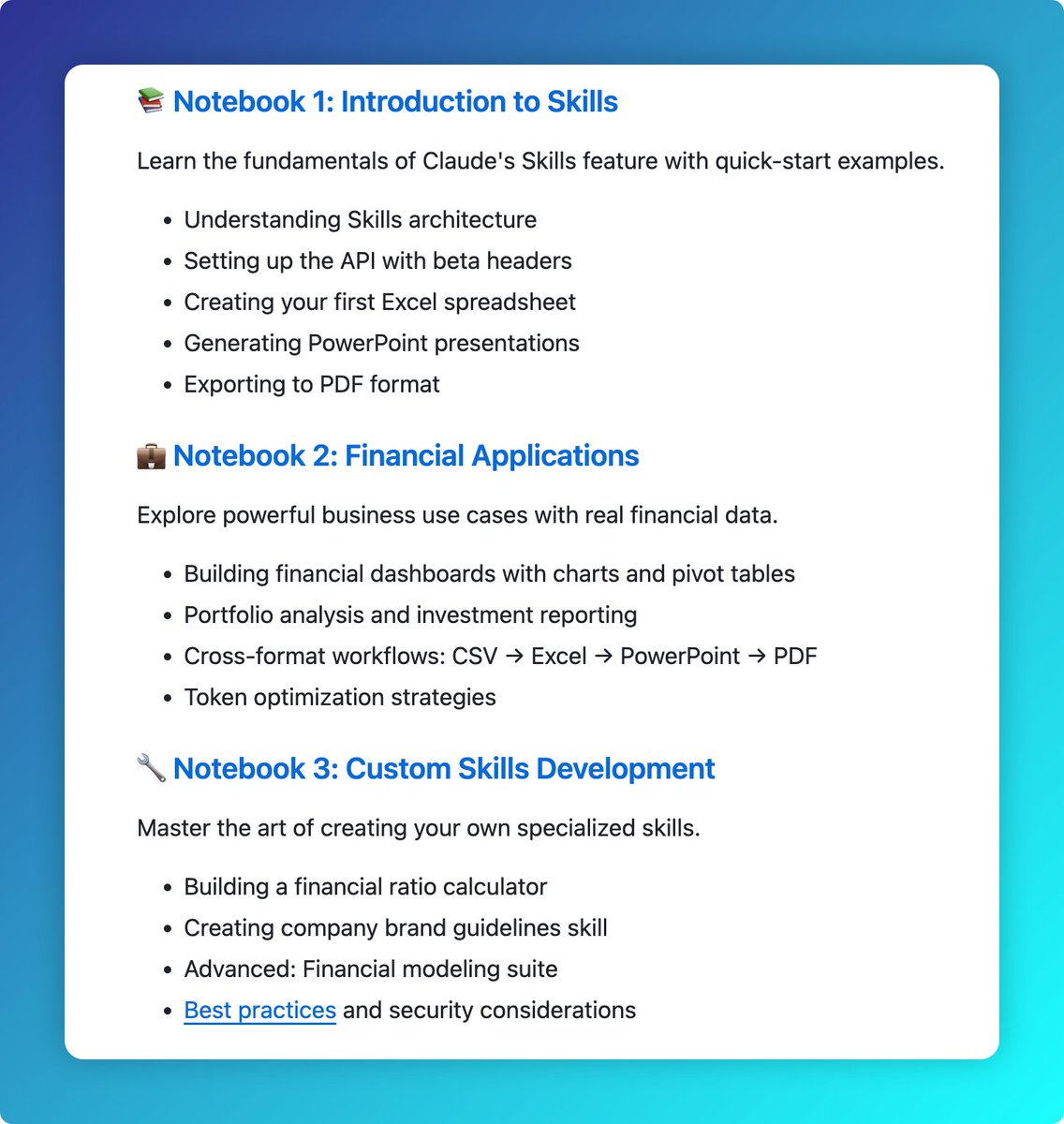
最好的 Claude Skills 学习资料 竟然藏到了这么深 三大练习案例代理由浅到深学习 Claude Skills ✅ Notebook1:入门+API设置 ✅ Notebook2:财务场景(CSV→Excel→PPT→PDF全流程) ✅Notebook3:教你自制专属Skills 财务/分析师/PM狂喜! 那么如何开始,很简单 跟着我的步骤就可以开学 1️⃣ 下载仓库 git clone github.com/anthropics/cla… cd claude-cookbooks/skills 2️⃣ 初始化环境 python -m venv venv source venv/bin/activate pip install -r requirements.txt 3️⃣ 配置 API_KEY cp .env.example .env # Edit .env and add your ANTHROPIC_API_KEY 4️⃣ 开始学习 jupyter notebook github.com/anthropics/cla…
志辉 tweet media
中文
10
65
276
17.8K