Sid Chaudhary

1.6K posts

Sid Chaudhary banner
Sid Chaudhary

Sid Chaudhary

@siditweet

Founder/CEO @intempt. Previously at Intel, Adobe & UC Berkeley. I post about entrepreneurship and life on the road
San Francisco, CA Katılım Ağustos 2008
429 Takip Edilen485 Takipçiler
Sid Chaudhary
Sid Chaudhary@siditweet·
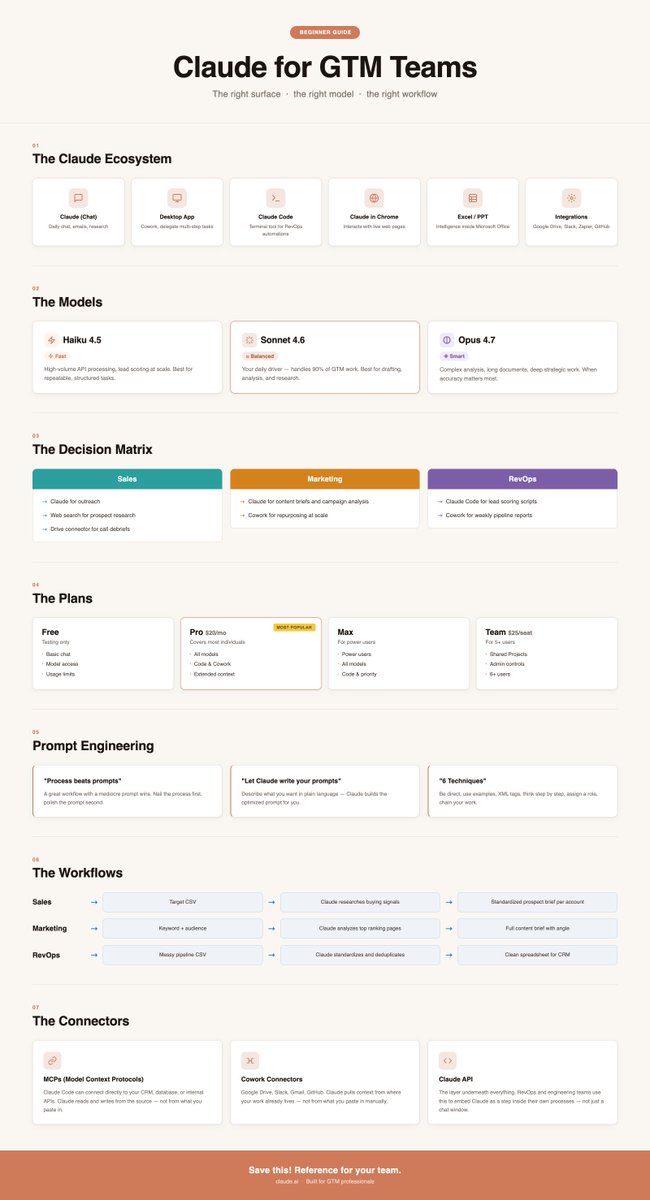
We built a beginner's map to @Claudeai for GTM teams. Here's everything you need to know to actually use it: Claude is not one product. It's an ecosystem of 6 surfaces, and I've watched most GTM teams use the wrong one and just leave money on the table because of it. 1. THE ECOSYSTEM → Claude (Chat): Daily chat interface for emails, research, analysis → Desktop App: Adds Cowork, delegates multi-step tasks, and Claude runs them autonomously → Claude Code: Terminal tool for RevOps teams building automations and processing large datasets → Claude in Chrome: Claude interacts with live web pages directly → Claude in Excel/PPT: Intelligence inside Microsoft Office 2. THE MODELS → Haiku 4.5: High-volume API processing and lead scoring at scale → Sonnet 4.6: Your daily driver, handles 90% of GTM work → Opus 4.7: Complex analysis, long documents, deep strategic work 3. THE DECISION MATRIX → Sales: Claude for outreach, web search for prospect research, Drive connector for call debriefs → Marketing: Claude for content briefs and campaign analysis, Cowork for repurposing at scale → RevOps: Claude Code for lead scoring scripts, Cowork for weekly pipeline reports 4. THE PLANS → Pro at $20/mo: Covers most individual GTM pros. All models, Code, Cowork, and connectors included → Max: For power users hitting limits → Team at $25/seat: Shared Projects and admin controls for teams of 5 or more 5. PROMPT ENGINEERING → Process beats prompts. A great workflow with a mediocre prompt wins every time → Let Claude write your prompts. Describe what you want, ask Claude to build it, then run it → The 6 techniques: be direct, use examples, use XML tags, ask Claude to think step by step, assign a role, chain complex work into sequential prompts 6. THE WORKFLOWS → Sales: Target CSV → Claude researches buying signals → Standardized prospect brief per account → Marketing: Keyword + audience → Claude analyzes top ranking pages → Full content brief with angle → RevOps: Messy pipeline CSV → Claude standardizes and deduplicates → Clean spreadsheet for CRM 7. THE CONNECTORS → MCPs (Model Context Protocols): Claude Code can connect directly to your CRM, database, or internal APIs. Claude reads and writes from the source. → Cowork Connectors: Google Drive, Slack, Gmail, GitHub. Claude pulls context from where your work already lives, not from what you paste in. → Claude API: The layer underneath everything. RevOps and engineering teams use this to embed Claude as a step inside their own processes, not just a chat window. Save this! 📌 Send it to anyone on your team, just starting with Claude. It'll be the reference they come back to every week.
Sid Chaudhary tweet media
English
1
0
1
31
Sid Chaudhary
Sid Chaudhary@siditweet·
Stop writing 500-word prompts that don't work. I've seen this dozens of times. Talented GTM teams, smart people, trying to get Claude to write something useful. They paste their whole brand guide into the prompt. Explain the audience three different ways. Claude still comes back with something that sounds like every other AI post out there. Every time, the issue is the same: Claude has no idea who they are, what they've built, or how they actually talk. Here's the 3-part structure that works better: Part 1: Context (.md) files. Step 1. Create a file called "ABOUT ME." Step 2. Put in your role, audience, goals, and tone. Step 3. Create a second file: "WRITING STYLE." Step 4. Add 3-5 examples of your best past writing. Step 5. Save both as .md files. Step 6. Upload them before you type a prompt. Step 7. Claude knows who you are before it writes a word. Part 2: Clear instruction. Step 1. State the task in one sentence. Step 2. Name the format. (Post, email, thread, ad.) Step 3. Name the audience. (Founders, marketers, SDRs, AEs.) Step 4. That's your prompt. Not 500 words. Three lines. Part 3: "Ask me questions first." Step 1. Add this line at the end of every prompt: "DO NOT start writing yet. Ask me clarifying questions first." Step 2. Claude will ask 3-6 questions. Step 3. Answer them. Step 4. Now Claude writes something that actually sounds like you said it. The short version: a vague one-liner gets you generic output. Add "ask me questions first" and you get something closer. Add .md context files and it starts sounding like you actually wrote it. If this resonated, join our Slack community. Link in the comments. ♻ Repost to help someone on your team prompt better.
Sid Chaudhary tweet media
English
1
0
0
24
Sid Chaudhary
Sid Chaudhary@siditweet·
A website visitor is curious. A signup is intent. Most outreach happens too late. The moment someone signs up for your product is the window that actually matters. Pay attention to what they did before signing up. Pay attention to what they do after. Take all of that, website activity, app activity, and push it to a Slack card. One view. Real time. Before the lead goes cold. If that lead does not take the actions you expect within seven days, reach out. Find their phone number. If you did not collect it at signup, use a phone finder. You have their email. Give them a call. Website behavior plus app behavior, to Slack, seven-day trigger, human outreach. That is the playbook. Reach out in that window. You will learn a lot.
English
1
0
1
10
Sid Chaudhary
Sid Chaudhary@siditweet·
10. @Base44 shipped built-in SEO and AI search optimization for every app Grades your app on Google and AI search visibility and auto-generates an llms.txt file. The SEO grade is actionable. AI visibility scores shift with model updates outside your control. (intempt.link/OqHsvHr) Map what happens when those instructions become outdated. That is the actual work. Ciao Ciao 🚀
English
0
0
0
65
Sid Chaudhary
Sid Chaudhary@siditweet·
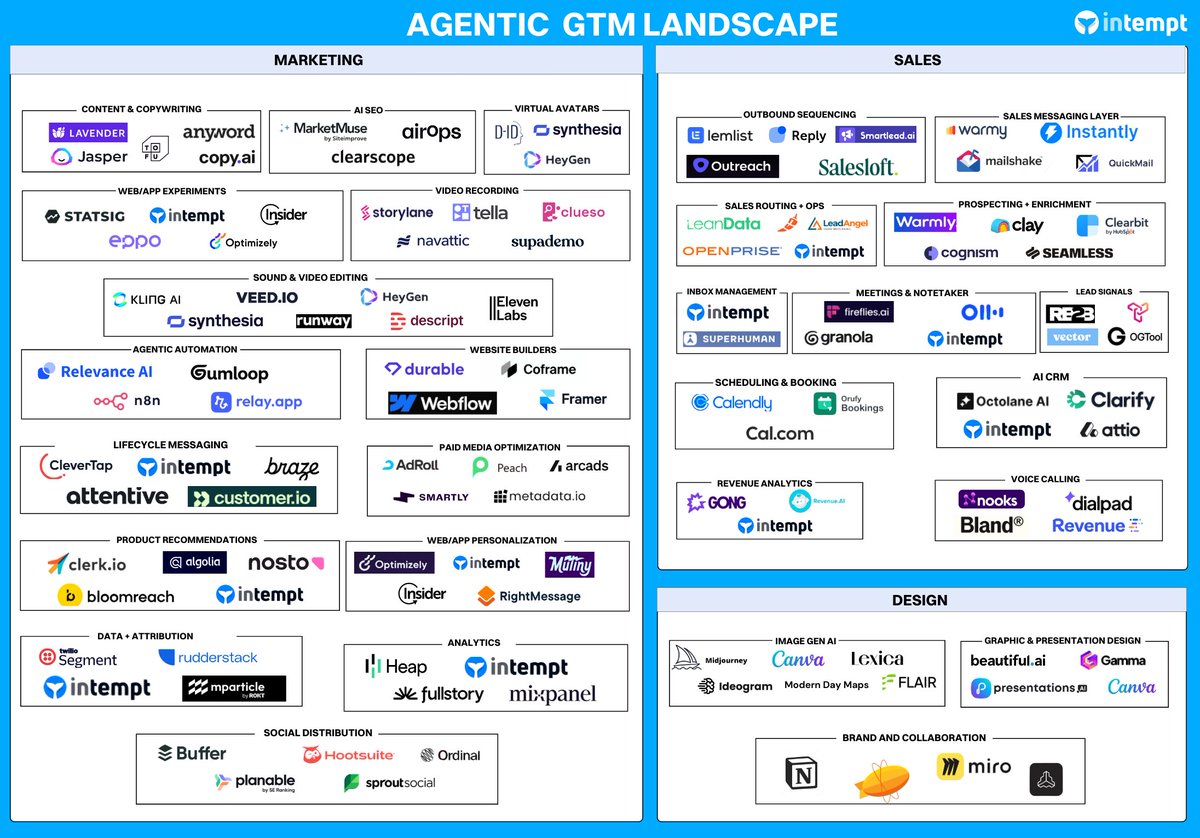
The tools that shipped this week don't need your morning prompt. They're already running. Here is what launched.
Sid Chaudhary tweet media
English
1
0
1
20
Sid Chaudhary
Sid Chaudhary@siditweet·
Most people suck at using Claude for actual GTM strategy work. So I built 10 strategic prompts that help you generate a complete GTM system. When you run these with your company data, they help you build: • A stress-tested ICP and market assumptions validated • A differentiated positioning narrative your team believes in • Pricing tiers optimized for your customer segments • A GTM expansion strategy into adjacent markets • Competitive positioning that actually holds • An investor narrative ready for your next fundraise • A framework for identifying and fixing retention problems • Discovery of untapped revenue opportunities This playbook is built on every layer of GTM strategy—from market validation to investor pitch. Each prompt forces specific, analytical thinking. The exact frameworks that SaaS consultants charge $20k to deliver. Here's what you'll build: 1. Market Reality Check: Stress-test your assumptions. Identify blind spots investors will point out. 2. Founder Blind-Spot Detection: Reveal your cognitive biases before they cost you. 3. Pricing Leverage: Find revenue opportunities without proportional cost increases. 4. Narrative Differentiation: Craft positioning that creates separation from competitors. 5. Activation Bottleneck: Diagnose where and why users fail to reach activation. 6. Category Direction Forecast: Predict how your category will evolve over 3-5 years. 7. Strategic TAM Expansion: Identify and evaluate adjacent market segments to fuel growth. 8. Competitive Counter-Moves: Develop strategic responses to competitor moves. 9. Value-Based Tiering: Design pricing tiers that align with how customers perceive value. 10. Investor Narrative Rebuild: Refresh your fundraising pitch for current market conditions. Each prompt is a thinking framework, not a template. The quality of your output depends on the quality of your input context. Front-load specific data (actual customer quotes, deal sizes, retention rates, competitor moves). Generic inputs get generic outputs. Run these quarterly as your market and competition evolve. Use outputs as starting points, not final answers. You have context, Claude does not. Treat the analysis as high-quality first drafts that inform your decisions. Comment "GTM" and I'll send the complete 10-prompt playbook straight to your DMs.
Sid Chaudhary tweet media
English
0
0
0
25
Sid Chaudhary
Sid Chaudhary@siditweet·
You've become a human approve button on your own tools, and I've watched this kill productivity for almost every GTM team I know. Here's what changed in @Claudeai and why it matters: 𝗨𝗽𝗱𝗮𝘁𝗲 𝟭: Dispatch You pair your phone to your desktop, and from that point, you can text Claude a task from anywhere. It's simple, but it changes everything. → Claude runs the workflow on your machine while you're away from it → Not a chatbot you message and wait on → An agent you actually delegate to and move on 𝗨𝗽𝗱𝗮𝘁𝗲 𝟮: Auto Mode in Claude Code Until now, Claude has asked for your approval before every single action. On anything complex, you'd just become a human approve button, clicking through dozens of prompts without actually reading them. Auto Mode fixes that. → A classifier reviews each action before it runs → Safe actions proceed automatically without interrupting you → Risky ones get flagged and redirected → You only get pulled in when something actually warrants your attention Together, they point at something bigger for GTM teams. Because the real bottleneck isn't Claude. It's the overhead. Switching tools. Waiting on workflows. Approving steps that didn't need a human touch in the first place. That's where the hours go. These two updates directly cut that overhead. Delegation without friction. Time savings add up fast.
Sid Chaudhary tweet media
English
0
0
1
8
Sid Chaudhary
Sid Chaudhary@siditweet·
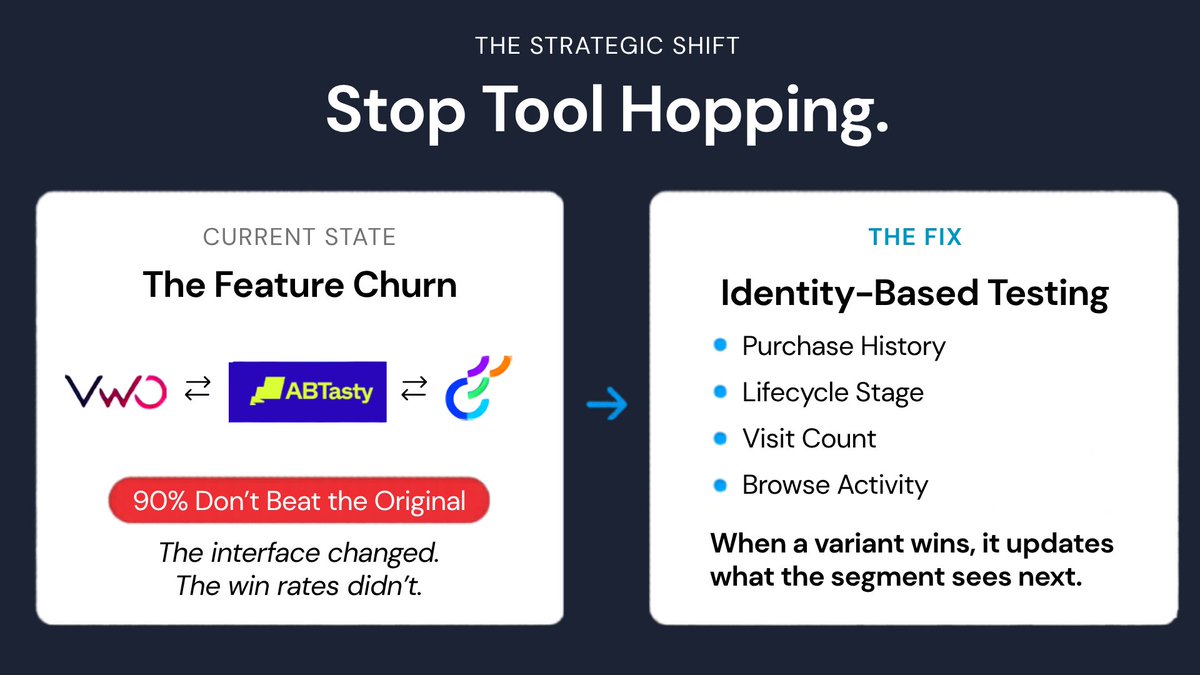
90% of A/B tests tied to revenue don't beat the original version they're compared against. Teams keep blaming the tool. @VWO to @Optimizely to @ABTasty. I've watched this cycle repeat for years. The interface changes. The win rates don't move.
Sid Chaudhary tweet media
English
2
0
0
12
Sid Chaudhary
Sid Chaudhary@siditweet·
@VWO @Optimizely @ABTasty When a variant wins, it doesn't stay in a dashboard. It updates what that segment sees next. That's the difference. Where the testing layer sits in relation to your customer data. Switching the tool is the expensive version of not fixing that.
English
0
0
0
12
Sid Chaudhary
Sid Chaudhary@siditweet·
So the winner reflects the least-bad option for a mixed group of people who had almost nothing in common. Switching to a different tool doesn't change that. A cleaner interface doesn't change that. What changes it, connecting testing to your customer data. That means the experiment knows who it's running on before it starts: purchase history, lifecycle stage, how many times someone has visited, what they've browsed.
English
1
0
0
11