

Kuria theMacharian 🇰🇪
20.5K posts

Kuria theMacharian 🇰🇪
@theMacharian
Concerned and Grounded
Nairobi, Kenya Katılım Şubat 2011
1.4K Takip Edilen370 Takipçiler

I have screamt 😂😂😂😂😂😂😂
I’m sorry WHAT IS THIS SONG
English
Kuria theMacharian 🇰🇪 retweetledi

Kuria theMacharian 🇰🇪 retweetledi

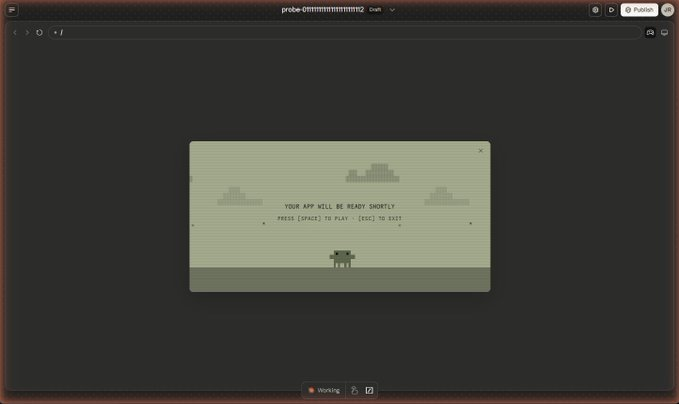
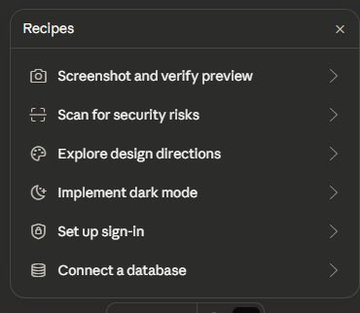
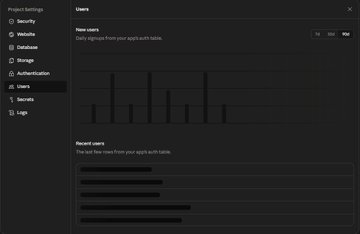
Another leak from Anthropic
They created a lovable-like feature where you can build full-stack apps easily
They are coming after everthing

Tensor@hysteresis_x
Sneak leak at something coming soon to Claude :)
English
Kuria theMacharian 🇰🇪 retweetledi

650,000+ Kenyans registered on Boma Yangu.
But saved NOTHING.
Only 40 people crossed KSh 1 million.
The 653,183 didn't deposit even a cent.
Some people will still call this “apathy,” but no. This is distrust.
You’re asking citizens to lock away up to KSh 2 million plus in a system and flats with no title deeds, no clear ownership, and fully dependent on government policy that can change overnight.
That’s not an investment. It’s blind faith. Kenyans are not stupid.
If tomorrow a new government scraps or alters the program, who takes responsibility?
Or are people just expected to gamble their life savings and hope for the best?
If a system requires blind trust instead of guarantees, people will walk away, and that is exactly what is happening.


English
@Safaricom_Care @SafaricomPLC this is the 4th time I am getting this alert, I do not want to buy your mobile data anymore! That system should be able to tell that I am using your home fibre and do the necessary. Kindly deal with this issue.

English
Kuria theMacharian 🇰🇪 retweetledi

1.Download Obsidian → create a new vault (folder)
2.Download Claude Desktop (Claude Code)
3.Point Claude to the path of your vault
4.Paste the prompt from the article
> Just 4 steps and 10 minutes of your time
The face I made when I realized I had been suffering all this time, not knowing such simple things
Defileo🔮@defileo
English
Kuria theMacharian 🇰🇪 retweetledi

this video is the CLEAREST explanation of how claude skills + AI agents work and how to use them
most people set up an AI agent and wonder why it keeps disappointing them.
the context window is everything
context is what the model assembles before it takes any action. think of it like everything the agent needs to read before it does anything. the quality of what goes in determines the quality of what comes out. the models are genuinely really good right now. claude and gpt are exceptional. the variable is almost always the context you give them.
1. agent.md files are mostly unnecessary
every single line you put in an agent.md file gets added to every single conversation you have with your agent. a 1000 line file is around 7000 tokens burning on every run. the model already knows to use react. it can read your codebase. save the agent.md for proprietary information specific to your company that the model genuinely cannot know on its own.
2. skills are the actual unlock
a skill.md file works differently. what loads into context is only the name and description, around 50 tokens. the full instructions only appear when the agent recognizes it needs that skill. so instead of 7000 tokens on every run you have 50. and the agent stays sharp because the context window stays lean. the closer you get to filling the context window the worse the agent performs, same way you perform worse when someone dumps 10 things on you at once.
3. here is how to actually build a skill the right way
most people identify a workflow and immediately try to write the skill. what you want to do instead is run the workflow by hand with the agent first. walk it through every single step. tell it what to check, what good looks like, what bad looks like. correct it in real time. once you have had a full successful run from start to finish, tell the agent to review everything it just did and write the skill itself. it writes a better skill than you will because it has the full context of what actually worked in practice not in theory.
4. recursively building skills is how you go from frustrated to reliable
when the skill breaks, and it will break, ask the agent exactly why it failed. it will tell you specifically what went wrong. fix it together in that same conversation. then tell it to update the skill file so that failure mode never happens again. ross mike did this five times with his youtube report generator. it now pulls from eight different data sources and runs flawlessly every single time without him touching it.
5. sub agents are something you earn not something you set up on day one
start with one agent. build one workflow. turn it into one skill. once that works add another. ross mike has five sub agents now covering marketing, business, personal and more. it took months to get there and every single one exists because a workflow proved it deserved to exist. the people who set up 15 sub agents on day one and wonder why nothing works skipped all the steps that make the thing actually run.
6. your workflow is the thing the model cannot get anywhere else
the model has been trained on everything. it knows more than you about most things. what it does not have is your specific process, your taste, your way of doing things. that is what skills capture. that is what makes your agent actually useful versus a generic one. downloading someone else's skill means downloading their context onto your setup and it will not work the way you want it to because it was never built around how you work.
this is the clearest explanation of how agents actually work i have heard. @rasmic runs this stuff every single day and the results show it.
full episode is now live on @startupideaspod where you get your pods
people charge for this sorta stuff
i give away the sauce for free
i just want you to win
watch
English
Kuria theMacharian 🇰🇪 retweetledi

The 80% job: how design leads are using AI — and it’s not about mockups
uxdesign.cc/the-80-job-how… #UX

English
Kuria theMacharian 🇰🇪 retweetledi

Kuria theMacharian 🇰🇪 retweetledi

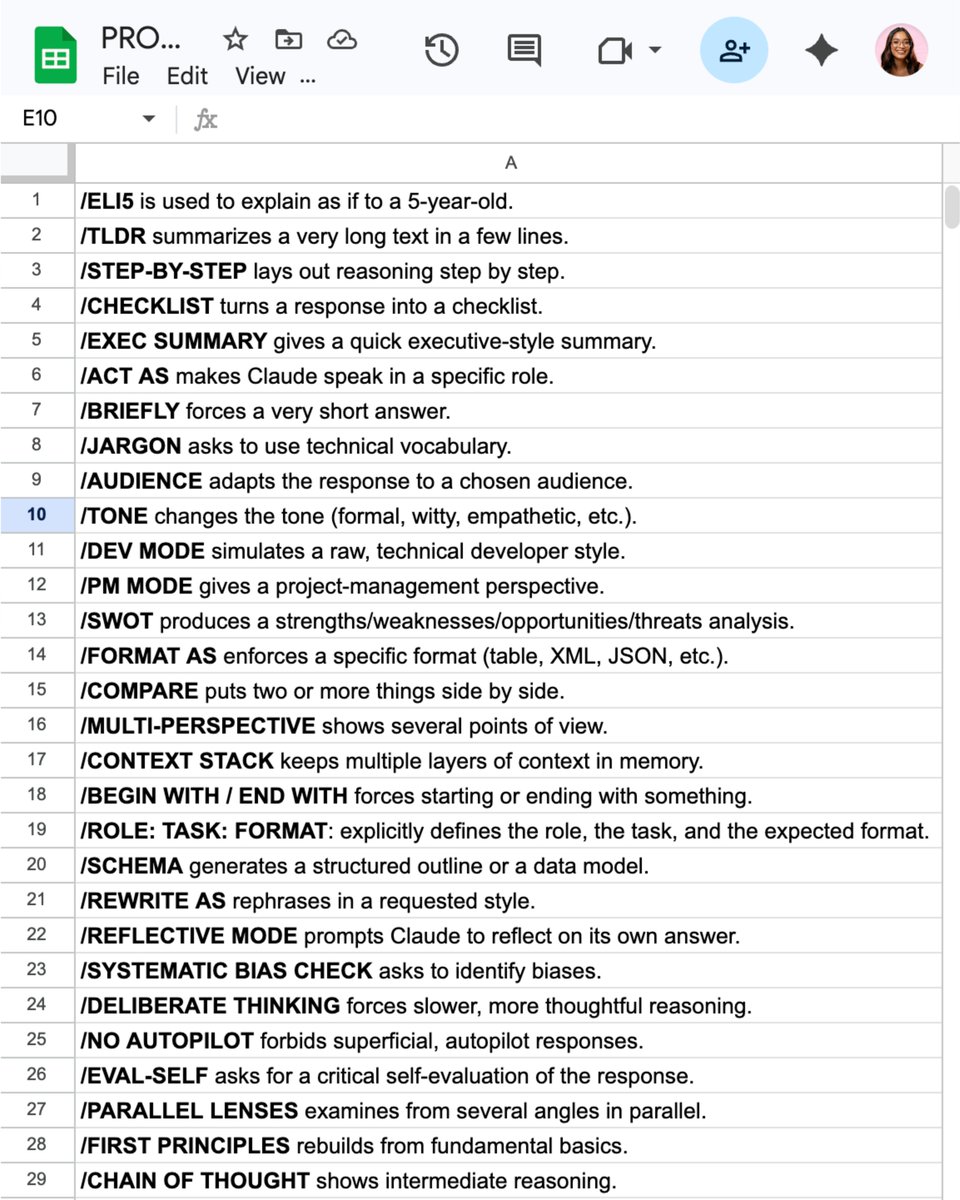
32 Claude shortcut hacks for faster prompts:
(worth saving for later)
Add one of these at the very start of your prompt.
Example: ELI5: [your topic] → get a simple, kid-friendly explanation.
——
/ELI5 is used to explain as if to a 5-year-old.
/TLDL summarizes a very long text in a few lines.
/STEP-BY-STEP lays out reasoning step by step.
/CHECKLIST turns a response into a checklist.
/EXEC SUMMARY gives a quick executive-style summary.
/ACT AS makes ChatGPT speak in a specific role.
/BRIEFLY forces a very short answer.
/JARGON asks to use technical vocabulary.
/AUDIENCE adapts the response to a chosen audience.
/TONE changes the tone (formal, funny, dramatic, etc.).
/DEV MODE simulates a raw, technical developer style.
/PM MODE gives a project-management perspective.
/SWOT produces a strengths/weaknesses/opportunities/threats analysis.
/FORMAT AS enforces a specific format (table, JSON, etc.).
/COMPARE puts two or more things side by side.
/MULTI-PERSPECTIVE shows several points of view.
/CONTEXT STACK keeps multiple layers of context in memory.
/BEGIN WITH / END WITH forces starting or ending with something.
/ROLE: TASK: FORMAT: explicitly defines the role, the task, and the expected format.
/SCHEMA generates a structured outline or a data model.
/REWRITE AS: rephrases in a requested style.
/REFLECTIVE MODE prompts the AI to reflect on its own answer.
/SYSTEMATIC BIAS CHECK asks to identify biases.
/DELIBERATE THINKING forces slower, more thoughtful reasoning.
/NO AUTOPILOT forbids superficial, autopilot responses.
/EVAL-SELF asks for a critical self-evaluation of the response.
/PARALLEL LENSES examines from several angles in parallel.
/FIRST PRINCIPLES rebuilds from fundamental basics.
/CHAIN OF THOUGHT shows intermediate reasoning.
/PITFALLS identifies possible traps and errors.
/METRICS MODE expresses answers with measures and indicators.
/GUARDRAIL sets strict boundaries not to cross.
——
After months of testing Claude, I built a single prompt library with every prompt I personally use.
To access it, complete these 4 steps:
1. Subscribe (for free) → how-to-ai.guide.
2. Open my welcome email.
3. Hit the automatic reply button inside.
4. Receive your prompt library + bonus video.
Ruben Hassid@rubenhassid
English
Kuria theMacharian 🇰🇪 retweetledi

Kuria theMacharian 🇰🇪 retweetledi

"Claude usage limit reached. Your limit will reset at 7pm"
every. fucking. day.
was about to pay $200 for Max. then I read this article
98.5% of tokens - wasted
you're not paying for answers. you're paying for Claude to re-read its own homework 30 times
spent months blaming Anthropic for being greedy. turns out the problem was how I write prompts
5 minutes of reading
basic plan now handles more than my old Max
kaize@0x_kaize
English
Kuria theMacharian 🇰🇪 retweetledi

Kuria theMacharian 🇰🇪 retweetledi

Best breakdown of Karpathy's "second brain" system I've seen. My co-founder turned it into an actual step-by-step build.
The 80/20:
1. Three folders: raw/ (dump everything), wiki/ (AI organizes it), outputs/ (AI answers your questions)
2. One schema file (CLAUDE.md) that tells the AI how to organize your knowledge. Copy the template in the article.
3. Don't organize anything by hand. Drop raw files in, tell the AI "compile the wiki." Walk away.
4. Ask questions against your own knowledge base. Save the answers back. Every question makes the next one better.
5. Monthly health check: have the AI flag contradictions, missing sources, and gaps.
6. Skip Obsidian. A folder of .md files and a good schema beats 47 plugins every time.
He includes a free skill that scaffolds the whole system in 60 seconds.
Nick Spisak@NickSpisak_
English
Kuria theMacharian 🇰🇪 retweetledi

LLM Knowledge Bases
Something I'm finding very useful recently: using LLMs to build personal knowledge bases for various topics of research interest. In this way, a large fraction of my recent token throughput is going less into manipulating code, and more into manipulating knowledge (stored as markdown and images). The latest LLMs are quite good at it. So:
Data ingest:
I index source documents (articles, papers, repos, datasets, images, etc.) into a raw/ directory, then I use an LLM to incrementally "compile" a wiki, which is just a collection of .md files in a directory structure. The wiki includes summaries of all the data in raw/, backlinks, and then it categorizes data into concepts, writes articles for them, and links them all. To convert web articles into .md files I like to use the Obsidian Web Clipper extension, and then I also use a hotkey to download all the related images to local so that my LLM can easily reference them.
IDE:
I use Obsidian as the IDE "frontend" where I can view the raw data, the the compiled wiki, and the derived visualizations. Important to note that the LLM writes and maintains all of the data of the wiki, I rarely touch it directly. I've played with a few Obsidian plugins to render and view data in other ways (e.g. Marp for slides).
Q&A:
Where things get interesting is that once your wiki is big enough (e.g. mine on some recent research is ~100 articles and ~400K words), you can ask your LLM agent all kinds of complex questions against the wiki, and it will go off, research the answers, etc. I thought I had to reach for fancy RAG, but the LLM has been pretty good about auto-maintaining index files and brief summaries of all the documents and it reads all the important related data fairly easily at this ~small scale.
Output:
Instead of getting answers in text/terminal, I like to have it render markdown files for me, or slide shows (Marp format), or matplotlib images, all of which I then view again in Obsidian. You can imagine many other visual output formats depending on the query. Often, I end up "filing" the outputs back into the wiki to enhance it for further queries. So my own explorations and queries always "add up" in the knowledge base.
Linting:
I've run some LLM "health checks" over the wiki to e.g. find inconsistent data, impute missing data (with web searchers), find interesting connections for new article candidates, etc., to incrementally clean up the wiki and enhance its overall data integrity. The LLMs are quite good at suggesting further questions to ask and look into.
Extra tools:
I find myself developing additional tools to process the data, e.g. I vibe coded a small and naive search engine over the wiki, which I both use directly (in a web ui), but more often I want to hand it off to an LLM via CLI as a tool for larger queries.
Further explorations:
As the repo grows, the natural desire is to also think about synthetic data generation + finetuning to have your LLM "know" the data in its weights instead of just context windows.
TLDR: raw data from a given number of sources is collected, then compiled by an LLM into a .md wiki, then operated on by various CLIs by the LLM to do Q&A and to incrementally enhance the wiki, and all of it viewable in Obsidian. You rarely ever write or edit the wiki manually, it's the domain of the LLM. I think there is room here for an incredible new product instead of a hacky collection of scripts.
English
Kuria theMacharian 🇰🇪 retweetledi

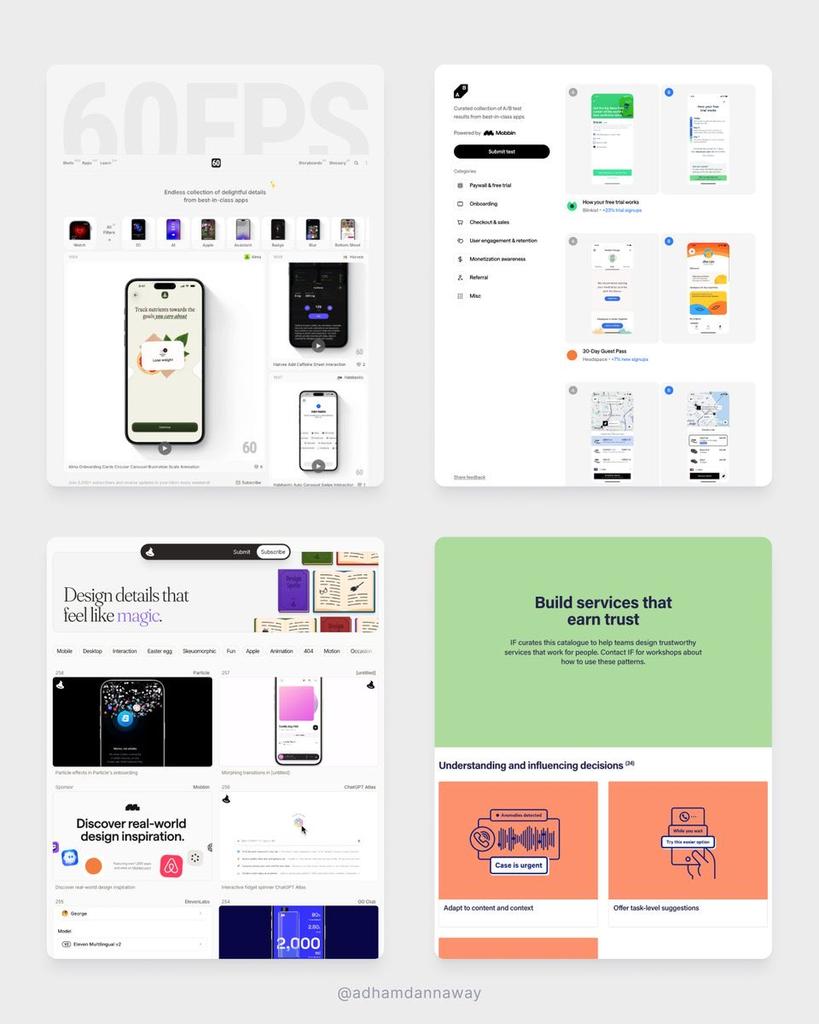
Go-to sites to learn UI design for free
Motion → 60fps.design
Patterns → catalogue.projectsbyif.com
AB Tests → abtest.design
Inspiration → designspells.com
Breakdowns → uxsnaps.com
UI components → uiplaybook.dev
Did I miss any? 🤔
English
Kuria theMacharian 🇰🇪 retweetledi

10 free Claude Code skills for Meta Ads.
No API keys. No MCP setup. No coding. 👇
Just export a CSV from Ads Manager,
drop it in, and run the command
These all work with standard Meta Ads exports.
Nothing connects to your account.
Your data stays on your machine.
1/ Creative fatigue scanner
Tracks CTR decay, frequency buildup, and CPC inflation
across every active ad.
Categorizes each one: 🟢 healthy, 🟡 warning, 🔴 critical.
Tells you what to pause and what to refresh.
2/ Wasted spend finder
Scans for ads and ad sets producing zero conversions.
Groups the waste by theme, attaches dollar amounts.
Most accounts have 15-25% hidden waste. This finds it.
3/ CPA spike diagnosis
Paste current vs. previous period data.
It isolates the root cause — audience fatigue, creative decay,
bid shifts, budget ramp too fast, external factors.
Ranked by dollar impact.
4/ Audience overlap detector
Maps every ad set's targeting against every other ad set.
Flags where you're bidding against yourself.
Shows the exact overlap percentage and the CPM cost.
5/ A/B test analyzer
Calculates statistical significance on your test data.
Tells you if your winner is actually a winner
or if you're calling it too early.
Includes sample size recommendations.
6/ Budget reallocation modeler
Models what happens to CPA at different spend levels
using your actual historical data.
Shows where scaling works and where returns collapse.
7/ Weekly performance report
Paste this week's numbers.
Get an executive summary, campaign table, creative rankings,
audience insights, and a prioritized action list.
Plain English. No jargon. Ready to send.
8/ Ad copy generator
Feed it your product brief and audience data.
Gets back 20+ copy variations — short, medium, long-form —
across Meta's placement specs.
Feed, Stories, Reels — character limits handled.
9/ Competitor ad library analyzer
Give it a competitor name.
It pulls their active Meta ads from the Ad Library,
categorizes by theme, identifies their top hooks and angles,
and suggests what to test against them.
10/ Lookalike audience refresher
Audits your current lookalike performance.
Flags which ones have degraded (they decay every 60-90 days).
Recommends which seed lists to update,
what % to test, and which to retire.
Setup:
→ Download the .md files
→ Add them to a Claude Project as knowledge
→ Export your last 30 days from Meta Ads Manager
→ Start asking questions
Works with Claude Pro ($20/month).
No terminal required if you use Claude Projects.
Comment "Skills" and I'll send you the full guide
(must be connected)

English
Kuria theMacharian 🇰🇪 retweetledi
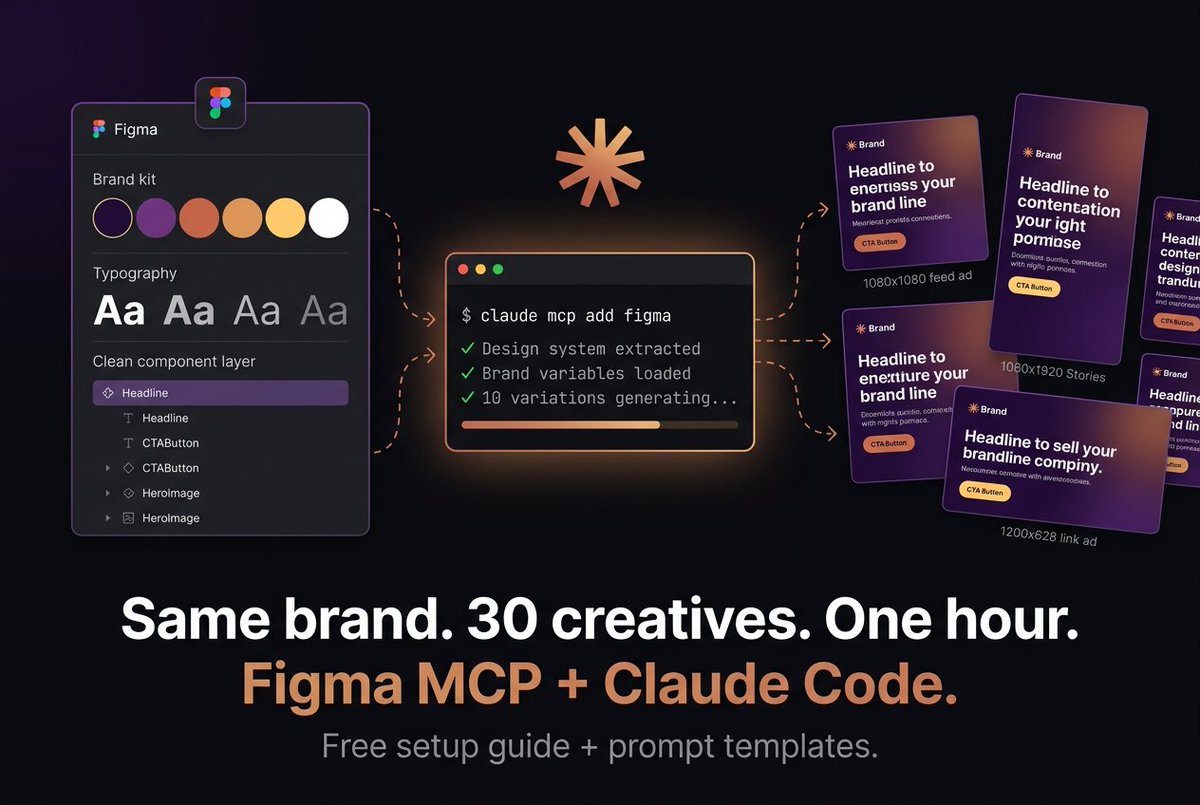
Figma MCP + Claude Code
140 ads in 11 minutes. 👇
Same brand colors.
Same fonts.
Same layout rules.
Because the AI reads my actual Figma file
Here's the problem with AI-generated ads:
They look like AI-generated ads.
Generic colors.
Wrong fonts.
Off-brand everything.
You spend more time fixing them than you saved.
Figma's MCP server changes this.
It lets Claude Code read your real design system — your brand variables, typography styles, components, spacing tokens — and generate creatives that actually match your brand.
Not "close enough."
Exact match.
Here's the workflow:
1/ Set up your brand kit in Figma
Define your colors, fonts, and spacing as variables.
Name your layers clearly (not "Rectangle 47").
Build one master template per ad format.
2/ Connect Figma to Claude Code
One command in your terminal.
Claude reads your design system and learns your brand rules.
You do this once.
3/ Give it a brief
Product, audience, goal, key benefit, offer.
Ask for 10 variations with different hooks: → Problem-aware → Benefit-led → Social proof → Direct offer → Curiosity gap
4/ Scale across formats
Take your best variations and adapt: 1080x1080 for feed.
1080x1920 for Stories/Reels.
1200x628 for link ads.
10 creatives become 30 in minutes.
5/ Iterate on winners
When Meta tells you which ad is winning, feed that back in and generate 10 more riffs on the winner.
Different secondary text, color emphasis, CTA wording.
This is how you compound creative testing.
What this replaces:
→ Designer making variations manually in Figma — hours
→ Agency charging per revision — $$$
→ You resizing the same ad 4 times — soul-crushing
What it costs:
→ Claude Code: free to start
→ Figma paid seat: you probably already have one
→ Meta Marketing API: free
The brands winning on Meta right now aren't running 3-5 creatives.
They're running 30-50+, cycling weekly.
This is how you keep up without a full creative team.
Comment "Figma" and I'll send you the full setup guide + copy-paste prompt templates for every ad type.
(must be connected)
English
Kuria theMacharian 🇰🇪 retweetledi


Kuria theMacharian 🇰🇪 retweetledi
