
Sabitlenmiş Tweet
Simon
7.1K posts


Simon
@tokumin
@NotebookLM, @AIFF, CC, Jules & Stitch @GoogleLabs 🕒 Gemini & PaLM2 post-training, AI Studio, Gemini API, YT, Discover, Search. More LaMDA moments.
latent space Katılım Şubat 2007
1.8K Takip Edilen12K Takipçiler
Simon retweetledi

We are building up to something big for I/O, but we had to sneak this update out early. ✨
The native image generation inside Stitch just got a glow-up. We've upgraded the underlying agent to give you:
🖼️ Higher overall quality and fidelity
🎨 Better alignment with your specific brand vibe
📝 Deeper understanding of your page's context
Check out the before and after! 👇

English
Simon retweetledi

Excited to introduce Gemma 4 Multi-Token Prediction Drafters⚡️Accelerated inference right in your pockets
- Up to a 3x speedup
- Same quality guarantees
- Available in your favorite open-source tools
English

I caved and downloaded Hermes to try.
For those of you who have tried both Hermes and OpenClaw what difference do you notice?
No shilling please, just want some honest opinions
English
Simon retweetledi


@MarceloLima @iambiaowang @joshwoodward @stevenbjohnson @NotebookLM @sundarpichai @demishassabis @JeffDean Thanks for the feedback Marcelo - this is a tricky area since some URLs are unreachable by Notebook - we should make it easier to remove failed files tho. BTW - we just launched AI souce organization! the button is a little hidden, but give it a try: x.com/NotebookLM/sta…
NotebookLM@NotebookLM
Mo sources mo problems? Not anymore: Rolling out now, NotebookLM can auto-label & categorize sources (when you have 5+), so you can spend less time scrolling and more time thinking/learning/philosophizing, etc. Rename, reorganize, & personalize (emojis!) to your ❤️'s content.
English

@iambiaowang @joshwoodward @tokumin @stevenbjohnson @NotebookLM @sundarpichai @demishassabis @JeffDean @iambiaowang
@joshwoodward
@tokumin
@stevenbjohnson
@notebooklm
@sundarpichai
@demishassabis
@jeffdean
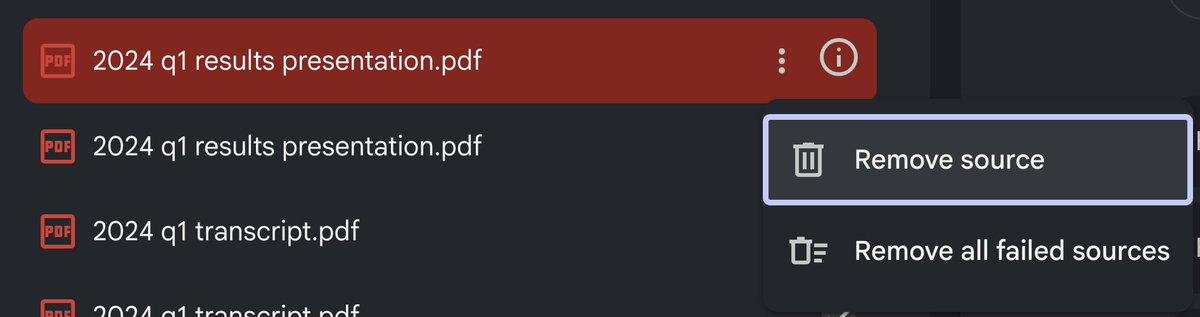
How ironic that I have to manually manage sources for an artificial intelligence project that should be able to figure out if it has duplicates or not
English
@iambiaowang @joshwoodward @tokumin @stevenbjohnson @notebooklm @sundarpichai @demishassabis @jeffdean
Can the team improve the reliability of document upload and let NotebookLM automatically retry failed uploads? The limit is 600 documents but in practice even uploading 250 gets you a lot of failures and it's very tedious to fix each one individually

English
Simon retweetledi

Major new feature for @NotebookLM power users: in the tradition of Mind Maps, Notebook can now auto-label your sources, making it much easier to manage notebooks with many sources.
I’ve been using it for weeks and it is amazingly versatile with big notebooks. Details below.
Here’s how it works. If you have more than 5 sources in a Notebook, you’ll see a new “auto-label” button above the source list on the left side. Click on that and Notebook will review the content of all your sources and organize them into high-level categories. Each source can have multiple labels if there is overlap in the subject matter.
Once the labels have been applied, you’ll see a new tidy view of your sources where you see only the top level categories, but you can easily expand to see all the sources associated with each label. Click the three dot menu next to each to rename or delete the label. (Sources won’t be deleted.) Or add emojis to visually differentiate between labels. You can click the three dot menu next to each source to assign different labels to the source.
Having that organized label view in the source panel makes it much easier to find a specific source you’re looking for, but that’s just the beginning.
You can also focus the AI on specific categories using the selection buttons on the right hand of the source panel. Select one category and all the responses in chat will be grounded exclusively in the sources assigned to that label. This can be helpful if you’re worried about the AI getting distracted by information in other categories, and it can speed up your chat response times because there are fewer sources to load into the context.
Selecting by label is also super helpful for generating studio artifacts. If you want a podcast focused only the sources about the civil war in your American History notebook, just select that label and click the audio overview button in Studio.
Label view also greatly enhances Fast and Deep Research in a notebook with many existing sources. In the past, if one of the research agents added a batch of sources (up to 40 or 50 with Deep Research) all the sources would be scattered through your source panel alphabetically with no way to tell which ones were the new additions. But now, if all your pre-existing sources are neatly filed away in the appropriate labels, when you pull down new research sources they all appear in alphabetical list below the label categories. That makes it easy to review those new sources to see which ones you really want to keep, and you can manually select them (and de-select all the labels) to explore the new information you’ve just added to your notebook. Let’s say you want to add new information specifically about the Battle Of Gettysburg to your American History notebook—run a Fast Research query, import ten new sources, select those new unlabelled sources and hit the Slide Deck button to do a focused review of the history of Gettysburg.
Once you’ve explored those new sources, you can always hit the original auto-label button in the top left and choose “Reorganize unlabeled sources.” Notebook will automatically assign the appropriate labels to the new arrivals.
If you want to switch back to the full alphabetical list of sources, just choose “Return to list view” to return to the traditional source panel layout. Notebook will remember your labels so it's easy to switch back and forth between the two views.
The feature should be rolling out to all users over the next few days. Enjoy!
GIF
English
Simon retweetledi

Google’s level of disrespect is OFF THE CHARTS right now.
Anthropic really thought they had us locked down with Claude Design’s ridiculous rate limits…
…and now Google has literally countered it straight away by open-sourcing DESIGN.md 🤯
Stitch by Google@stitchbygoogle
Today, we’re open-sourcing the draft specification for DESIGN.md, so it can be used across any tool or platform. We’re also adding new capabilities. DESIGN.md lets you easily export and import your design rules from project to project. Instead of guessing intent, agents know exactly what a color is for and can even validate their choices against WCAG accessibility rules. Watch David East break down this shared visual language in action👇. New capabilities and links in 🧵
English
Simon retweetledi

We're opening up the waitlist for a new version of Jules.
We're evolving Jules into an end-to-end agentic product development platform that reads your entire product context, figures out what to build next, comes up with solutions, and then ships a PR.
Join the waitlist today! Link in comments.
English
Simon retweetledi

At #googlecloudnext today, we are introducing Workspace Intelligence
Today’s digital workflows are information-rich but context-poor; project details live in Docs, trackers in Sheets, decisions are tucked in meeting notes, and updates are scattered across emails and chats. Workspace Intelligence provides a unifying semantic layer for all this information, giving you and your AI agents the context needed to drive outcomes instead of hunting for data.
Workspace Intelligence is generally available (GA) to all Workspace Customers and AI Ultra/AI Pro users. Here is how Workspace Intelligence transforms your favorite Workspace Apps 🧵 1/8

English

I have some news: I’ve started a new chapter helping lead product for @NotebookLM at @GoogleLabs
NotebookLM is a genuine partner for research, learning, and project organization, built entirely from your own sources. That transparency is why I believe it’s a core pillar of Google’s AI future.
My mission is to scale this product while ensuring our commitment to grounding and user trust remains our North Star. Huge thanks to @joshwoodward, @tokumin and the NLM team for the incredible foundation of trust.
I’m excited to build in the open, stay close to your feedback, and continue building this with you.
Let's get to work! 🚀
English
@MarceloLima @iambiaowang @joshwoodward @stevenbjohnson @sundarpichai @demishassabis @JeffDean Thanks Marcelo! Will fwd.
English
@iambiaowang @joshwoodward @tokumin @stevenbjohnson @sundarpichai @demishassabis @JeffDean
Two issues: NotebookLM is having a lot of trouble ingesting a 1.8 mb PDF with 242 pages which opens/renders fine in Preview so it seems like a NLM problem.
Second, uploads fail often. My suggestion is that when I re-upload the file, it automatically removes the failed one.

English
Simon retweetledi

Token efficiency is something we paid a lot of attention to during training
Benjamin Marie@bnjmn_marie
Another win for Gemma 4 31B: token efficiency, by far
English
@trevor_strohman @realEstateTrent I didn't make the cut at The GAP.
different weight class
English

@realEstateTrent Other schools made it sound like they had no agency in the decision, like "you weren't selected, who can say why?" MIT owned the decision and I appreciated the candor.
English

Conversation I just witnessed in the elevator.
Two women in their 50’s:
(Woman A):
“How’s Sarah doing, did she hear back?”
(Woman B):
“Not so good. She got into Yale, Harvard, and Columbia, but not MIT.”
(Woman A):
“Oh, I’m sorry. Let her know I’m here if she wants to talk.”
(Woman B):
“The MIT rejection letter was worded in a way where it basically told her, “you’re stupid.”
They’re both silent, mourning the moment.
Elevator door opens, woman a walks out.
My inner voice:
You have completely lost touch with reality and cannot be helped!!!
English

@tokumin lmao Simon every time I get tea this morning I keep laughing to myself at the idea that you scald your hands ten times a day at our office with hot water because you refuse on principle to learn Fahrenheit
English
my middle school math teacher told me I'd use algebra at work someday and she was completely right. the office hot water tap is 200F, the cold water tap is 40F, and every morning I need to figure out how much of each to put in my cup to brew tea at 185F
English
Made and shipped by @LizzieTao, voice of @NotebookLM on X
Community by day, builder by night
Remarkable.
NotebookLM@NotebookLM
If you have a feature request or paper cut you want fixed, you just have to keep pushing our buttons. No... really: Introducing new buttons on the audio overview web player for skip and speed controls! We’re working through your wishlists, so keep those suggestions coming✨🫡
English