
Sabitlenmiş Tweet
Code Monkey
2.8K posts


Code Monkey
@UnityCodeMonkey
Teaching Game Development and Programming using Unity and C# https://t.co/YvPfuTJmIz
Katılım Nisan 2018
160 Takip Edilen25.8K Takipçiler
Early Access isn't what it used to be! Back in the day you could put out a game that was pretty buggy on Early Access and players wouldn't care, as long as the core idea was interesting that was enough.
However today, that is no longer the case. Your demo or EA launch must be highly POLISHED. Players won't give you second chances.
The game does not have to be super complete with 100 hours of content, it can have only a small amount of content, but the content that is there needs to be super well polished. So nowadays if you do go to Early Access (which in most cases isn't recommended because of how tough it is) then you should prefer publishing something that has only 5 features but that are super well polished, as opposed to something with 100 features but they're all in alpha stage.

English
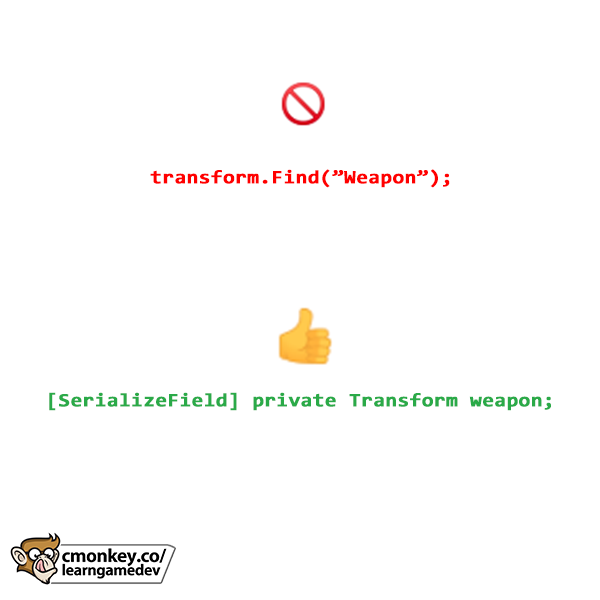
Do you use transform.Find() in your code?
Stop! I highly advise against it for one simple reason: Find uses strings and strings are horrible identifiers.
Strings are extremely brittle, it is very easy to make mistakes. If you have the string "Player" and "PIayer" they look similar but are completely different, as is "BOne" vs "B0ne" or "Elite" vs "Eli7e" or simply "Player" vs "Player ", invisible spaces have driven me insane many times in the past.
All of those are completely different but hard to tell at a glance. And those are also perfectly valid strings in terms of code compilation, so you won't get any errors until you run the game and everything breaks.
Because of that I highly recommend you avoid using strings as identifiers whenever possible, which thankfully in Unity you can avoid them with only a handful of exceptions (like Animator parameters)
So instead of using transform.Find(); just use a [SerializeField] and drag the reference in the editor.
This one simple change will help you avoid so many headaches.
English

Can This Day get Even better?!?! 😱🤯
500,000+ Views on the Announcement Day of my Next Game and @geoffkeighley liked my Tweet OMG
My whole life turned around after paddle paddle paddle went viral and sold over 200k copies and im soo hyped to make more Games 🙌😊

English
@MrAwesomeBruce Sure go ahead, I'm curious to see what you wrote in those 30 page
English

@UnityCodeMonkey No, I've added and dropped things over time. If you want a look, I'll send the doc to you. I think you're trustworthy. You want it emailed?
English
How do you know if a game idea is fun or not? When should you drop a game idea?
"fun" is really hard because it's impossible to measure, there's no objective "fun" meter. So the only way is to playtest constantly, both by yourself and ask friends and other players to play and give you their feedback.
If the feedback you get on your prototype is negative then absolutely you should drop that idea and go back to the drawing board. Remember how it's much easier to drop a project in the beginning, rather than spend 6+ months working on something and then be disappointed when it sells 0 copies because you ignored negative feedback at the start.
But it's also up to you to analyze that feedback. It might be fixable, maybe you can tweak some things to get the project onto a good state.
As always the only way to know is to constantly playtest, if the feedback is improving then you're on the right track so keep working on it, but if you're working super hard to improve and the feedback just keeps coming back negative, then it might be wise to drop it and move on to something else.
Idea Selection and Idea Validation are extremely important things nowadays (if your goal is to find success), so do not neglect this very important step!

English
I'm not sure I understand what you're saying. You would validate that the OnTickEvent has subscribers before running that code? Usually you only validate events right before you trigger them, not randomly before.
That wouldn't even work if this function was doing anything more than just the timer, if you did an early return on Update(); just based on the Tick logic you would be skipping all the other non-Tick logic in your Update.
English

@UnityCodeMonkey I make all my validations at the start of the method, then varaible declarations, after would be this and finally the return, there is no way to know if this will crash, just run or throw an error as is.
This feels like you want an excuse so you can go: "Well askcully! ☝️🤓"
English
What is the possible error in this code:
tickTimer += Time.deltaTime;
if (tickTimer >= TICK_TIMER_MAX) {
tickTimer -= TICK_TIMER_MAX;
tick++;
OnTickEvent(this, EventArgs.Empty);
}
A) None
B) NullReferenceException
C) Crash
(answer in reply below)
English
@VerdadesCompa Technically yes it could be a normal function which wouldn't cause an error. I tried to keep the code snippet as simple as possible so I wrote the name in a way to make it as obvious as possible that it is an event and not a function
English

@UnityCodeMonkey You forgot the "invoke" call in the example no? Else its kind of misguiding and might think OnTickEvent is a custom method.
English
@DanTwoHundred Yes technically I would wrap this in a while loop to make sure it doesn't skip any ticks. But I didn't want to overcomplicate this simple code snippet.
English

@UnityCodeMonkey Nobody is pointing out the floating point accuracy issues here. If Time.deltaTime is small and TICK_TIMER_MAX is large, accumulated error will mean that the time between OnTickEvent() calls will noticeably differ from the intended frequency.
English
@WalterTelnov Yes technically that's right, I tried to keep the code snippet as small as possible to fit in the post. I made the name as obvious as possible to make it clear it is defined as an event
English

@UnityCodeMonkey Not to be a buzzkill, but…
Everyone’s jumping to “NullReferenceException” because they see OnTickEvent and assume it’s an event. But in reality, OnTickEvent could just be a regular method
English
@p5yl0 It's counting down the timer.
If you just do tickTimer - TICK_TIMER_MAX then that's not valid code, that's just a math operation, you're not assigning anything to any variable.
English

@UnityCodeMonkey i dont understand this line...
tickTimer -= TICK_TIMER_MAX;
why?
-= ???
English

@UnityCodeMonkey I prefer to make eveything from scratch, minu some speed trees, then reuse my own assets for other projects when needed. Just a golden standard set for my company.
English
What are Asset Flips? Should I make everything from scratch?
English
@prime_31 The problems that happen at 30FPS will also happen at 10FPS, they will just be easier to spot, that's why I recommend it.
English

@UnityCodeMonkey If your game drops to 10 fps you messed something up in a gargantuan way. You do not need to waste your time playing through your game at 10 fps, that's ridiculous. Profile your game on min spec hardware and make sure you are always above 30 fps bare minimum.
English
PRO-TIP: Always test your game at low frame rates!
Just do: Application.targetFrameRate = 10; and try to play through your whole game. You will quickly catch bugs that you won't notice at 60FPS.
For example if you do a simple distance check to see if a Unit has reached a target position: transform.position += moveSpeed * Time.deltaTime; if (Vector3.Distance(transform.position, targetPosition) < reachedDistance) { }
That code might work perfectly at 60FPS because the Time.deltaTime is tiny, but at 10FPS since the Time.deltaTime is huge it might break if the unit never gets close enough to the target position.
So test your game at low frame rates to ensure it will work, even on low end machines.
This simple tip will save you a lot of headaches after release!

English
@VektorError The problems that happen at 25FPS will also happen at 10FPS, the will just be easier to spot, that's why I recommend it.
English

@UnityCodeMonkey 10fps is unplayable on any low end system.
25fps is the lowest one should optimize for.
If it drops to 10fps then heavy optimization is necessary!
English
@totmacherx I have no idea why that shows up, I'm guessing it's because I do all the images for these posts in a single .PSD file, and since I used their Canvas Expand tool for just one image then it apparently tags all of them
English

@UnityCodeMonkey imagine getting a "made with AI" tag on a text on white background LOL
English

@UnityCodeMonkey Also test at ridiculous pings.
250ms minimum
English
@ARomeoSierra I would really really encourage you to put this on the top of your priority list. Otherwise you will get negative reviews which might kill your launch
English

@UnityCodeMonkey this is excellent bug fixing advice but most indie’s probably don’t have time to drive this deep. expert advice though
English