AboveSpec

283 posts

AboveSpec banner
AboveSpec

AboveSpec

@above_spec

Love 3d printing, playing with local llms and learning Claude Code

Ontario, Canada เข้าร่วม Aralık 2017
174 กำลังติดตาม1K ผู้ติดตาม
witcheer ☯︎
witcheer ☯︎@witcheer·
I ran Hermes agent (v0.13.0) with qwen3.6-35B-A3B on my RTX 4060 Ti 8GB for the first time today. full local agent stack. my question was: can a local 3B-active MoE model actually drive an agent harness end-to-end? quickly, my setup: >WSL2 Ubuntu 26.04 → CUDA 13.2 → llama.cpp (b9049) → llama-server → Hermes Agent >model: qwen3.6-35B-A3B-UD-Q4_K_M >config: -ngl 999 -ncmoe 30 -c 32768 --cache-type-k q8_0 --cache-type-v q8_0 >baseline decode: 35.36 tok/s (from prior -ncmoe sweep) I tested 4 rounds, easy to hard: 1. single tool call (list files) - pass, 31.4 tok/s 2. 5 chained tool calls (mkdir → venv → pip → write script → run) - pass, self-corrected a path error 3. read 10 files from windows via /mnt/c/ - pass when scoped, fail when hermes read full files 4. write a 95-line python CLI with argparse, then run it - pass, genuinely usable code my biggest issue: the context. hermes system prompt eats ~13.5K tokens. out of 32K, that leaves ~18.5K usable. a multi-step task fills that in 3-4 exchanges. when I pushed it, hermes tried to compress via the same qwen model → slot contention → timeout → retry storm → ctrl+c. and also, hermes has a 64K minimum context gate - needs a config override to run with 32K my conclusion: hermes + qwen3.6-35B-A3B is a capable local agent for short automated tasks, code gen, file ops, cron jobs. 4-5 tool calls per session, but not viable for long multi-turn sessions. context fills too fast, compression self-destructs, VRAM cliff halves speed before you hit the wall. ---- I am curious if anyone's running hermes agent with a local model on similar hardware (8-12 GB VRAM). what model are you pairing it with? how do you handle the context ceiling? I am especially interested in setups that solve the compression-model problem (separate lightweight model for context compression).
witcheer ☯︎@witcheer

now testing real results with Hermes on WSL2

English
33
9
147
14.7K
AboveSpec
AboveSpec@above_spec·
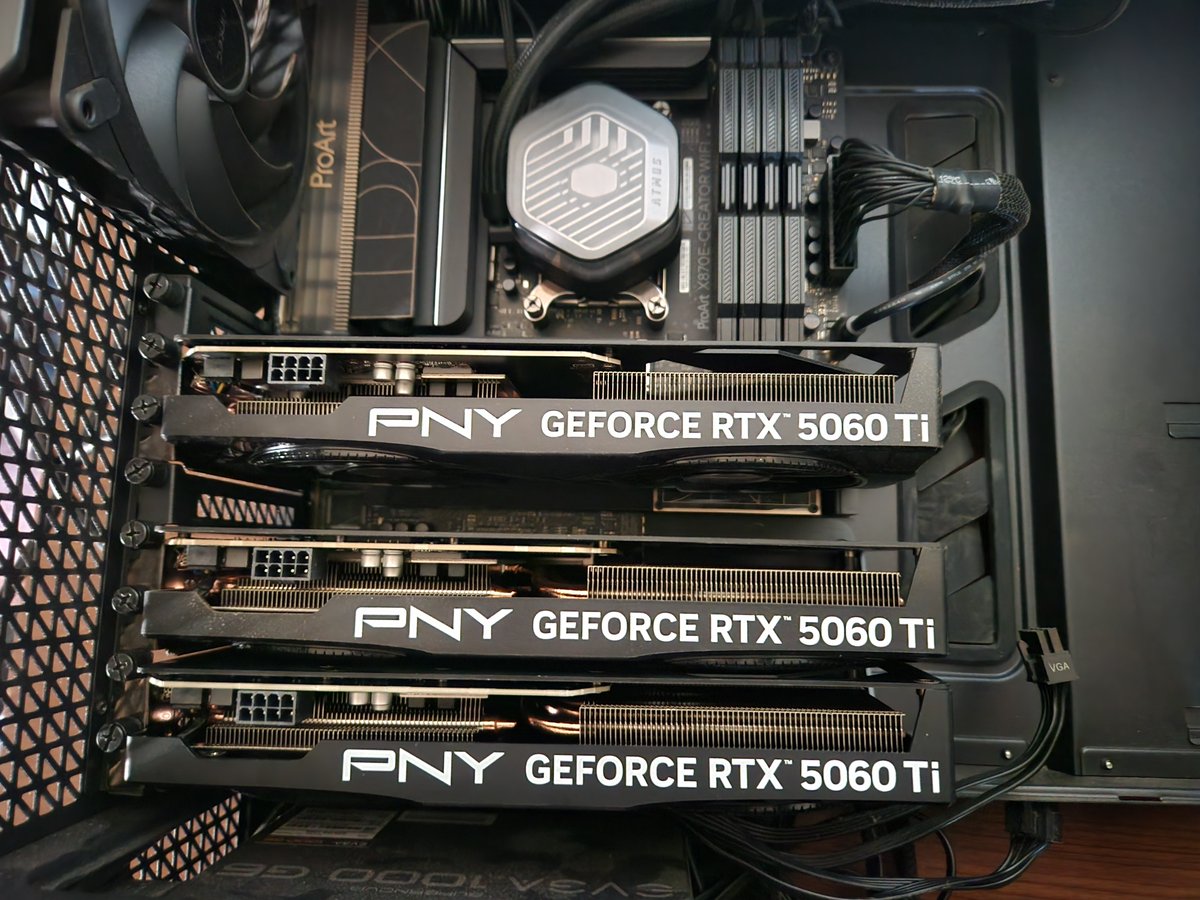
@FStrongpaw So nice! Which proart motherboard is that? I have B650 Proart as daily driver right now and looks like I could do similar.
English
1
0
0
75
Fatherfox Strongpaw
Fatherfox Strongpaw@FStrongpaw·
holy crap! the symmetry..the symmetry.. what a difference mached gpu's makes! AAAHHH!!!! now i have to redownload all the models i deleted and retest Everyhting i've rejected for the last 4 months! oh shit... what if all my ai's actually... *gasp* work? 😱 i'm screwed 😅
Fatherfox Strongpaw tweet media
English
1
0
1
113
AboveSpec
AboveSpec@above_spec·
@aliez_ren They need to make a workstation version with fans.
English
0
0
1
710
Sudo su
Sudo su@sudoingX·
it's so easy to get started in local ai actually. the only real wall is vram math. practical heuristic for a single gpu: > 24gb = 27B Q4_K_M at 262k context (qwen 3.6, carnice-v2) > 16gb = 13B Q5_K_M at 32k or 9B Q8_0 at 64k > 12gb = 8B Q5_K_M at 16k > 8gb = 4B Q4_K_M at 8k quantization rule of thumb: Q4_K_M ≈ 0.6 gb per billion params. kv cache scales with context. add 1 gb activation buffer. that's the math. every other piece (llama.cpp build, hermes agent setup, prompt config) is one good day setup. the math is the only ongoing constraint. once you can eyeball this for your gpu, you can pick any model + context combo with confidence. stop being intimidated by the stack.
English
32
44
576
27K
Tomás Crucial
Tomás Crucial@Crucialhunter·
@above_spec I'm on a 2080 , and being able to squeeze it a little bit longer sounds great as right now upgrading does not sound worth it vs cloud models
English
1
0
2
423
AboveSpec
AboveSpec@above_spec·
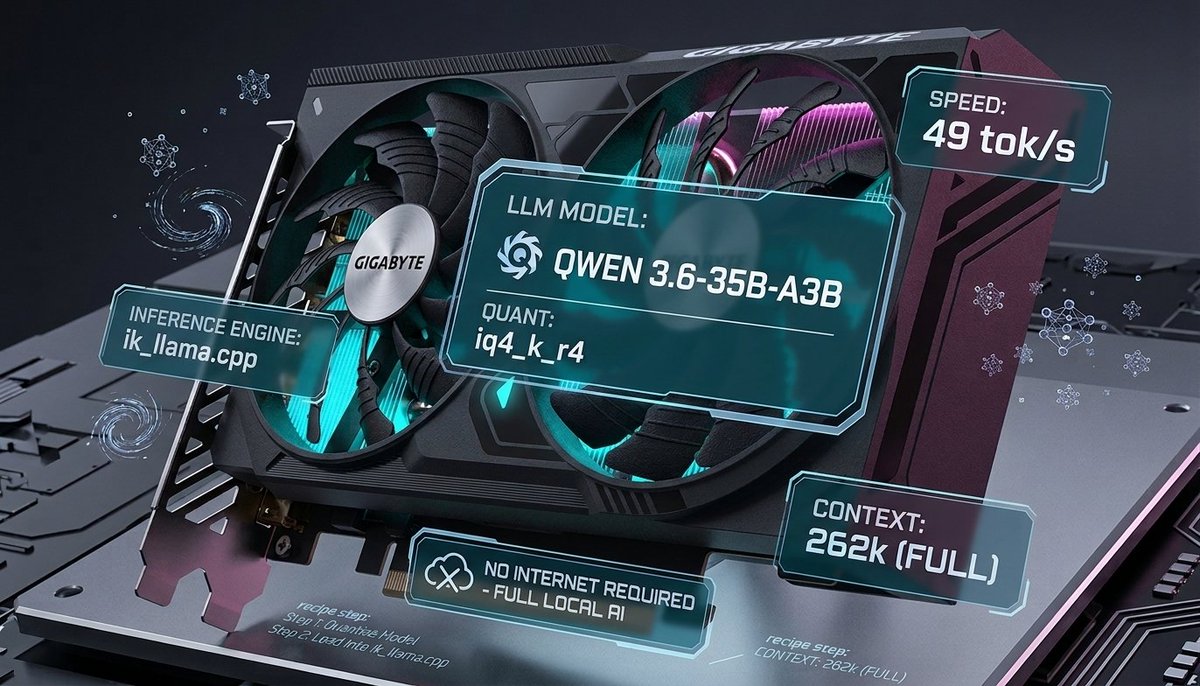
Quick update on the 35B / 8GB setup. Switched to IQ4_K_R4 — higher quality quant, without losing much speed — getting ~49tok/s through model's full native 262k context. And VRAM usage is low enough to keep a browser with multiple tabs open the whole time. 🧵
AboveSpec tweet media
AboveSpec@above_spec

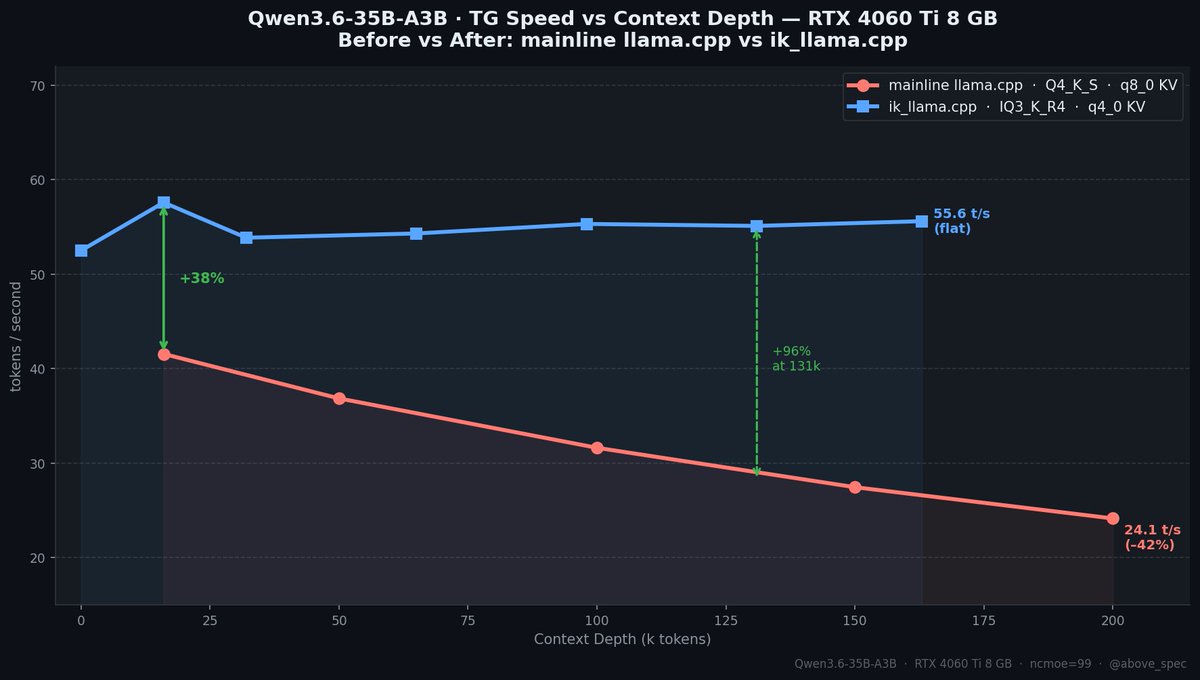
Qwen3.6 35B A3B model. 55+ tokens/sec. $300 GPU. No, this isn't a server card. It's an RTX 4060 Ti 8GB. Previously I posted that I 41 t/s on this gpu and that post blew up and went viral. I went back and made it 34% faster. And now the speed doesn't drop with context depth at all. New benchmarks + what changed 🧵

English
11
14
138
16.7K
AboveSpec
AboveSpec@above_spec·
@witcheer Ncmoe 32 can get you even up to 55 t/s.
English
0
0
0
62
witcheer ☯︎
witcheer ☯︎@witcheer·
ran tests with Qwen3.6-35B-A3B-UD-Q4_K_M as main local model for Hermes: >Hardware: RTX 4060 Ti 8GB VRAM, Ryzen 5 7600X, 32GB DDR5-6000 > Model: unsloth/Qwen3.6-35B-A3B-UD-Q4_K_M (22.1 GB on disk, 20.60 GiB GGUF) >Runtime: llama.cpp llama-server (build b9049-2496f9c14, ggml 0.11.0) >OS: WSL2 Ubuntu 26.04 on Windows 11 >CUDA: 13.2.1, compute capability 8.9 for Hermes daily use, the optimal config is: ``` -ngl 999 -ncmoe 30 -fa on --cache-type-k q8_0 --cache-type-v q8_0 -c 32768 -t 6 ```
witcheer ☯︎ tweet media
witcheer ☯︎@witcheer

study @Teknium: >me asking him the best way to host Hermes on windows >him explaining that WSL2 is the preferred way right now >him sending a previous NousResearch documentation about the set up >him deciding that it is too sparse and reworking the documentation >1 hour later him coming back to me with a very comprehensive tutoral on how tu run Hermes on WSL2 Hermes agent is #1 and there is no second best. for those who are interested in the documentation: hermes-agent.nousresearch.com/docs/user-guid…

English
13
9
98
10.1K
AboveSpec
AboveSpec@above_spec·
@Frudoheili Yes, need to test qwopus. Not enough hours in a day!
English
0
0
0
307
AboveSpec
AboveSpec@above_spec·
@mindinpanic Tough to get good performance with 4gb, but you can try your best. Use ik_llama.cpp as it's best for cpu offload.
English
0
0
1
387
Volodymyr Pavlenko
Volodymyr Pavlenko@mindinpanic·
@above_spec sir im poormaxxing can I run something similar on AMD Radeon Pro 5300M with 4GB VRAM and Intel Core i9 and 32bg ram?
English
1
0
1
448
AboveSpec
AboveSpec@above_spec·
Qwen3.6 35B A3B model. 55+ tokens/sec. $300 GPU. No, this isn't a server card. It's an RTX 4060 Ti 8GB. Previously I posted that I 41 t/s on this gpu and that post blew up and went viral. I went back and made it 34% faster. And now the speed doesn't drop with context depth at all. New benchmarks + what changed 🧵
AboveSpec tweet media
English
24
54
482
44K
AboveSpec
AboveSpec@above_spec·
@chrisdrit Ryzen 9 7900x, B650M ProArt Creator, 96Gb DDR5 5600Mhz
Čeština
0
0
1
41
Chris
Chris@chrisdrit·
@above_spec @above_spec that's amazing, what are the rest of the spec's on your rig? CPU / Memory, etc...
English
1
0
1
31
AboveSpec
AboveSpec@above_spec·
RTX 5060 Ti 16GB. $429 GPU. Last night I got 128 t/s on Qwen3.6-35B using ik_llama.cpp's R4 quant format. Crushing performance. Faster than the 5070 Ti on mainline llama.cpp. Performance stays consistent from 0 to 139k context and no speculative decoding used!🤯 Special thanks to @MakJoris for sharing ik_llama.cpp with us! Today I wanted to know if it's actually *useful* at that speed. So I gave it a coding agent and 4 creative challenges. Here's what it built. 🧵
AboveSpec tweet media
English
36
48
525
29.7K
.🫟
.🫟@ab_jpeg·
@above_spec i’m assuming tool calling quality is fine at this quant?
English
1
0
1
146
Imm0rta1
Imm0rta1@DobrinGeorgie10·
@above_spec Im trying to find the exact setup llama.cpp repo , settings etc. is there any link to i can read
English
1
0
1
86
AboveSpec
AboveSpec@above_spec·
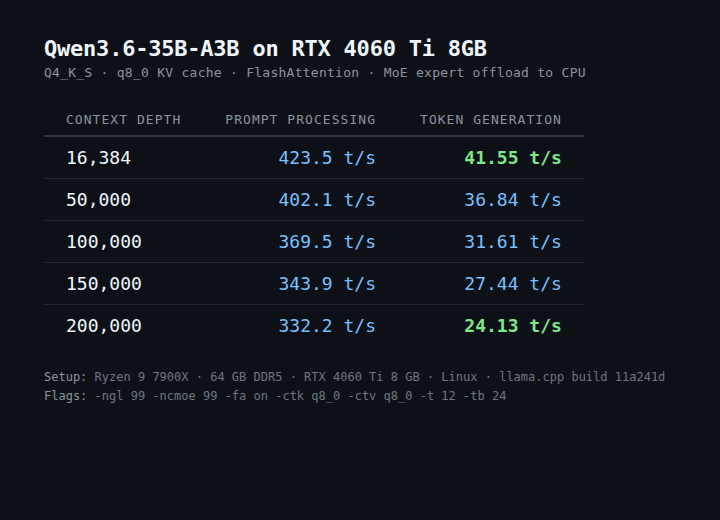
"You need a 24 GB GPU for serious local LLMs in 2026." Everyone repeats this. It's not true anymore. Just ran a 35B-parameter model on an RTX 4060 Ti 8 GB: • 41 tok/s at 16k context • 24 tok/s at 200k context Recipe + benchmarks below 🧵
AboveSpec tweet media
English
135
230
2.8K
279K
AboveSpec
AboveSpec@above_spec·
@doktor_DeFi You should get much faster speeds than me, esp if you have dd5
English
0
0
1
33
Doktor Funk
Doktor Funk@doktor_DeFi·
Thanks for sharing this stuff. I'm really curious to try it on my 4060ti 16gb. Only 32gb ram and you know I have a zillion tabs open. Speed looks great but practical assesment and use, how is that holding up? Any trade offs, hallucinations, loops, sub-par results? Are you testing agentic stuff or tool use? Very interested to know.
English
2
0
1
576
AboveSpec
AboveSpec@above_spec·
@doktor_DeFi Yeah with 16gb you can offload much less layers to the cpu, test different numbers but ncmoe=20 will work with full context and room to spare. You can probably go down to 10, but need to see how much room for context will be left. Just be sure to use q4 for context.
English
0
0
1
517
xinxuanx
xinxuanx@XINXUANX·
@above_spec NVIDIA GeForce RTX 3080 VRAM: 10 GB RAM: 32 GB CPU AMD 9900X Model Name: Qwen3.6-35B-A3B-i1-Q4_K_S llama.cpp CUDA cu12.0 GPU Offload: 41 / 41 layers Context Length: 10240 tokens KV Cache: q8_0 CPU Threads: 12 Flash Attention: Enabled Generation Speed: 70.77 tokens/s
English
2
0
0
133
AboveSpec
AboveSpec@above_spec·
@loktar00 Love your examples. Tesla dashboard looks amazing with all the graphs and charts!
English
0
0
2
353
Loktar 🇺🇸
Loktar 🇺🇸@loktar00·
Qwen 3.6 35B A3B compared to Qwopus 3.6 35B A3B for web design, pretty neck and neck. Some overall good designs. All one shot, both Q8, 4 designs. rtx 6000 product page Transformers 1986 Real estate Tesla Dashboard Curious what others think. Will be doing 35B vs 27B next.
English
20
4
105
15K
AboveSpec
AboveSpec@above_spec·
@XINXUANX Hard to answer without what exactly you did and your settings. Can you post your setup? Maybe you didn't even use gpu's VRAM?
English
1
0
0
98
xinxuanx
xinxuanx@XINXUANX·
@above_spec When I used Gemma 4 26B before, the model size was about 14G. After doing a task, I needed to call the tool to browse a web 32G. The memory was full for a while and then reported an error. The speed of Qwen 3.6 memory usage will be slightly better. But it is not enough.
English
1
0
0
145