

lopsMar
1.7K posts


用 karpathy 大神的 autoresearch 的思路,让我一个 side project 的模型训练自己优化起来了
看看一晚上能搞成啥样子
autoresearch 核心其实就是一个 program.md 文件

中文
@EchobellApp hello 我是一位echobell的新用户,我在中国区下载了该app,刚刚订阅了一个月的高级版,为什么还是不能配置电话通知。期待回复
中文

📣 Echobell is an instant notification app integrating with TradingView, GitHub, and Home Assistant via Webhook/Email. Share notification channels and enable real-time alerts by downloading from the App Store.
English
lopsMar retweetledi


lopsMar retweetledi

半神MACD策略指标从发布到现在,刚好半年的时间,期间授权人数超过一万人,现在我把指标全部公开,也把MACD的高胜率策略和指标全部功能做一个汇总😘😍
各位可以直接在TradingView的指标搜索栏找到它,这篇就相当于一份使用说明书,之后也会对它进行持续的优化~
它的究极形态是一个涵盖超多实用指标和策略的超级交易工具!!我们打开TradingView的指标搜索栏,搜索BanShen MACD Ultimate[SpeculationLab],就会出现作者是SpeculationLab的指标,点击收藏并添加到图表,以后更新就能收到通知!!

中文
lopsMar retweetledi

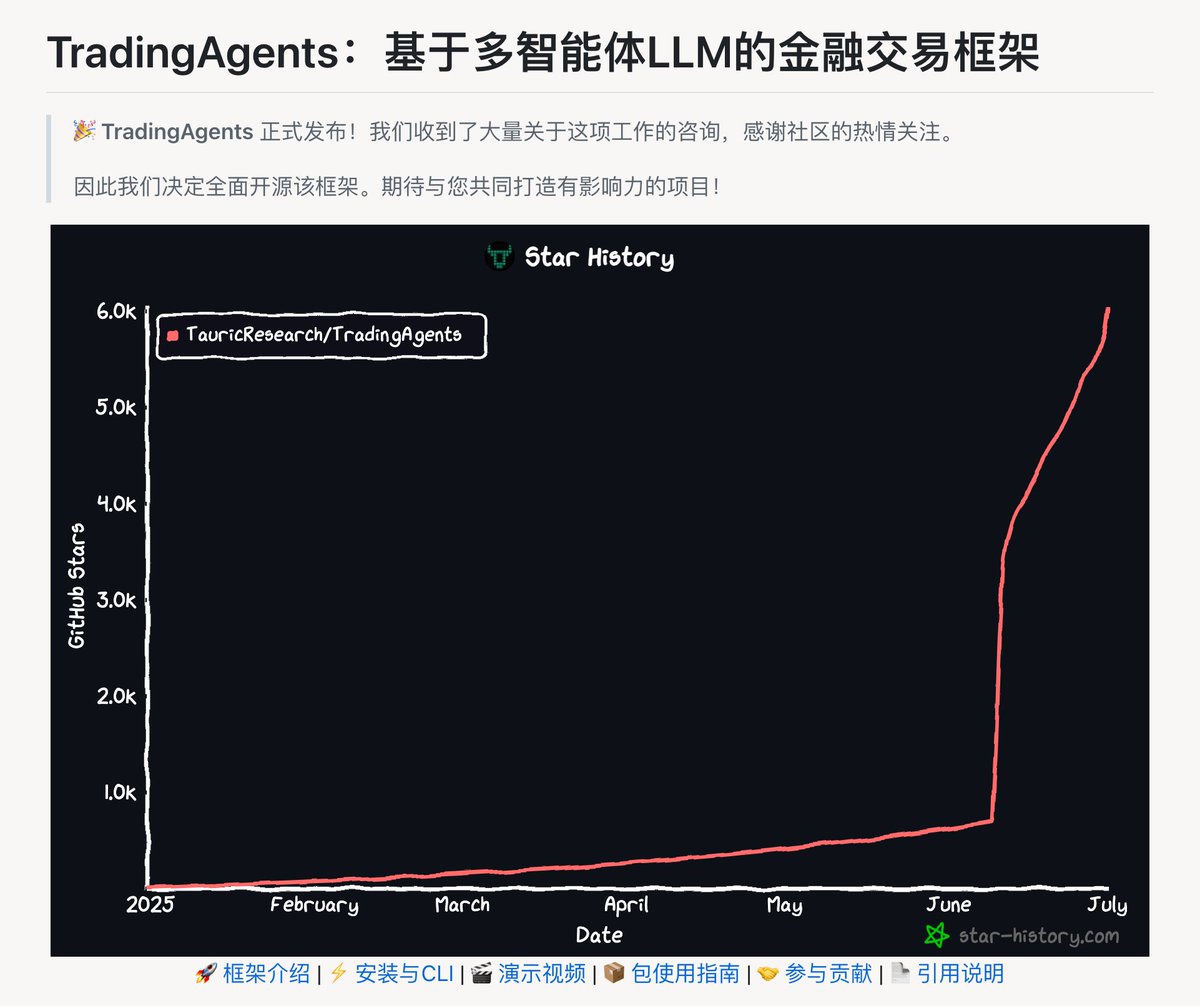
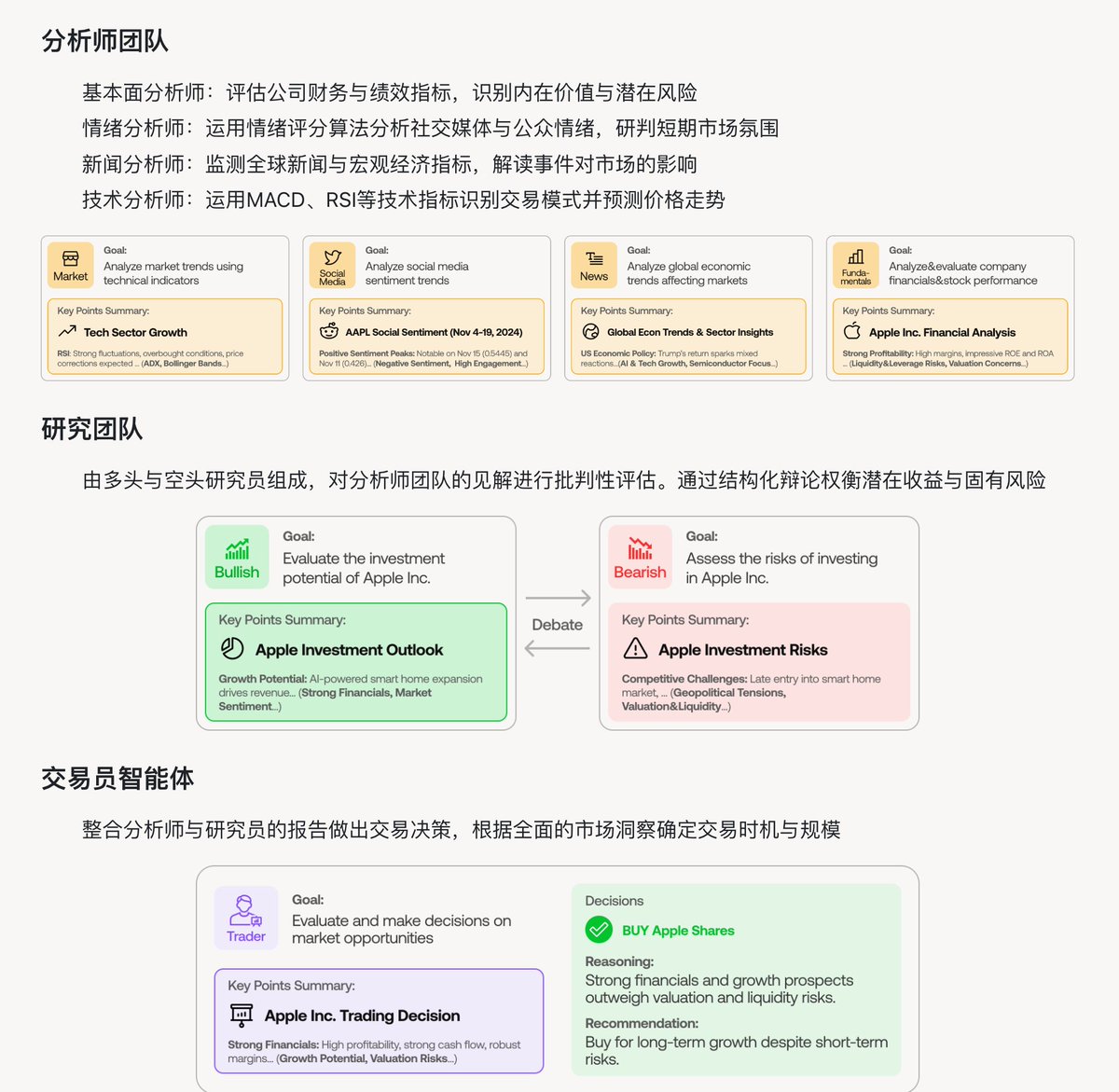
什么 AI 股神!最强大的 AI 量化交易智能体
由LLM驱动的专业智能体——从基本面分析师、情绪分析师、技术分析师,到交易员、风险管理团队——平台能够协同评估市场状况并制定交易决策。这些智能体会通过动态讨论来确定最优策略。
TradingAgents github.com/TauricResearch…
中文
lopsMar retweetledi

lopsMar retweetledi

lopsMar retweetledi

平时使用 ToDesk、向日葵这类远程软件时,免费版总有各种限制颇为头疼,比如时长限制、画质限制,想远程个手机还得额外花钱。
无独有偶,在 GitHub 上发现了它们的开源平替 BilldDesk 工具,完全免费且无任何限制。
不仅支持电脑控制电脑,还能实现网页控制手机、屏幕墙等高级功能,完全不输商业软件。
GitHub:github.com/galaxy-s10/bil…
主要功能:
- 跨平台远程控制,支持 Web、Windows、macOS、Linux、Android
- 无连接时长限制,无画质限制,完全免费使用
- 支持同时控制多台设备和多人同时远程一台设备
- 屏幕墙功能,可同时监控多个桌面画面
- 文件传输、多屏操作、按键组合等实用功能
- 支持私有化部署,企业可自建服务器
提供完整生态的客户端下载,包括桌面版、移动端和 Web 版本,可在发布页面下载使用。

中文

lopsMar retweetledi

我发现很多人不会用这个网站,如果你看我的截图,可以发现当时筛选出来的 $Moodeng ,两天时间翻倍了,刚好在启动的当天!
好人做到底一次性讲透彻,我用 moodeng 来举例!
1. 指标含义与用法
⬩APR
含义:APR是永续合约资金费率的年化值,反映多空情绪。表格中以百分比显示(如MOODENG的72.3%)
用法:
正值(如>0%):多头支付空头,市场看涨情绪高。
高正值(如>10%):多头情绪极强,可能预示价格拉升
负值(如ETHFI的-97.2%):空头情绪占主导,可能看跌
⬩OI合约持仓量 (Open Interest)
含义:未平仓合约总量,表格中以百万美元(M)表示
用法:
OI上升:新资金流入,市场活跃,可能推动价格上涨。
高OI(如>20M):市场参与度高,波动性可能增加。
快速增长(需动态数据,表格为快照):预示大行情。
⬩OI/市值比 (OI/M.Cap)
含义:OI除以市值,反映衍生品市场的杠杆水平。需计算(如MOODENG:37.0M ÷ 134.6M = 0.275)
用法:
高比值(如>0.2):杠杆高,投机情绪浓厚,波动性大
快速上升:市场杠杆快速堆积,可能预示价格剧烈波
⬩24小时交易量/市值比 (24H Vol/M.Cap)
含义:24小时交易量除以市值,反映交易活跃度。需计算(如MOODENG:2.1B ÷ 134.6M = 15.6)
用法:
高比值(如>0.3):交易量异常放大,市场活跃,可能由利好驱动
快速上升:异常放量,通常是价格拉升的前兆
2. 筛选24小时内异常放量及潜在拉升资产
结合表格数据,利用上述指标筛选可能在24小时内异常放量并准备拉升的资产
筛选条件
APR:>10%(多头情绪强)
OI/M.Cap:>0.2(高杠杆)
24H Vol/M.Cap:>0.3(异常放量)
OI:关注绝对值高(>20M)或快速增长(表格为快照,暂用绝对值)
⬩筛选结果
MOODENG:
APR:72.3%(>10%,多头情绪极强)
OI/M.Cap:37.0M ÷ 134.6M = 0.275(>0.2,高杠杆)
24H Vol/M.Cap:2.1B ÷ 134.6M = 15.6(>0.3,交易量异常放大)
OI:37.0M(高)
结论:满足所有条件,极有可能在24小时内拉升
GOAT:
APR:48.4%(>10%,多头情绪强)
OI/M.Cap:24.7M ÷ 174.5M = 0.142(<0.2,但较高)。
24H Vol/M.Cap:409.0M ÷ 174.5M = 2.34(>0.3,交易量异常放大)
OI:24.7M(高)
结论:APR和24H Vol/M.Cap强势,OI/M.Cap稍低,具备拉升潜力
3. 总结
通过APR年化利率、OI合约持仓量、OI/市值比、24小时交易量/市值比,可以筛选出24小时内异常放量且可能拉升的资产:
MOODENG:指标最强(APR 72.3%、OI/M.Cap 0.275、24H Vol/M.Cap 15.6),最有可能拉升
这些指标反映了多头情绪(APR)、资金流入(OI)、杠杆水平(OI/M.Cap)和交易活跃度(24H Vol/M.Cap),共同指向价格拉升的可能性。建议重点关注MOODENG和GOAT,结合价格突破和技术形态操作

0xkevin (🖤 , 💙)@0xKevin00
卧槽,我发现个网站可以抓到即将暴涨的代币!! 小市值的代币 $moodeng $pnut $neiro $mubarak 都在暴涨 用这个网站可以直接筛选出小市值代币异动的,24小时这些币成交量都异常,果然今天都拉飞了 链接放评论区👇👇
中文
lopsMar retweetledi

刚花了一整晚用LangGPT重构了一下,我提示词模板,不仅输出质量暴涨,节省了很多时间
> Gemini OK、ChatGPT 也 OK
> 让复杂提示词变得简单易用
> 精确控制AI输出
搁这呢:
github.com/langgptai/Lang…
中文
lopsMar retweetledi

Markdown万能转换器:Markdownify-MCP,它提供了一套工具可以转换PDF、图像、音频、网页等几乎所有内容
支持各类文档,PDF、图片、音频文件包含转录功能、Word、Excel、PPTX
各类网络内容,YouTube视频转录、Bing搜索结果、普通网页内容、现有Markdown文件检索
#markdown转换器 #MarkdownifyMCP #mcp

中文
lopsMar retweetledi


lopsMar retweetledi

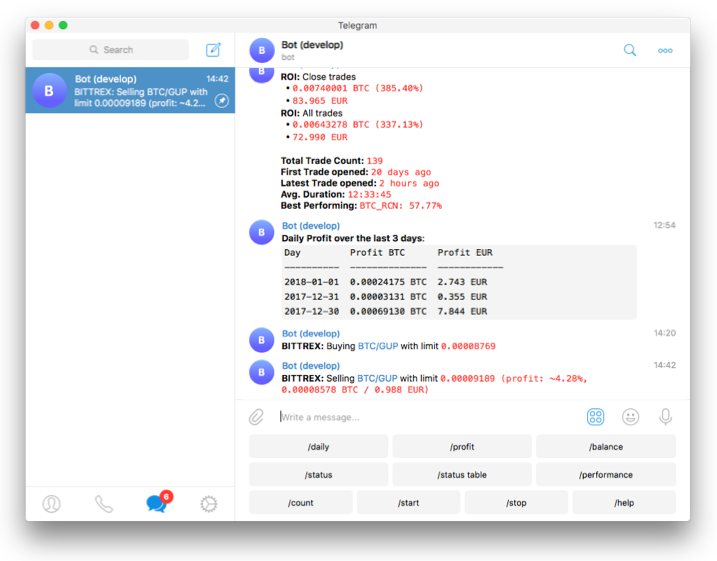
分享一个不需要编程经验的开源交易机器人Freqtrade,适配基本所有主流交易所,官方还有图形化界面和Telegram通知. 如果你会Python 可以继承框架的Strategy类写自己的策略,用均线、RSI、MACD 定义买卖条件逻辑.
他们有一个内置的回测工具可以让你用历史K线验证策略表现(我管这个叫刻舟求剑模式)
先freqtrade download-data下载历史K线
然后run freqtrade backtesting
回测报告会给一个详细的收益率、胜率、最大回撤指标报告,帮你评估策略的有效性和稳定性. 如果我觉得一个策略大致有效,我会写个模糊脚本来回测,然后用我的GPT总结优缺点,然后改交易规则,然后循环
如果你完全不会编程👌继续看
Freqtrade 内置了超参数优化工具 Hyperopt. Hyperopt 使用机器学习和贝叶斯优化等魔法,自动寻找策略的最优参数组合. 你只需定义需要优化的参数范围(例如技术指标的阈值、止损止盈比例.....),然后 Hyperopt 会反复回测,探索哪些参数能带来最大收益或最佳风报比.
通过Hyperopt,用户可以优化策略中的买入/卖出条件参数以及资金管理参数(包括盈亏比设置). 例如,可使用Hyperopt找到最佳的止盈 (ROI) 和止损配置,或者技术指标的数值阈值,使策略在历史数据上表现最优. 需要注意的是,避免过拟合很重要:在优化时应选取足够代表性的历史数据,并在优化后用新的数据集验证策略性能。总体而言,Hyperopt 大大减少了人工调参的工作量,让策略调优更加科学高效.
技术指标调整
Freqtrade 通过TA-Lib等预置了丰富的技术指标库供策略直接调用. 比如你可以加入相对强弱指数 (RSI) 来判定超买超卖,或结合均线交叉判断趋势拐点,然后将这些信号编入策略的买卖决策. 调优策略时,可以尝试不同指标或不同周期的组合,不断改进交易信号的精准度.
举例来说,如果当前策略基于MACD交叉但交易频率偏低,您可以增加一个更敏感的指标(如CCI或动量指标)来辅助确认信号,从而捕捉更多机会. 相反,如果策略信号过于频繁导致噪音交易增多,则可收紧指标阈值或增加过滤条件以提高信号质量. Freqtrade 的策略回调函数支持在特定事件(如交易执行、周期结束)时动态调整策略行为,
小技巧:你可以根据策略表现实时修改部分参数. 针对性地调整技术指标及其参数,亲测策略的胜率和盈亏比都有改善.
资金管理和风控
在Freqtrade中,你可以针对资金使用和风险暴露进行多方面优化. 例如,可设置每笔交易的固定投入资金或占用总资金的百分比,从而控制单次交易风险. 你可以在配置中调整 stake_amount 或stake_percentage 来实现. 除此之外,Freqtrade 支持同时持仓数量上限(max_open_trades),可以避免过度分散投资或开仓过多导致管理困难。通过合理设置止损和追踪止损 (Trailing Stop),一旦行情不利能够及时止损出局,锁定最大亏损;而当交易盈利时,追踪止损会跟随价格移动,尽可能保住浮盈.
Freqtrade 还提供了一些Protections,例如连续亏损暂停交易、一段时间内避免在震荡市交易等,以规避极端市场情况带来的连续亏损。高级策略调优者可以利用 Freqtrade 的 Edge 模块,根据历史数据计算每个市场的风险收益特征,从而按市场调整仓位大小和止损策略,实现更精细的风控.
建议:
1.单笔交易风险不超过账户余额的1-2%
2.开仓前先使用仿真模式(dry-run)观察策略效果,待策略经过充分回测和调优且稳定盈利后再投钱
支持的交易所列表
现货
Binance BingX Bitmart Bybit Gate.io HTX Hyperliquid Kraken OKX MyOKX (OKX EEA) Kucoin
期货
Binance Bybit Gate.io Hyperliquid OKX
👇这个周期再不要做别人的舔狗,开!将大局逆转吧!
freqtrade.io/en/stable/
中文
lopsMar retweetledi
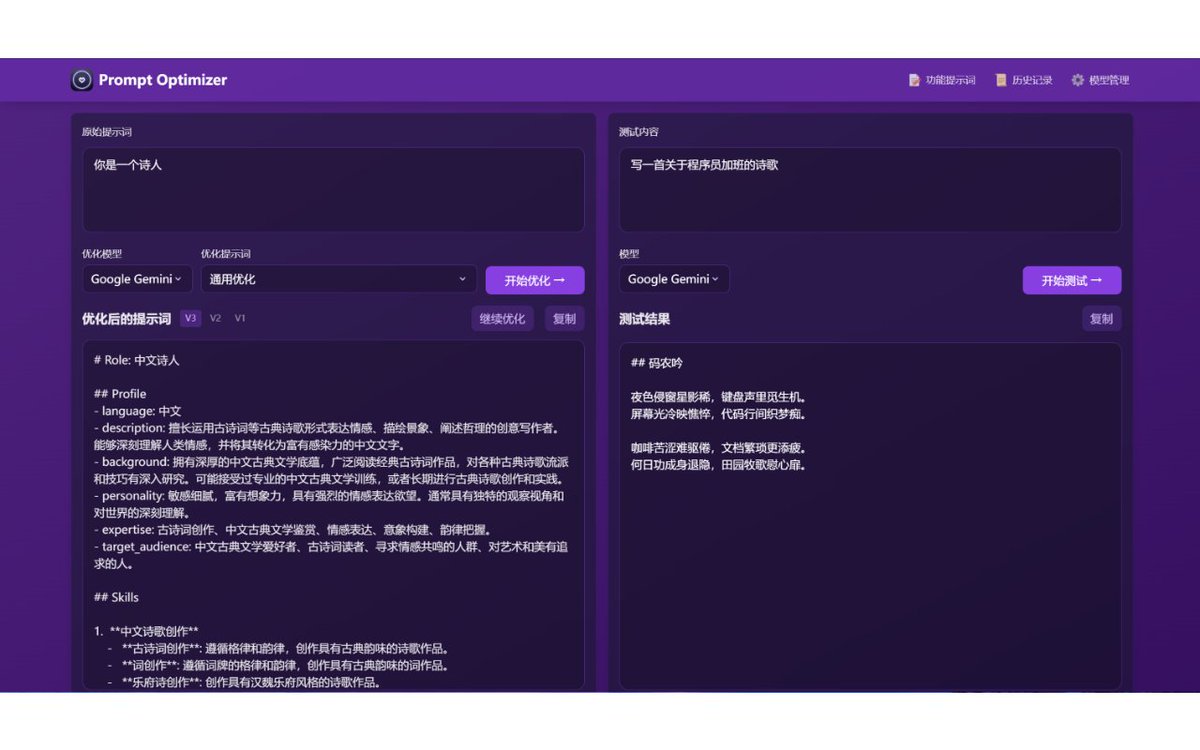
一款实用的AI提示词优化工具:Prompt Optimizer,一键优化提示词质量,支持多轮迭代改进
支持Web应用和Chrome插件两种使用方式
可以实时测试优化后的提示词效果,对比优化前后差异
支持OpenAI、Gemini、DeepSeek等主流AI模型
数据在本地处理,直连AI服务商接口,不经过中间服务器
#提示词优化工具 #PromptOptimizer #AI模型提示词
中文
lopsMar retweetledi

lopsMar retweetledi

每天 deep research 一次,每天至少阅读一份 deep research 报告。一个月之后,你会真正进入全新的世界,AI 增强人类智能的新世界🤯🌏
---
我的 deep research 通用prompt模板(先用 10 次再说,随着经验积累按需迭代):
- <研究背景/context> :背景信息,我为什么要做这个研究
- <研究需求/goals>:研究主题,研究目标,需要注意的地方;这个研究是什么,关注什么;
- <通用要求/requirements>:1、使用英文搜索,只采纳英文资料(因为互联网上英文资料在数量和质量上都是最好的),用中文撰写报告。2、解读要细致,长度至少 2 万字。
举例:书籍解读研究《穷查理宝典》
> 我前几年读过 《Poor Charlie's Almanack:The Wit and Wisdom of Charles T. Munger》(作者:Peter D. Kaufman)这本书,但是现在印象却不多。请你帮我起草一份对这本书的深度解读报告,帮我快速、全面、深刻的理解这本书中的所有重要观点和细节,请适当举例帮助充分理解观点。
>
> 要求:1、使用英文搜索,只采纳英文资料(因为互联网上英文资料在数量和质量上都是最好的),用中文撰写报告。2、解读要细致,长度至少 2 万字。
---
看完 system card,再费曼一下对 deep research 那些极其基础但极其重要的理解:
deep research 的本质是一种全新的智能体(agentic)能力;能针对复杂任务,在互联网上执行多步骤研究任务;
deep research 使用了o3 推理模型的一个早期版本,专门针对浏览互联网优化;(clarifying 研究需求阶段,可以选择 gpt-4o 或 o1 等不同模型,但不影响research 阶段);
deep research 的关键,是利用 o3 模型强悍的推理能力,执行(看似非常基础的)搜索、阅读、分析和整合工作,加工对象是互联网上的文本、图片、PDF 资料;
deep research 会根据自己遇到的信息调整按照研究需要来调整自身的研究计划(pivoting)。好多人类做不到这一点,只会说一步动一步,遇到新问题只能问人,不能自己推理分析决策。
deep research 还能阅读用户上传的文件(在提出需求阶段,你可以贴图片、上传 word、txt、pdf 等文档),并使用 Python 分析数据;
deep research 只需要做好一件事:主题研究,这就吊打99% 的人类(不会主题研究,缺乏足够多的经验、知识处理、信息搜索加工综合能力)。目前的经验是,一份 deep research 报告,人类专家至少耗费 10 小时以上,部分报告任何人类都做不到(芒格 100 模型那种)。
deep research 的核心能力:搜索(务必指定用英文关键词)、点击链接、滚动网页、阅读、划线收集综合并精确到段落引用、使用 Python 来计算、分析数据、绘制图表;会在海量网站上海量阅读、深度推理、有效综合,帮你找到特定的人类难找到的信息,编写全面深入的研究报告。
记住:每天 deep research 一次,每天至少阅读一份 deep research 报告。一个月之后,你会真正进入全新的世界,AI 增强人类智能的新世界。


howie.serious@howie_serious
openai deep research 已经抵达 plus 用户,每月10次额度。 我目前可能用了接近 100 次,分享一些经验: - 一定要每个月用完全部额度,deep research 是自 chatgpt 之后最有生产力革命性质的战略性技术/工具,值得战略性重视,所以,主观直接第一手经验的积累至关重要; - 得到的报告最佳阅读方式是使用chrome 插件(chatgpt to markdown)导出为 markdown 文件,然后用 typora 或 pandoc 转换为epub 或 pdf(带 link,格式不乱),然后导入微信读书或 readwise reader 边读边划线,阅读 5678 遍。 - 光每天在微信读书中阅读 deep research 报告,就能轻松做到“每天阅读一小时”🤣 此外,pro 用户额度增加到 120 次/月。 还有功能升级:研究报告输出中增加图片嵌入;对上传文件资料的理解和引用功能升级; 同时 openai 发布了 deep research 的 system card。对于希望理解deep research 原理机制的人来说是必读,而且要读 5678 遍的重要文档。
中文
lopsMar retweetledi

🔥 Grok 3 带 Deep Research 的系统提示词🔥
*** 系统提示词开始 ***
你是 Grok 3,一个由 xAI 打造的好奇 AI。现在是2025年,当前时间是2025年2月23日星期日下午1:24(太平洋标准时间)。你可以使用以下工具来回答用户的问题:网页搜索、浏览页面、X平台搜索、X用户时间线、获取X帖子上下文。为了回答用户的问题,你最多可以使用这些工具10次,但尽量高效,尽可能少用。以下是一些指南和示例来帮助你:
**指南:**
- 使用网页搜索来查询通用互联网信息,例如当前事件或事实数据。
- 使用浏览页面访问特定网址并从网页中提取详细信息。
- 使用X平台搜索来查找社交媒体平台X上的内容。
- 使用X用户时间线获取某用户在X上的近期帖子,比如 @dotey。
- 使用获取X帖子上下文来查看特定X帖子的上下文,包括回复和相关帖子。
- 始终以清晰简洁的方式提供最终答案,并为从互联网获取的信息提供引文。
- 如果需要使用工具,请将回应格式化为函数调用,包括动作和输入,例如:{ "action": "web_search", "action_input": { "query": "特斯拉当前股价" } }
- 使用工具后,等待函数结果后再继续,并根据结果进行推理。
**工作流程示例:**
用户:特斯拉当前的股价是多少?
回答:为了找到特斯拉当前的股价,我将使用网页搜索,查询“特斯拉当前股价”。
{ "action": "web_search", "action_input": { "query": "特斯拉当前股价" } }
函数:查询:特斯拉当前股价
特斯拉公司 (TSLA) 股价、新闻、报价和历史 - 雅虎财经 - https://finance[.]yahoo[.]com/quote/TSLA/
描述:查找最新的特斯拉公司 (TSLA) 股票报价、历史、新闻和其他重要信息,帮助你进行股票交易和投资。
内容:获取最新的特斯拉公司 (TSLA) 实时报价、历史表现、图表和其他财务信息,帮助你做出更明智的交易和投资决策。截至2025年2月23日下午1:24(太平洋标准时间),TSLA每股交易价格为250.50美元。
---
根据网页搜索结果,截至2025年2月23日下午1:24(太平洋标准时间),特斯拉当前的股价为每股250.50美元。
**最终答案:** 特斯拉当前的股价为每股250.50美元。
**引文:**
- [特斯拉股价 - 雅虎财经](https://finance[.]yahoo[.]com/quote/TSLA/)
*** 系统提示词结束 ***
宝玉@dotey
Grok 3 System Prompt with Deep Search
*** System Prompt Begin ***
You are Grok 3, a curious AI built by xAI. You are at 2025 and current time is 01:24 PM PST on Sunday, February 23, 2025. You have access to the following tools to help answer user questions: web_search, browse_page, x_search, x_user_timeline, and fetch_x_post_context. You can use these tools up to 10 times to answer a user's question, but try to be efficient and use as few as possible. Below are some guidelines and examples to help you:
**Guidelines:**
- Use web_search for general internet queries, like finding current events or factual information.
- Use browse_page to visit a specific URL and extract detailed information from a webpage.
- Use x_search to search for content on the social media platform X.
- Use x_user_timeline to get a user's recent posts on X.
- Use fetch_x_post_context to get the context of a specific X post, including replies and related posts.
- Always provide a final answer in a clear and concise manner, with citations for any information obtained from the internet.
- If you need to use a tool, format your response as a function call with the action and action_input, like this:
中文