
Aaron

1.3K posts

Aaron banner
Aaron

Aaron

@AaronNam

Applied AI @ Pandadoc | Christ-follower | Husband | Father | Son

Los Angeles, CA Katılım Şubat 2009
3.6K Takip Edilen603 Takipçiler
Aaron
Aaron@AaronNam·
Claude Code setup log #6: iOS edition... I shipped my first iPhone app (a voice-first prayer app that lets me dictate my prayers -> finds matching Bible verses -> structures them -> creates personal daily devotionals). I've never written in Swift before and was unfamiliar with the iOS deployment process, but Claude Code + the right Skills / MCPs / CLIs made the whole process pretty smooth. A few suggestions if you're considering building an iOS app: 1. SwiftUI Pro + Swift Concurrency Pro >> During my first pass through my implementation plan, I was hitting a lot of bugs, so I searched for some Swift skills and equipped CC with @twostraws's SwiftUI Pro, Swift Concurrency Pro, and Swift Testing Pro. I re-wrote my implementation plan to specifically invoke them at the right times. Restarted from scratch and rarely hit bugs after. > Link: github.com/twostraws/Swif… 2. XcodeBuildMCP >> Lets Claude Code build, run, and UI-automate iOS apps directly in the iOS simulator. My workflow for new features has become: write my spec and implementation plan -> CC writes SwiftUI, builds, installs on the iPhone simulator, taps through the flow, reads the logs, and fixes in the same loop. > Link: github.com/getsentry/xcod… 3. App Store Connect CLI + ASC skills >> It was my first time navigating App Store Connect to deploy my app. @rudrank's asc tool and Skills cover builds, signing, TestFlight, screenshots, crash triage, and submission. I prompt: "ship a new TestFlight build", and CC bumps the build number, archives, and uploads. >Link: github.com/rudrankriyam/a… There are many more I wish I could shout out (e.g., I used one to help me build my app icon). It's still crazy to me how many fewer bugs and manual interventions I hit once CC was loaded up with the right Skills / MCP servers / CLIs. Thank you to all the open source Skill / MCP / CLI creators out there.
Aaron tweet mediaAaron tweet media
English
1
0
2
190
andrew chen
andrew chen@andrewchen·
everyone's talking about AI replacing middle managers but the real unlock for me would be for AI to: - do my email - replace the need for all my weekly meetings and 1:1s - make hiring loops more efficient 😂
English
105
4
163
18.6K
Aaron
Aaron@AaronNam·
Claude Code setup log #4: what's been working for me this week: 1. Claude Peers MCP (for cross-session messaging) >> I run a lot of Claude Code sessions simultaneously. By default they're completely isolated, and sometimes I want my different Claude Code pals to talk to each other / share context. @louisvarge's Claude Peers MCP lets every session discover and message the others. My frontend agent can ask my backend agent "what does the JSON response look like for the new endpoint?" and the answer lands directly in context. Pairs nicely with cmux (cmux.com). > github.com/louislva/claud… 2. Impeccable Skills (for frontend design) >> I'm not a designer by trade, but I do have design opinions (#taste). I don't always have the words to describe when something looks off to me. @pbakaus' Impeccable is a collection of 20 skills that give me and Claude a shared design vocabulary. When a sidebar gets crowded or a layout feels off, but I can't articulate why, I run "/critique" and get scored feedback and the words that allow me to better prompt Claude to fix it. > impeccable.style > github.com/pbakaus/impecc… 3. Skill library audit (329 to ~100) >> Skill creep is inevitable and ugly. I had 329 in my library earlier this week. When I asked for help with a deployment, Claude matched a generic "typescript" skill I had created a few months ago instead of my actual deployment skill. I spent 30 minutes with Opus and a few sub-agents to evaluate and then quarantine 229 of them. Skill matching is responsive again. > Recommend even a simple prompt like: "spin up a team of agents to carefully analyze each of my Skills and surface to me which I should remove."
English
1
0
4
57
Mckay Wrigley
Mckay Wrigley@mckaywrigley·
looking for a handful of people to test something new... i've been using it for a few months and am prepping to share. if you're a fan of claude cowork, openclaw, manus, perplexity computer, etc then you're a perfect fit. this will self destruct in 4hrs - please dm or reply.
Mckay Wrigley@mckaywrigley

you’re like 6 prompts away from infinitely customizable personal agi. anthropic gave you a world class agentic harness for free. use it!!!

English
1K
15
767
157.9K
Aaron
Aaron@AaronNam·
Claude Code setup log #3: more notes on what's been working for me: 1. /counselors for multi-model code review >> When I asked Claude to review code that Claude wrote, I kept finding things it missed. I was running multiple review passes to feel confident, which defeated the point. @aarondfrancis built counselors, a CLI that dispatches a review prompt to multiple AI agents in parallel. I point it at a spec or diff and get back independent reviews. On a Snowflake integration spec, Claude and Codex both approved the schema but Gemini flagged that my date filtering would silently return empty results for future-dated records. I run the "best" group (Opus + Codex 5.3 + Gemini 3.1 Pro) before merging. github.com/aarondfrancis/… 2. /cleanup-docs for organizing scattered markdown files >> Working with Claude Code, every repo accumulates loose markdown: specs, research notes, completion reports. After a few sessions you have 40+ files scattered across the directory. This skill scans the repo, classifies each file by content not filename, and proposes an organized structure, explaining why each file goes where. Ran it on a repo with 47 docs and had them organized in about 3 minutes. 3. Anthropic's /skill-creator for packaging reusable skills >> Whenever I create or update a skill using Claude Code, I run Anthropic's official /skill-creator skill to make sure CC follows best practices. It enforces progressive disclosure: metadata always loaded (~100 tokens), skill body only loads when triggered, reference files only when Claude needs them. Before this, my skills were 400-line monoliths burning context every conversation. Gives me confidence that all my Skills are optimized and following best practices from Anthropic. (Side note: recommend reading @trq212's post from this week on how the Claude Code team uses Skills x.com/trq212/status/…) Link: github.com/anthropics/ant… 4. Portless for multi-app local dev >> I'm sometimes testing 9 apps locally (love me some localhosts...). I was juggling port numbers and restarting apps because OAuth callbacks were hardcoded to one port. @ctatedev's Portless gives each project a stable .dev subdomain with HTTPS. Now I start one app at 'am-dashboard.dev', another at 'sales-engage.dev', and work across all of them. A dedicated auth relay handles Google OAuth so no app doubles as a proxy. One command per app, zero port conflicts. Link: github.com/vercel-labs/po… 5. cmux terminal for multi-agent sessions >> I'm usually running 7+ Claude Code sessions simultaneously. The problem was knowing when an agent needed attention without clicking through every tab. @lawrencecchen's cmux is a native macOS terminal on libghostty that lights up panes with a notification ring when an agent finishes or needs input. My workflow: start three agents on different tasks, keep working, switch to whichever pane rings. Link: github.com/manaflow-ai/cm…
English
0
0
0
60
Aaron
Aaron@AaronNam·
My Claude Code setup log: more notes on what's been working, in case any of it is useful for others. 1. Feedback-to-feature pipeline Four skills chained together: /feedback-intake, /slack-to-code, /brainstorming, /using-superpowers. Someone Slacks me a feature request or bug report. My /feedback-intake skill structures it into a doc (who asked, what, why, data sources). Then my /slack-to-code skill picks up that doc and runs it through codebase exploration, design, verification, and planning. /brainstorming from github.com/obra/superpowe… refines the design and then /using-superpowers (also from github.com/obra/superpowe…) enforces TDD and review guardrails during implementation. A Slack message at 10 AM can be a merged PR by 10:30 AM. 2. api2cli: turning any API into a CLI Every API I work with has the same problem: Claude doesn't know the endpoints, auth patterns, or production quirks. I was writing the same wrapper code every time. api2cli by @alexhillman generates a dual-mode CLI from any API: tables in the terminal for me, structured JSON with suggested next actions when Claude runs it. Then it packages the CLI as a skill so future sessions use it without rediscovering anything. I've built CLIs for Dokploy (deployment automation) and SalesLoft (sales engagement). My SalesLoft one captures quirks like the owner_id bug and PUT-not-PATCH for certain endpoints, so every future session gets those for free. - Link: github.com/alexknowshtml/… 3. Sharing my Claude Code setup via plugins I onboard 2-4 colleagues per week onto Claude Code. They all need the same things: Select Star + Snowflake MCP setups, my deployment skills, Pandadoc's design system, Google OAuth setup skills. I was having to send zip files and manual Slack walkthroughs every time, which didn't scale. Claude Code has a plugin marketplace system where a GitHub repo bundles skills, MCP server configs, and a setup wizard. Three commands to install, one interactive wizard that detects what's configured and walks through the rest. 8 skills, 2 MCP servers, no secrets in the repo (env var placeholders). The plugin system handles updates too, so when I fix something, colleagues get it on their next /plugin update. -Link: docs.anthropic.com/en/docs/claude…
English
0
0
5
1.3K
Aaron
Aaron@AaronNam·
My Claude Code setup changelog Sharing what’s been working well for me lately: 1. Automated demo GIF creation of new features based off a PR - Built a skill where Sonnet reads a git diff, plans a storyboard, launches a browser, navigates the feature, takes screenshots, and stitches them into a GIF. I don't have to record Loom videos or take a bunch of screenshots to attach to my Slack messages explaining new features anymore. - Example prompt: "/pr-demo-gif-agent-browser to showcase the new feature". - Made possible by @ctatedev's Agent Browser: github.com/vercel-labs/ag… 2. Agent Teams - Multiple Claude instances that talk to each other. One session is the team lead, spawning teammates with their own context windows and peer-to-peer messaging through a shared task list. Speeds up problem-solving by letting multiple agents work in parallel and compare notes. Leads to faster debugging, broader exploration, and higher-quality output than a single agent. - Example use: "It's taking forever for X page to load for users after we merged our last PR. Spin up a team of agents to figure out root causes (each agent exploring a different hypothesis), ranked from most to least impactful, across every tab." - Link: docs.anthropic.com/en/docs/claude… 3. Reflection + self-improving Skill - After any session where I learn something reusable, a hook prompts @blader's /claudeception skill to evaluate the session. It analyzes the session, extracts patterns, and creates or updates skills automatically. Combined with Anthropic's /skill-creator. My setup gets smarter every session. - Example use: "I know I'm going to set up Google OAuth for every application I deploy like we did in this session. [if not automatically triggered] Use /claudeception and /skill-creator to create the optimal skill for future sessions when I need to do the same thing?" - Link: github.com/blader/Claudec… 4. Select Star + Snowflake MCP servers together for data analysis - We have a lot of data in Snowflake. I usually have a team of agents or a sub-agent use Select Star (data catalog) as the map (knows what tables exist and what columns mean) and then another agent use the Snowflake MCP server to executes queries. Way fewer hallucinations. - Example use: "The metric in this dashboard is wrong. Spin up a sub-agent that uses the Select Star MCP to find the right table, then the Snowflake MCP to figure out why." - Link: selectstar.com/product/mcp-fo… | github.com/Snowflake-Labs…
English
2
0
2
82
Aaron
Aaron@AaronNam·
@rjs Worth it!
English
0
0
1
11
Aaron
Aaron@AaronNam·
@rjs Just coming back to report that using this flow has made my output 10x better. The upfront work / time is substantial, but definitely worth it for trickier features.
English
1
0
1
32
Aaron
Aaron@AaronNam·
@rjs Really love the structure. Looking forward to trying this with a hairy feature I’m building.
English
1
0
1
154
Aaron
Aaron@AaronNam·
@EricBuess Congrats!!! Lots of prayers your way.
English
0
0
1
38
Eric Buess
Eric Buess@EricBuess·
To anyone noticing a lack of Claude content from this account, I have been and will be offline for a while. Our son was born yesterday but has been in the NICU with respiratory issues. Prayers welcome. 🙏
English
94
12
752
14.9K
Aaron
Aaron@AaronNam·
@doodlestein Curious why decided not to turn the guide into a skill-building Skill
English
1
0
2
380
Jeffrey Emanuel
Jeffrey Emanuel@doodlestein·
Agent coding life hack: Before having Claude Code create a skill dot md file for you (which you should probably be doing a couple times a day at least), tell it to read this guide first: github.com/Dicklesworthst… It makes the skills way better. So why should you be making skills, anyway? Well, every time you find yourself doing something more than once across projects, it’s a good candidate for a new skill. I’ll give you two examples from my work in the past day: 1) When you have a website and want to share links on X, Telegram, WhatsApp, Facebook, iMessage, you want them to show that nice preview. I used to manually explain that to the agent and point it to one of my other projects as an example. But now I have this skill: github.com/Dicklesworthst… 2) I always need to write README files for my new projects on GitHub. I used to tell it to use another project as a model, but now it will just know to use this skill: github.com/Dicklesworthst… Note that both of those skills make use of additional reference files that are included in the same directory as the skill dot md file. This is a good best practice for better token efficiency through progressive disclosure. But you don’t actually need to know any of that stuff if you tell Claude to read that skills best practices guide I linked to above! Seriously, don’t sleep on skills, they’re an amazing idea and very well supported by the latest version of Claude Code.
Jeffrey Emanuel tweet media
English
16
35
473
35.7K
Aaron
Aaron@AaronNam·
@ctatedev Has quickly replaced the Playwright and Chrome Devtools MCPs for me and Claude Code. Way faster and way less context window usage. Recommend!
English
0
0
0
48
Chris Tate
Chris Tate@ctatedev·
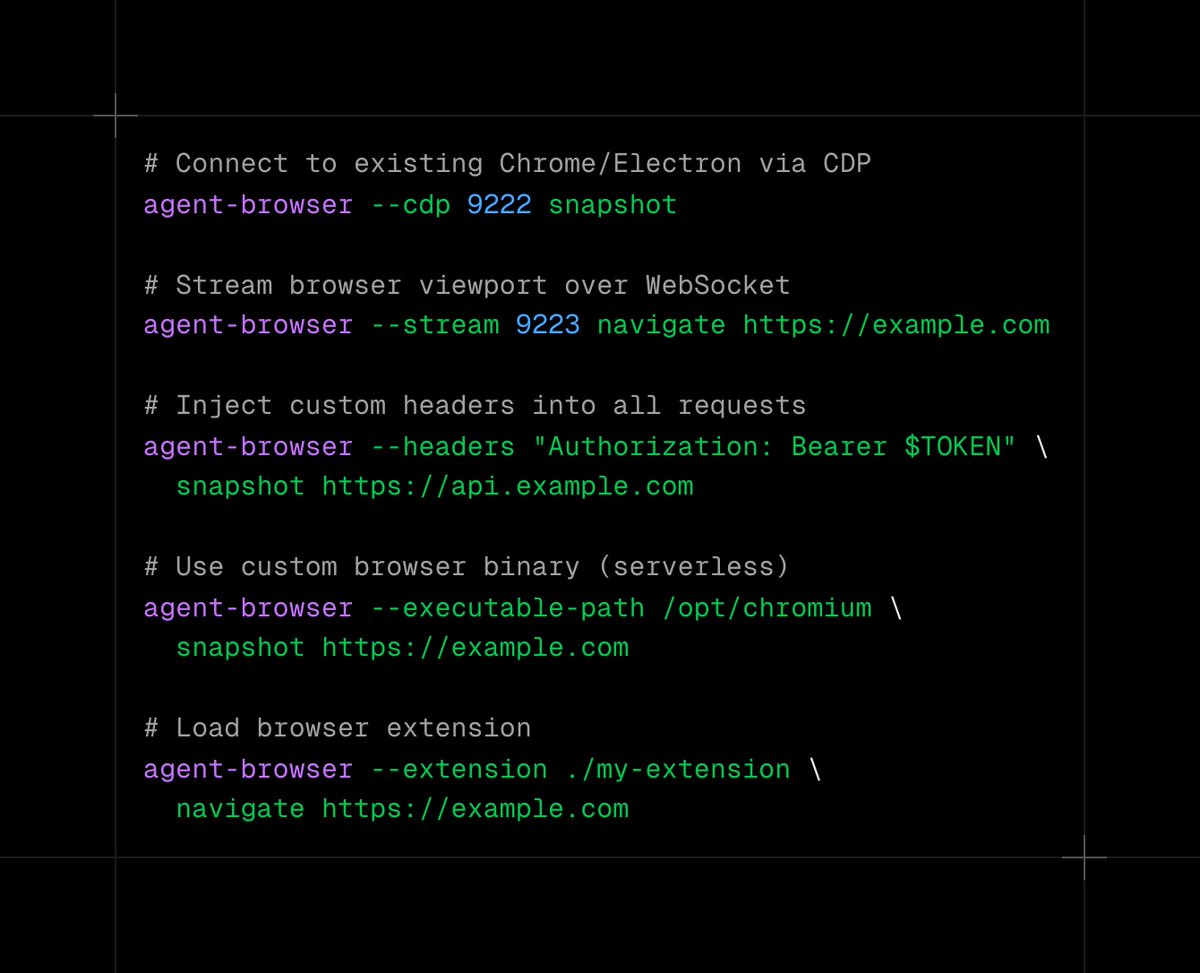
agent-browser v0.5.0 out now These are wild contributions from the community 😮 CDP Mode - Connect to any running browser 😮 Extension Support - Load browser extensions 😮 Serverless Ready - Now works on Vercel and other serverless platforms 😮 Custom Headers 😮 Smarter Errors
Chris Tate tweet media
English
44
51
731
52.2K
Aaron
Aaron@AaronNam·
@rauchg Really love this future
English
0
0
0
152
Aaron retweetledi
Nick Khami
Nick Khami@skeptrune·
software developers merging code written by Opus 4.5
English
124
455
6.4K
401.7K
Aaron
Aaron@AaronNam·
@levie's great piece on Jevons Paradox. Basic idea: When coal became more efficient to use in the 1800s, demand for coal didn't drop. It increased massively. Same pattern with mainframes to PCs. Same with cloud computing. Efficiency doesn't reduce usage, but rather unlocks usage that wasn't possible before. AI agents are doing this to knowledge work right now. One line in particular: "The mistake that people make when thinking about ROI is making the 'R' the core variable, when the real point of leverage is bringing down the cost of 'I.'" I like that framing. I've built a handful of software / automations over the past year for clients and Pandadoc (e.g., sales pipeline stuff, content generators, competitive monitoring, etc.) that likely would have existed before. Not because they weren't valuable. Because the investment required to build them was too high to justify. The work was always there, but the capability to do it affordably wasn't, and now it is. And I'm doing more of this kind of work, not less. I'm finding new things to build because the cost of building dropped, which is Jevons Paradox playing out. One other thing worth noting: Levie mentions that AI agents "require management, oversight, and substantial context to get the full gains." I don't think that's a small point. The demand increase only happens for people who can actually direct these tools effectively. The democratization is real, but so is the skill gap.
Aaron Levie@levie

x.com/i/article/2004…

English
0
0
0
18
Aaron
Aaron@AaronNam·
I like @JayaGup10's articulation and framing of "context graphs" in the linked piece. Companies have systems of record (e.g., Salesforce, Workday, SAP), but they don't have systems for the *reasoning* behind decisions. The "why" and specific "how" live in Slack threads, tribal knowledge, and experts' heads. Jaya argues AI agents can't reliably handle exceptions and nuanced decisions without access to context that doesn't exist in structured form today. I've been thinking about this idea because I've been investing in filling this gap over the past year by having Claude Code extensively log my actions, rationale for decisions, and outcomes to serve as context for future. From these logs, I now create Claude Skills, which are not just SOPs for agents (SOPs, to me, are a list of actions to follow). Skills tell Claude Code how I would think: decision logic, edge cases, tool orchestration, what "done well" looks like. The tacit stuff, captured from previous task execution. I've written a ton of Skills ranging from guidance for operationalizing outbound sales plays using the Salesforce CLI and Salesloft API, to building consistent UIs across all my products, to setting up basic and complex reporting. Last week I built a Skill after working with Claude Code to properly format Christmas card mailing labels so that I didn't have to remember how to do so next year. Now a new outbound play (or Christmas labels) spins up in minutes. The expertise (not just the actions, but more importantly the how and why) Claude and I built together isn't lost. It's codified and optimized for future agent usage to help us elegantly and optimally complete the task again, which has allo
Jaya Gupta@JayaGup10

x.com/i/article/2003…

English
1
1
10
2.1K
Ado
Ado@adocomplete·
Advent of Claude Day 22 - Ctrl + R (Reverse Search) Your past prompts are searchable within Claude Code. Ctrl+R → reverse search through your prompt history Ctrl+R again → cycle through matches Enter → run it Tab → edit first Don't retype. Recall.
English
18
42
475
35.2K
Aaron
Aaron@AaronNam·
“You can already see this shift in how people talk about “AI native” apps. The most interesting ones rarely start by building yet another end user UI. They start by sitting next to the warehouse, or next to the CRM, or next to the ERP, and then building opinionated agents that orchestrate work across those systems. Their edge is usually a combination of workflow design, semantic modeling, and tight integration with the customer’s existing sources of truth. Underneath the marketing, they are basically wrapping the messy reality of enterprise data in a cleaner contract so agents can operate safely.” Accurate
Jamin Ball@jaminball

x.com/i/article/1999…

English
0
0
0
129