Cyber Edition

801 posts

Cyber Edition banner
Cyber Edition

Cyber Edition

@CyberEdition

Exclusive Cybersecurity News & Analysis | We follow people whose work we want to learn from ! | Actively connecting with Cybersecurity Professionals #hacking

India Katılım Nisan 2024
430 Takip Edilen727 Takipçiler
Sabitlenmiş Tweet
Cyber Edition
Cyber Edition@CyberEdition·
🔥 How a Web Application Firewall (WAF) Works A Web Application Firewall (WAF) is a specialized security layer that protects web applications by monitoring, filtering, and blocking HTTP/HTTPS traffic between users and the server. Unlike traditional firewalls that operate at the network layer, a WAF works at the application layer (OSI Layer 7), understanding web traffic structure: URLs, headers, cookies, sessions, and payloads. Here’s how it works step by step 👇 🌐 1. Users Send Requests Users send HTTP/HTTPS requests to access the web application. Traffic passes through the WAF before reaching the server (security checkpoint). 🛑 2. Request Interception The WAF intercepts and parses each request into components: - HTTP headers - Cookies - URL parameters - Query strings - Request body (payload) 🧠 3. Rule-Based Inspection The WAF checks requests against predefined rules: - Signature matching (known attack patterns) - URL pattern validation - Header validation This blocks common attacks such as: - SQL Injection - Cross-Site Scripting (XSS) - Command Injection - Local File Inclusion (LFI) 📊 4. Behavioral Analysis Modern WAFs also analyze behavior by: - Comparing requests to normal traffic baselines - Detecting bot activity - Identifying abnormal API usage - Recognizing automated attack tools This stops: - Brute-force attempts - Credential stuffing - Bot scraping - Enumeration attacks 🔍 5. Payload Analysis The WAF deeply inspects the request body by: - Decoding encoded or obfuscated payloads - Examining input fields for malicious scripts - Identifying hidden attack vectors Example: It detects in a form field before it reaches the application. 🚨 6. Decision Engine The WAF decides: - 🟢 Allow → forwards safe requests - 🔴 Block → drops malicious requests (often returns 403 Forbidden) - 🟡 Challenge → triggers CAPTCHA or other verification 🖥 7. Server Processing & Response Handling Allowed requests are processed by the server. Responses pass back through the WAF, which may inspect them to prevent: - Data leakage - Sensitive information exposure - Malicious response injection 📈 8. Logging & Reporting The WAF logs all activity: - Allowed traffic - Blocked attacks - Suspicious behavior - Security events This data supports monitoring, threat intelligence, incident response, and compliance. 🔥 Why WAF Is Critical Today Modern web applications face constant threats: - Zero-day vulnerabilities - API abuse - Bot attacks - Layer 7 DDoS - OWASP Top 10 risks A WAF serves as: - A protective shield - A virtual patching mechanism - A traffic intelligence system - A compliance support layer 🧩 Types of WAF - Network-based (hardware appliance) - Host-based (installed on server) - Cloud-based (most common today) Cloud WAFs offer scalability and easier management.
GIF
English

0
0
7
730
Cyber Edition retweetledi
Defused
Defused@DefusedCyber·
🚨 The Cisco SD-WAN vManage CVE-2026-20224 released yesterday - currently stated to have no known ITW exploitation by Cisco PSIRT - is now seeing exploit activity on the Defused honeypots Attackers are using 6 XXE variants for reading local filesystem paths. Payloads align with advisory but exploit success not verified Track exploitation of this and other Cisco honeypots 👉 console.defusedcyber.com/intel
Defused tweet media
English
1
11
28
5.4K
Cyber Edition retweetledi
impulsive
impulsive@weezerOSINT·
Microsoft "patched" a Windows bug in December 2020 that lets a standard user write to protected parts of the system that only SYSTEM should have access to. Basically you can take over the machine from a normal account. I just built the new exploit for it and ran it on my Windows 11 machine. Still works. Over 5 years later.
impulsive tweet media
English
9
83
651
62.8K
Cyber Edition
Cyber Edition@CyberEdition·
🕵️‍♂️Iranian-linked Seedworm hackers targeted electronics firms, airports, and government orgs globally. The campaign used DLL sideloading, Node.js loaders, and cloud exfiltration to quietly steal credentials and sensitive data. Read more: thecyberedition.com/seedworm-campa… #ThreatIntel
English
0
0
1
14
Cyber Edition retweetledi
Clandestine
Clandestine@akaclandestine·
🚨 Critical Linux Kernel Vulnerability Alert Qualys has disclosed ssh-keysign-pwn: a 6-year race condition in __ptrace_may_access() that lets unprivileged local users read root-owned files. A privileged process (e.g. ssh-keysign or chage) opens sensitive FDs. During do_exit(), after exit_mm() (mm=NULL) but before exit_files(), pidfd_getfd() can steal those FDs. Impact: • Theft of host SSH private keys → real impersonation & MitM risk until keys are rotated
• Full read access to /etc/shadow → offline password cracking Affected: All kernels before 31e62c2ebbfd (May 14, 2026) — Ubuntu, Debian, Arch, CentOS, Raspberry Pi OS and more. Immediate action required: Apply the kernel patch NOW. 🔗 PoC: github.com/0xdeadbeefnetw…
🔗 Patch: git.kernel.org…/31e62c2ebbfd
🔗 Full analysis: Phoronix & Qualys oss-security #LinuxSecurity #KernelVulnerability #CyberSecurity #InfoSec #OpenSSH #PrivilegeEscalation #ThreatIntelligence #Linux #CyberThreat #PatchNow
English
8
180
598
61.4K
Cyber Edition retweetledi
Aikido Security
Aikido Security@AikidoSecurity·
❗️npm is having a rough week. node-ipc, with 600k+ weekly downloads, just got three malicious versions published: 9.1.6, 9.2.3, 12.0.1. Aikido caught it within minutes of its publication. Obfuscated stealer/backdoor behavior. Check your lockfiles.
English
0
16
88
9.4K
Cyber Edition retweetledi
Feross
Feross@feross·
🚨 node-ipc is compromised again. Three new malicious versions just dropped: 9.1.6, 9.2.3, and 12.0.1. Socket’s AI scanner flagged them as malware within three minutes of publication. The attack vector: a dormant maintainer account (atiertant) was likely taken over via an expired email domain. The attacker registered the lapsed domain, triggered an npm password reset, and gained publish rights to a package with millions of historical downloads. The payload is a credential stealer embedded in the CommonJS entrypoint (node-ipc.cjs). It activates on require(“node-ipc”), not through a postinstall script. Here’s what it does: •Fingerprints the host (OS, arch, hostname, uname) •Harvests 113-127 credential file patterns depending on platform (AWS, GCP, Azure, SSH keys, Kubernetes configs, npm tokens, .env files, shell histories, macOS Keychain databases, and more) •Dumps the entire process.env, capturing every CI secret and cloud credential in memory •Builds a gzip archive in a temp directory •Exfiltrates everything over DNS TXT queries to bt[.]node[.]js, using a bootstrap resolver at sh[.]azurestaticprovider[.]net:443 (a deliberate lookalike of Microsoft’s Azure Static Web Apps domain) The DNS exfiltration is chunked. A 500 KB archive generates roughly 29,400 TXT queries. The body is XOR-encrypted with a SHA-256 keystream, base64-encoded, alphabet-substituted, and split into 31-character chunks before hex-encoding into DNS labels. Header, data, and footer queries use xh, xd, and xf prefixes respectively. The malware forks a detached child process (env var __ntw=1) so credential theft runs silently in the background. It also exposes a __ntRun export, meaning any downstream code that calls require(“node-ipc”).__ntRun() can trigger a second collection/exfiltration cycle. ESM-only consumers using the import path are not affected by the reviewed package metadata. CommonJS consumers are. This is the same package involved in the 2022 protestware incident. It has a history. If you use node-ipc: •Do not install 9.1.6, 9.2.3, or 12.0.1 •Audit your lockfiles for these versions •If you loaded the CommonJS entrypoint, treat all environment variables, SSH keys, cloud credentials, npm tokens, and local secrets as compromised. Rotate immediately. •Hunt for DNS TXT queries to bt[.]node[.]js and sh[.]azurestaticprovider[.]net in your network logs •Check for temp files matching /nt-/.tar.gz Credit to Ian Ahl (@TekDefense) for first publicly identifying the expired-domain account takeover vector. Developing story. Full technical breakdown and IOCs on the Socket blog: socket.dev/blog/node-ipc-…
English
9
36
139
346.2K
Cyber Edition retweetledi
CISA Cyber
CISA Cyber@CISACyber·
🛡️ We added Cisco Catalyst SD-WAN controller authentication bypass vulnerability CVE-2026-20182 to our Known Exploited Vulnerabilities Catalog. Visit go.dhs.gov/Z3Q for more information. #Cybersecurity #InfoSec
CISA Cyber tweet media
English
3
15
49
6.1K
Cyber Edition retweetledi
International Cyber Digest
International Cyber Digest@IntCyberDigest·
‼️🚨 BREAKING: Microsoft Exchange Server CVE-2026-42897 lets an attacker execute arbitrary JavaScript in a victim's browser just by getting them to open an email in Outlook Web Access. It is being exploited in the wild. Microsoft classified it as... "spoofing." 🤔 Affected: on-premises Exchange Server 2016, 2019 and SE. Exchange Online is not impacted.
International Cyber Digest tweet mediaInternational Cyber Digest tweet media
English
17
178
926
78.4K
Cyber Edition retweetledi
SlowMist
SlowMist@SlowMist_Team·
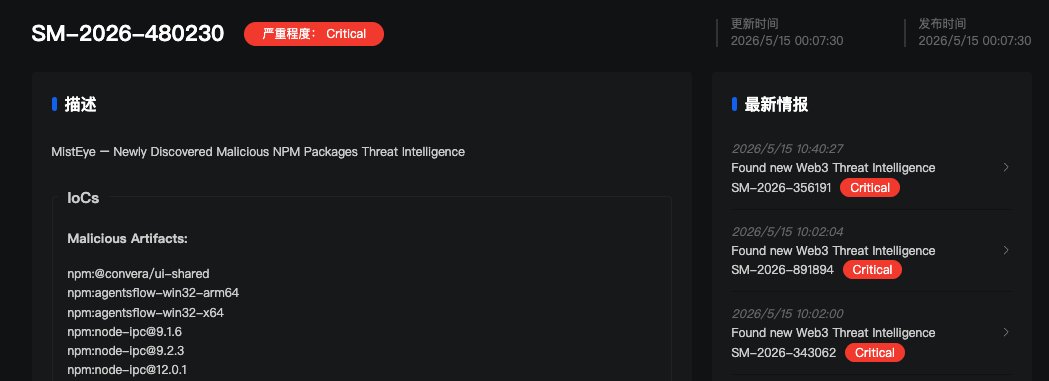
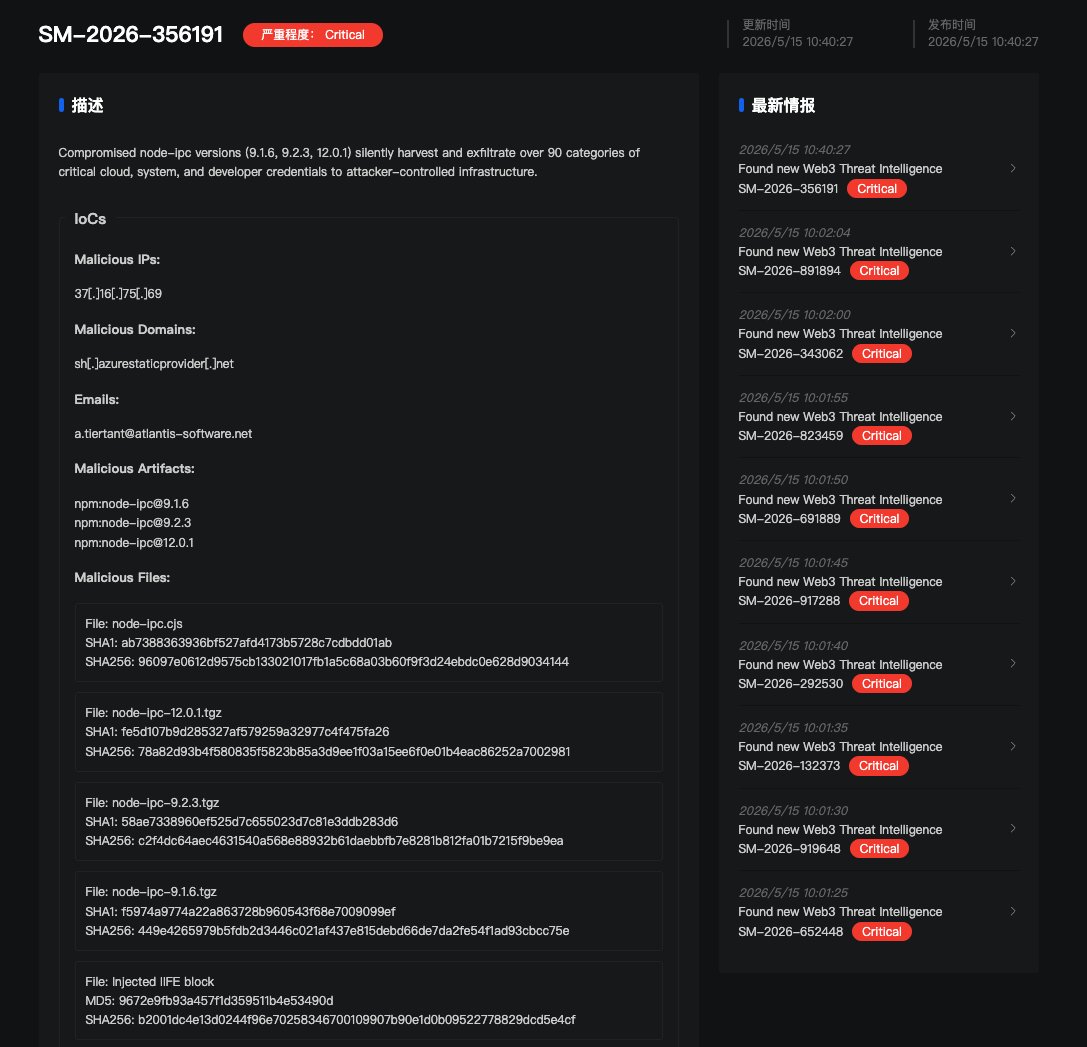
🚨 SlowMist TI Alert 🚨 MistEye has received critical threat intelligence regarding an active supply chain attack compromising node-ipc, a foundational Node.js library. The malicious releases have been identified as versions 9.1.6, 9.2.3, and 12.0.1. Threat actors injected an obfuscated credential-stealing payload into the CommonJS bundle. Once loaded, it silently harvests over 90 categories of developer data—including AWS, Azure, GCP, SSH, K8s tokens, and Terraform states—and exfiltrates it to attacker-controlled infrastructure. We have synchronized this IOC with our clients immediately. Detection & Remediation: Please urgently audit your environments for exposure: • Dependencies: Run npm ls node-ipc --all to identify direct or transitive inclusions. • Lockfiles: Search package-lock.json, yarn.lock, or pnpm-lock.yaml for the affected version ranges. • CI/CD: Review pipeline jobs executed after May 14, 2026, that may have pulled loose semver updates (~9.1.x, ^12, etc.). ⚠️ Critical Action: If a compromised version was installed, assume certain compromise. Do not wait for exfiltration confirmation. Downgrade to a known safe version immediately and aggressively rotate all credentials, tokens, and environment secrets present on the affected machine or CI runner. As always, stay vigilant! enterprise.misteye.io/threat-intelli…
SlowMist tweet mediaSlowMist tweet media
English
2
13
39
6.6K
Cyber Edition retweetledi
bugcrowd
bugcrowd@Bugcrowd·
A 9-year-old Linux flaw is drawing urgent attention after researchers confirmed exploitability at scale. 🌎 Bugcrowd’s @thedavidbrumley told @Forbes the issue highlights how routine system functions can create critical weaknesses when mishandled across widely used systems. The latest on this: forbes.com/sites/daveywin…
English
0
2
23
2.4K
Cyber Edition retweetledi
Prasenjit
Prasenjit@Star_Knight12·
Next.js just got its worst vulnerability ever, CVSS 8.6. → affects versions 13.4.13+, 14.x, 15.x, and 16.0.0–16.2.4 → attackers can access your internal services, cloud credentials, API keys, and admin panels → no authentication needed → one crafted request is all it takes → roughly 79,000 instances are exploitable right now → vercel-hosted apps are safe, self-hosted are not upgrade to 15.5.16 or 16.2.5 immediately.
English
122
318
2.5K
833.5K
Cyber Edition retweetledi
Rapid7
Rapid7@rapid7·
🚨 Rapid7 Labs has discovered an authentication bypass vuln. affecting #Cisco Catalyst SD-WAN Controller (FKA vSmart). CVE-2026-20182 has a Critical CVSSv3.1 score of 10.0 and allows a remote unauth. attacker to perform privileged operations. Read on: r-7.co/4uLxSlR
English
2
42
111
12.3K
Cyber Edition retweetledi
International Cyber Digest
International Cyber Digest@IntCyberDigest·
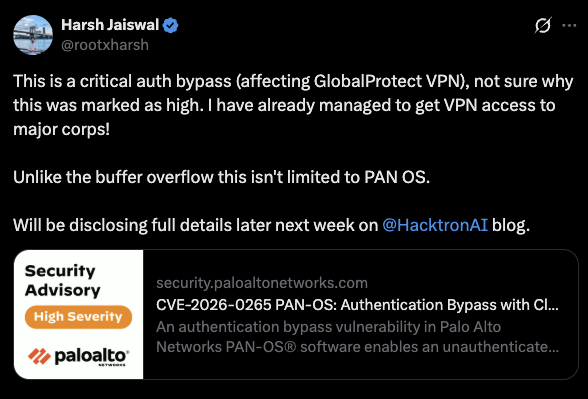
‼️🚨 Palo Alto Networks just dropped an advisory for CVE-2026-0265, an authentication bypass in PAN-OS. Palo Alto rated it HIGH with a CVSS of 7.2 and says exploitation has not been observed. The reporting researcher, Harsh Jaiswal of Hacktron AI, publicly pushed back on that rating. He says he already got VPN access to major corps by abusing the bug against GlobalProtect. He also flagged that the issue is not limited to PAN-OS, meaning the blast radius is wider than just firewalls. If that holds up, this is not a 7.2. Full technical details are landing on the Hacktron AI blog later next week. The flaw lives in the Cloud Authentication Service (CAS) when it is enabled and attached to a login interface. It hits PA-Series and VM-Series firewalls, plus Panorama virtual and M-Series appliances. Patches are partially available now, with additional fixed builds expected May 28. Admins running CAS on a Palo Alto login interface should verify exposure and patch on an emergency basis.
International Cyber Digest tweet mediaInternational Cyber Digest tweet media
English
5
43
217
23.9K
Cyber Edition retweetledi
Unit 42
Unit 42@Unit42_Intel·
We detected 7 dynamic runtime impersonating malicious Chrome extensions. A remote kill-switch targets #crypto users. They used deceptive practices including Unicode BIDI spoofing (Ledger, Braavos, etc), dual-identity, BSC drainer and fake Solana wallet: bit.ly/4dbw8wC
Unit 42 tweet mediaUnit 42 tweet mediaUnit 42 tweet media
English
1
26
82
6.8K
Cyber Edition
Cyber Edition@CyberEdition·
🧠 OpenAI says two employee devices were hit in the TanStack npm “Mini Shai-Hulud” supply chain attack, but no customer data or production systems were compromised. macOS users should update affected apps before June 12. Read more: thecyberedition.com/tanstack-npm-a… #CyberSecurity
English
0
0
1
61