Tech With KG

1.1K posts

Tech With KG banner
Tech With KG

Tech With KG

@TechWithKG

I have a Tech Review YouTube channel link is in bio. I use X to post tech deals for followers which may contain affiliate links.
United States Katılım Ocak 2009
91 Takip Edilen1.1K Takipçiler
Tech With KG
Tech With KG@TechWithKG·
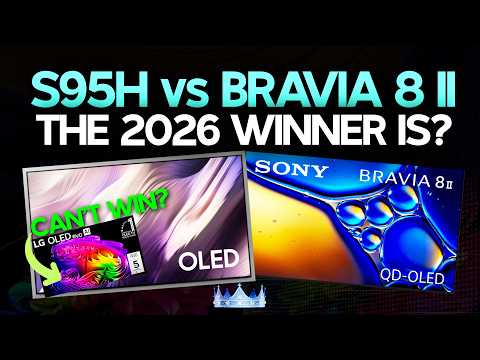
Hosting a comparison live stream in 2 hours at 5:30pm PST come hang out. S95H vs BRAVIA 8 II also will be giving my prediction on the shootout and hearing your guy's predictions as well! youtube.com/live/5jFZEGKDG…
YouTube video
YouTube
English
0
0
1
169
Filippo Tarpini
Filippo Tarpini@FilippoTarpini·
I've been messing around with my Samsung OLED S95F, trying to get the most accuracy out of the HDR modes. So far, I've been using the Filmmaker mode even for gaming, because it seems to be the most accurate (especially on reds & saturation levels). The input lag isn't bad at all. It might not adhere to HGiG closely but at 2000+ nits peak brightness I haven't found that be a problem. To be able to get it on PC you need to satisfy these conditions: - Do not use the 165Hz mode, it enforces game mode and might lessen accuracy, given that it's a bit of an overclock mode. 120Hz is the max you can set. - Do not set the source to PC mode, but to Game Console. Otherwise it enforces Game Mode. - Disable Game Mode from the advanced settings. I also set the Color Space to Custom BT.2020. It seems to accurately reproduce colors. I've been however experimenting with HDR10+ GAMING through NvAPI, seeing whether it can get the best of both worlds. I got some interesting results so far. More on that soon. Some people have brought up the internal menus to tweak the color spaces for any HDR mode. So far I haven't tried that method as it feels a bit too much.
Filippo Tarpini tweet media
English
8
0
29
4.9K
Tech With KG
Tech With KG@TechWithKG·
@High_Def_News This will be the most unnecessary feature people ask for in their TVs, its nit going to benefit them much. This isn’t like going from 2.0 to 2.1 true meaningful upgrade. This is more for latency related issues like niche devices and audio, which isn’t HDMI audio’s biggest issue.
English
0
0
1
148
Tech With KG
Tech With KG@TechWithKG·
@BrandouDio Just a side channel for HDR gaming passion, I wanted to keep separate. I do have it hooked up to a PC RTX 5080 thats what the first light gameplay capture was, I haven’t dabbled in RenoDX HDR yet but im sure I will.
English
1
0
1
22
Brando Dio
Brando Dio@BrandouDio·
@TechWithKG no way KG, what's with the new channel lol. When will you finally connect a PC to your High end TVs and enjoy the full potency of RENODX HDR ? 😄 Heard you like clair obscur :
Brando Dio tweet media
English
1
0
1
40
Tech With KG
Tech With KG@TechWithKG·
Mostly true so many people avoid display upgrades, too many people fall victim to fake HDR monitors and TVs. However OLED won’t fix everything you need a specific type if people buy an OLED monitor there are still some very dim models out there, not capable enough. On the flip side there are some great mini LED displays out there too that can get it done HDR gaming however motion will nrver be OLED. OLED makes much more sense for gaming but people should be careful about buying the wrong display “HDR 400” for example.
English
2
0
3
1.1K
Filippo Tarpini
Filippo Tarpini@FilippoTarpini·
Pro tip: do not spend 3k on a fancy GPU if you are going to play on a mid 1080p LCD from 2013! Invest in a proper monitor before sinking your entire budget into hardware horsepower. Ray tracing can only get you so far. Only OLED can offer proper HDR, natural colors, deep blacks, and zero blur. I've seen a crazy amount of people with 5k setups and a terrible display! This bias is partially due to marketing: GPU improvements can be measured on paper and seen on YouTube. Monitor upgrades? Not really. So, go visit a friend who has an OLED and you might finally understand what you are missing out on!
Filippo Tarpini tweet media
English
70
31
388
119.4K
Tech With KG
Tech With KG@TechWithKG·
@HDRgameAnalysis Maybe it has something to do with another setting you’re disabling. Im using the default settings. The same exact night club scene, im getting 10,000 nit peaks with film grain on and with it off in getting 1,000 nit peaks.
English
2
0
0
60
HDR Game Analysis
HDR Game Analysis@HDRgameAnalysis·
This is the game setup for an 800 nits OLED. Its with 800 nits in Windows 11 HDR calibration app and 250 nits on the in game brightness slider. The game outputs 800 nits max with film grain off and around 6000 nits with film grain on. If you game on a 2000+ nits OLED like me, then the less bright secondary highlights are 2000-4000 nits. My TV can handle this natively and with the help of its roll off in HGIG mode. But the small 10000 nits it can not, of course. The games HDR is clearly broken when using film grain. That doesn’t mean this doesn’t have its use-cases. High nits display owners can take advantage of this. And an 800 nits OLED TV owner could use DTM to get the TV to tone map the signal down to something the TV can handle. I don’t like the games HDR implementation. Its only for lower nits display owners. The above is for console gamers only. PC gamers should use the RenoDX HDR mod. It has none of these issues.
HDR Game Analysis tweet mediaHDR Game Analysis tweet mediaHDR Game Analysis tweet mediaHDR Game Analysis tweet media
English
2
0
0
208
HDR Game Analysis
HDR Game Analysis@HDRgameAnalysis·
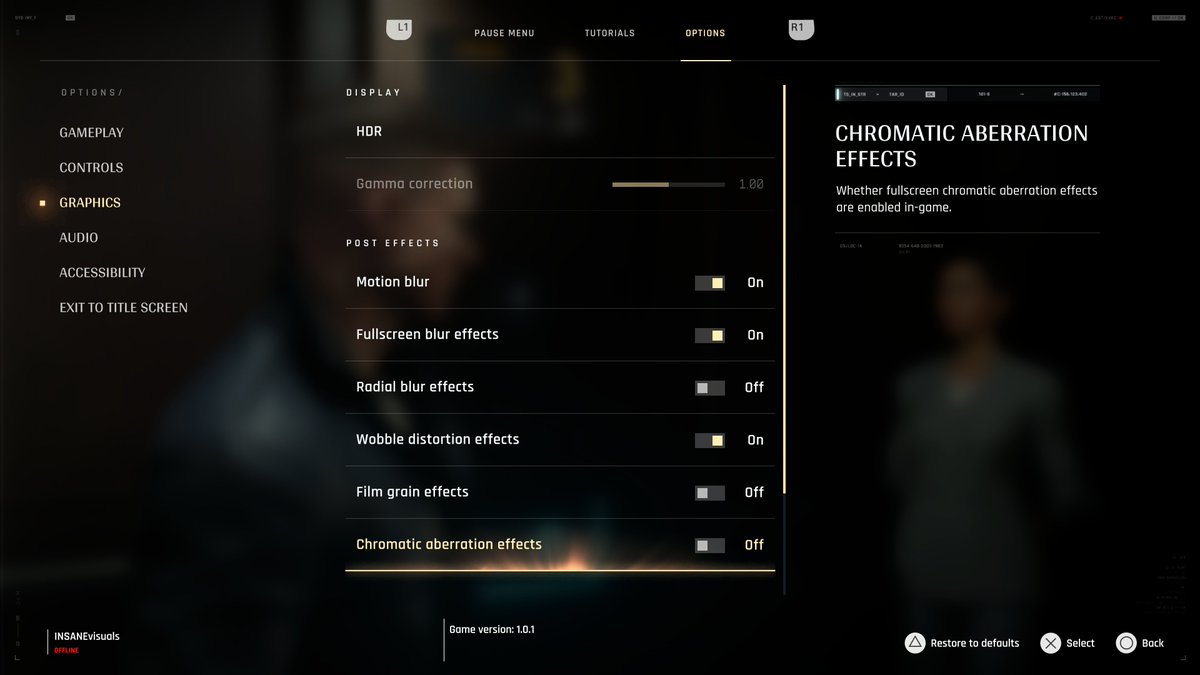
Turn off film grain in 007 First Light. It breaks HDR so it outputs up to 10000 nits. Picture 1 is 10000 nits and picture 2 is 1000 nits. Only difference is film grain on and off. I didn’t notice this when testing the HDR, because I always turn off film grain, chromatic aberration, motion blur etc. in my games.
HDR Game Analysis tweet mediaHDR Game Analysis tweet media
HDR Game Analysis@HDRgameAnalysis

The HDR output of #007FirstLight can be explained in a much more simple way than I did in my earlier post (a bit of sleep helped☺️). We have one in-game brightness slider. This slider is what sets up peak brightness and paper white / midtone brightness in the game. It increases the brightness (midtones, highlights) in a liniar way. We see that in the data below. However, it does not effect the black level floor - not much anyway. First number is brightness on the in-game slider. Second number is what the game maxium outputs in the Crash Site scene. 100 / 470 150 / 700 200 / 930 250 / 1140 300 / 1360 350 / 1560 400 / 1760 450 / 1950 500 / 2130 550 / 2300 600 / 2450 700 / 2730 800 / 2960 The game cuts all detail in highlights above your peak brightness, that the game automatically gets from Xbox's and PS5's HDR system settings or Windows HDR calibration App. Your TV wont be able to output more anyway, if peak brightness is setup correctly. This is how simple it is, basically. You should setup the brightness slider to what looks must natural to you. This value is somewhat dependend on personal preference and ambient light in the room. However, I think if you game in a dark room then you can use these brightness values as guidelines or starting points; - 180-250 nits brightness (500-1000 nits displays) - 250-300 nits brightness (1000-1500 nits displays) - 300-350 nits brightness (1500-2300 nits displays) The conclusion in my earlier post is the same: I don't like that paper white (brightness) and peak brightess are not decoupled when setting up HDR. It's not intuitive to me and it usually means higher nits displays gets underutilized. On top of the above, the games bright lightsources are mostly much dimmer than the above tested peak brightness output. I showed that we only get around 1000-1200 nits peak brightness in disco lights in the Night Club scene on my 2000 nits OLED display. OLED Displays in 2026 have up to 3000 nits peak brightness. So a huge under-utilization of current display technology.

English
10
6
116
21.1K
Tech With KG
Tech With KG@TechWithKG·
@HDRgameAnalysis @Ptshotsun I have a lot in and out constantly I review TVs just some of the notable ones I own BRAVIA 8 II, S90D, Hisense UR9 and actively reviewing Samsung R85H Micro RGB.
English
0
0
1
82
Tech With KG
Tech With KG@TechWithKG·
Extreme brightness is usually supposed to be hard clipped by design by many HDR colorists, how do we know this isn’t a design choice? Theres no way they intentionally made the film grain off cap the games peaks to 1,000 nits in scenes where it was previously an extreme brightness highlight that would make sense to clip.
English
1
0
0
62
HDR Game Analysis
HDR Game Analysis@HDRgameAnalysis·
Whether they didn’t test it properly or just noticed the issue and shipped it anyway, the end result is the same. The vanilla film grain in HDR is broken. This is what the RenoDX modder says: The original film grain code was made for SDR and uses math that breaks in HDR, causing bright areas to explode in brightness and heavily exceed the user's peak brightness. On my 2000 nit Samsung QD-OLED it’s not a big deal because the TV does a strong roll-off at the top of the PQ curve. It compresses the crazy spikes and still keeps most of the highlight detail. But on most other displays (gaming monitors, LG OLEDs in HGIG, etc.) those extreme highlights get hard clipped, which means real loss of detail in bright areas. For those people we could, as a potential solution, recommend turning on DTM with film grain on. DTM is made to handle high nits signals (like 4000 nits), so it tone maps the image much better.
English
1
0
0
229
Tech With KG
Tech With KG@TechWithKG·
@HDRgameAnalysis I tested this on multiple different displays yesterday again and you absolutely don’t want film grain off.
English
0
0
0
19
Tech With KG
Tech With KG@TechWithKG·
@VisualFidelity Its not that simple. Turning some of these off completely ruin the HDR presentation and how the creator intended the game to look so it is a big trade off, film grain off and on examples here notice when its off you lose HDR impact.
Tech With KG tweet mediaTech With KG tweet media
English
0
0
0
156
Visual Fidelity
Visual Fidelity@VisualFidelity·
In 007 First Light, be sure to turn OFF the following graphics options -Radial Blur -Film Grain -Chromatic Distortion Makes a huge difference, like going from looking 1080p to 4K on the Pro Be sure to check out the HDR analysis below for proper setting as well
Visual Fidelity tweet media
HDR Game Analysis@HDRgameAnalysis

The HDR output of #007FirstLight can be explained in a much more simple way than I did in my earlier post (a bit of sleep helped☺️). We have one in-game brightness slider. This slider is what sets up peak brightness and paper white / midtone brightness in the game. It increases the brightness (midtones, highlights) in a liniar way. We see that in the data below. However, it does not effect the black level floor - not much anyway. First number is brightness on the in-game slider. Second number is what the game maxium outputs in the Crash Site scene. 100 / 470 150 / 700 200 / 930 250 / 1140 300 / 1360 350 / 1560 400 / 1760 450 / 1950 500 / 2130 550 / 2300 600 / 2450 700 / 2730 800 / 2960 The game cuts all detail in highlights above your peak brightness, that the game automatically gets from Xbox's and PS5's HDR system settings or Windows HDR calibration App. Your TV wont be able to output more anyway, if peak brightness is setup correctly. This is how simple it is, basically. You should setup the brightness slider to what looks must natural to you. This value is somewhat dependend on personal preference and ambient light in the room. However, I think if you game in a dark room then you can use these brightness values as guidelines or starting points; - 180-250 nits brightness (500-1000 nits displays) - 250-300 nits brightness (1000-1500 nits displays) - 300-350 nits brightness (1500-2300 nits displays) The conclusion in my earlier post is the same: I don't like that paper white (brightness) and peak brightess are not decoupled when setting up HDR. It's not intuitive to me and it usually means higher nits displays gets underutilized. On top of the above, the games bright lightsources are mostly much dimmer than the above tested peak brightness output. I showed that we only get around 1000-1200 nits peak brightness in disco lights in the Night Club scene on my 2000 nits OLED display. OLED Displays in 2026 have up to 3000 nits peak brightness. So a huge under-utilization of current display technology.

English
41
202
3.9K
527.4K
Tech With KG
Tech With KG@TechWithKG·
@HDRgameAnalysis This might be just one example. I suggest keeping film grain ON otherwise you lose HDR highlights in a lot of scenes impact is now gone, example that crash scene on the water, moon drops all the way down to 1,000 nits from 10,000 nits. It it also compromises the HDR in other ways
English
1
0
0
130
HDR Game Analysis
HDR Game Analysis@HDRgameAnalysis·
@TechWithKG Try and turn off film grain😉 10.000 nits with film grain (picture 1) and 1000 nits with film grain off (picture 2). With 250 on the brightness slider.
HDR Game Analysis tweet mediaHDR Game Analysis tweet media
English
3
0
11
1.5K
FlatpanelsHD
FlatpanelsHD@Flatpanels·
Google TV is preparing for LG-style motion-controlled pointer remotes – but why? The new push could suggest that Google, or an existing or new partner, wants to adopt something similar to LG's Magic Remote. More inside👇🏼
GIF
English
7
0
10
1.2K
Vincent Teoh
Vincent Teoh@Vincent_Teoh·
My LG G6 OLED review should finally drop later today… unless another firmware update lands and sends me back into another full round of measurements and retesting 😅 Safe to say this has been one of the most iterative TV reviews I’ve worked on in quite some time.
GIF
English
21
8
351
12.5K
Tech With KG
Tech With KG@TechWithKG·
@FomoReviews @High_Def_News It launched unfinished. The G5 was criticized by people way more than the G6. G5 was rightfully criticized and it’s not like it wasn’t public information. LG knew they had issues. That is what magnifies the G6’s problems you have them repeating the same mistakes once again.
English
0
0
3
165
Stop the FOMO
Stop the FOMO@FomoReviews·
@TechWithKG @High_Def_News Hardly unfinished - G6 is currently a better TV “as is” than the UR9, X11L and G5 while the S95H is all or nothing with matte screen and reflective bezel.
English
2
0
1
228