Dennis Goedegebuure retweetledi

Dennis Goedegebuure
41.4K posts


@TheNextCorner
Growth marketing executive formerly at @Bitdefender @PayPal @Fanatics @Airbnb & @eBay Love Photography, Travel and Blogging. Father of 4 Tweets are my own







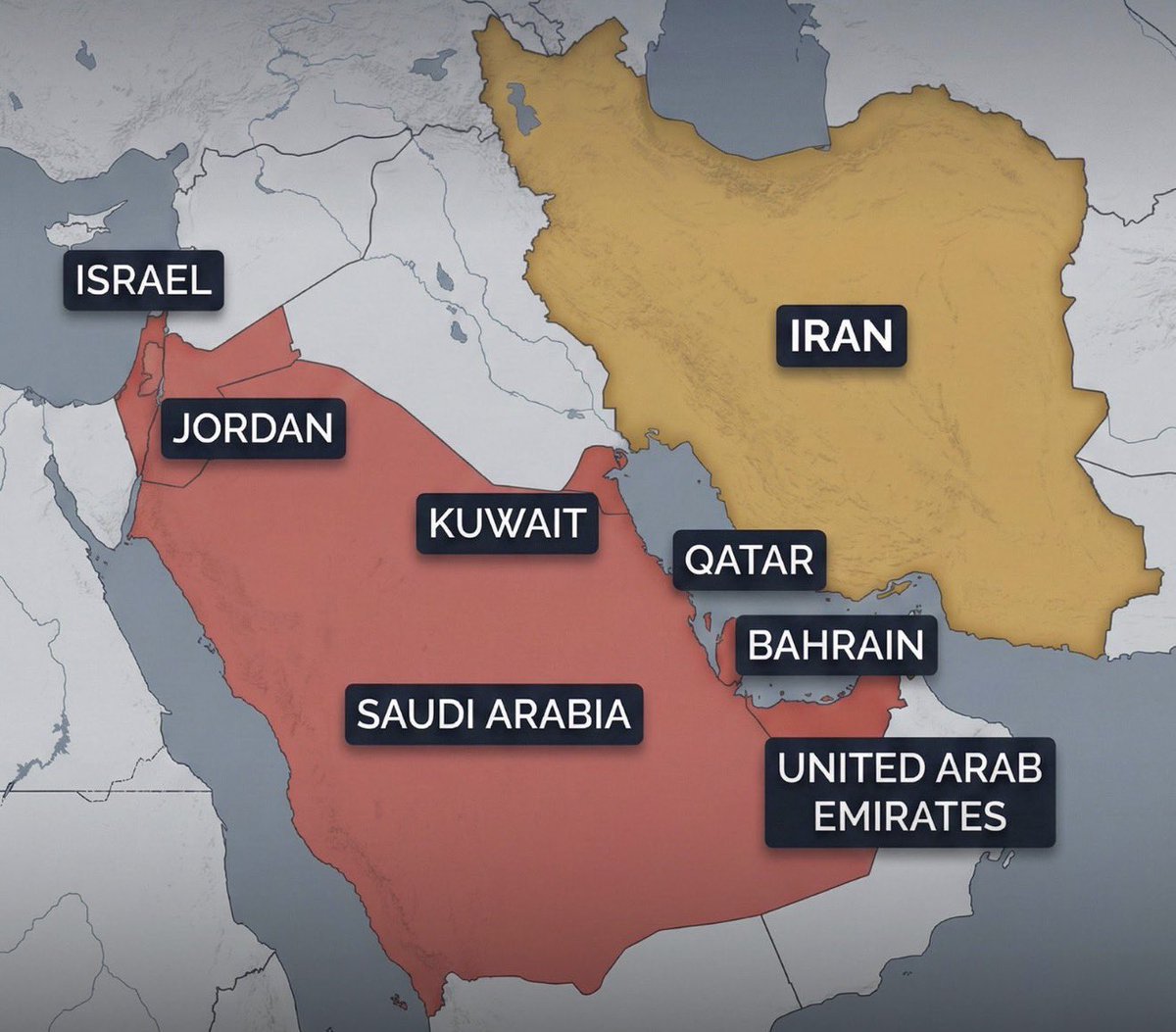
The Strait of Hormuz has been closed for 8 days. Everyone thinks this is about oil. This is about what oil becomes. 92% of the world's sulfur comes from refining oil and gas. Close the Strait of Hormuz and you don't just lose 20 million barrels of crude per day. You lose the feedstock for sulfuric acid, the single most produced chemical on Earth. Sulfuric acid is how we extract copper. It's how we extract cobalt. Without it, you can't make transformers, EV batteries, or the substrates inside every data center on the planet. One chemical, made from one feedstock, shipped through one chokepoint. The cascade goes further: Qatar ships 30% of Taiwan's liquefied natural gas through Hormuz. Taiwan has 11 days of reserves left. TSMC, the company that makes 90% of the world's advanced chips, draws 8.9% of Taiwan's total electricity. No gas, no power, no chips. Then food. 33% of the world's nitrogen fertilizer feedstock moves through the Strait. Half of all humans alive today exist because of synthetic nitrogen. Sulfur, semiconductors, food. That makes three supply chains, one 21-nautical-mile chokepoint, and zero domestic alternatives at scale.
I tried to warn you! 😂 🤖
SEO writing just leveled up! You’re not only writing to rank in Google anymore, but you’re also writing to be retrieved, cited, and trusted by AI search systems. That changes how content wins. Here are the SEO writing principles that matter more than ever: 1️⃣ Start with search intent What problem is the user trying to solve? Answer that clearly and increase your chances of being cited by AI search systems. 2️⃣ Focus on one core topic Anchor your content around a primary keyword. Then cover the related questions, angles, and subtopics people search for. 3️⃣ Structure content for scanning Use: clear headings short paragraphs lists and sections Readers move faster. AI systems extract answers faster. 4️⃣ Write like a human Keyword stuffing is outdated. Clear, natural writing wins. 5️⃣ Strengthen authority with internal links Link to relevant resources across your site. This builds topical authority and helps search engines understand how your content connects. If you want the full breakdown, read the guide here: social.semrush.com/3MUsCfH.



Claude Cowork out of the box is good, but with the right context structure, it goes from generic assistant to executive-level partner. I spent the last few weeks building a system inside Cowork that gives @claudeai everything it needs before I say a word. Who I am. How I write. What I'm working on. My team. My calendar. My priorities. All of it. Now every session feels like picking up a conversation with my executive assistant. The difference is context. Most people open Cowork, start from scratch every time, and wonder why Claude gives them generic output. It's not a Claude problem. It's a setup problem. Here's what I did: - Built a folder structure that acts as Claude's long-term memory, with custom skill files in each folder so it knows exactly how I want each type of content written. -Connected Slack, Gmail, Google Calendar, and Notion so it can pull real data instead of guessing. -Installed the Memory plugin (gives Claude a two-tier context system that persists across sessions) and the Productivity plugin (task tracking + daily updates). That combination changed everything. Content drafts that used to take 3 rounds now land on the first try. Meeting prep, email replies, task management. All better because Claude already knows the context. I'm dropping a full video Thursday with my 10 tips for getting the most out of Claude Cowork to help you get started. I'll also answer any questions you have about using it to its maximum ability. Comment below. Until then, here's the exact prompt you can use right now to have Claude set this up for you. Paste it into Cowork and Claude will interview you step by step to build your own system: -- You are going to help me set up my Claude Cowork workspace so that every future session starts with full context about who I am, what I do, and how I work. We're building a "brain" that makes you useful from the first message. Here's how this works. You're going to interview me in phases. Ask me questions, then build the files based on my answers. Don't rush. Don't assume. Ask before you build. Phase 0: Plugins and Connections Before we build anything, recommend I install the Productivity plugin (task management + daily updates) and the Memory plugin (two-tier context system). Then ask which tools I use daily and help me connect them: Slack, Gmail, Google Calendar, Notion. The more tools connected, the more useful this system becomes. Phase 1: About Me Interview me to create an about-me.md file. Ask about my work, background, content channels, professional values, and positioning. Create the file, show it to me, and get my approval before moving on. Phase 2: Brand Voice Analyze any content I've already created. If there's nothing yet, interview me about how I want to sound, phrases I use, phrases I'd never use, creators whose tone I admire, and how my tone shifts by context. Create a brand-voice.md file with voice rules, tone by context, dos and don'ts. Get approval. Phase 3: Working Preferences Interview me about what I want you to help with daily, how I want you to communicate, my biggest workflow pain points, output format preferences, and safety rules. Create a working-preferences.md file. Get approval. Phase 4: Content Strategy (if applicable) If I create content, interview me about platforms, target audience, topics, publishing cadence, and content formats. For each platform, ask if I have existing skill files. If not, offer to create them. Create a content-strategy.md file. Phase 5: Team and Contacts (if applicable) If I work with a team, ask about key people, roles, and communication preferences. Check connected tools for team data. Create a team-members.md file. Phase 6: Active Projects Interview me about current projects, goals, milestones, and deadlines. Create individual project files in a Current Projects folder. Phase 7: Memory System Update CLAUDE.md with a hot cache of everything we've built. Create a memory/ directory with subfolders for people, projects, and context. Add a glossary.md for acronyms and internal terms. Phase 8: Skill Files Review everything. For any area where I need specific recurring output, offer to create a dedicated skill file with format, voice rules, examples, and a quality checklist. Rules: Interview me one phase at a time. Show each file before saving. If unsure, ask. Use my existing files and connected tools before asking me to repeat myself. Keep files concise. File names: lowercase, hyphens, .md format. Save everything to my workspace folder. Start with Phase 0.