
B2B Mktr
873 posts


B2B Mktr
@harry_jose
B2B marketer; Occasional blogger; Quizzer; Trendspotter; Head of Marketing Ops - Firstsource, Ex Syngene, Infosys BPM; Personal views on topics of my interest
Bangalore Katılım Ağustos 2009
2.5K Takip Edilen240 Takipçiler

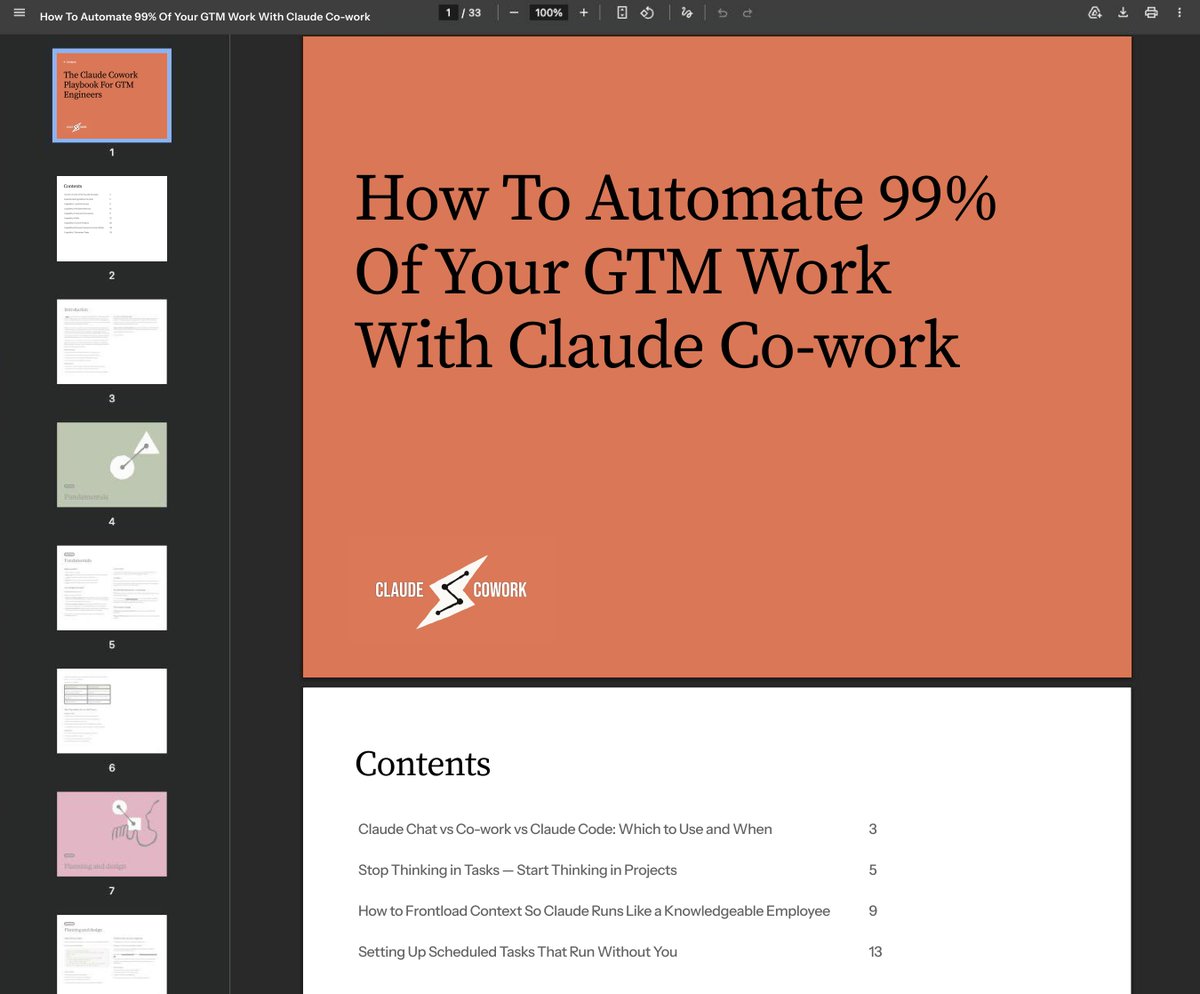
This Claude course can save you 20+ hours a week on GTM work you are currently doing manually.
Over 3,000 founders and agency owners requested access last month... but I couldn't send it to everyone.
So I'm releasing it again today.
It reveals the exact Co-work setup needed to turn Claude into a system that pulls reports, triages your inbox, monitors your tools, and runs scheduled tasks every day without you triggering a single thing manually.
Like + comment 'COWORK' and I'll share the full course for FREE.
Follow me to receive the DM.
For the next 48 hours only.
English

Most B2B websites die the same way. Someone ships a strong homepage, everyone celebrates, then every new page becomes a fresh writing project.
The result is drift, repetition, and a site that does not feel like one thing.
In the next live AI session this Friday, I’ll show how to use AI to turn one page into a website system, so every page stays connected. hiten.com/how-to-use-ai-…
English

I turned my entire Claude Code learning curve into a 10-module system…
And honestly - this would’ve saved me months.
Just one clean Notion doc.
Here’s what’s inside:
* Set up Claude Code and run your first real workflow in minutes (not hours)
* Build a CLAUDE.md that actually remembers context like a second brain
* Install and chain GTM skills so tasks run without babysitting
* Connect your tools using MCP (no messy custom integrations)
* Run multiple agents + subagents at the same time (yes, parallel execution)
* Control context + tokens so long sessions don’t break
* Pick the right model every time (Sonnet vs Opus vs Haiku - simplified)
* Automate workflows with triggers (so work runs even when you don’t)
* Real GTM use cases: lead scoring, signal tracking, outreach flows
* Slash commands you’ll reuse daily (huge time saver)
This is not theory.
It’s the exact system I built after wasting weeks figuring things out the hard way.
If you're trying to actually use Claude Code for real work (not just playing around), this will shortcut everything.
Comment “CLAUDE” and I’ll send it to you.
(Must be connected for priority access)

English

i'm running a live claude cowork workshop for non-technical people on april 22
by the end of the 2 hours, you'll have a fully set up marketing system on your computer that:
> produces a full week of content in one sitting, dialed into your voice so it sounds like you on your sharpest day
> turns any marketing framework or post into a repeatable skill that claude runs on command for you
> builds sales pages in minutes so you stop paying designers and copywriters thousands
> schedules tasks to run while you sleep so you wake up to finished drafts, fresh ideas, and updated reports every morning
> writes launch emails, newsletters, and sequences using the same frameworks behind my 6-figure product launches
all click by click, on your machine, while i do it on mine
here's everything that you get:
• the full 2-hour live workshop where you build everything in real time
• 16 personal skills that i built over 100s of hours for my own business
• the complete recording so you can rewatch anytime
• a self-paced course version of all the material
• access to Claude Marketing OS telegram group
this system runs 90% of the marketing behind my 7-figure brand doing 15M+ impressions/month
and it's all yours come april 22nd
comment "Cowork" and i'll DM you the link

English

Most Claude setups are a fucked.
Files everywhere. Output in random folders. Generic responses because context resets every session.
I've been testing a client delivery system for GTM agencies over the past few months.
Same problems kept showing up:
- Raw files scattered with no system
- Prompts producing generic output because context is missing
- Hours rebuilding the same instructions every session
- No way to run multi-client analysis without doing it one by one
So I built a full system around it.
Here's what's inside:
→ A /Claude-Work folder structure (Inbox, Processed, Outputs, Reference) with exact rules for each
→ A Prime Directive Prompt you paste at session start to lock Claude into your workflow
→ The CCO Framework (Context, Constraints, Output) for senior-level output every time
→ A Campaign Analyst workflow - sub-agents analyzing multiple client accounts simultaneously
→ A Client Report Creator - real .xlsx, .pptx, and .docx files with working formulas
→ A Competitive Intelligence workflow - live pricing page scans turned into gap analysis decks
Drop in raw campaign CSVs. Walk away. Come back to finished client reports.
Just a folder and a prompt.
Reply COWORK and I'll send it over.
(Works for solo consultants running client work too not just agency teams)
English
I just built a complete Claude Code system for GTM teams.
It runs lead scrapes, writes LinkedIn posts, manages your CRM, and processes 100 emails in 36 seconds.
Here's everything inside:
I've spent the last several months refining how GTM engineers can plug their existing stack straight into Claude Code.
✓ Install and configure Claude Code in under 10 minutes
✓ Build a CLAUDE.md that keeps every session fully aligned with your ICP and tone rules
✓ Create reusable skills that run lead scrapes, write cold email sequences, and push content cards to Notion automatically
✓ Connect MCP servers for HubSpot, Gmail, Slack, and Google Sheets without burning your context window
✓ Run 3-4 parallel sessions simultaneously so 4 tasks take the time of 1
And I turned the entire system into a step-by-step bible you can copy.
Claude Code - the fastest way to turn plain language instructions into GTM automation.
Combined with your existing stack - a full agentic GTM engine.
And I'm giving you the whole framework for free.
Here's what's inside:
✅ Setup and installation guide
Every install command for Mac, Windows, and Linux. Native installer vs Homebrew tradeoffs. VS Code and Cursor extension setup. What to do first in any new project.
✅ CLAUDE.md mastery
How to write rules Claude actually follows. ICP definitions, tone rules, guardrail structure, and the primacy bias fix that stops Claude from ignoring your most important instructions.
✅ Skills library with 7 pre-built GTM workflows
Lead scraper and classifier (60-90 minutes down to 87 seconds). LinkedIn post writer. Cold email sequence writer. Content calendar card writer. Morning pulse check. Asset brief generator. Boosting comment generator.
✅ MCP integration guide
Notion, HubSpot, Gmail, Slack, GitHub, Google Sheets. Which MCPs to keep, which to convert to direct API skills, and how a single bloated MCP can eat 40% of your context window before you type a single message.
✅ Context management and model selection
When to use Opus vs Sonnet vs Haiku. The dynamic switching pattern that gets Opus-quality decisions at Sonnet-level cost. How to use /compact, /context, and /clear to keep sessions fast.
And here's the full workflow you'll learn:
- Plan Mode before every new workflow - a 5-minute plan prevents 30 minutes of undoing mistakes
- Explore-plan-execute pattern for building internal tools without a developer
- Subagent setup for research, QA, and review tasks that keeps your main session clean
- Hooks that play a chime when parallel sessions finish and block writes to sensitive files
- Modal deployment to turn any skill into a URL your whole team can trigger
This is the same system GTM engineers are using to:
→ Scrape and classify 1,000 leads in under 2 minutes
→ Process and label 100 emails in 36 seconds using direct Gmail API calls
→ Generate LinkedIn posts, boosting comments, and asset briefs in a single session
→ Build client-facing reports in 20 minutes instead of 2 hours
All without hiring a developer.
All inside Claude Code.
All free.
Want the full Claude Code Bible for GTM Engineers?
Reply BIBLE and I'll DM it to you.
English

RELEASING Scribe Tomorrow 🚨
Most AI writing tools produce content nobody reads.
You paste a prompt. You get a post that sounds like every other AI post on the platform.
Generic hooks. No voice. No point of view.
We've written thousands of posts across 15 industries. We know what hooks stop the scroll. What formats convert. What structure keeps someone reading past line two.
So we (@Layton_Gott and I) built all of that into one tool. It's called Scribe.
Here's what's inside:
→ Trained on real performance data, not just "good writing"
→ Pulls from your brand brief so it sounds like you, not a robot
→ Built for each platform separately. LinkedIn, Twitter, email.
→ Multiple hook variations per post so you pick the strongest angle
→ Takes youTube transcripts, articles, voice notes, etc, and turns them into LinkedIn posts, Twitter short-form hot takes, lead magnets, and even story emails
→ And plenty more formats
We've been building this for months. We're launching early access tomorrow.
You get free access until testing ends. Then an exclusive discount that will not come back so you can continue using it.
Want early access?
1. Follow me
2. Comment "SCRIBE"
I'll send you the waitlist link soon!
English

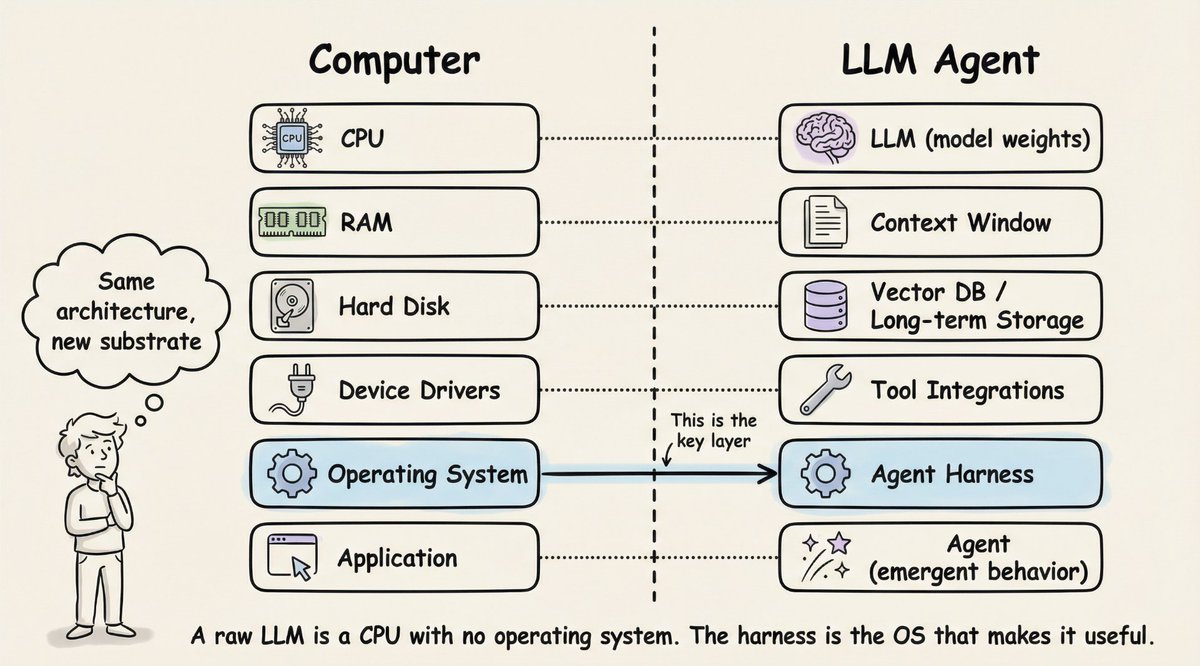
A raw LLM is just like a CPU without OS.
It can compute. But it can't do anything useful on its own.
This analogy is the clearest way I've found to understand what an agent harness actually does.
Here's the mapping:
• 𝗖𝗣𝗨 → 𝗟𝗟𝗠 (model weights). The raw compute engine. Powerful, but useless without infrastructure around it.
• 𝗥𝗔𝗠 → 𝗖𝗼𝗻𝘁𝗲𝘅𝘁 𝘄𝗶𝗻𝗱𝗼𝘄. Fast, always available, but limited. When it fills up, you start losing things.
• 𝗛𝗮𝗿𝗱 𝗱𝗶𝘀𝗸 → 𝗩𝗲𝗰𝘁𝗼𝗿 𝗗𝗕 / 𝗹𝗼𝗻𝗴-𝘁𝗲𝗿𝗺 𝘀𝘁𝗼𝗿𝗮𝗴𝗲. Large capacity, but slow to access. You retrieve from it, not compute in it.
• 𝗗𝗲𝘃𝗶𝗰𝗲 𝗱𝗿𝗶𝘃𝗲𝗿𝘀 → 𝗧𝗼𝗼𝗹 𝗶𝗻𝘁𝗲𝗴𝗿𝗮𝘁𝗶𝗼𝗻𝘀. The interfaces that let the model interact with the outside world. Code execution, web search, file I/O.
• 𝗢𝗽𝗲𝗿𝗮𝘁𝗶𝗻𝗴 𝘀𝘆𝘀𝘁𝗲𝗺 → 𝗔𝗴𝗲𝗻𝘁 𝗵𝗮𝗿𝗻𝗲𝘀𝘀. This is the key layer. It manages everything: which tools to call, what fits in memory, when to retrieve, how to recover from errors, and when to stop.
And then there's the 𝗮𝗽𝗽𝗹𝗶𝗰𝗮𝘁𝗶𝗼𝗻 layer. That's the "agent" itself. Not a piece of software you install, but emergent behavior that arises when the OS does its job well.
This is why two products using the exact same model can perform completely differently. LangChain changed only their harness infrastructure (same model, same weights) and jumped from outside the top 30 to rank 5 on TerminalBench 2.0.
The model didn't improve. The operating system around it did.
The article below is a deep dive on agent harness engineering, covering the orchestration loop, tools, memory, context management, and everything else that transforms a stateless LLM into a capable agent.
Akshay 🚀@akshay_pachaar
English

I just built a Claude skill that acts as a second brain for DTC brands 🤯
Drop your ad exports, customer reviews, competitor screenshots, and brand docs into a folder → Claude compiles it all into an organized wiki you can ask questions against.
All inside Claude Cowork.
Perfect for DTC brands and agencies whose knowledge is scattered across Google Drive, Notion, Meta Ads Manager, Figma, and 47 spreadsheets nobody has opened in 3 months.
If every strategic question takes 2 hours to answer because the data lives in 8 different places ...
This skill eliminates the entire loop:
→ Claude scaffolds a DTC folder structure: ads, customers, competitors, brand, performance, notes
→ You drop every file you have into those folders — messy, unorganized, exactly how you have them now
→ Claude reads everything and compiles a wiki: hooks-that-work, customer-pains, competitor-angles, brand-voice, performance-patterns, creative-brief-library
→ Every article is cross-linked and traceable back to the source file
→ You ask questions against the wiki — "what hooks are actually working?" "what objections come up most?" "where are my competitors weak?"
→ Claude answers, grounded entirely in your own data
→ Save the answers back in and the system gets smarter every time you use it
No more hunting through 12 tools.
No more "where did I save that brief?"
No more answering the same question twice.
What you get:
→ A complete DTC brand brain scaffold in 60 seconds
→ Six core wiki articles Claude populates automatically from your raw files
→ A schema file that tells Claude exactly how to maintain the wiki for DTC use cases
→ Monthly health checks that catch contradictions and flag gaps before errors compound
→ A knowledge base that compounds — every question you ask makes the next answer better
Built on a methodology @karpathy shared for personal knowledge bases, I rebuilt the entire thing for DTC operators: folder structure, schema rules, wiki articles, and question frameworks all tuned for brands and agencies.
I put together the full skill file plus a playbook walking through the exact setup and 5 real questions to ask your brand brain.
Want it for free?
> Like this post
> Comment "BRAIN"
And I'll send it over (must be following so I can DM)
English
I put the entire Claude GTM Agency Playbook into ONE Notion doc.
10 modules. No fluff.
- What Claude Code does for GTM agencies, how to start, and the core use cases including the Shoptalk cookie editor method
- How to onboard clients end to end in 6 steps from a single Slack trigger to live campaigns
- How to build sending infrastructure in 5 minutes instead of 40 and what breaks it
- How to build campaigns automatically: offer bible, generation flow, feedback loop, and reporting
- Which channel to use and when: the 10x reply rate gap between LinkedIn and email and the allbound model
- Two signal-based plays to build now: event outreach plus social listening, and competitor displacement
- How to run the webinar play for outbound-led inbound on LinkedIn without burning deliverability
- What Clay's pricing change means for agencies and the 4 moves to make now
- How to set up OpenClaw for autonomous prospecting without breaking compliance
- The 3 advantages of the AI-native agency, the copy risk, and what the GTM engineer role is becoming
This is the playbook I would have KILLED for before spending months figuring out how to run a GTM agency on Claude Code without rebuilding everything from scratch every time a client onboards.
Like + comment "CLAUDE" and I'll send it over
(must be connected for priority access)
English

q2 gift for you guys 🎁
i've compiled our top google ads strategies in 2026 into a single resource
22 guides including:
> the execution playbooks
> the checklists we follow
> the SOPs our team uses daily
like + reply "guide" and i'll dm it over
(must be following)

English

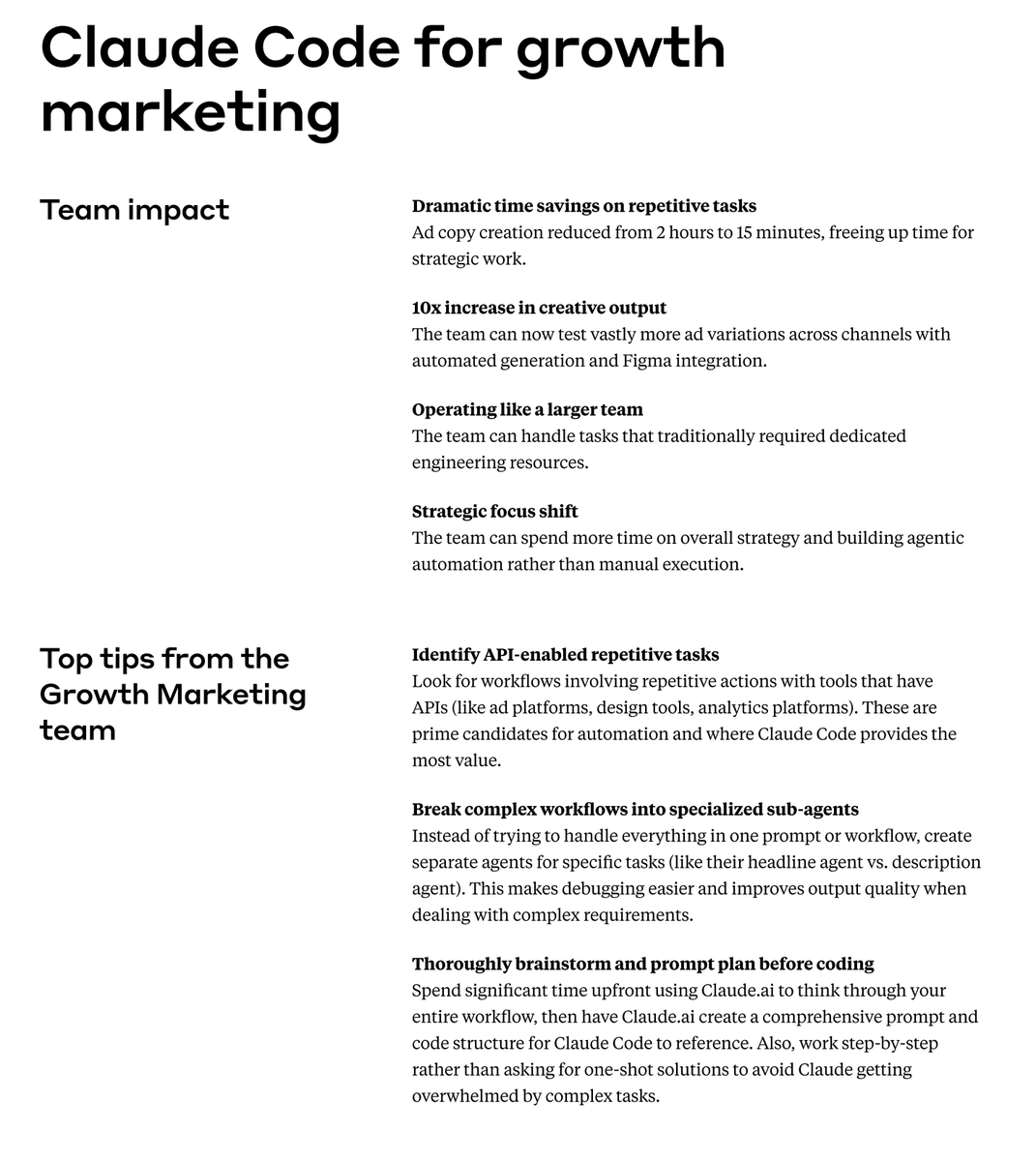
Anthropic ran their entire marketing operation with one person.
$380 billion company.
Paid search. Paid social. SEO. Email. App stores.
One non-technical hire doing all of it — for 10 months.
I pulled it apart.
Compared it to every system we've built across the clients we've worked with.
Then asked myself one question:
If I had to reverse engineer this from scratch — what would it actually look like?
Turns out the architecture isn't that complicated.
I mapped the whole thing into a 47-page PDF you can upload directly to any LLM.
It coaches you through building your own version step by step.
Comment "marketing" and I'll send it over.
English
ngl this process is addictive
it’s like you know you’ll wake up with a skill you didn’t have. even though I might not know it perfectly yet, the machine does, and the machine is an extension of me
today I am training a use case writer skill after I saw this book mentioned in a highlight
share some great PDFs with me please 🙏

George from 🕹prodmgmt.world@nurijanian
English

We were Clay's largest user at one point in time, hitting their platform 17.3 million times per week. Last month we replaced them entirely with a $200/mo Claude Code subscription.
I can't write code. Neither can James, my VP of Growth who built the replacement.
Here's the full story.
Clay is a GREAT product and I TRULY think most people should use it. But we hit their ceiling.
50,000 row limit per table.
12.5 million row cap per workspace.
Tables that take days to actually delete.
Clicking "run all" thousands of times and waiting days for things to clear out.
So
When you're processing millions of leads, all the above become the bottleneck of your entire business.
James had never touched Claude Code before. Three weeks after learning it, he built our entire core system.
With Clay, processing 1 million leads took 27 hours.
And it would error out often enough that we would always have to plan on hitting the “run all rows” button again on 20+ clay tables. IYKYK
but
Our new system waterfall enriches 1 million leads in 5 seconds. 272,000 leads PER SECOND.
AND On top of the core engine, we vibe coded a Google Maps scraper that pulls leads zip code by zip code across all 32,000 US zip codes.
AND An AI lead finder that hits 95% contact match rates where Apollo gives you about 30%.
AND Ad library scrapers for Google and LinkedIn.
AND An AI campaign analysis system.
AND An auto-refill system so clients never run out of leads mid-campaign.
One we started building with Claude, we just couldn’t stop
Now we have the data ready for clients sending 5 million emails a month within 1 week of signing the contract.
I put together the full system blueprint -- every tool, the tech stack, a Clay vs custom comparison, and a 6-step playbook for building your own. Plus a video walkthrough where I show you the live system and how each tool actually works.
Retweet or Reply CODE below and I'll DM it to you.
English
Claude Cowork is f*cking cracked for Meta Ads 🤯
Point it at a folder with your ad export, your brand context, and your brief template —>
... and it analyzes your account like a senior creative strategist + saves a finished brief directly to your computer.
All inside Claude Cowork.
Perfect for DTC brands and agencies who are still manually digging through ad reports trying to figure out why performance shifted.
If you're running Meta Ads and pulling weekly reports that tell you what happened but not why —
CPAs creeping up, CTRs dropping...
You're killing creatives on gut feel because mapping performance back to hook type, angle, and offer framing takes hours you don't have.
Claude Cowork eliminates the entire loop:
→ Drop your Meta Ads CSV export into a project folder
→ Add a brand context file and your brief template
→ Claude reads all three files and audits across 4 lenses: hook performance, offer angles, fatigue signals, next test recommendations
→ Asks clarifying questions if it needs them
→ Saves a finished creative brief as a real .md file directly to your folder
No copy-pasting data into chat windows.
No manually tagging creatives in a spreadsheet.
No "here are your metrics" summaries that tell you nothing new.
What you get:
→ Pattern analysis across every creative — which hook structures are converting and why
→ Creative fatigue signals before CPAs blow up
→ Competitor intelligence layered in from the Meta Ad Library
→ A data-backed brief your creative team can execute immediately
Set it up once, drop in a fresh CSV every week and run the same prompt.
I put together a full playbook with the exact folder setup, the prompts, and the brief template to get this running in under 30 minutes.
Want it for free?
> Like this post
> Comment "ADS"
And I'll send it over (must be following so I can DM)
English
@pootlepress This looks really neat. Very interested in finding out how you will make this responsive without breaking the visual story
English

Today’s AI WordPress experiment 👀🔥👇
I built a plugin called StoryGrid.
Upload one photo… and it automatically slices it into multiple featured images and assigns them across your posts.
The result? Your post grid becomes one coherent visual story.
Beautifully elegant when combined with categories.
Built with Cursor + Sonnet 4.6 and WordPress Studio.
Has anyone seen WordPress do this before?
English

I built the ultimate GTM Engineer AI Toolkit that handles prospect research, outreach writing, meeting prep, and more in minutes.
This is a beginner-friendly walkthrough that shows you exactly how to set it up, use it at work, and personalize it to your business.
It can:
- Research real prospects and companies
- Score accounts against your ICP
- Write personalized cold outreach sequences
- Generate meeting prep briefs before calls
- Help you build a repeatable prospecting pipeline
- All using a free toolkit + Claude Code / Codex.
This is for SDRs, founders, marketers, and GTM operators who want to use AI to do more at work without buying another expensive tool.
I break down the full workflow step by step in the video.
👇 Comment "GTM GUIDE" and I’ll send you the full toolkit.
(make sure you're following me so I can DM you)
English

I should charge $99 for this.
But I'm giving away our Claude Mastery Guide for free.
We just updated it with a full Claude Skills section, the feature most people still don't know exists.
Inside:
→ 30 prompt engineering principles
→ 10+ mega-prompts ready to copy
→ Mini-course from beginner to advanced
→ How to build Skills that make Claude remember your workflows forever
→ Glossary + strategic use cases
This turns Claude from a chatbot into your actual work system.
Comment "Claude" and I'll DM it to you.
(Must be following me to receive it)

English
@rohanpaul_ai Finally something that I can understand. Actually it would be more poetic if you were to cut off at 1945 and see if it can independently discover Information theory as Claude Shannon did in 1948
English

Demis Hassabis’s “Einstein test” for defining AGI:
Train a model on all human knowledge but cut it off at 1911, then see if it can independently discover general relativity (as Einstein did by 1915);
if yes, it’s AGI.
English
Which book stands out from your personal bookshelf?
P.S. This is a design review, not a book review. I still have to complete the book.
English
Do Epic Shit by @warikoo is a Masterclass in Product Design 🧠
Here is what you can learn about product design by picking this book.

English