

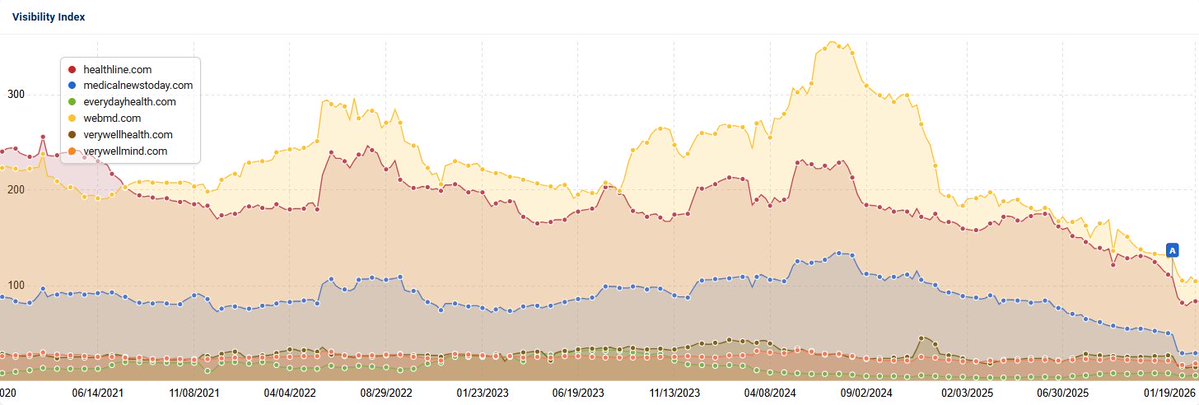
@glenngabe @rustybrick Fun fact wikipedia has blacklisted Healthline and EveryDayHealth and no other health media websites. Make it make sense…
English
Matt Smith
1.1K posts

@mattsinla
VP of SEO & audience acquisition at RVOHealth who dreams of one day opening a smoked brisket taco truck.



LLM Knowledge Bases Something I'm finding very useful recently: using LLMs to build personal knowledge bases for various topics of research interest. In this way, a large fraction of my recent token throughput is going less into manipulating code, and more into manipulating knowledge (stored as markdown and images). The latest LLMs are quite good at it. So: Data ingest: I index source documents (articles, papers, repos, datasets, images, etc.) into a raw/ directory, then I use an LLM to incrementally "compile" a wiki, which is just a collection of .md files in a directory structure. The wiki includes summaries of all the data in raw/, backlinks, and then it categorizes data into concepts, writes articles for them, and links them all. To convert web articles into .md files I like to use the Obsidian Web Clipper extension, and then I also use a hotkey to download all the related images to local so that my LLM can easily reference them. IDE: I use Obsidian as the IDE "frontend" where I can view the raw data, the the compiled wiki, and the derived visualizations. Important to note that the LLM writes and maintains all of the data of the wiki, I rarely touch it directly. I've played with a few Obsidian plugins to render and view data in other ways (e.g. Marp for slides). Q&A: Where things get interesting is that once your wiki is big enough (e.g. mine on some recent research is ~100 articles and ~400K words), you can ask your LLM agent all kinds of complex questions against the wiki, and it will go off, research the answers, etc. I thought I had to reach for fancy RAG, but the LLM has been pretty good about auto-maintaining index files and brief summaries of all the documents and it reads all the important related data fairly easily at this ~small scale. Output: Instead of getting answers in text/terminal, I like to have it render markdown files for me, or slide shows (Marp format), or matplotlib images, all of which I then view again in Obsidian. You can imagine many other visual output formats depending on the query. Often, I end up "filing" the outputs back into the wiki to enhance it for further queries. So my own explorations and queries always "add up" in the knowledge base. Linting: I've run some LLM "health checks" over the wiki to e.g. find inconsistent data, impute missing data (with web searchers), find interesting connections for new article candidates, etc., to incrementally clean up the wiki and enhance its overall data integrity. The LLMs are quite good at suggesting further questions to ask and look into. Extra tools: I find myself developing additional tools to process the data, e.g. I vibe coded a small and naive search engine over the wiki, which I both use directly (in a web ui), but more often I want to hand it off to an LLM via CLI as a tool for larger queries. Further explorations: As the repo grows, the natural desire is to also think about synthetic data generation + finetuning to have your LLM "know" the data in its weights instead of just context windows. TLDR: raw data from a given number of sources is collected, then compiled by an LLM into a .md wiki, then operated on by various CLIs by the LLM to do Q&A and to incrementally enhance the wiki, and all of it viewable in Obsidian. You rarely ever write or edit the wiki manually, it's the domain of the LLM. I think there is room here for an incredible new product instead of a hacky collection of scripts.




SERPrecon just got even better: Use code SEPT40 when you sign up for 40% off your lifetime subscription. Not your first month, not your first year - your subscription, forever. 🤭 But you can only get it if you sign up by September 30th, 2025 ‼️ Code expires 9/30/2025 at midnight. *If the code is used, then a subscription is cancelled, the code is no longer valid. Subscription must remain active for 40% lifetime discount to apply. #SERPrecon #SEOTool #SEO #DigitalMarketing #FallPromo




Vibe coding is a scam. I tried vibe coding for 2 days. I’m talking real vibe coding where I turn on YOLO mode and spend time on my phone while Cursor spits out code. Here’s why it’s a scam: 1. I didn’t learn anything. Like actually nothing. I felt dumber than before 2. It generates 💩 code. The worst code imaginable. Extremely annoying or impossible to debug. Easier to just start over 3. AI can’t fix every bug. Sometimes it goes in infinite loops trying to fix something 4. It’s not fun. At first it seems great but once you realize you don’t know what’s going on and it’s producing bad code, it gives you stress and anxiety 5. I feel like a worse engineer. Not thinking through the approach, how to build a solution, how to debug, what even am I doing? At this point I’m a non-technical product manager (no offense ❤️)

