awdnn
31 posts


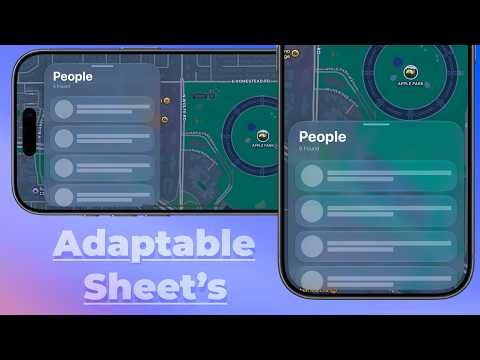
By adding constraints to the UISheetPresentationController’s containerView along with some SwiftUI modifiers, we can mimic the landscape sticky-sheet effect found in Apple’s Find My app, For more 👇
youtu.be/LyU_Of_TdPo

YouTube
English

@_Kavsoft How make sheet not distort after stretching on iPad, and have it sit on one side of the screen just like the iPad version of Find My? I think this would be really important for adapting to future iPhone foldable screens. The source code you sent before didn't do this, thanks!
English

@Dimillian You can disable it: @floperillat/post/DZX4b2hiXmQ?xmt=AQG08E0Mtx_-KkENhcx1DM1HnBQDi8zpdeKlxer1iHRRlZpOslyXefGVuUz_TgwI4c0ZSkY&slof=1" target="_blank" rel="nofollow noopener">threads.com/@floperillat/p…
English

@lindadong please please restore the high visibility of the soft edge effect in 26 and set it as the default. The current default hard effect in 27 is just too outdated... And the hard black edges on the liquid glass look completely out of place and not at all aesthetic!
English

On a serious note, the last the time we had Design Principles in the HIG was much too long ago.
With the help of the Apple design team they are back and completely refreshed.
Please take a moment with them. We’re in an era where the responsibility of being a designer is more important than ever and hope these principles help guide you as much as they guide us.
developer.apple.com/design/human-i…

Linda Dong 🍉@lindadong
Watch me make gorgeous faces like this one in our video! 💅 Principles of Great Design #wwdc26 youtu.be/Xa9L2yx_QH8
English

@chan_k @alexwidua @mactyler please please restore the high visibility of the soft edge effect in 26 and set it as the default. The current default hard effect in 27 is just too outdated... And the hard black edges on the liquid glass look completely out of place and not at all aesthetic!
English

Siri now lives in the Dynamic Island! Amazing work by @alexwidua, @mactyler and many more. Super proud of the team!
Alex Widua@alexwidua
Feels incredible to share the work we’ve done this year, excited to have been a big part in bringing to life a more powerful and personal Siri.
English

@NickWeb96802468 @OutofGalaxyy Got rid of the shadows and replaced them with thin edges - really weird

English

@OutofGalaxyy I will be honest, I really do not dig the adjustments made to the liquid glass design language this update as of now. And I say that as someone who was a LG fan since day one. It looks so incredibly plasticky, I dunno
English

Just updated to iOS 27 Dev Beta 1 on my iPhone 17. FIRST IMPRESSIONS:
.
.
> the new “transparency” toggle is absolutely magical. You have no right to hate on Liquid Glass now ☺️🔪
> THEY REMOVED THE UGLY GYRO HIGHLIGHTS. Now when you tilt your phone they are static. This is love 💕
> It’s not 100% smooth, but for the first developer beta it’s more than good enough. So much better than iOS 26 Dev Beta 1.
> most iOS 26 bugs are still, unfortunately, present. But that isn’t an issue (for now), cause it’s the very very first developer Beta.
> many app icons now feature a shadow from the main subject on the icon, which makes them look even more 3D and “Glass-like”. Lovely change.
> personally, I feel like the whole design of Liquid Glass buttons, elements etc, got an almost exact look that Apple showed us last year with iOS 26 (the TRUE Liquid Glass we all wanted)
So far so good. It’s basically iOS 26 on steroids.


English

@alexwidua Why get rid of the beautiful: progressive blur?As a developer, this is really bothering me and affecting my original design. At least give me an option!

English

@Dimillian That's really weird. Why do we need an extra mask? What's the point of liquid glass? The old gradual blur was beautiful and practical!
English

对比一下 GPT-5.5 的设计效果和 Opus 4.8 的设计效果
我真不是尬黑 GPT-5.5,我这种审美水平都能看出来差距
使用 Skill:github.com/JimLiu/baoyu-d…
---- 提示词 ----
/baoyu-design 帮我开发一款Reader Mac App,帮助我更好的阅读和收藏文章。数据都在本地。
## 信息采集
1. 主动添加
可以手动添加不同类型的信息:
- URL:输入 URL,自动抓取内容和图片
- 附件:上传PDF、视频、图片
- Markdown 编辑:类似于发布博客,输入标题、内容、发布图片
- 其他
2. 自动订阅
- RSS 订阅
- 社交媒体账号:X、微博、YouTube
- 其他
## 信息编辑和分类
1. 标签
每条内容都可以打标签
2. 分类、目录
可以创建树形目录,可以把内容放到不同的分类
3. 收藏
可以点击收藏
4. 编辑
每一条内容都可以编辑,有个内置的Markdown编辑
## AI 辅助
### 功能
1. 自动翻译
可以支持不同语言的翻译
2. 总结和摘要
可以去对抓取了的内容进行摘要
3. 二次创作
可以基于一条或者多条内容进行二次创作
### 交互
1. CMD + K 随时唤出菜单
2. 集成 AI Chat Sidebar
可以显示 Chat Sidebar 通过 AI Chat 去调用 AI Agent 辅助对内容进行处理
3. 选中操作
选中内容文字,可以进行处理,比如翻译、润色、修改之类


宝玉@dotey
Cursor's new browser + element annotation turns it into a design studio. Meet Cursor Design 🎨 — Claude Design, running locally. Describe a screen → get polished HTML → click any element in the preview & say what to change. Best w/ Opus 4.8. npx skills add JimLiu/baoyu-design github.com/JimLiu/baoyu-d…
中文