Zen'no ^_^ รีทวีตแล้ว
Zen'no ^_^
6.9K posts


Zen'no ^_^
@RealZenno
Retired hacker/activist. I occasionally post about #hacking, #infosec or whatever else peeks my interest.
The Internet เข้าร่วม Ağustos 2019
3.3K กำลังติดตาม3.9K ผู้ติดตาม

Zen'no ^_^ รีทวีตแล้ว

@DHAhole @misstennisha @intigriti @zbraiterman @thejonmccoy @BentleyAudrey @Jhaddix @DanielMiessler @jeff_foley @bishopfox @C0d3Cr4zy @caseyjohnellis @MrJeffMan @SW_Samii @0xTib3rius @OliviaGalluccii @rana__khalil @Infosecpat @J3ssa @luizfernandorg @ethicalhacker @irawinkler @CyberWarriorSt1 @ebelardo73 @NahamSec @CSKIP71 @HackingDave @MeterPeter4Eva @corewarrior #FF
@cybergeekgirl
@RealZenno
@clintgibler
@rez0__
@hackerxbella
@InfoSecComm
@CISAJen
@Djax_Alpha
@B91Tech
@RaicesCyberOrg
@Puggmeister
@nitoang
@lynn_dohm
@LilMzMuffinCup
@InsiderPhD
@PinkDraconian
@KeilanRolle
@G0LDEN_infosec
@medarkus_
@blenster
@garyjoseph227
QME
Zen'no ^_^ รีทวีตแล้ว
@DHAhole @misstennisha @intigriti @zbraiterman @thejonmccoy @BentleyAudrey @Jhaddix @DanielMiessler @jeff_foley @bishopfox @C0d3Cr4zy @caseyjohnellis @MrJeffMan @SW_Samii @0xTib3rius @OliviaGalluccii @rana__khalil @Infosecpat @J3ssa @luizfernandorg @ethicalhacker @irawinkler @CyberWarriorSt1 @ebelardo73 @NahamSec @CSKIP71 @HackingDave @MeterPeter4Eva @corewarrior @cybergeekgirl @RealZenno @clintgibler @rez0__ @hackerxbella @InfoSecComm #FF
@JustHackingHQ
@DaBootWolverine
@RedSiege
@yuridiogenes
@FilipiPires
@Dallas_Hackers
@HackSpaceCon
@ericteichmiller
@ScorpVayne
@MikeHacksThings
@rickcable
@vvanitydevil
@rekdt
@Lemonitup
@mhernandeztech
QME
Zen'no ^_^ รีทวีตแล้ว
@DHAhole @misstennisha @intigriti @zbraiterman @thejonmccoy @BentleyAudrey @Jhaddix @DanielMiessler @jeff_foley @bishopfox @C0d3Cr4zy @caseyjohnellis @MrJeffMan @SW_Samii @0xTib3rius @OliviaGalluccii @rana__khalil @Infosecpat @J3ssa @luizfernandorg @ethicalhacker @irawinkler @CyberWarriorSt1 @ebelardo73 @NahamSec @CSKIP71 @HackingDave @MeterPeter4Eva @corewarrior @cybergeekgirl @RealZenno @clintgibler @rez0__ #FF
@chris_foulon
@m1a1vet
@SamVR
@BillBrenner70
@JNitterauer
@SciaticNerd
@BanjoCrashland
@EanMeyer
@investigatorchi
@Snubs
@strandjs
@Antisy_Training
@mattjay
@chrisculling
@I_Am_Jakoby
@TecFlack
@MadAlexPR
QME
Zen'no ^_^ รีทวีตแล้ว

.@vonderleyen "The European #AgeVerification app is technically ready. It respects the highest privacy standards in the world. It's open-source, so anyone can check the code..."
I did. It didn't take long to find what looks like a serious #privacy issue.
The app goes to great lengths to protect the AV data AFTER collection (is_over_18: true is AES-GCM'd); it does so pretty well.
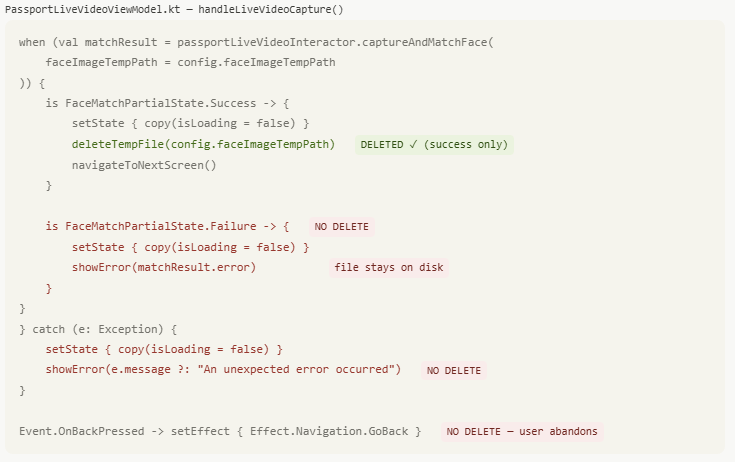
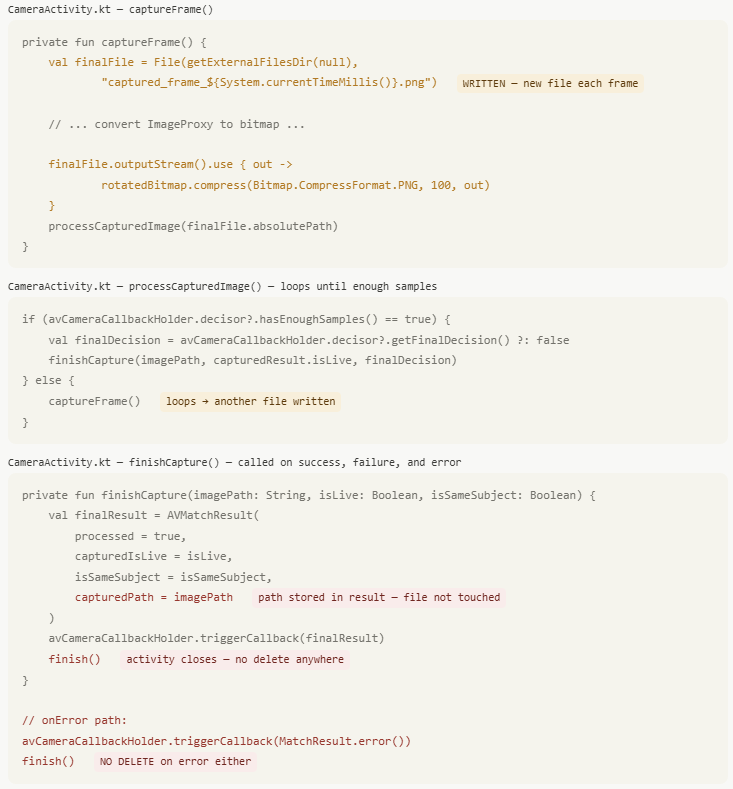
But, the source image used to collect that data is written to disk without encryption and not deleted correctly.
For NFC biometric data:
It pulls DG2 and writes a lossless PNG to the filesystem. It's only deleted on success. If it fails for any reason (user clicks back, scan fails & retries, app crashes etc), the full biometric image remains on the device in cache. This is protected with CE keys at the Android level, but the app makes no attempt to encrypt/protect them.
For selfie pictures:
Different scenario. These images are written to external storage in lossless PNG format, but they're never deleted. Not a cache... long-term storage. These are protected with DE keys at the Android level, but again, the app makes no attempt to encrypt/protect them.
This is akin to taking a picture of your passport/government ID using the camera app and keeping it just in case. You can encrypt data taken from it until you're blue in the face... leaving the original image on disk is crazy & unnecessary.
From a #GDPR standpoint:
Biometric data collected is special category data. If there's no lawful basis to retain it after processing, that's potentially a material breach.
youtube.com/watch?v=4VRRri…

YouTube
English
Zen'no ^_^ รีทวีตแล้ว
Hacking the #EU #AgeVerification app in under 2 minutes.
During setup, the app asks you to create a PIN. After entry, the app *encrypts* it and saves it in the shared_prefs directory.
1. It shouldn't be encrypted at all - that's a really poor design.
2. It's not cryptographically tied to the vault which contains the identity data.
So, an attacker can simply remove the PinEnc/PinIV values from the shared_prefs file and restart the app.
After choosing a different PIN, the app presents credentials created under the old profile and let's the attacker present them as valid.
Other issues:
1. Rate limiting is an incrementing number in the same config file. Just reset it to 0 and keep trying.
2. "UseBiometricAuth" is a boolean, also in the same file. Set it to false and it just skips that step.
Seriously @vonderleyen - this product will be the catalyst for an enormous breach at some point. It's just a matter of time.
Paul Moore - Security Consultant @Paul_Reviews
.@vonderleyen "The European #AgeVerification app is technically ready. It respects the highest privacy standards in the world. It's open-source, so anyone can check the code..." I did. It didn't take long to find what looks like a serious #privacy issue. The app goes to great lengths to protect the AV data AFTER collection (is_over_18: true is AES-GCM'd); it does so pretty well. But, the source image used to collect that data is written to disk without encryption and not deleted correctly. For NFC biometric data: It pulls DG2 and writes a lossless PNG to the filesystem. It's only deleted on success. If it fails for any reason (user clicks back, scan fails & retries, app crashes etc), the full biometric image remains on the device in cache. This is protected with CE keys at the Android level, but the app makes no attempt to encrypt/protect them. For selfie pictures: Different scenario. These images are written to external storage in lossless PNG format, but they're never deleted. Not a cache... long-term storage. These are protected with DE keys at the Android level, but again, the app makes no attempt to encrypt/protect them. This is akin to taking a picture of your passport/government ID using the camera app and keeping it just in case. You can encrypt data taken from it until you're blue in the face... leaving the original image on disk is crazy & unnecessary. From a #GDPR standpoint: Biometric data collected is special category data. If there's no lawful basis to retain it after processing, that's potentially a material breach. youtube.com/watch?v=4VRRri…
English
Zen'no ^_^ รีทวีตแล้ว
Bypassing #EU #AgeVerification using their own infrastructure.
I've ported the Android app logic to a Chrome extension - stripping out the pesky step of handing over biometric data which they can leak... and pass verification instantly.
Step 1: Install the extension
Step 2: Register an identity (just once)
Step 3: Continue using the web as normal
The extension detects the QR code, generates a cryptographically identical payload and tells the verifier I'm over 18, which it "fully trusts".
This isn't a bug... it's a fundamental design flaw they can't solve without irrevocably tying a key to you personally; which then allows tracking/monitoring.
Of course, I could skip the enrolment process entirely and hard-code the credentials into the extension... and the verifier would never know.
Paul Moore - Security Consultant @Paul_Reviews
Hacking the #EU #AgeVerification app in under 2 minutes. During setup, the app asks you to create a PIN. After entry, the app *encrypts* it and saves it in the shared_prefs directory. 1. It shouldn't be encrypted at all - that's a really poor design. 2. It's not cryptographically tied to the vault which contains the identity data. So, an attacker can simply remove the PinEnc/PinIV values from the shared_prefs file and restart the app. After choosing a different PIN, the app presents credentials created under the old profile and let's the attacker present them as valid. Other issues: 1. Rate limiting is an incrementing number in the same config file. Just reset it to 0 and keep trying. 2. "UseBiometricAuth" is a boolean, also in the same file. Set it to false and it just skips that step. Seriously @vonderleyen - this product will be the catalyst for an enormous breach at some point. It's just a matter of time.
English
Zen'no ^_^ รีทวีตแล้ว
Let's shift focus and explain why the #EU #AgeVerification concept is fundamentally flawed.
Assume:
1. The production app is released.
2. It's 100% secure, 100% private (fantasy land, but stick with me)
3. It cryptographically challenges every step, including hardware attestation which requires a physical device.
4. Every single other attack vector in the surrounding environment is somehow magically patched.
aka - it's working exactly as intended/designed.
It does not protect against a relay attack.
This is a threat they considered and somewhat addressed here: github.com/eu-digital-ide…
With the current design, there's nothing preventing someone running a verification-as-a-service; a remote Android device which returns a valid attestation. Remember, it's not returning "I am over 18", it returns "someone is over 18". Neither the verifier, nor the app has any way to link the session ID to a physical device.
Their own docs state this clearly:
Remote Cross-Device Presentation:
"Note that the Wallet Instance does not see any difference between the cross-device flow and the same-device flow. In both cases, it receives an OpenID4VP-compliant presentation request over the Wallet Instance-platform API described in the previous section."
This is a known & well-understood attack vector in all remote credential presentation models; it's just not mitigated in this one... primarily because they can't. CTAP 2.2 won't work with all app flows, hardware attestation doesn't mitigate relay attacks, on-demand liveness detection would be too intrusive & potentially privacy-invasive & timing calculations don't reveal anything useful... all the available options to resolve this break the core design; completely anonymous age verification.
The Architecture & Reference Framework (ARF) is technically sound in some respects. They considered external threat actors and discussed solutions to mitigate them, including ZKP. However, the EC applied the wrong threat model, thus arriving at the wrong conclusion.
Yes, you need to protect against malicious verifiers, phishing sites, session hijacks, data brokers et al... but that's addressing external threats, it doesn't protect the architecture from the user itself.
In virtually every other scenario, the user and system's interests are aligned; protect my biometric asset at all costs.
Specifically for age verification, most users do not want to present ID simply to access a website, so whilst the system may adequately protect from external threats, if the user wants to bypass the system, they can... and the architecture doesn't consider this.
Every single applied mitigation assumes the user is the protected party, not the threat actor.
To those people claiming "it requires physical access to the device and root, this is BS/hyperbole", you too applied the wrong threat model & completely missed the point. These disclosures demonstrate that you, the user, are the threat actor they haven't considered.
You have your device.
You can root your device.
You can create a chrome extension, just as I did.
Ironically, it's precisely those under 18 who can't pass verification who are motivated to bypass it.
So where does that leave us?
A system which replaces "I am over 18" with "someone is over 18", with absolutely no guarantee that it's true... which is the entire purpose of the app.
Paul Moore - Security Consultant @Paul_Reviews
Bypassing #EU #AgeVerification using their own infrastructure. I've ported the Android app logic to a Chrome extension - stripping out the pesky step of handing over biometric data which they can leak... and pass verification instantly. Step 1: Install the extension Step 2: Register an identity (just once) Step 3: Continue using the web as normal The extension detects the QR code, generates a cryptographically identical payload and tells the verifier I'm over 18, which it "fully trusts". This isn't a bug... it's a fundamental design flaw they can't solve without irrevocably tying a key to you personally; which then allows tracking/monitoring. Of course, I could skip the enrolment process entirely and hard-code the credentials into the extension... and the verifier would never know.
English
Zen'no ^_^ รีทวีตแล้ว
I'm genuinely stunned by how many people push back on the #EU #ageVerification issues with "it's a demo, it's not a production app... don't you understand?!"
When the President of the EC publicly states it's "technically ready, reaches the highest standard of privacy and go check the code"... it shouldn't come as a surprise when someone does just that.
There's a growing number of people screaming "it's protected by Android, this is a non-issue".
I don't know about you... but I'd rather have a few layers of substantial security to protect my biometric data than rely on a 3rd-party layer which may fail or have bugs/flaws of its own. This app was supposed to set a standard, not fall back to one.
GIF
English
Zen'no ^_^ รีทวีตแล้ว
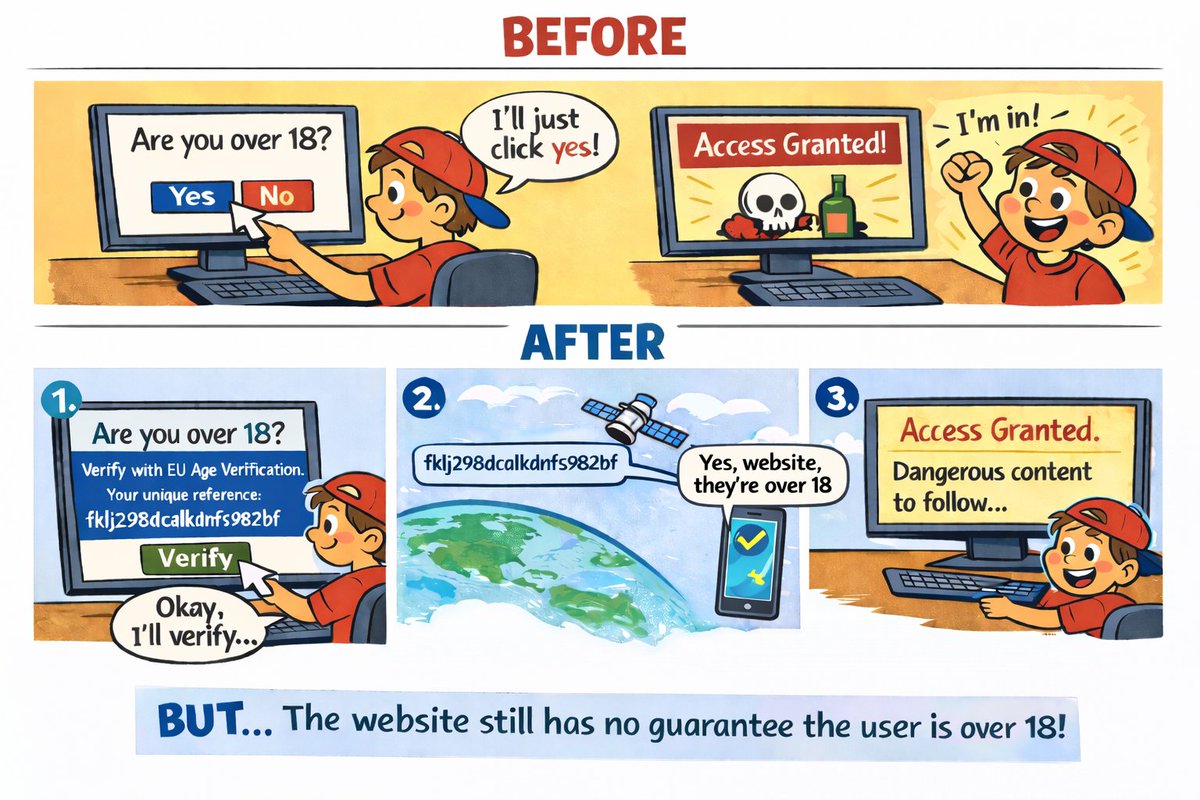
It's not easy to visualize the relay attack against the #EU #AgeVerification app from a user's perspective, so here it is.
Even if the app works exactly as designed, the website & verification process is entirely decoupled & 'anonymous'
The architecture assumes you'll send the request to your device, which contains your biometric data. But, it can go to any device, anywhere in the world... and because the phone has no way to know who initiated the process, the child still passes age verification.
The assertion is the user is over 18. In reality, the app is responding to say the owner of this Android device is over 18. It doesn't know who the user is... how can it know their age?
This is the current design, not a bug.
They thought the ISO/IEC 18013-7 Annex C/DC API upgrade would protect against this, but CTAP only protects against external attackers, not the user wanting to bypass the system themselves - hence my description that we've replaced "I am over 18" with "someone is over 18" and it's supposedly better.
If (more likely when) this is exploited, will company Directors/staff still face fines, legal action or imprisonment for not protecting children?
Once you've signed in, websites are highly unlikely to ask for age verification again... so this attack, even if it could be mitigated in some way (I can't see how) only applies to new verifications.
The EU #AgeVerification Relay Attack:
Paul Moore - Security Consultant @Paul_Reviews
Let's shift focus and explain why the #EU #AgeVerification concept is fundamentally flawed. Assume: 1. The production app is released. 2. It's 100% secure, 100% private (fantasy land, but stick with me) 3. It cryptographically challenges every step, including hardware attestation which requires a physical device. 4. Every single other attack vector in the surrounding environment is somehow magically patched. aka - it's working exactly as intended/designed. It does not protect against a relay attack. This is a threat they considered and somewhat addressed here: github.com/eu-digital-ide… With the current design, there's nothing preventing someone running a verification-as-a-service; a remote Android device which returns a valid attestation. Remember, it's not returning "I am over 18", it returns "someone is over 18". Neither the verifier, nor the app has any way to link the session ID to a physical device. Their own docs state this clearly: Remote Cross-Device Presentation: "Note that the Wallet Instance does not see any difference between the cross-device flow and the same-device flow. In both cases, it receives an OpenID4VP-compliant presentation request over the Wallet Instance-platform API described in the previous section." This is a known & well-understood attack vector in all remote credential presentation models; it's just not mitigated in this one... primarily because they can't. CTAP 2.2 won't work with all app flows, hardware attestation doesn't mitigate relay attacks, on-demand liveness detection would be too intrusive & potentially privacy-invasive & timing calculations don't reveal anything useful... all the available options to resolve this break the core design; completely anonymous age verification. The Architecture & Reference Framework (ARF) is technically sound in some respects. They considered external threat actors and discussed solutions to mitigate them, including ZKP. However, the EC applied the wrong threat model, thus arriving at the wrong conclusion. Yes, you need to protect against malicious verifiers, phishing sites, session hijacks, data brokers et al... but that's addressing external threats, it doesn't protect the architecture from the user itself. In virtually every other scenario, the user and system's interests are aligned; protect my biometric asset at all costs. Specifically for age verification, most users do not want to present ID simply to access a website, so whilst the system may adequately protect from external threats, if the user wants to bypass the system, they can... and the architecture doesn't consider this. Every single applied mitigation assumes the user is the protected party, not the threat actor. To those people claiming "it requires physical access to the device and root, this is BS/hyperbole", you too applied the wrong threat model & completely missed the point. These disclosures demonstrate that you, the user, are the threat actor they haven't considered. You have your device. You can root your device. You can create a chrome extension, just as I did. Ironically, it's precisely those under 18 who can't pass verification who are motivated to bypass it. So where does that leave us? A system which replaces "I am over 18" with "someone is over 18", with absolutely no guarantee that it's true... which is the entire purpose of the app.
English
Zen'no ^_^ รีทวีตแล้ว
@DHAhole @misstennisha @intigriti @zbraiterman @thejonmccoy @BentleyAudrey @Jhaddix @DanielMiessler @jeff_foley @bishopfox @C0d3Cr4zy @caseyjohnellis @MrJeffMan @SW_Samii @0xTib3rius @OliviaGalluccii @rana__khalil @Infosecpat @J3ssa @luizfernandorg @ethicalhacker @irawinkler @CyberWarriorSt1 @ebelardo73 @NahamSec @CSKIP71 @HackingDave @MeterPeter4Eva @corewarrior #FF
@cybergeekgirl
@RealZenno
@clintgibler
@rez0__
@hackerxbella
@InfoSecComm
@CISAJen
@Djax_Alpha
@B91Tech
@RaicesCyberOrg
@Puggmeister
@nitoang
@lynn_dohm
@LilMzMuffinCup
@InsiderPhD
@PinkDraconian
@KeilanRolle
@G0LDEN_infosec
@medarkus_
@blenster
@garyjoseph227
QME
Zen'no ^_^ รีทวีตแล้ว
Zen'no ^_^ รีทวีตแล้ว
Zen'no ^_^ รีทวีตแล้ว
Zen'no ^_^ รีทวีตแล้ว
@DHAhole @misstennisha @intigriti @zbraiterman @thejonmccoy @BentleyAudrey @Jhaddix @DanielMiessler @jeff_foley @bishopfox @C0d3Cr4zy @caseyjohnellis @MrJeffMan @SW_Samii @0xTib3rius @OliviaGalluccii @rana__khalil @Infosecpat @J3ssa @luizfernandorg @ethicalhacker @irawinkler @CyberWarriorSt1 @ebelardo73 @NahamSec @CSKIP71 @HackingDave @MeterPeter4Eva @corewarrior #FF
@cybergeekgirl
@RealZenno
@clintgibler
@rez0__
@hackerxbella
@InfoSecComm
@CISAJen
@Djax_Alpha
@B91Tech
@RaicesCyberOrg
@Puggmeister
@nitoang
@lynn_dohm
@LilMzMuffinCup
@InsiderPhD
@PinkDraconian
@KeilanRolle
@G0LDEN_infosec
@medarkus_
@blenster
@garyjoseph227
QME
Zen'no ^_^ รีทวีตแล้ว
@DHAhole @misstennisha @intigriti @zbraiterman @thejonmccoy @BentleyAudrey @Jhaddix @DanielMiessler @jeff_foley @bishopfox @C0d3Cr4zy @caseyjohnellis @MrJeffMan @SW_Samii @0xTib3rius @OliviaGalluccii @rana__khalil @Infosecpat @J3ssa @luizfernandorg @ethicalhacker @irawinkler @CyberWarriorSt1 @ebelardo73 @NahamSec @CSKIP71 @HackingDave @MeterPeter4Eva @corewarrior @cybergeekgirl @RealZenno @clintgibler @rez0__ @hackerxbella @InfoSecComm #FF
@JustHackingHQ
@DaBootWolverine
@RedSiege
@yuridiogenes
@FilipiPires
@Dallas_Hackers
@HackSpaceCon
@ericteichmiller
@ScorpVayne
@MikeHacksThings
@rickcable
@vvanitydevil
@rekdt
@Lemonitup
@mhernandeztech
QME
Zen'no ^_^ รีทวีตแล้ว
@DHAhole @misstennisha @intigriti @zbraiterman @thejonmccoy @BentleyAudrey @Jhaddix @DanielMiessler @jeff_foley @bishopfox @C0d3Cr4zy @caseyjohnellis @MrJeffMan @SW_Samii @0xTib3rius @OliviaGalluccii @rana__khalil @Infosecpat @J3ssa @luizfernandorg @ethicalhacker @irawinkler @CyberWarriorSt1 @ebelardo73 @NahamSec @CSKIP71 @HackingDave @MeterPeter4Eva @corewarrior @cybergeekgirl @RealZenno @clintgibler @rez0__ #FF
@chris_foulon
@m1a1vet
@SamVR
@BillBrenner70
@JNitterauer
@SciaticNerd
@BanjoCrashland
@EanMeyer
@investigatorchi
@Snubs
@strandjs
@Antisy_Training
@mattjay
@chrisculling
@I_Am_Jakoby
@TecFlack
@MadAlexPR
QME
@kmcnam1 It's absurd how many different fields/situations this can be applied to lmao
English
Zen'no ^_^ รีทวีตแล้ว