

Himanshu Bamoria
1K posts
Himanshu Bamoria
@0xhbam
Co-Founder, Gooseworks | AI co-worker for GTM teams
San Francisco, CA Katılım Ekim 2021
232 Takip Edilen218 Takipçiler
Himanshu Bamoria retweetledi

I made this @hypeandvice ad in Claude Code in under an hour.
I've never used a video editor in my life.
Claude orchestrated every tool. generated the video end-to-end. here's the exact stack:
1/ I gave Claude a reference video I liked and a one-line concept.
2/ Claude broke the concept into a scene-by-scene shot list. picked which AI model to use for each scene. picked the sound for each beat.
3/ product references pulled Hype and Vice's real apparel off their site. used those as the anchor for every keyframe.
4/ keyframes - Nano Banana generated all 24 keyframes for the video.
5/ keyframe → video - Kling + VEO 3.1 via Higgsfield Kling for the slower lifestyle shots. VEO for anything with real physics - crowd motion, confetti, movement.
6/ music - ElevenLabs generated 2 audio tracks and stitched them together. clean drop at 0:11.
7/ stitch - ffmpeg Claude wrote the ffmpeg commands itself. final cut out the other end.
one prompt. one hour. zero video editing experience.
this is what we do at @GooseworksAI .
building a library of these → gooseworks.ai/ads/library
I'll break down how we made each one. follow along if you want the next teardown.
English
@Ethanarpi @touchland @grok You can ask Claude to watch the video and do a quality check. It uses a Skill to watch every frame at 1fps and come back with its analysis. You then ask claude to improve the output by re-generating what doesn't look good. I usually run this watch loop 3 times.
English

Most AI-generated brand videos still feel generic.
So I tested if Claude Code/Codex + Higgsfield AI could create a brand-grounded content factory.
Turns out, yes.
Here's the workflow I used to create this video for @touchland :
1. Research the brand, products, ICP, positioning, and visual style
2. Turn it into a brand bible
3. Generate video concepts for different customer segments
4. Pull real product images from the website
5. Preprocess them with Nano Banana 2
6. Write a storyboard with consistent scenes/props
7 .Send assets + storyboard to Higgsfield
8. Have Claude self-QC frames and iterate
The bigger opportunity:
Brands can run this across hundreds/thousands of SKUs and generate product videos grounded in real product info, brand assets, and customer segments.
I turned this into a reusable Skill. Let me know if you want access.
English

Himanshu Bamoria retweetledi

Claude Code can ship a 45-second animated explainer ad in 30 minutes.
No video editor needed, just CC + skills.
Here's how I made this video for @SoteriSkin 👇
1. /plan Concept Brief (Claude Code)
I handwrite a concept brief, then chat with the agent to iterate on it.
The agent gathers any raw materials we might need - context about the brand, product images, end card, etc.
The concept brief details the concept, characters, visual style, script, etc
2. /prepare a moodboard (CC + GPT Image 2 + ElevenLabs)
After reviewing the script, generate:
- character reference images
- voiceover samples for the characters / narrator
- the storyboard (scene by scene grid)
- a few keyframe scenes
3. /generate Keyframes for each scene (CC uses Nano Banana or GPT Image 2)
Uses the character references from the previous step to generate keyframes for each scene.
I probably should have done a round of iteration at this step – there's some character drift and the pH meter representation could have been better.
4. /animate Keyframe → Animated Clip (CC uses Fal Seedance)
Generate 2-4 representative scenes first to see a preview. If it looks good, then generate everything.
5. /stitch (CC + ffmpeg + ElevenLabs)
- Stitch clips together with hard cut
- Add a music score + SFX
- Sync clips to the VO
- Add captions
- Review and edit timing / pacing issues
6. /watch the final cut and review it
- as a video editor for technical errors (mismatched voiceover and visuals, AI hallucinations, etc)
- as a viewer (ICP).
I delegate most of the review to the agent because it catches more things and keeps me out of the loop as much as possible.
It also fixes any issues found in the review.
That's it.
This video took me 30 minutes because I have already created skills for everything I described above.
Some day, this will be < 5 minutes.
I just review and chat to provide direction and feedback.
The skills do all the technical work.
7. /learn
Extracts learnings and updates the skills.
This final step is really important.
It turns this process into a closed loop system that makes the next video much easier to create because all the learnings from the human-in-the-loop process get encoded into code.
Skills are code too.
If you want access to the skill, drop a comment, and I'll DM it to you (must be following).
If you want to make AI video ads like this, DM me.
English
@caffinelabs Yeah! Still waiting for @LiquidDeath to respond though 😃
English

I made this Liquid Death ad in Claude Code in under an hour.
I've never used any video editor in my entire life.
Claude orchestrated every single tool and generated this video.
Here's the process that Claude ran:
1. Idea Brief:
I gave Claude a reference video – a Smartwater wellness ad I liked and the rough idea I wanted – a wellness montage that corrupts into a mosh pit at the midpoint.
2. Design Brief:
Based on the reference, Claude built a scene-by-scene plan – what each scene shows, which AI model should generate it, and what sound plays.
3. Product Reference
Claude pulled a real product photo off Liquid Death website and used it as the reference for every keyframe going forward.
4. Keyframes (Nano Banana)
It used Nano banana to generate all 24 keyframes used in this video.
5. Keyframe → Video (Kling + VEO 3.1 via Higgsfield)
Claude picked Kling for static-ish motion. VEO for physics – gulps, mosh pit, BMX, donut smoke.
6. Music (ElevenLabs)
Used ElevenLabs music API to generate the audio. It generated 2 audio tracks and joined them together giving a drop at 0:11.
7. Stitch (ffmpeg)
Stitched everything together using ffmpeg.
Here's a library of videos we've been creating: gooseworks.ai/ads/library
I'll be sharing more about how we created each one of them
English
Himanshu Bamoria retweetledi
I made this video entirely in a terminal using Claude Code. Took about 1 hour (mostly in ideation / review).
I didn't use any video editing tools. I only left my terminal to review output files.
Claude is amazing video editor if you give it the right skills.
Here's how 👇
English
Himanshu Bamoria retweetledi
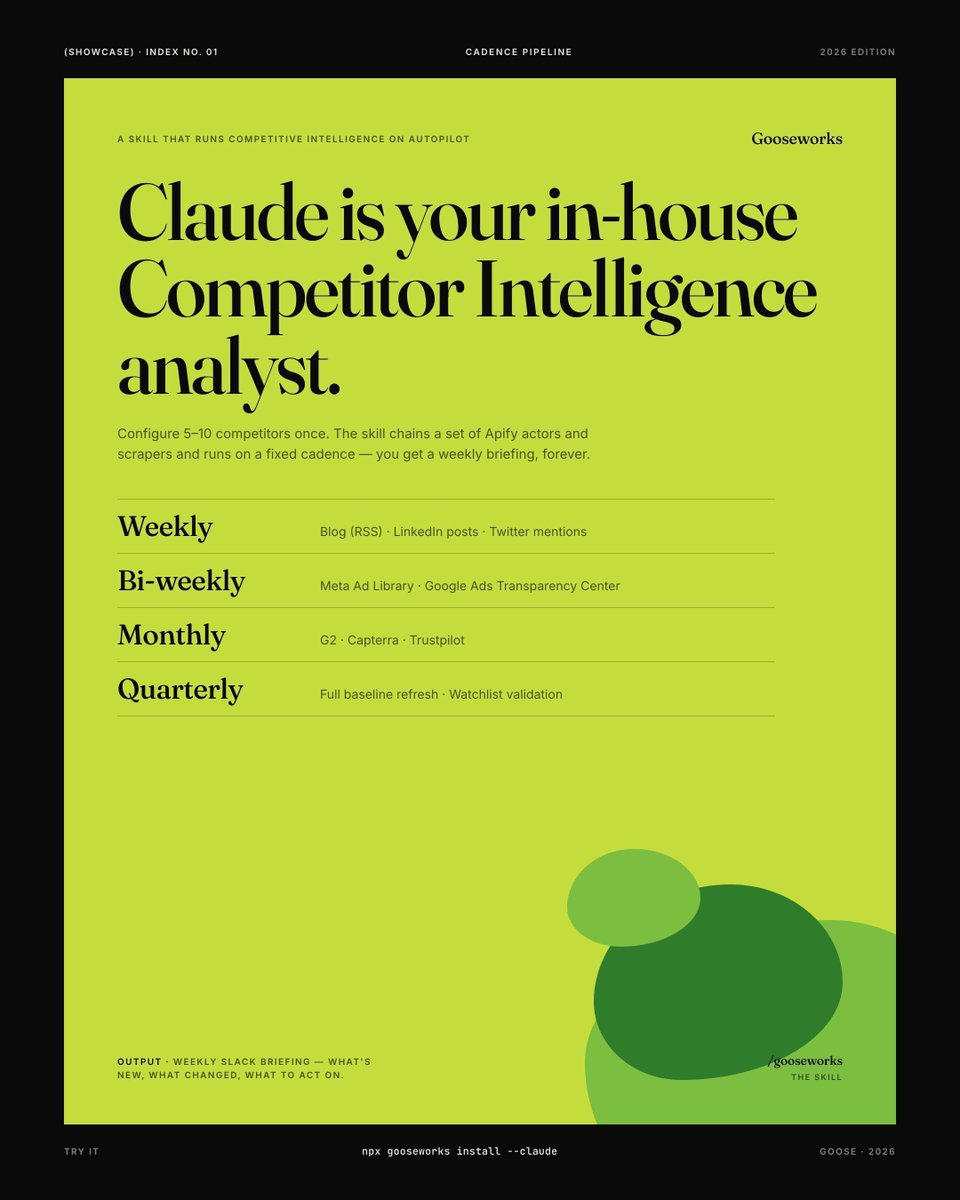
We built an AI system to monitor competitors on autopilot. Here's how it works.
Provide context about your company, positioning and product. Provide a list of competitors.
Then run the playbook skill – it chains a set of scrapers and prepares a report:
1. Weekly: blog (RSS), LinkedIn posts (Apify's LinkedIn profile post scraper), Twitter mentions
2. Bi-weekly: ad creative from Meta Ad Library + Google Ads Transparency Center
3. Monthly: full review-site scrape on G2, Capterra, Trustpilot (Apify actors)
You can change the cadence. We have it configured like this because ads and reviews don't change every week.
The output is a weekly briefing that diffs against last week — what's new, what changed, what to act on.
We send ours to Slack.
Here's how you can set this up:
1. Install Gooseworks: npx gooseworks install --claude
(this CLI contains the skills and APIs needed to scrape all of these sites)
2. Run this prompt in Claude Code:
/gooseworks set up competitor monitoring for my competitors [list-of-competitors-doc]. Watch their blog, LinkedIn, Twitter, ads (Meta + Google), and reviews (G2, Capterra, Trustpilot). Show me a briefing of what to act on. Here's everything you need to know about my company: [company-context-doc]
If you want this to be really good, it helps to provide a lot of context about your company, product, competitors, etc.
Costs about $1-3 every week.
English
Himanshu Bamoria retweetledi

i'm hosting a yc darty next saturday. we'll have a private chef, dj, games, and a massive fucking bubble machine.
last time I personally grilled >40 lbs of meat.
dm for an invite.
w/ @modaflows @danylo_dev @pranavbedi @legalosai @tanagram_

English
Your competitor's LinkedIn audience is publicly readable.
Every like, comment, and reshare by definition – someone interested in the problem you both solve.
You can scrape this with @apify + @claudeai .
Here's the setup we use:
1. The linkedIn profile post scraper skill pulls the last N posts from any account
2. The post commenter extractor skill pulls everyone who engaged with each post
3. Claude deduplicates, enriches with title/company/seniority, and filters to your ICP
4. Output: a CSV of warm prospects with personalization context — which competitor's post they engaged with, what they commented
The cold email opener writes itself: "Saw your comment on [post] about X..."
Beyond the lead list, you can pull patterns from the data:
- Topics that get the most engagement on their posts (what their audience cares about)
- The handful of accounts that engage with everything they publish (their power users / champions)
- Pain language in the comments ("we tried this and...") (positioning research)
It's the closest thing to legally peering into your competitor's CRM.
Try it:
1. Install: npx gooseworks install --claude
2. Run this prompt in Claude Code or your favorite AI agent:
/gooseworks pull the last 5 posts from [competitor LinkedIn]. Extract every commenter and engager. Dedupe, enrich with title/company/seniority, filter to my ICP, and output a CSV with personalization context for each.

English
This Claude Skill helps you create better ads by learning from your competitor's best performing ads.
English
Himanshu Bamoria retweetledi
Launching: Gooseworks CLI – a unified API for your AI agents to access dozens of data sources for GTM & Growth.
1 command to install:
npx gooseworks install --claude
Then you can ask Claude to run GTM & growth work without needing 100 subscriptions and API keys.
Here are some things you can do with Claude + Gooseworks.
1. Find people via @useapolloio, @Fiber_AI, @crustdata and @PeopleDataLabs
2. Deep enrichments and social data via @nyne_ai
3. Company intelligence via Apollo, Fiber, @joinaviato
4. Social data via @ScrapeCreators and @apify
5. Search (web, images, google, reviews, etc) via @serperapi, @ExaAILabs
6. Influencer data via @InfluencersClub
+ lots more examples below 👇

English
Himanshu Bamoria retweetledi
Himanshu Bamoria retweetledi
Himanshu Bamoria retweetledi

There’s $1T up for grabs for agent-first startups and this window is WIDE open. Probably 10,000+ niches.
How it plays out:
1. Every SaaS company follows salesforce and goes headless within 18 months
2. a new category of "agent-native" startups emerges that treat salesforce, HubSpot, workday etc as dumb backends. the startup IS the agent. the SaaS is just the database.
3. the entire consulting/services industry around enterprise SaaS gets compressed into software. the agent replaces the implementation team.
4. outcome-based pricing becomes default. nobody pays per seat when the "seat" is an agent making 10,000 API calls a minute. you pay when revenue hits your account.
5. the winning founders are ex-operators who understand a vertical workflow cold. the code is the easy part. knowing that a property manager spends 14 hours a week on lease renewals? that's the insight worth $100M.
6. distribution becomes the moat. when anyone can wire agents to APIs, the company with the audience and the brand wins. media + agents is the new SaaS. There’s a rush to incubate live/short form shows.
7. Silicon Valley goes all influencer. Roy lee gets this. Pat Walls gets this. Sam Parr gets this.
8. the first $1B agent-native company in each vertical will look nothing like the SaaS it replaced. smaller team, higher margins, no implementation cost, no churn from bad UX because there is no UX.
the fastest path to wealth right now: find an industry that still runs on dashboards, phone calls, and spreadsheets. build the agent-native version. charge per outcome. own the workflow end-to-end.
someone reading this right now is going to build a $100M company off this exact shift. tell me about it on the @startupideaspod when you do. Im rooting for you.
Less reading, less bookmarking, more building.
the last wave rewarded people who built pretty interfaces on top of ugly data.
I think this wave rewards people who build smart agents on top of exposed APIs.
Or who just build the APIs themselves
Here we go
Marc Benioff@Benioff
Welcome Salesforce Headless 360: No Browser Required! Our API is the UI. Entire Salesforce & Agentforce & Slack platforms are now exposed as APIs, MCP, & CLI. All AI agents can access data, workflows, and tasks directly in Slack, Voice, or anywhere else with Salesforce Headless 360. Faster builds, agentic everything. 🚀 #Salesforce #Agentforce #AI venturebeat.com/ai/salesforce-…
English