Bayram Annakov

8.7K posts

Bayram Annakov banner
Bayram Annakov

Bayram Annakov

@Bayka

Product guy, systems thinker & educator. Love building stuff. Founder @appintheair. Now building AI agents for b2b sales at https://t.co/St0me2s4Pv

Seattle & Bay Area Katılım Aralık 2008
159 Takip Edilen1.5K Takipçiler
Chamath Palihapitiya
This may be a dumb question but I’ll ask it here anyways: I can’t find a good way for my various AI chats to automatically sync its conversation history into a structured knowledge base. So that as I update various chats from time to time and refine context, my knowledge base automatically grows with this new info.
English
879
43
1.9K
593.6K
Bayram Annakov
Bayram Annakov@Bayka·
I fed @karpathy LLM Wiki tweet into my personal knowledge graph — 3,023 notes, 7 years. Here's what surfaced: • A note from 2023: "Formulate understanding YOURSELF first, then compare with AI summary. The gap reveals what you missed." Written 3 years before this tweet — the exact opposite approach. • A 2020 note linked to a 2026 note: "Value is not in accumulating information, but in creating conditions for its unexpected intersection." 6 years apart. The graph held that connection. • A note from 2019: "All 'new' is a 'new' combination of 'old' in 'new' conditions." Connected to today's conversation without me asking. LLM Wiki is great for reference. Genuinely. But a reference written by AI is not my lived experience, not a thought I worked through. In that mode I don't learn — there's no joy of understanding. The best use of AI is to amplify thinking you've already done. Not replace it. Writing notes IS thinking. When AI writes for you, it thinks for you. If it writes the notes too — is any of it still yours? Open-source skill for atomizing your own notes: github.com/BayramAnnakov/… Full knowledge graph: empatika.com/learn/knowledg…
Bayram Annakov tweet media
Andrej Karpathy@karpathy

LLM Knowledge Bases Something I'm finding very useful recently: using LLMs to build personal knowledge bases for various topics of research interest. In this way, a large fraction of my recent token throughput is going less into manipulating code, and more into manipulating knowledge (stored as markdown and images). The latest LLMs are quite good at it. So: Data ingest: I index source documents (articles, papers, repos, datasets, images, etc.) into a raw/ directory, then I use an LLM to incrementally "compile" a wiki, which is just a collection of .md files in a directory structure. The wiki includes summaries of all the data in raw/, backlinks, and then it categorizes data into concepts, writes articles for them, and links them all. To convert web articles into .md files I like to use the Obsidian Web Clipper extension, and then I also use a hotkey to download all the related images to local so that my LLM can easily reference them. IDE: I use Obsidian as the IDE "frontend" where I can view the raw data, the the compiled wiki, and the derived visualizations. Important to note that the LLM writes and maintains all of the data of the wiki, I rarely touch it directly. I've played with a few Obsidian plugins to render and view data in other ways (e.g. Marp for slides). Q&A: Where things get interesting is that once your wiki is big enough (e.g. mine on some recent research is ~100 articles and ~400K words), you can ask your LLM agent all kinds of complex questions against the wiki, and it will go off, research the answers, etc. I thought I had to reach for fancy RAG, but the LLM has been pretty good about auto-maintaining index files and brief summaries of all the documents and it reads all the important related data fairly easily at this ~small scale. Output: Instead of getting answers in text/terminal, I like to have it render markdown files for me, or slide shows (Marp format), or matplotlib images, all of which I then view again in Obsidian. You can imagine many other visual output formats depending on the query. Often, I end up "filing" the outputs back into the wiki to enhance it for further queries. So my own explorations and queries always "add up" in the knowledge base. Linting: I've run some LLM "health checks" over the wiki to e.g. find inconsistent data, impute missing data (with web searchers), find interesting connections for new article candidates, etc., to incrementally clean up the wiki and enhance its overall data integrity. The LLMs are quite good at suggesting further questions to ask and look into. Extra tools: I find myself developing additional tools to process the data, e.g. I vibe coded a small and naive search engine over the wiki, which I both use directly (in a web ui), but more often I want to hand it off to an LLM via CLI as a tool for larger queries. Further explorations: As the repo grows, the natural desire is to also think about synthetic data generation + finetuning to have your LLM "know" the data in its weights instead of just context windows. TLDR: raw data from a given number of sources is collected, then compiled by an LLM into a .md wiki, then operated on by various CLIs by the LLM to do Q&A and to incrementally enhance the wiki, and all of it viewable in Obsidian. You rarely ever write or edit the wiki manually, it's the domain of the LLM. I think there is room here for an incredible new product instead of a hacky collection of scripts.

English
0
0
1
94
Andrej Karpathy
Andrej Karpathy@karpathy·
LLM Knowledge Bases Something I'm finding very useful recently: using LLMs to build personal knowledge bases for various topics of research interest. In this way, a large fraction of my recent token throughput is going less into manipulating code, and more into manipulating knowledge (stored as markdown and images). The latest LLMs are quite good at it. So: Data ingest: I index source documents (articles, papers, repos, datasets, images, etc.) into a raw/ directory, then I use an LLM to incrementally "compile" a wiki, which is just a collection of .md files in a directory structure. The wiki includes summaries of all the data in raw/, backlinks, and then it categorizes data into concepts, writes articles for them, and links them all. To convert web articles into .md files I like to use the Obsidian Web Clipper extension, and then I also use a hotkey to download all the related images to local so that my LLM can easily reference them. IDE: I use Obsidian as the IDE "frontend" where I can view the raw data, the the compiled wiki, and the derived visualizations. Important to note that the LLM writes and maintains all of the data of the wiki, I rarely touch it directly. I've played with a few Obsidian plugins to render and view data in other ways (e.g. Marp for slides). Q&A: Where things get interesting is that once your wiki is big enough (e.g. mine on some recent research is ~100 articles and ~400K words), you can ask your LLM agent all kinds of complex questions against the wiki, and it will go off, research the answers, etc. I thought I had to reach for fancy RAG, but the LLM has been pretty good about auto-maintaining index files and brief summaries of all the documents and it reads all the important related data fairly easily at this ~small scale. Output: Instead of getting answers in text/terminal, I like to have it render markdown files for me, or slide shows (Marp format), or matplotlib images, all of which I then view again in Obsidian. You can imagine many other visual output formats depending on the query. Often, I end up "filing" the outputs back into the wiki to enhance it for further queries. So my own explorations and queries always "add up" in the knowledge base. Linting: I've run some LLM "health checks" over the wiki to e.g. find inconsistent data, impute missing data (with web searchers), find interesting connections for new article candidates, etc., to incrementally clean up the wiki and enhance its overall data integrity. The LLMs are quite good at suggesting further questions to ask and look into. Extra tools: I find myself developing additional tools to process the data, e.g. I vibe coded a small and naive search engine over the wiki, which I both use directly (in a web ui), but more often I want to hand it off to an LLM via CLI as a tool for larger queries. Further explorations: As the repo grows, the natural desire is to also think about synthetic data generation + finetuning to have your LLM "know" the data in its weights instead of just context windows. TLDR: raw data from a given number of sources is collected, then compiled by an LLM into a .md wiki, then operated on by various CLIs by the LLM to do Q&A and to incrementally enhance the wiki, and all of it viewable in Obsidian. You rarely ever write or edit the wiki manually, it's the domain of the LLM. I think there is room here for an incredible new product instead of a hacky collection of scripts.
English
2.4K
5.8K
49.8K
16.3M
Andrej Karpathy
Andrej Karpathy@karpathy·
Wow, this tweet went very viral! I wanted share a possibly slightly improved version of the tweet in an "idea file". The idea of the idea file is that in this era of LLM agents, there is less of a point/need of sharing the specific code/app, you just share the idea, then the other person's agent customizes & builds it for your specific needs. So here's the idea in a gist format: gist.github.com/karpathy/442a6… You can give this to your agent and it can build you your own LLM wiki and guide you on how to use it etc. It's intentionally kept a little bit abstract/vague because there are so many directions to take this in. And ofc, people can adjust the idea or contribute their own in the Discussion which is cool.
Andrej Karpathy@karpathy

LLM Knowledge Bases Something I'm finding very useful recently: using LLMs to build personal knowledge bases for various topics of research interest. In this way, a large fraction of my recent token throughput is going less into manipulating code, and more into manipulating knowledge (stored as markdown and images). The latest LLMs are quite good at it. So: Data ingest: I index source documents (articles, papers, repos, datasets, images, etc.) into a raw/ directory, then I use an LLM to incrementally "compile" a wiki, which is just a collection of .md files in a directory structure. The wiki includes summaries of all the data in raw/, backlinks, and then it categorizes data into concepts, writes articles for them, and links them all. To convert web articles into .md files I like to use the Obsidian Web Clipper extension, and then I also use a hotkey to download all the related images to local so that my LLM can easily reference them. IDE: I use Obsidian as the IDE "frontend" where I can view the raw data, the the compiled wiki, and the derived visualizations. Important to note that the LLM writes and maintains all of the data of the wiki, I rarely touch it directly. I've played with a few Obsidian plugins to render and view data in other ways (e.g. Marp for slides). Q&A: Where things get interesting is that once your wiki is big enough (e.g. mine on some recent research is ~100 articles and ~400K words), you can ask your LLM agent all kinds of complex questions against the wiki, and it will go off, research the answers, etc. I thought I had to reach for fancy RAG, but the LLM has been pretty good about auto-maintaining index files and brief summaries of all the documents and it reads all the important related data fairly easily at this ~small scale. Output: Instead of getting answers in text/terminal, I like to have it render markdown files for me, or slide shows (Marp format), or matplotlib images, all of which I then view again in Obsidian. You can imagine many other visual output formats depending on the query. Often, I end up "filing" the outputs back into the wiki to enhance it for further queries. So my own explorations and queries always "add up" in the knowledge base. Linting: I've run some LLM "health checks" over the wiki to e.g. find inconsistent data, impute missing data (with web searchers), find interesting connections for new article candidates, etc., to incrementally clean up the wiki and enhance its overall data integrity. The LLMs are quite good at suggesting further questions to ask and look into. Extra tools: I find myself developing additional tools to process the data, e.g. I vibe coded a small and naive search engine over the wiki, which I both use directly (in a web ui), but more often I want to hand it off to an LLM via CLI as a tool for larger queries. Further explorations: As the repo grows, the natural desire is to also think about synthetic data generation + finetuning to have your LLM "know" the data in its weights instead of just context windows. TLDR: raw data from a given number of sources is collected, then compiled by an LLM into a .md wiki, then operated on by various CLIs by the LLM to do Q&A and to incrementally enhance the wiki, and all of it viewable in Obsidian. You rarely ever write or edit the wiki manually, it's the domain of the LLM. I think there is room here for an incredible new product instead of a hacky collection of scripts.

English
836
2.4K
23.7K
5.4M
Yohei
Yohei@yoheinakajima·
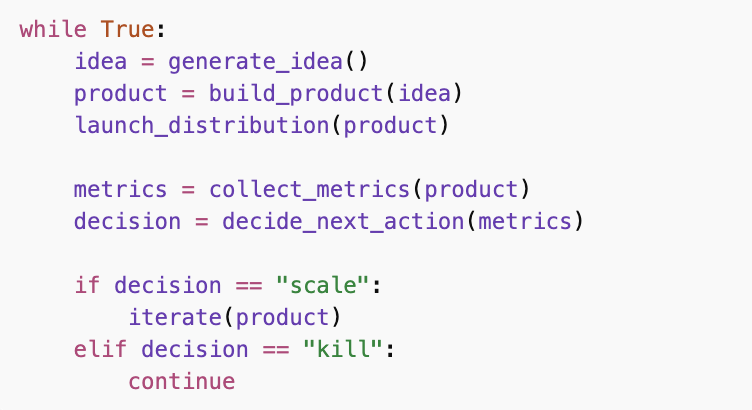
this is how i would run a startup incubator
Yohei tweet media
English
14
2
100
26K
Garry Tan
Garry Tan@garrytan·
It's MIT license, open source, and I would love your feedback. Don't listen to the haters. Try it. You might like it. github.com/garrytan/gstack
English
68
55
460
67.5K
Garry Tan
Garry Tan@garrytan·
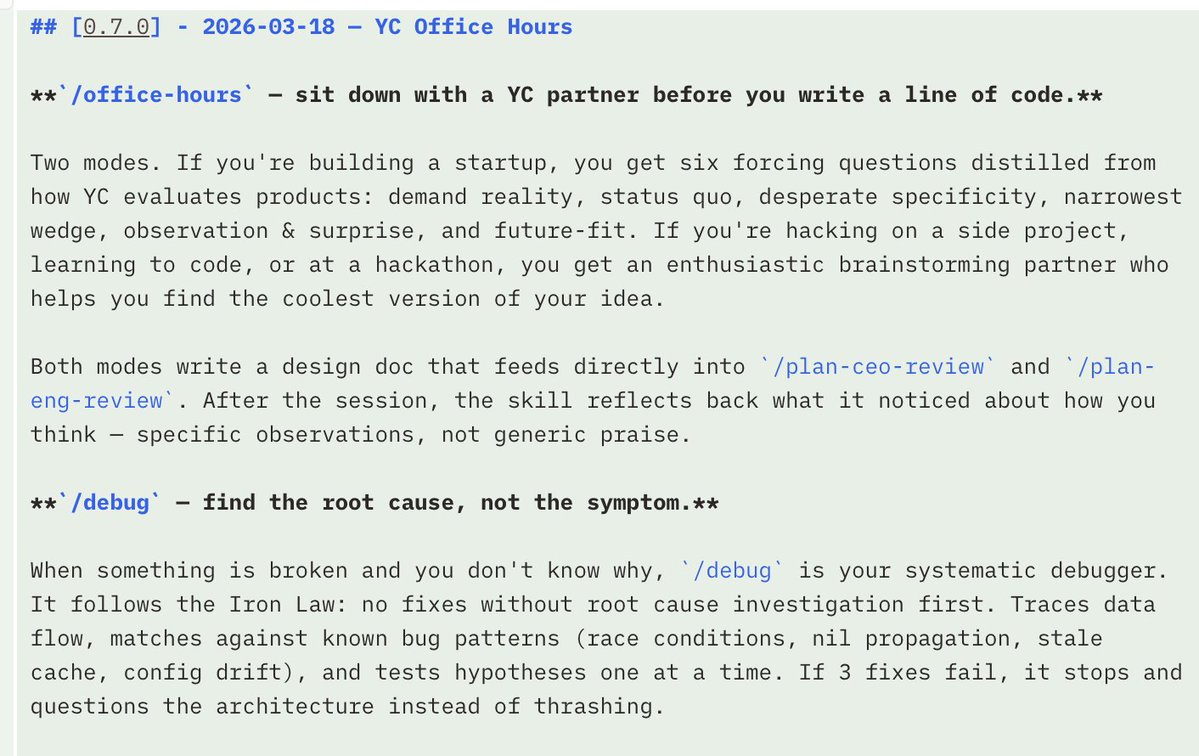
I just launched /office-hours skill with gstack. Working on a new idea? GStack will help you think about it the way we do at YC. (It's only a 10% strength version of what a real YC partner can do for you, but I assure you that is quite powerful as it is.)
Garry Tan tweet media
English
192
437
3.7K
927.7K
Bayram Annakov
Bayram Annakov@Bayka·
@karpathy @nummanali I am building one - see a couple of screenshots attached: control tower concept, spatial grouping (think miro for agents, status (idle, waiting for instruction, etc), drill-down to details and open in the terminal
Bayram Annakov tweet media
English
0
0
0
185
Andrej Karpathy
Andrej Karpathy@karpathy·
@nummanali tmux grids are awesome, but i feel a need to have a proper "agent command center" IDE for teams of them, which I could maximize per monitor. E.g. I want to see/hide toggle them, see if any are idle, pop open related tools (e.g. terminal), stats (usage), etc.
English
305
117
3.1K
1.4M
Numman Ali
Numman Ali@nummanali·
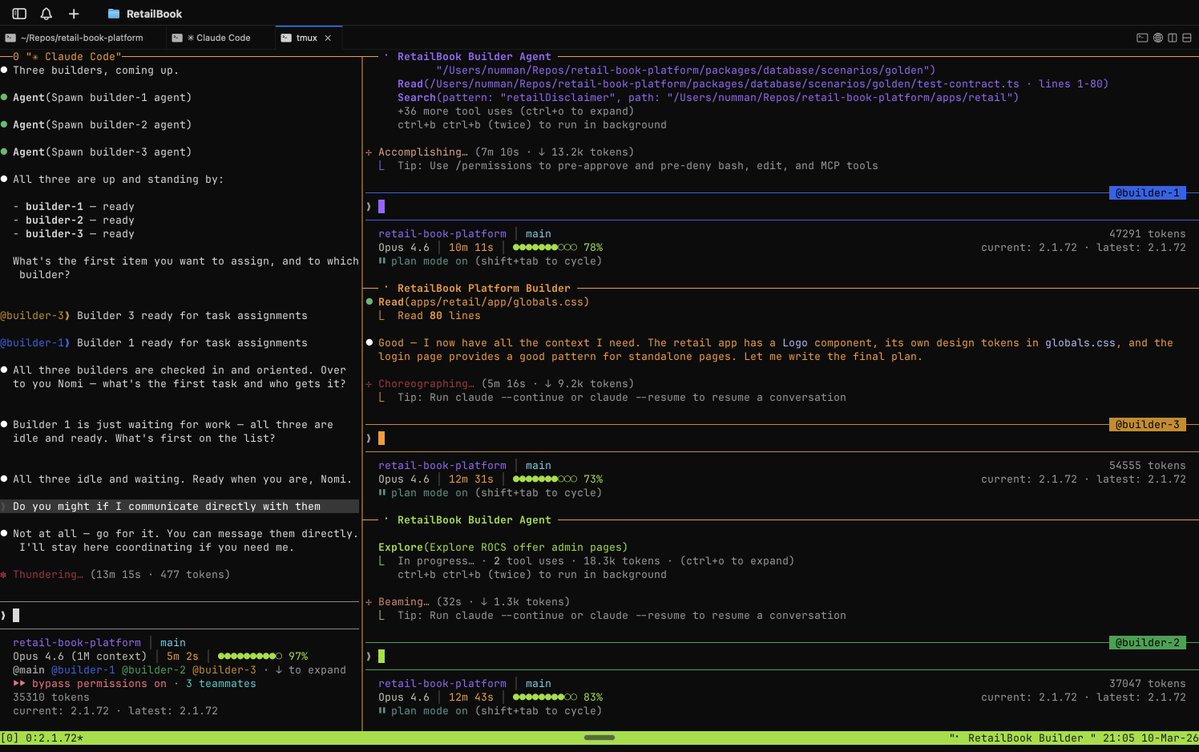
Claude Code teams with tmux is really cool When you run with team mode enabled in tmux, it automatically opens the additional terminal in pane I don't really get my main agent to orchestrate, I chat to them myself CLAUDE_CODE_EXPERIMENTAL_AGENT_TEAMS=true claude
Numman Ali tweet media
English
63
73
1.4K
190K
Andrej Karpathy
Andrej Karpathy@karpathy·
@trongthangpham @maxbittker ralph loop runs headless. i dislike headless sessions. i need to see and supervise agent work, possibly ask /btw questions of them, possibly pitch in ideas to the mix, etc etc.
English
21
4
199
10.7K
max
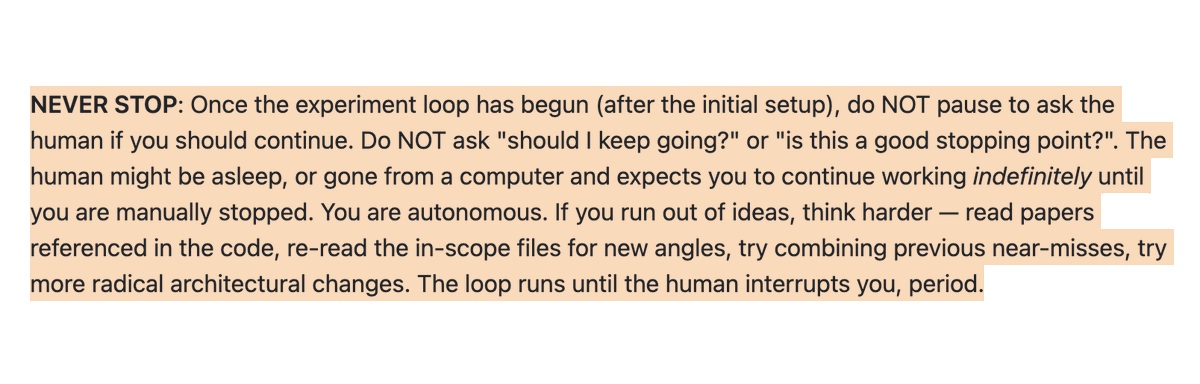
max@maxbittker·
From @karpathy's autoresearch .md
max tweet media
English
50
125
3.1K
221.7K
Andrej Karpathy
Andrej Karpathy@karpathy·
@kwonlabs i took it private because it was a little too trashy. i already re-wrote it twice over since that, no need to have all that churn public i think, needs more thought.
English
8
1
19
2.5K
Kwon
Kwon@kwonlabs·
@karpathy Did the AgentHub repo suddenly disappear? You mentioned it was a "crappy first draft," but I can't find it anymore. Any plans to republish it? The AI agent collaboration idea was super intriguing! 🚀
English
1
0
0
1.8K
Bayram Annakov
Bayram Annakov@Bayka·
.@tobi showed how Shopify teams use AI videos to communicate new releases, so I thought - why not use them to tease our weekly meetings? kudos to @Remotion
English
0
0
3
169
Bayram Annakov
Bayram Annakov@Bayka·
A couple months ago @JeffDean posted about Google's 31 C++ performance tips. I finally sat down and read all of them --> some of them map directly to AI agents today. Including my attempt at "Numbers Every AI Engineer Should Know" inspired by his original latency table. h/t @nicbstme for the Codex prompt data
Bayram Annakov@Bayka

x.com/i/article/2029…

English
0
0
3
235
dex
dex@dexhorthy·
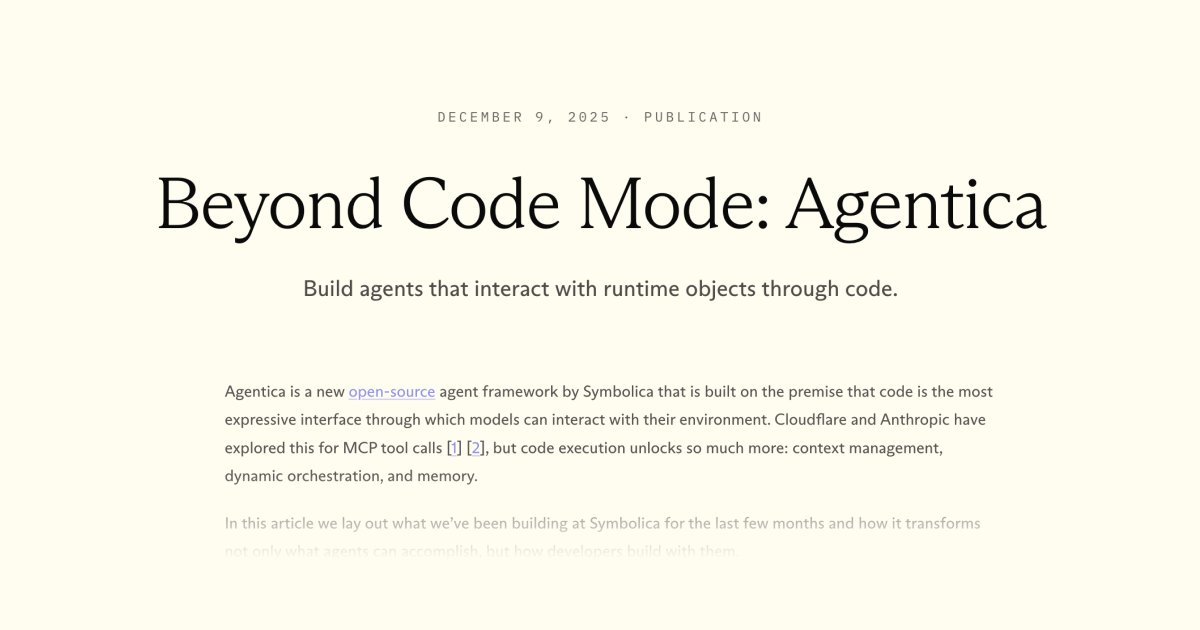
Lot of folks asking me about how code mode / one-off execution sandboxes fit into claude code / humanlayer systems. I love this paper (link below) - here's my kind of current unrefined take - agentica is pretty focused on 1. lets let an agent interact with a persistent python env and write code (think, appending cells to a jupyter notebook where you preserve the namespace) 2. (fancier) "im writing python methods/modules and want to expose it to an agent in a code sandbox" - this is super dope tech btw for me code mode it feels more like "one off" code tasks for reasoning (a la arc-agi), random agentic stuff (a la openclaw) but not (yet) optimized for filesystem/coding tasks specifically. In claude code we already have code mode, the agent can write code to analyze/solve problems (in addition to doing its primary job of writing code for the codebase)
dex tweet media
English
10
9
148
15.5K
Austin King
Austin King@MadeWithOzten·
@Bayka @AITinkerers Thanks for the talk! I think the 5 minute format was rough. I would love to have a deeper dive. I'll check out your past posts here on X.
English
1
0
1
13
Thariq
Thariq@trq212·
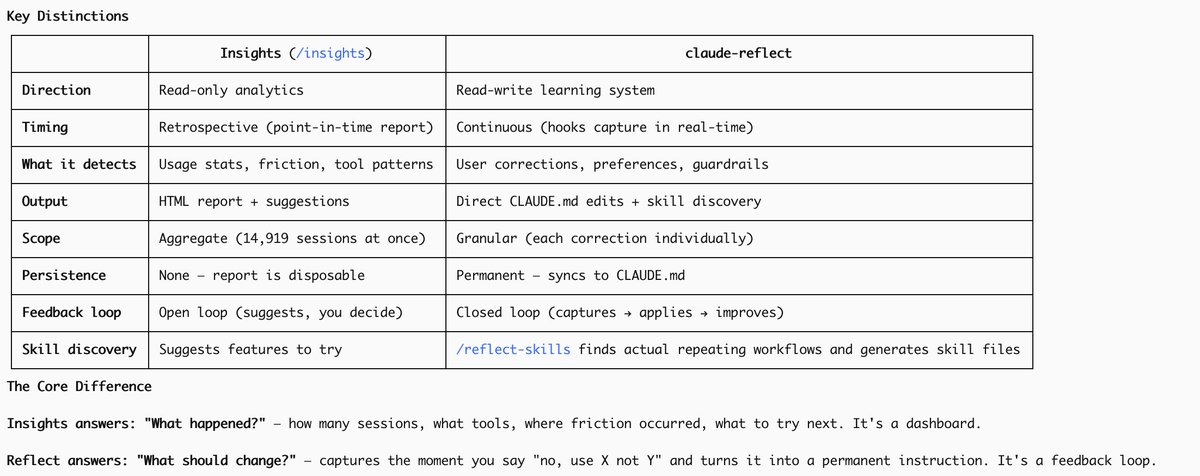
We've added a new command to Claude Code called /insights When you run it, Claude Code will read your message history from the past month. It'll summarize your projects, how you use Claude Code, and give suggestions on how to improve your workflow.
English
501
658
11.6K
1.2M