Nick Hynes

141 posts

Nick Hynes banner
Nick Hynes

Nick Hynes

@nickhynes_

30 x 0 → 1

🟪⬜️⬜️⬜️⬜️⬜️⬜️⬜️⬜️⬜️ Katılım Nisan 2024
1.4K Takip Edilen145 Takipçiler
Nick Hynes retweetledi
Brian Armstrong
Brian Armstrong@brian_armstrong·
We need more rugged individualism, not less. Build on the frontier. Be independent. Decentralize power. Accelerate civilizational progress. Celebrate economic freedom.
English
874
1.2K
11.6K
427.7K
Nick Hynes retweetledi
Andrew D. Huberman, Ph.D.
Andrew D. Huberman, Ph.D.@hubermanlab·
I hear from a lot of depressed young men these days that have girlfriends, but not male friends and they are mentally spiraling. A lot of men who commit suicide are in relationships. And have work. So what’s happening? Time to start parsing this.
Andrew D. Huberman, Ph.D.@hubermanlab

The new Huberman Lab episode is out: Defining Healthy Masculinity & How to Build It | Terry Real 0:00 Terry Real 2:53 Men & Masculinity, Political vs Psychological Patriarchy, Feminism 7:39 Stoicism, Vulnerability, Traditional Masculinity, Emotions 10:50 Sponsors: BetterHelp & David 13:14 Masculinity Across Decades, Giving; Gratification vs Relational Joy 21:54 Healthy Emotional Expression, Connection & Vulnerability; Self-Esteem 31:17 Feeling Emotions, Tools: Asking For Help; Fights & "What Do You Need?" 35:10 Self-Esteem & Relationship Accountability; Criticism, Redefining Strength 40:47 Sponsor: AG1 42:32 Healthy Criticism, Tool: Women & Articulating Needs 50:21 Childlike Behavior, Wise Adult & Trauma, Tool: Relational Mindfulness 58:11 Tool: Responsible Distance Taking; Self-Interest; Relationship "Biosphere" 1:08:14 Alcohol, Men & Friends, Loneliness, Men's Retreat 1:17:51 Fraternities, Men's Groups, Tool: Relationship vs Individual Support 1:25:39 Sponsor: Function 1:27:27 Lack of Male Friends, Hiking, Community, Teaching Young Men 1:36:11 Cannabis, Alcohol, Young Men & Purpose, Flexibility & Manliness 1:40:40 Work, Life Purpose & Men; Skillful Warriors 1:45:01 Absent Fathers; Early Childhood & Proper Nurturing; Caretaking 1:53:24 Sponsor: Waking Up 1:54:47 Women & Speaking Relationally, Objectivity Battle 1:59:02 Addiction & Disconnection, 12-Step Meetings & Fellowship 2:08:04 Pornography, Internet, Intensity vs Intimacy; Optimization 2:11:57 Tool: Families & Hanging Out; Relational Joy; Relational Recovery 2:22:29 Giving Criticism, Tools: Make Requests; Feedback Wheel 2:28:21 Gratitude, Aging; Skillful Fighting in Relationship & Repair 2:34:17 Men & Self-Esteem, Mentors, Tool: Inner Dialogue without Harshness 2:44:00 Y Chromosome, Wholeness 2:48:00 Zero-Cost Support, YouTube, Spotify & Apple Follow, Reviews & Feedback, Sponsors, Protocols Book, Social Media, Neural Network Newsletter Includes paid partnerships.

English
88
116
1.6K
287.1K
Nick Hynes
Nick Hynes@nickhynes_·
@jacobrodri_ For the characters, how did you design these? Would you mind sharing your prompting strategy?
English
0
0
0
20
Jacob Rodri
Jacob Rodri@jacobrodri_·
Kevin Aluwi (Gojek founder) just said he loves my app idea… That was the sign I needed to build it and launch asap
Jacob Rodri tweet media
English
14
4
98
6.8K
Nick Hynes
Nick Hynes@nickhynes_·
@Siron93 These are priceless gems. Thank you so much for sharing this!
English
1
0
1
919
Siro
Siro@Siron93·
100 Lessons From Bootstrapping My App to a 7-Figure Exit 1. Your onboarding is your first date with the user. Don't blow it. This is arguably the single most critical flow in your entire app. You usually get one shot to convince a user you're worth their time and money. 2. Stop selling features during onboarding. Nobody cares about your "proprietary algorithm." They care about the benefit. 3. Don't hope the user stumbles upon your app's magic. Design your onboarding to guide them directly to that "Aha!" moment, the instant they get why your app is awesome. The faster they get there, the more likely they are to stick around. 4. Don’t just ask for notification permissions. Build a short flow that shows why they’re valuable for the user. The right context can turn a 'No' into a 'Yes' 5. If it's not strictly necessary for your app to function, never put a sign-up form before the user sees the core value or the paywall. We found that sign-ups are one of the biggest drop-off points 6. In all our tests, a personalized onboarding flow crushed a generic one. Ask a few simple questions to tailor the experience. It makes the user feel understood. 7. The right number of onboarding steps is the one that works for you. After endless testing, you'll find a balance. 8. For a multi-step onboarding, a progress bar is a must. It reduces friction and helps with retention because users can see the finish line. It's a small detail that signals you respect their time 9. If your app transforms something (a photo, a fitness journey), show it. A powerful "before and after" visual helps the user instantly grasp the value and motivates them to get started 10. Incorporate trust signals right into your onboarding. This can be anything from press mentions ("As seen in..." but don´t cheat if you don´t have them) to user testimonials ("Join 50,000 happy users"). It tells new users they're making a smart choice, not a risky one. 11. Loading screens during onboarding are prime real estate. Instead of a blank spinner, show testimonials, ratings, or quick wins. It keeps users engaged and reinforces why they made the right choice 12. You built the app for a reason, but the user is downloading it for their reason. Dig deep into what they hope to achieve. Is it to save time? Make more money? Reduce stress? Speak their language, not yours 13. A powerful onboarding technique is to first articulate the user's pain point. "Tired of messy notes?" Then, immediately follow up with how your app is the cure. This problem-solution framing makes your value proposition crystal clear 14. Every extra field you ask for name, email, phone number is another chance for the user to drop off. Unless it's essential for personalization or for the app's core function, save it for later or don't ask at all. 15. Ask a simple, positive question like, "Are you ready to improve your health?" The user will almost certainly tap "Yes." This small, unconscious commitment makes them more likely to follow through with the rest of the onboarding. 16. A subtle but powerful onboarding trick: ask users to commit with a small ritual. It could be drawing a checkmark, signing their name, or tapping 'I promise.' 17. Another powerful onboarding trick: use 'Do you relate?' statements. For example, 'Struggle to stay organized?' When users tap yes, you’ve framed their pain and primed your app as the solution. 18. After a user makes a choice or answers a question, show them a quick screen that says something like, "Great choice!" or "We've got you covered." It's a small psychological boost that makes the experience feel more like a supportive conversation 19. Celebrate progress. People stick with what makes them feel good. This can help with retention 20. If your app type allows it, add a leaderboard. A little friendly competition can be a huge retention driver. 21. Same as the previous tip, if your app type allows it, when users hit milestones, give them a beautiful share card. It feels good to show progress and could spread your app organically. 22. Referrals are tricky, most flop. But when they work, it’s because both sides win. Give the friend free access or a bonus, and the inviter a reward too. 23. Your App Store screenshots are your billboard. Use them. This is one of the first things a potential user sees. Don't just show random screens. Use your screenshots to tell a story and scream your app's main value proposition. Make them count. Follow accounts like @designerants and @screenshotfirst 24. App Store screenshots without strong headlines are wasted. Use bold, benefit-driven text that tells users what’s in it for them. Features explain, benefits sell. 25. Build for the average user, not for yourself. You live and breathe your app, but your users don't. The average person is busy, distracted, and not as tech-savvy as you. Always design with this in mind. If a feature isn't intuitive, it's a design failure, not a user failure. 26. A tool like Mixpanel is essential. It'll show you which features users love and which ones are dead weight. This data is gold. It tells you where to double down with your development efforts and what new feature is a complete waste 27. One of our best sources for feature ideas was finding creators in our niche on social media. We'd look for their top-performing posts. If a "social media calendar idea" went viral, it was a clear signal to try out something similar in our app. 28. In the early days, we used Smartlook to watch screen recordings of real user sessions. It´s amazing for finding friction points and understanding behavior in a way analytics can't show you. I don't recommend keeping it forever but it can be insanely helpful when you start 29. Add gesture recording. This is a small but powerful helper. When a user sends a screen recording of a bug, also recording where they are tapping helps you and your developers instantly see what went wrong. No more "I tapped the button and nothing happened" mysteries 30. If your app loads content like images or videos, don’t leave a blank box. Use skeleton loaders so users see a preview instead of staring at nothing. 31. When a user clicks "Contact Support," automatically populate the email with their device model, OS version, and app version. This saves countless back-and-forth emails and lets you provide faster, more effective support 32. Replying to reviews, both good and bad, shows you're listening. It builds community, gives you a chance to turn a negative experience around, and shows potential new users that a real human cares about the app. 33. Go read the 1-star and 5-star reviews for your top competitors. You'll get tons of insights into what people love, what they hate, and what features they're begging for. It's an absolute goldmine. 34. A simple "What's New" popup or section is powerful. It shows users that the app is actively maintained and improved, reinforcing its value and making them feel good about their subscription. 35. If your app uses a costly API like OpenAI, build a way to remotely limit or disable that feature for specific users. This saved us a ton of money. There will always be bad actors who try to exploit your service, so be prepared. 36. When a critical external API goes down, your app shouldn't just break. Set up a simple, triggerable in-app message to inform users of the issue. It manages expectations and stops your support inbox from exploding 37. If you push a major bug, you need a way to get everyone on the new, fixed version ASAP. A popup that forces users to update is your emergency escape hatch. You won't need it often, but when you do, you'll be glad you have it. 38. If your app is larger than 200MB, users on a cellular connection will get a pop-up from Apple asking for confirmation before downloading. It's an extra step and an unnecessary point of friction. Optimize your app size if you can 39. Show your paywall during onboarding. This is non-negotiable. As many in the space have shared, the highest concentration of users who will ever pay you is in the onboarding flow. They are at their peak motivation. Don't miss this opportunity. 40. A user might not be ready to buy the first time they see your paywall, or the second. Showing the paywall on app open is a simple, effective way to consistently prompt the conversion. 41. Hard Paywall vs. Soft Paywall: You have to test it. There's no universal answer here. For us, a hard paywall (no access without trial) was the right move, but every app is different. It's one of the most important A/B tests you can run. 42. Don't be afraid to test radical price points We tested things that felt crazy, like putting a $39.99/year plan against a $99.99/year plan. You'd be absolutely surprised by the results. Don't assume you know what your users are willing to pay. Let the data tell you. 43. We were hesitant, but testing a weekly plan was an eye-opener. The lower price point makes the decision to try feel much less risky for users. We were surprised at how many people were more willing to jump in with a smaller, weekly commitment. 44. Weekly plans mean it takes longer to recover your ad spend. Before you go all-in, let a few cohorts run for 1-2 months. This gives you a real look at the LTV and helps you understand how many users stick around, so you can model your cash flow without panicking. 45. We never thought a lifetime offer was a good idea, but we tried it and were blown away by the results. The key is to price it slightly higher than your average customer lifetime value (LTV). It's a great cash injection and appeals to a specific type of power user. 46. If you're using a soft paywall, trigger a discount offer on the exit attempt. You can recapture users who are on the fence but price-sensitive. 47. When a user starts a free trial, don’t just drop them into the app. Show a screen that highlights what they unlocked and guide them to the most valuable features. It reinforces value and boosts retention. 48. When you're pouring money into ads, cash flow becomes king. You need to pay for ads today for revenue that might come in weeks or months later. A service like Braavo can bridge that gap. If you can manage cash flow without them, great. If not, they're a lifesaver. 49. It's easy to get lost in data. We found that focusing on just two things kept us sane and on track: a) our install-to-paid conversion rate, and b) our average revenue per user (ARPU). Everything else was just noise, distracting us from what actually grew the business 50. Mobile retention is brutal. Don't freak out, but don't ignore it. 51. We used Adapty's @adapty webhook system to pipe all our revenue data into our own internal dashboard. This let us track cohort performance over time exactly how we wanted to. RevenueCat offers similar capabilities. Don't rely solely on App Store Connect; get granular with your own tools. 52. This is a power move. Forward your events from Adapty/RevenueCat to an analytics tool like Mixpanel. Seeing app usage (like "feature_X_used") and subscription events (like "trial_started") on the same chart is insanely helpful for understanding what actions lead to revenue. 53. We never had a period without an A/B test running. We were always running some test. This constant state of testing is how you find incremental wins that compound over time. 54. It's tempting to jump to conclusions when one version pulls ahead after a day. Don't. You need a statistically significant number of users in your test cohort before you can trust the results. Calling a test too early is one of the easiest ways to fool yourself. 55. Use Mixpanel or Amplitude to create a funnel report for every single step of your onboarding. This will immediately highlight your biggest drop-off points. You might discover that one specific screen is causing 40% of your users to quit. That's the screen you fix first. 56. After you've been running for a while, you'll have enough data to build predictive models. Being able to estimate how much revenue a new user is likely to generate (their predicted LTV) is a massive unlock, especially for paid ads. It helps you know instantly if your campaigns are profitable. 57. Your ad creative is 90% of the battle. Seriously. This isn't a hot take, but I'm repeating it because it's the absolute truth. 58. The creatives we thought were genius often flopped, and the ones we almost didn't run became our biggest winners. Your gut is not a reliable indicator of ad performance. Test everything, especially the weird stuff. 59. This is a non-negotiable. When you work with a creator, make sure your contract gives you the rights to all the raw, unedited footage. One 30-second video can be remixed into an infinite supply of ad variations, hooks, and new creatives. 60. Ad fatigue is real. You need to be feeding your campaigns new creatives on a weekly basis. This keeps performance from stagnating and constantly gives the algorithm new material to test. 61. Every so often, take a creative that was a top performer months ago and run it again. You'll be surprised how often old winners can find a second life and start performing again. 62. There are tons of platforms to find creators, a good one that I can recommend is from @tadasgedgaudas 63. Start your DM to an influencer with "PAID PROMO" If you're reaching out on social media, lead with "PAID PROMO" in all caps. Their inbox is flooded. This simple trick makes your message stand out and signals that you're a serious partner, not just another fan asking for a shoutout 64. Match your creator's age to your target audience. The Meta algorithm is smart. It sees the age of the person in your ad and tends to show it to people in a similar age bucket. We saw a massive jump in conversions when we started working with creators aged 30+, because that was our ideal customer. 65. Guide your creators, but give them creative freedom. Give them a clear brief with the key benefits you need to communicate, but then let them do their thing. The ad will feel far more authentic if it's in their voice and style. Micromanaging creators kills the magic. 66. Never mix USA with other countries in the same campaign. The cost, competition, and user behavior in the USA are completely different from other geos. 67. We ran our main testing campaign targeting only the USA. Yes, the CPMs are higher, but we saw that winning ads in the US almost always performed well elsewhere. It was a more reliable signal for us (though this may not apply to every app). 68. Run one testing campaign and one scaling campaign. Keep it simple. We had a single testing campaign where we'd throw in new creatives. Once an ad proved itself by getting significant spend, we'd move that winning creative over to our main scaling campaigns. 69. If you target the US, set your ad account timezone to the US. I got this tip from @nico_jeannen If your ad account is set to your local timezone (e.g., in Europe), Meta's "day" will reset at your midnight, which could be the middle of the day in the US, messing up your budget pacing. 70. Be prepared to lose money before you win. Paid ads are not a magic money machine from day one. I'd say don't even start unless you're mentally and financially prepared to "lose" at least $5k. Consider it tuition for learning what works for your app. 71. Ads take time. Be patient. You can't expect a new campaign to be profitable on the first day. The algorithm needs time to learn and find your audience. Rushing to judgment and killing campaigns too early is a classic beginner mistake. 72. Use the Meta Ad Library. It's free and it's a goldmine. Search for your competitors and see what ads they're running. Pay attention to the ones that have been active for a long time, those are usually their winners. Save the best ones and use them for inspiration. 73. Even small, personalized touches inside the app can help with retention. In the hyper-competitive app world, improving retention by even 1% can be the difference between success and failure. 74. I know a lot of apps ask for a review during onboarding, but that never felt right to us. We chose to trigger the rating prompt only after a user experienced a core "Aha!" moment in the app. They're happiest at that point, so the review is more likely to be positive. 75. If you want to ask for reviews during your onboarding, make it feel native. A custom screen that explains why feedback matters (and shows ratings/testimonials) works very good 76. Report negative reviews. Many will get removed. If a review is abusive, spam, or clearly violates the App Store guidelines, report it. You'll be surprised how many of them actually get taken down. It's a simple way to clean up your rating. 77. Buying reviews is a terrible idea and will probably get you banned at some point. To get your initial traction, just ask your friends, family, and early supporters to download the app and leave an honest review. 78. In the very beginning, we sent thousands of emails offering people free access to our app. This is how we got our first real users and our initial wave of reviews. It's a grind, but it works. 79. If you're running paid ads on multiple channels (TikTok, Meta, Google), add a simple "How did you hear about us?" screen in your onboarding. The data won't be perfect, but it can provide valuable directional insights to inform your marketing spend. 80. Don't let the emails you collect go to waste. If a user churns after a subscription, send them a follow-up email with a special offer. You can even link them to a web checkout to try and win them back. 81. Track which users cancel their trial. The next time they open the app, they are clearly still interested. Hit them with a targeted, "Welcome Back" special offer. It's a highly effective way to win back churned trialers. 82. When you're just starting out and the product direction isn't set in stone, an in-app survey is a great way to collect feedback. Ask users what they want to see next or why they signed up. It's a direct line to your customers' minds. 83. Be consistent. Seriously. If you truly believe in what you're building, don't give up. The road is incredibly steep, and there will be moments you want to quit. Consistency is the ultimate superpower. You'll thank yourself later for not giving up too early. 84. Nail one app before chasing the next shiny idea. It's easy to get distracted by a "better" app idea when things get tough. If you're a solo dev or a small team, this loss of focus is poison. Commit to one project and see it through. Master the entire process before you split your attention. 85. The "build it and users will come" strategy is a myth. Launching an app is the starting line, not the finish line. Don't release your app, hope for a magical boost from the algorithm, and then immediately jump to your next project. Success comes from iteration. 86. Unless you're hiring a world-class expert who is far better than you, you should understand how to do a job before you outsource it. Mastering the basics of marketing, support, or design allows you to manage and evaluate the people you hire much more effectively. 87. Listen to your users, but don't let a single piece of feedback completely derail your product roadmap. Look for patterns. One complaint is a one-off. Twenty complaints are a pattern 88. Look at your top competitors and analyze their entire strategy. What's their onboarding flow? How do they price their app? What's their marketing strategy? You'll discover patterns and best practices that you can adapt and test for your own app. 89. Go to your competitors' social media pages. Who follows them? Who comments on their posts? These are your target customers, pre-qualified and gathered in one place. Engage with them, learn from their comments, and understand the community better. 90. Many apps have a season. Don't panic during the lows. Your app's performance will fluctuate. There will be good months and bad months. In our first year, we panicked when performance dropped for a while.Don't make rash decisions during a downturn. 91. Ad costs, especially on Meta, can go crazy during the Black Friday and Christmas holiday season (Q4). Big brands with massive budgets flood the auction. Be mindful of this and adjust your strategy accordingly, or you might burn through cash with lower returns. 92. When optimizing your App Store listing, use tools like @tryastroapp. Don't just target the keywords with the most traffic; focus on the ones that will bring in users who are actively looking for the solution you provide. It's about quality, not just quantity. 93. At scale, localization = growth. Translating your app into a few key languages can drive huge adoption. With AI it´s easier than ever. 94. Network with other developers. It's a cheat code. I did this way too late. Connecting with fellow developers is one of the best things you can do. You can share wins, learn from their mistakes, and avoid costly errors yourself. You're all on the same journey. 95. You don't have to reinvent the wheel. Stand on the shoulders of giants. I have a list of people I follow like @Thomasbcn, @jakemor, @steven_cravotta @adamlyttleapps, @filippkowalski @desmondhth and @seraleev who share incredible insights. Learn from them. 96. Don't chase every "viral" marketing hack. You'll see a tweet about a "magical" new method, you'll try to replicate it, it'll fail, and you'll get discouraged. We've been there. The truth is, not everything that shines is gold. Focus on fundamentals. 97. Design for the "empty states." What does a user see the first time they open a feature with no data in it? A blank screen is a dead end. Use that space to guide them, educate them, and encourage the action that will populate the screen. 98. Use remote config for everything. We mentioned it for a kill switch, but use it for more. Prices, promotional text, feature flags. This lets you make changes and run tests instantly without waiting for app review cycle. It's a superpower. 99. Thinking of adding dark mode from day one? Use that time to figure out your distribution. 100. And most importantly Celebrate the small wins. Did you hit your first 10 subscribers? Fix a really annoying bug? Get a great review? Take a moment to acknowledge it. The journey is a long, difficult grind, and you need to enjoy it!
English
38
54
530
60.5K
Nick Hynes
Nick Hynes@nickhynes_·
Day 5 of building a better focus app ✅ figured out the in-app economics and progression mechanics ✅ made significant progress on writing PRD Screen-by-screen specs next.
Nick Hynes tweet media
English
4
0
5
139
Nick Hynes
Nick Hynes@nickhynes_·
Day 4 of building a better focus app ✅ updated onboarding with some best practice ✅ mapped out badges for MVP More lo-fi tomorrow.
English
0
0
7
90
Nick Hynes
Nick Hynes@nickhynes_·
Really interesting approach. I’m wondering if the thinking might become not to ever monetise this app “directly” and instead use the app as the case study for successful mass adoption growth as a result of usage of Postbridge - therefore growing the revenue of Postbridge, the bigger opportunity. Looking forward to seeing it grow!
English
0
0
0
290
jack friks
jack friks@jackfriks·
im making my new mobile app 90% free... as a longer term play at making an app with millions of users not only paying ones who love it but also people who use it for free who tell all their friends. the common advice here is to make it so you must pay to use the app (hard paywall) and this works super well for maxing out revenue per download as fast as possible... but i think it would be really fun to make a really good app that people LOVE to use as fast as possible... and the way to do that? Make the app mostly free and get TONS of user feedback. make it better with said feedback, and then have a word of mouth system of people who love the app doing my marketing for me (or some of it) yes this sounds like a dream, yes its not an easy thing to actually make it work, but YES im going to give it a go. ill use @postbridge_ soon once i crack a format on tikt0k/instagr4m and then keep also sharing interesting stories as they come from people using the app on here! i am now entering the b2c mobile app FREEMIUM ERA and waiting to see where it takes me. tons of apps have succeeded with this model and its also a lot more fun to let my friends and family download my app and not be hit with a hard paywall to even try it out (kinda getting old, no one likes this, not even me and ive done it on my other mobile apps before!!) this will push me to add more value to premium features and make app even better long term. a fun project for sure! TIME TO: KEEP GOING !!!
jack friks tweet media
English
31
2
175
16.2K
Nick Hynes
Nick Hynes@nickhynes_·
@alexcooldev This is legitimately very insightful advice, especially for consumer products.
English
0
0
0
34
Alex Nguyen
Alex Nguyen@alexcooldev·
Want your app to go viral? Don’t just build something useful, build something shareable. Make it fun, surprising, or satisfying enough that people want to show it off. And when they do, make sure it makes them look smart, cool, or early for finding it. That’s how you win both the algorithm and the audience.
English
26
6
136
7.8K
Nick Hynes
Nick Hynes@nickhynes_·
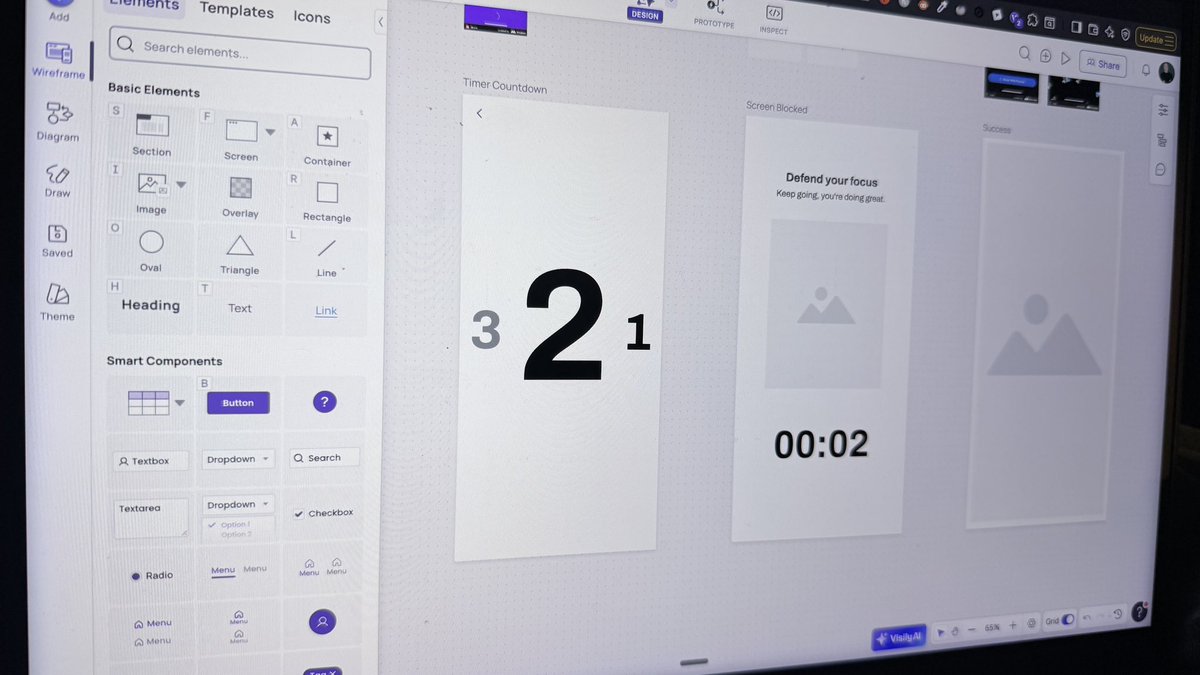
Day 3 of building a better focus app ✅ Further lo-fi wireframing ✅ Drafted game mechanics Tomorrow, further lo-fi
Nick Hynes tweet media
English
0
0
6
114
Nick Hynes
Nick Hynes@nickhynes_·
"Socialism is a scam. It doesn’t work and never has worked. It makes big promises about dignity and then robs people of their freedom. It promises fairness and then moves power to the top and impoverishes the rest. It arrives with the spark of hope and then burns down everything it touches."
Daniel Priestley@DanielPriestley

So sad for New York. It’s like watching your aunty getting scammed. She’s been talking to a 34 year old little huckster with smooth lines and big promises. You try to warn her “this is a very well known scam”. She doesn’t listen. “He’s going to give me lots of free things and some rich people will pay for it!” She squeals with excitement. It’s too late, she’s already sent everything over to the slimy con artist. Socialism is a scam. It doesn’t work and never has worked. It makes big promises about dignity and then robs people of their freedom. It promises fairness and then moves power to the top and impoverishes the rest. It arrives with the spark of hope and then burns down everything it touches. A socialist mayor of New York is a great embarrassment to every person who arrived into Ellis Island searching for the American Dream. People who were happy to start with nothing and build have now been replaced with people who have been given so much and still feel they are owed more free handouts. Their socialist leader - an over educated, trust fund kid who’s never worked a job who feels entitled to run a great city based on his fantasy land ideals. When the dust settles and New York starts to decay under the influence of this terrible philosophy, at least it will be another warning to the world about the socialism scam.

English
0
0
3
1.3K
Nick Hynes
Nick Hynes@nickhynes_·
Whether it’s a new venture or it’s a job, all three need to “fit” for it to work: 🏇 jockey 🐴 horse 🏁 racetrack
English
0
0
0
34
Nick Hynes
Nick Hynes@nickhynes_·
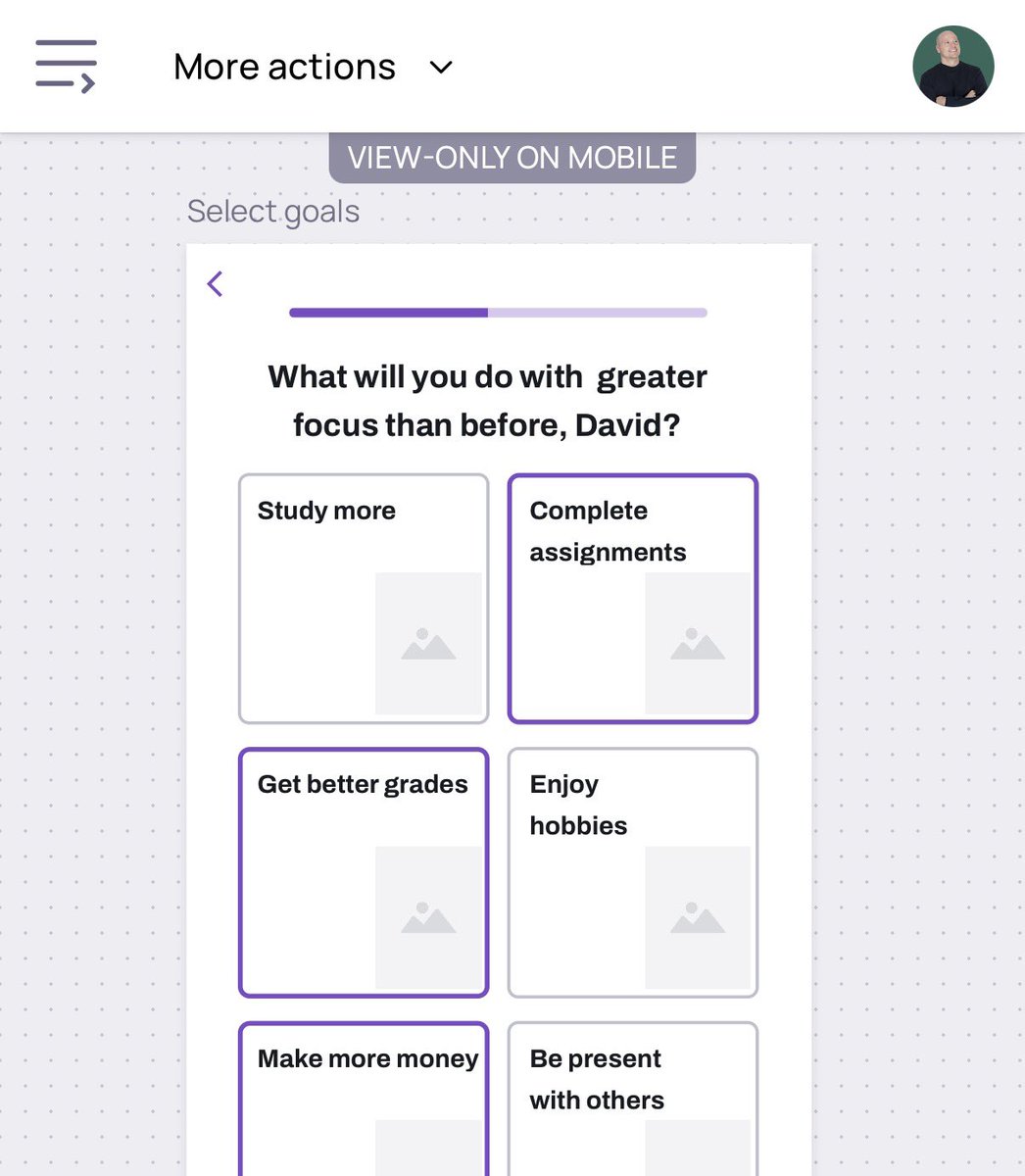
Day 2 of building a better focus app ✅ incorporated best-practices into onboarding ✅ made significant dent on lo-fi onboarding screens More lo-fi wireframing tomorrow
Nick Hynes tweet media
English
0
0
5
73
Anything
Anything@anything·
700,000+ builders shipped with Anything now it’s time to compete Anything x Contra Hackathon coming soon...
English
94
20
444
460.6K
Chris Raroque
Chris Raroque@raroque·
NEW VIDEO LIVE 🥳 Amy got its first 10 users! So next I spent 1 week FURIOUSLY fixing the app and trying to improve retention before onboarding the next 200 We talk onboarding, my analytics dashboard (optimizing retention) and a lot more in this one 👀
English
19
1
125
6.8K
Nick Hynes
Nick Hynes@nickhynes_·
Mobbin is an unbelievable timesaver.
English
0
0
1
23
Nick Hynes
Nick Hynes@nickhynes_·
Designing a new app.
English
0
0
0
19
atlas
atlas@reatlashype·
mfs who keep tweeting with 0 likes fear nothing.
English
4K
3.1K
31.8K
1.3M
Nick Hynes
Nick Hynes@nickhynes_·
Getting it done.
English
0
0
0
32
Nick Hynes
Nick Hynes@nickhynes_·
Liquid Glass is the ultimate cure for phone addiction.
English
0
0
1
51