Tweet Disematkan
Prompt Perfect
2K posts

Prompt Perfect
@Prompt_Perfect
Write the right prompt, automatically.
Your local AI tool Bergabung Mayıs 2023
281 Mengikuti2.1K Pengikut

I've spent the past year curating the best AI feed in the space.
These 50 accounts are the reason I'm ahead in AI.
They are by far the BEST AI accounts to follow on 𝕏.
Here's my top 50 (categorised):
General AI alpha:
@aiedge_ - my dedicated AI research account
@levie - all things AI
@omooretweets - all things AI
@mreflow - AI news & tips
@carlvellotti - the best free AI courses on the internet
@slow_developer - good AI takes
@petergyang - practical AI tutorials
@rubenhassid - long form reads (great Substack btw)
@minchoi - AI tips/tricks
@heyshrutimishra - news/staying ahead
OpenClaw:
@openclaw - for updates/news
@steipete - creator of OpenClaw
@AlexFinn - good video demos, tutorials, and tips
@MatthewBerman - good video demos, tutorials, and tips
@johann_sath - underrated OpenClaw creator
@DeRonin_ - OpenClaw tips
AI x Business:
@Codie_Sanchez - leveraging AI in business ventures
@alliekmiller - leveraging AI in business ventures
@ideabrowser - spot startup ideas based on trends
@eptwts - making money w/AI
@gregisenberg - startup ideas
@startupideaspod - Greg's podcast for startup ideas
@Lukealexxander - AI x sales
@vasuman - CEO of Varick
@eyad_khrais - CTO of Varik
@damianplayer - AI x business sauce
@EXM7777 - leveraging AI systems in business
AI x Marketing
@VibeMarketer_ - workflow automation
@boringmarketer - leveraging AI in marketing
@viktoroddy - AI for web design
@Salmaaboukarr - AI for brands
@AndrewBolis - marketing, consulting, business
Technical Expertise:
@frankdegods - skills/tools (OpenClaw, Claude Code, etc.)
@bcherny - creator of Claude Code
@dani_avila7 - Claude Code building tips
@karpathy - all things technical
@geoffreyhinton - all things technical
@MoonDevOnYT - automated AI trading
@Hesamation - AI engineering
@kloss_xyz - Design & dev
@GithubProjects - cool GitHub repos/tools
@tom_doerr - GitHub repos/tools
@googleaidevs - tips for building w/ Google AI products
@OpenAIDevs - OpenAI dev tips
Prompt engineering:
@PromptLLM - deep insight prompting
@godofprompt - prompt libraries, tips, and more
@alex_prompter - founder of GodOfPrompt
@promptcowboy - makes prompts on X copy/pastable
@Prompt_Perfect - cool tool for building good prompts
And if you're not following me already @milesdeutscher - I share everything you need to capitalise on the AI gold rush (prompts, general tips, OpenClaw workflows, and more). 💙
English

There has been a loud shift in software that you should listen to.
The quoted breakdown is a great example of how 'coding' and 'prompt engineering' have blossomed into 'Harness Engineering'
While prompt engineering is simply writing inputs to get a specific output from AI
this approach focuses on building the entire system, or 'harness', that gets AI agents to work autonomously.
OpenAI built codex by designing scaffolding, feedback loops, and environments for agents to work autonomously.
They used four pillars:
1. Agent-Legible Repositories
They moved all necessary context and information into the repo as Markdown with an AGENTS . md as a navigational map of the system.
They designed history, architecture maps, and core principles stored alongside code for decision context with a PLANS . md for progress on complex, long-running tasks.
2. Automated Feedback Loops
Agents were given ways to detect and fix issues independently.
They gave free access to logs, metrics, and traces so agents can diagnose issues via Chrome DevTools for DOM snapshots and UI validation.
Agents can review their own code, request agent reviews, and iterate until approved.
3. Rigid Architectural Boundaries
OpenAI’s engineers set up a strict system of digital "guardrails" to make sure all the work followed a specific set of rules.
They used linters, basically high-powered spell-check for code, to automatically catch mistakes and give context to fix them.
4. Continuous “Garbage Collection”
They created a way to prevent old code context confusion by removing or updating outdated details.
One way is with 'Doc-Gardening Agents'. These regularly scan for stale docs or inconsistencies and fix them.
The other way is with 'Golden Principles', which are high-level rules the harness must follow to maintain consistency across the entire codebase.
--
If you use AI a lot, the leverage has shifted away from using a lot of tools to building your own.
Harness engineering uses best practices from software and prompt engineering and has created a new way to build systems.
That shift is clearly here to stay.
And learning how to build harnesses is a very valuable skill that can help you do some crazy things.
OpenAI Developers@OpenAIDevs
📣 Shipping software with Codex without touching code. Here’s how a small team steering Codex opened and merged 1,500 pull requests to deliver a product used by hundreds of internal users with zero manual coding. openai.com/index/harness-…
English

At first, people type into AI the way they talk to each other.
Short. Implicit. Half-formed.
They expect it to understand.
Sometimes it works.
Often it doesn’t.
They try again.
They add a sentence.
They delete another.
The response changes, but not in a way they can explain.
They assume the problem is the AI.
They keep switching tools.
ChatGPT one day.
Claude the next.
Gemini at work.
Each time, they start from nothing.
They write prompts that feel reasonable.
They get answers that feel flat.
They feel stupid for not knowing why.
Over time, they stop asking hard questions.
They settle for “good enough.”
They copy prompts from old chats.
They paste them into new ones.
They forget which version worked.
Then the button appears
Small.
Unassuming.
It says Perfect.
They click it once.
The words they wrote stay recognizable.
But something shifts.
The request becomes explicit.
The goal is clear.
The constraints are visible.
The AI responds differently.
Not smarter.
Just clearer.
They don’t celebrate.
They just keep going.
Next time, the prompt is still vague.
They click Perfect again.
The same thing happens.
Patterns form.
They notice the structure.
They see what was missing before.
They start anticipating what the AI needs.
Sometimes they click Feedback instead.
The tool doesn’t scold them.
It points.
Here’s what worked.
Here’s what didn’t.
Here’s why.
They don’t read all of it every time.
But it sticks.
They save a prompt.
Then another.
A library forms quietly on the side.
They stop rewriting the same request.
They stop copying from old chats.
They stop wondering which version was better.
Weeks pass.
They switch tools without thinking about it.
The prompts come with them.
The structure holds.
The results stay consistent.
They no longer ask why AI is frustrating.
They no longer blame themselves.
They don’t think about prompt engineering at all.
They just get what they asked for.
Not because the AI changed.
Because the way they speak to it did.
The tool doesn’t announce this.
It doesn’t explain it upfront.
It doesn’t force a workflow.
It sits inside the input field.
Where the problem always was.
English

You know the feeling.
The cursor in the ChatGPT input field is blinking, and time is ticking. You have a clear idea in your head but there is a language barrier standing between you and that little digital pill.
You type your prompt.
You hit enter.
And it spits back three paragraphs of generic, robotic fluff.
You try again. You add more context. You get aggressive.
It overcorrects.
You are now ten minutes into a task that should have taken ten seconds. You're stuck in the gap between implicit human communication and AI's explicit context requirements.
Stop typing.
Look at that vague, frustrated sentence currently sitting in your chat bar.
Now, imagine a small button appearing below that text field. It’s labeled "Perfect."
You click it.
Instantly, your text vanishes. You blink and your vague prompt is rewritten.
Prompt Perfect has just injected expert-level prompt engineering directly into your world.
Your simple sentence is now a task blasting paragraph that outlines a goal, details, and a required response format.
You hit enter.
The difference is sharp and immediate.
The "Language Barrier" is gone.
The cursor is still blinking, but now it’s hungry for more.
That's what you get with tools that are built to meet you where you're at in ChatGPT.
English

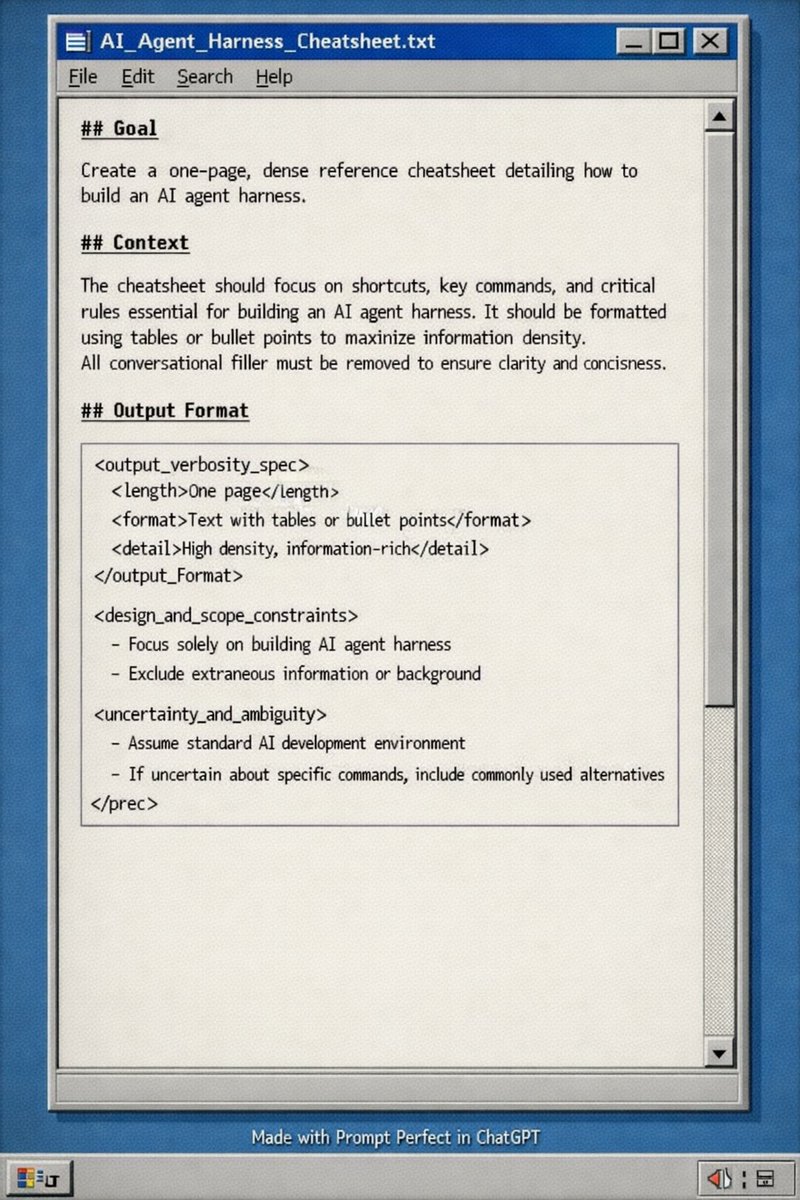
PROMPT:
## Goal
Create a one-page, dense reference cheatsheet detailing how to build an AI agent harness.
## Context
The cheatsheet should focus on shortcuts, key commands, and critical rules essential for building an AI agent harness. It should be formatted using tables or bullet points to maximize information density. All conversational filler must be removed to ensure clarity and conciseness.
## Output Format
```xml
One page
Text with tables or bullet points
High density, information-rich
- Focus solely on building AI agent harness
- Exclude extraneous information or background
- Assume standard AI development environment
- If uncertain about specific commands, include commonly used alternatives
```
English